
Chapter 1: Understanding the Test Automation Landscape
Modern enterprises rarely release software without automated testing.
Insurance companies, banks, healthcare providers, retailers, and government organizations continuously test their applications to ensure:
- Functionality works as expected
- New features don't break existing functionality
- Performance meets requirements
- Security vulnerabilities are identified
- User experience is consistent
This testing is primarily enabled through Test Automation Frameworks.
In this chapter, we will explore the evolution of test automation, understand different testing types, and learn why test automation has become the foundation of modern software delivery.
Throughout this tutorial, we will use a simplified Insurance Policy Management System (IPMS) as our application under test.
🎯 Learning Objectives
By the end of this chapter, you will be able to:
- Understand what test automation is and why it exists
- Explain the evolution of software testing
- Differentiate between manual and automated testing
- Understand the Selenium ecosystem
- Recognize different testing levels (Unit, Integration, E2E)
- Identify the benefits and challenges of test automation
- Understand the test automation pyramid
- Recognize common insurance industry testing use cases
What is Test Automation?
Test automation is the practice of:
Using software tools and scripts
to execute tests automatically
and compare actual results with expected results.
Think of test automation as a robotic quality assurance engineer.
Manual Tester
      ↓
  Automated Script
      ↓
Application Under Test
The manual tester defines test steps.
The automated script executes those steps repeatedly.
Real-World Insurance Example
Suppose an insurance company releases a new policy management feature every two weeks.
Manual testing approach:
Release 1 → Test (2 days) → Release
Release 2 → Test (2 days) → Release
Release 3 → Test (2 days) → Release
Automated testing approach:
Release 1 → Automate Tests (2 days) → Release
Release 2 → Run Tests (5 minutes) → Release
Release 3 → Run Tests (5 minutes) → Release
Automation saves significant time.
Why Test Automation Matters
Without test automation, organizations struggle with:
- Slow release cycles
- Human errors
- Inconsistent test execution
- Limited test coverage
- High regression testing costs
- Delayed feedback to developers
Test automation provides:
- Faster feedback
- Consistent execution
- Increased coverage
- Reduced costs
- Early bug detection
- Confidence in releases
Evolution of Software Testing
Before automation became mainstream, testing was entirely manual.
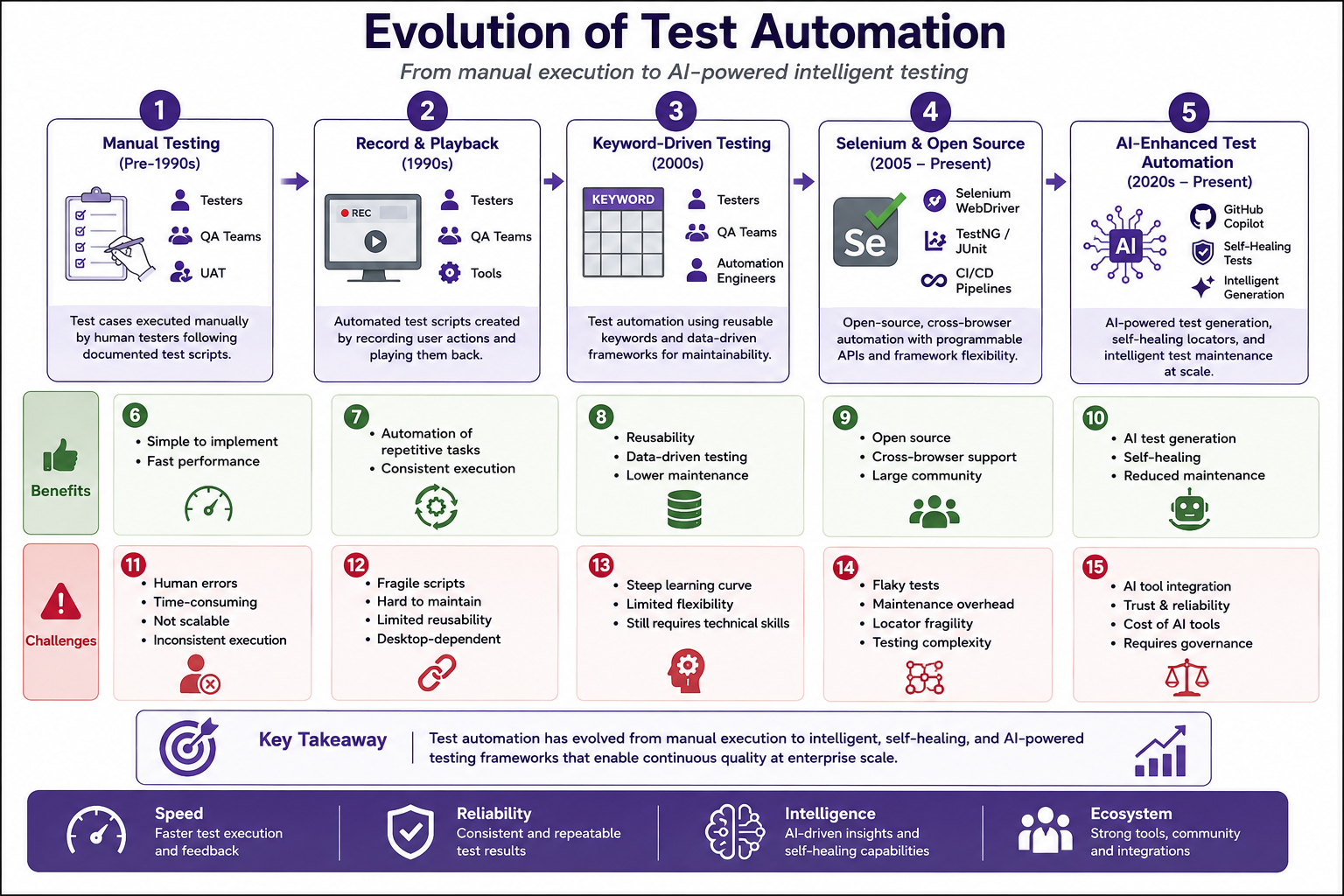
Phase 1: Manual Testing (Pre-1990s)
Tester
   ↓
Manual Test Execution
   ↓
Bug Reporting
Characteristics:
- All tests executed by humans
- High effort for regression testing
- Error-prone
- Not scalable
Phase 2: Record and Playback (1990s)
Tester
   ↓
Record Actions
   ↓
Playback Scripts
Tools:
- HP QuickTest Professional
- IBM Rational Robot
Problems:
- Fragile scripts
- Hard to maintain
- Limited reusability
Phase 3: Selenium and Open Source (2005–Present)
Selenium WebDriver
      ↓
Browser Automation
      ↓
Real Browser Execution
This changed everything.
Selenium provided:
- Open source
- Multiple language support
- Real browser automation
- Cross-browser support
- Active community
Phase 4: AI-Enhanced Test Automation (Present)
Selenium + GitHub Copilot
      ↓
AI-Assisted Testing
      ↓
Self-Healing Tests
Modern test automation includes:
- AI-driven test generation
- Self-healing tests
- AI-powered locator strategies
- Intelligent test maintenance
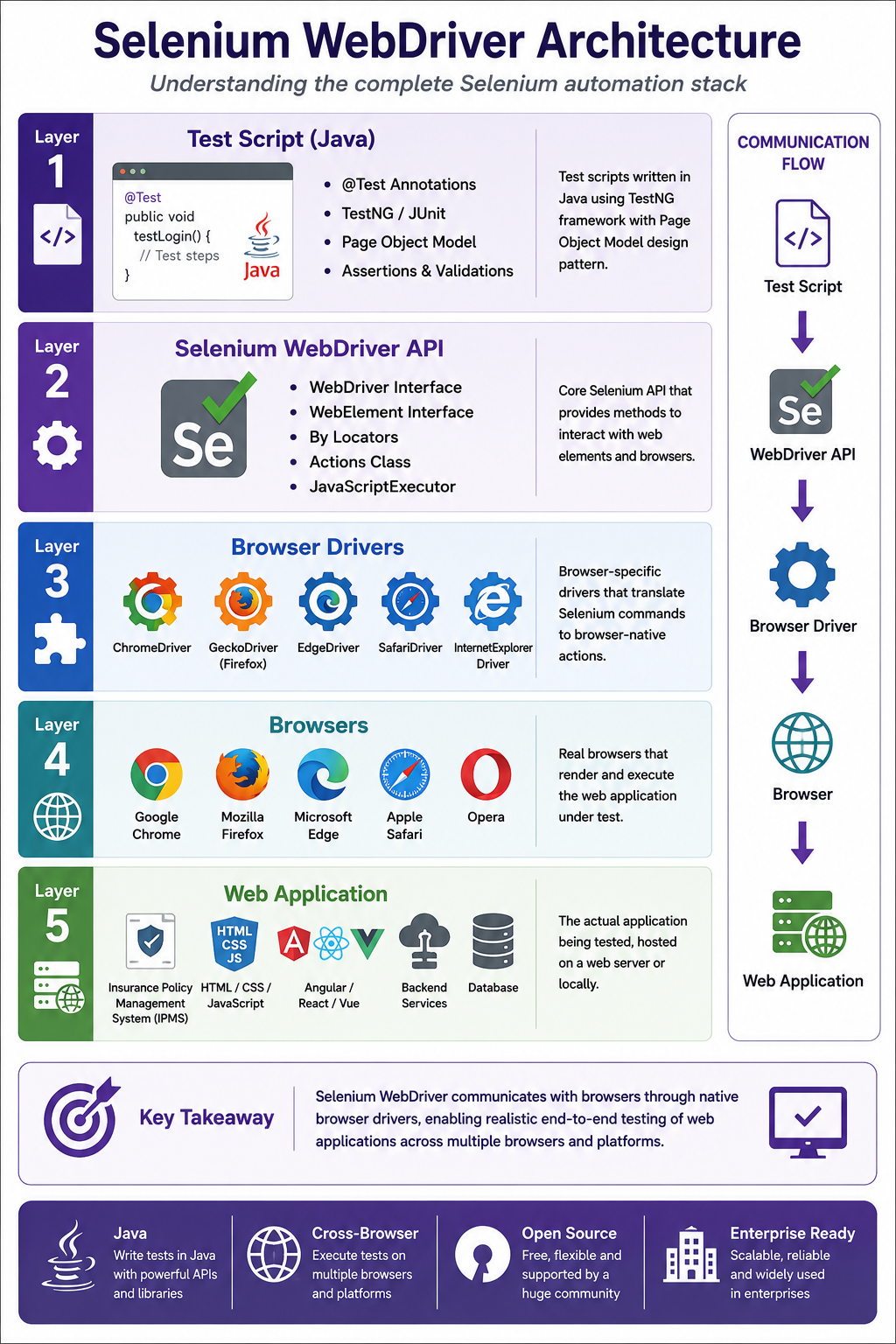
Understanding the Selenium Ecosystem
Selenium is not just one tool.
It is a suite of tools.
Selenium IDE
Browser Extension
Record and Playback
Limited to simple tests
Selenium WebDriver (Core)
Programmable API
Multiple languages (Java, Python, C#, etc.)
Real browser automation
Cross-browser support
Selenium Grid
Distributed execution
Run tests on multiple browsers
Parallel test execution
Testing Levels
Understanding testing levels is important before automating.
Unit Testing
Focus: Individual components
Target: Methods, Functions
Tools: JUnit, TestNG
Responsibility: Developers
Example:
@Test
public void calculatePremium_ShouldReturnCorrectAmount() {
    Policy policy = new Policy("TERM", 500000);
    double premium = policy.calculatePremium();
    assertEquals(2500.00, premium);
}
Integration Testing
Focus: Component interactions
Target: APIs, Databases, Services
Tools: TestNG, Mockito, RestAssured
Responsibility: Developers / SDETs
Example:
@Test
public void createPolicy_ShouldPersistInDatabase() {
    Policy policy = policyService.createPolicy(policyDTO);
    assertNotNull(policy.getPolicyNumber());
    assertTrue(policyRepository.existsById(policy.getId()));
}
End-to-End Testing
Focus: Complete user workflows
Target: UI, APIs, Database
Tools: Selenium, Playwright, Cypress
Responsibility: SDETs / QA Team
Example:
@Test
public void createPolicyFlow_ShouldCompleteSuccessfully() {
    loginPage.login("agent", "password");
    dashboardPage.clickCreatePolicy();
    policyPage.selectPolicyType("TERM");
    policyPage.enterCoverageAmount("500000");
    policyPage.clickSubmit();
    assertTrue(policyPage.isSuccessMessageDisplayed());
}
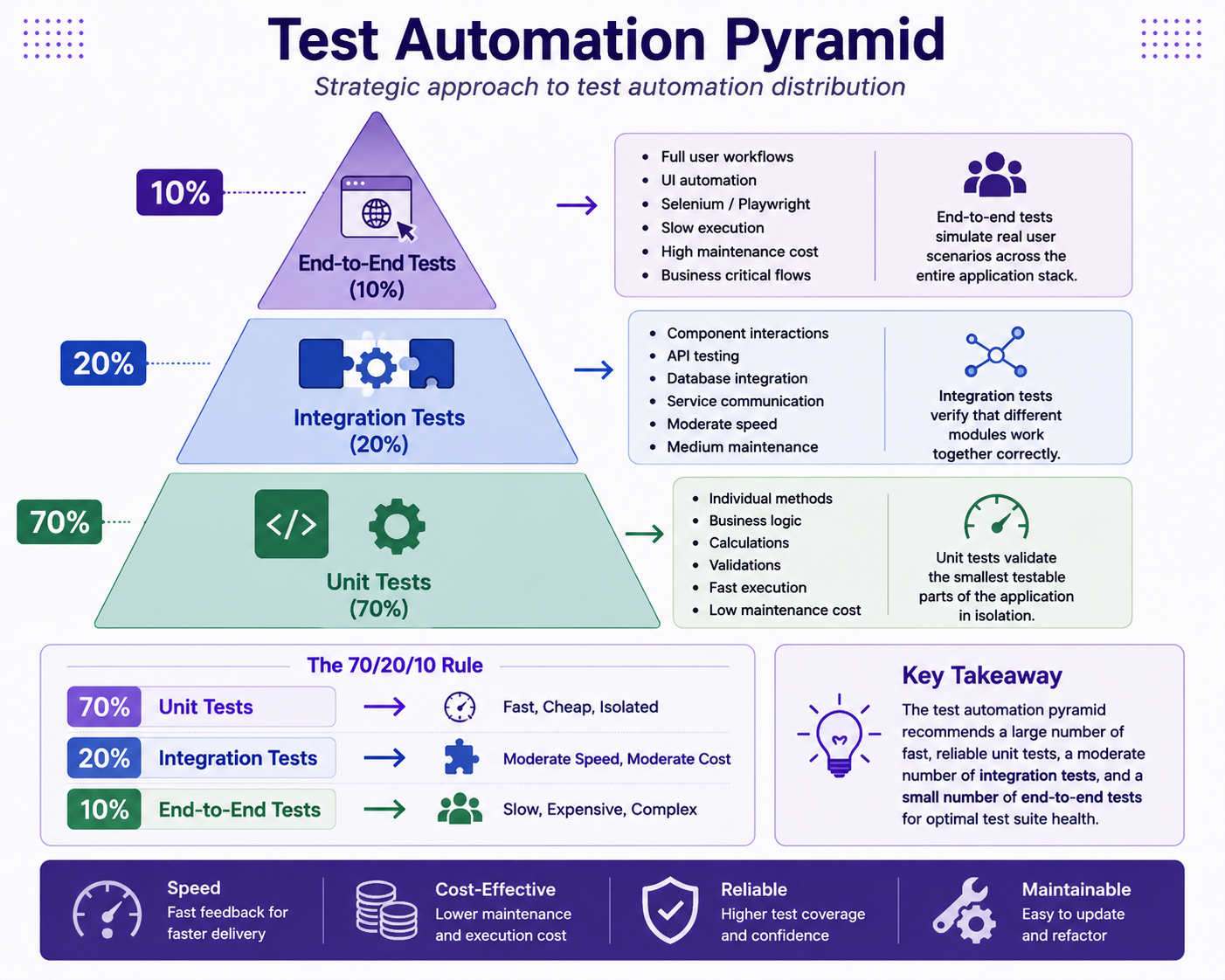
Why the Pyramid Matters
Unit Tests: 70% - Fast, Cheap, Isolated
Integration Tests: 20% - Medium, Moderate
End-to-End Tests: 10% - Slow, Expensive, Complex
Insurance Example
Unit Test:
Calculate premium formula
✅ 1000 tests in 5 seconds

Integration Test:
Create policy and save to database
✅ 200 tests in 30 seconds

End-to-End Test:
Complete policy purchase workflow
✅ 20 tests in 5 minutes
Selenium vs Other Automation Tools
| Feature | Selenium | Playwright | Cypress | UFT |
|---|---|---|---|---|
| Open Source | ✅ | ✅ | ✅ | ❌ |
| Language Support | Multiple | Multiple | JavaScript | VBScript |
| Cross-Browser | ✅ | ✅ | Limited | ✅ |
| Speed | Good | Excellent | Excellent | Good |
| Learning Curve | Medium | Medium | Low | High |
| Community | Large | Growing | Large | Small |
| Cost | Free | Free | Free | Expensive |
| CI/CD Integration | ✅ | ✅ | ✅ | Limited |
Benefits of Test Automation
✅ Speed - Tests run faster than manual
✅ Consistency - Tests execute the same way every time
✅ Reusability - Tests can be reused across releases
✅ Coverage - More test scenarios can be covered
✅ Reliability - Fewer human errors
✅ Feedback - Faster feedback to developers
✅ Resource Savings - QA resources focused on complex testing
Challenges of Test Automation
❌ Initial Investment - Setup costs time and money
❌ Maintenance - Tests need updates when application changes
❌ Skill Requirements - Requires programming skills
❌ Flaky Tests - Tests may fail intermittently
❌ Over-Automation - Not everything should be automated
❌ False Confidence - Passing tests don't guarantee quality
What Makes a Good Test Automation Framework?
Maintainable
- Page Object Model
- Reusable components
- Clear naming conventions
Reliable
- Proper synchronization
- Stable locators
- Retry mechanisms
Scalable
- Parallel execution support
- Data-driven testing
- Modular architecture
Reportable
- Clear test results
- Screenshots on failure
- Detailed logs
CI/CD Friendly
- Headless execution
- Docker support
- Integration with Jenkins/GitHub Actions
AI in Test Automation
Modern test automation increasingly leverages AI.
GitHub Copilot
- Suggests test code
- Generates test data
- Creates test scenarios
AI-Powered Locators
- AI generates stable locators
- Self-healing locators
- Intelligent element identification
Test Generation
- AI creates tests from requirements
- Test scenario identification
- Test data generation
Maintenance
- Identifies flaky tests
- Suggests test fixes
- Automates test updates
Our Tutorial Application
Throughout this tutorial, we will progressively build:
Insurance Policy Management Test Automation Framework
Core Test Suites:
PolicyHolderTests
PolicyTests
ClaimTests
PaymentTests
LoginTests
SearchTests
In upcoming chapters, these test suites will become:
- Page Object classes
- TestNG test methods
- Utility classes
- Data providers
- Configuration files
Best Practices
✅ Start automating high-value test cases first
✅ Follow the test automation pyramid
✅ Use Page Object Model
✅ Implement proper synchronization
✅ Use meaningful test names
✅ Keep tests independent
✅ Run tests in CI/CD
✅ Review and refactor tests regularly
Common Mistakes
❌ Automating everything
❌ Using brittle locators (xpath with indexes)
❌ Forgetting synchronization
❌ Ignoring test failures
❌ Not maintaining tests
❌ Testing multiple things in one test
❌ Hard-coded test data
Interview Questions
-
What is test automation and why is it important?
-
Explain the test automation pyramid.
-
What are the different levels of testing?
-
What is Selenium WebDriver?
-
What are the components of the Selenium suite?
-
Difference between Selenium and Playwright?
-
What is Page Object Model?
-
What are the benefits and challenges of test automation?
-
How does GitHub Copilot help with test automation?
-
What makes a test automation framework maintainable?
Practice Exercises
-
Identify five test cases in your organization that can be automated.
-
Classify them as:
- Unit Tests
- Integration Tests
- End-to-End Tests
-
Draw a simple test pyramid for an insurance application.
-
List the tools used for automation in your organization.
-
Identify which test cases provide the highest ROI for automation.
Key Takeaways
- Test automation is critical for modern software delivery.
- Selenium is the most widely used open-source test automation tool.
- The test automation pyramid guides automation strategy.
- GitHub Copilot enhances test automation productivity.
- AI is transforming test automation with self-healing and intelligent generation.
- A good automation framework is maintainable, reliable, and scalable.
Chapter Summary
In this chapter, you learned:
- What test automation is
- Evolution of software testing
- Selenium ecosystem and architecture
- Testing levels (Unit, Integration, E2E)
- Test automation pyramid
- Benefits and challenges of automation
- AI-enhanced testing
- Insurance industry testing use cases
You now have the foundation required to start building enterprise-grade test automation frameworks.
Next Chapter
👉 Next Chapter: Selenium WebDriver Architecture and Setup