
Chapter 5: GitHub Copilot for Test Automation
In the previous chapter, we implemented advanced Selenium features and data-driven testing.
In this chapter, we will explore how GitHub Copilot and AI-powered tools can supercharge your test automation development, making you more productive and enabling intelligent testing capabilities.
🎯 Learning Objectives
By the end of this chapter, you will be able to:
- Understand GitHub Copilot and its capabilities
- Use Copilot for test generation
- Implement AI-assisted test data creation
- Generate page objects with Copilot
- Create intelligent locator strategies
- Implement self-healing tests
- Use AI for test maintenance
- Understand AI test automation best practices
What is GitHub Copilot?
GitHub Copilot is an AI-powered coding assistant developed by GitHub and OpenAI.
GitHub Copilot
      ↓
AI Code Generation
      ↓
Faster Development
      ↓
Reduced Boilerplate
Key Capabilities
| Capability | Description |
|---|---|
| Code Completion | Suggests code as you type |
| Test Generation | Creates test methods from code |
| Boilerplate Reduction | Generates repetitive code |
| Documentation | Creates comments and docs |
| Test Data Generation | Creates realistic test data |
| Bug Detection | Identifies potential issues |
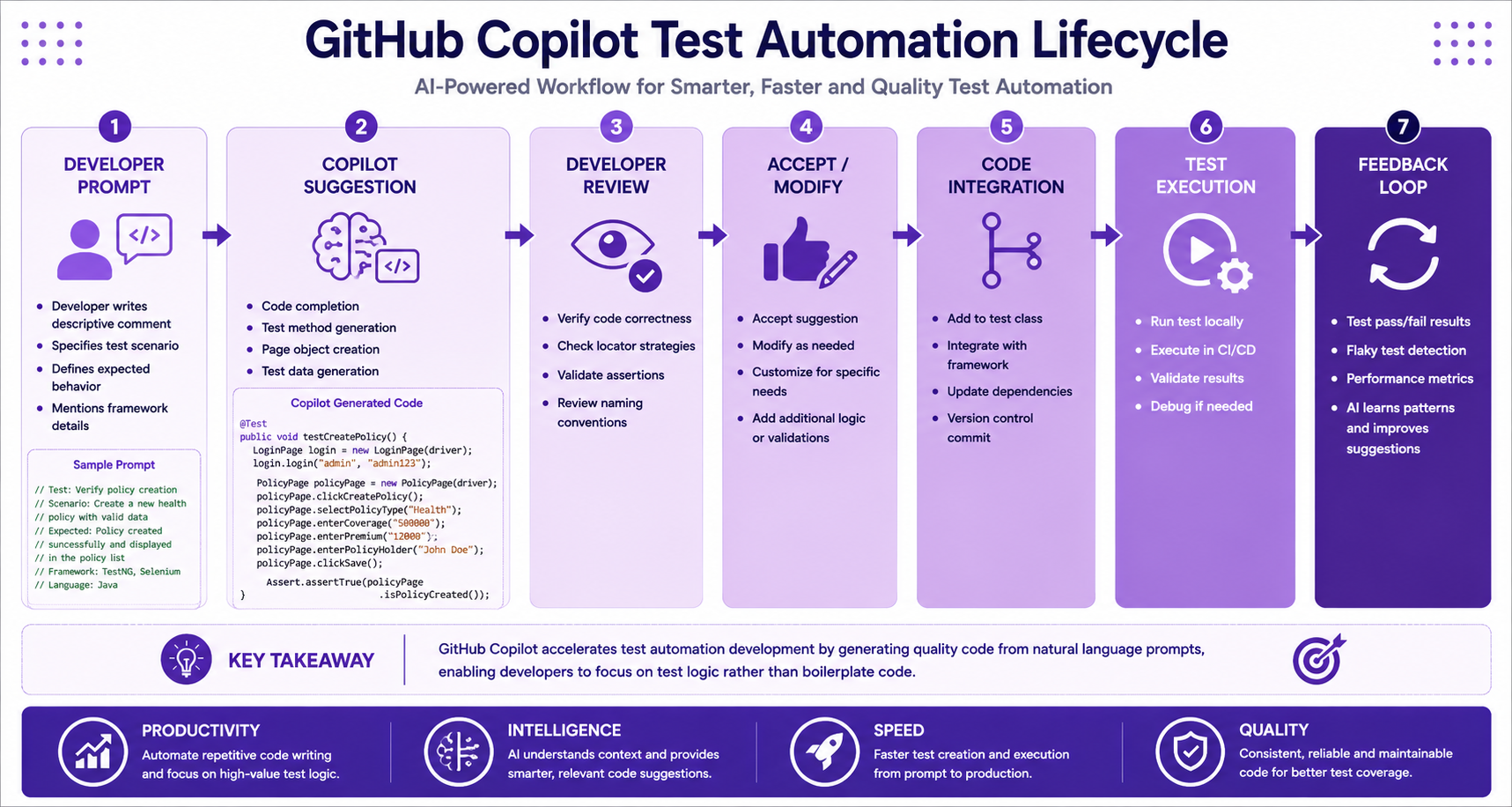
Setting Up GitHub Copilot
Installation
- Install GitHub Copilot extension in VS Code / IntelliJ
- Sign in with GitHub account
- Accept terms of service
- Start using Copilot suggestions
VS Code:
Extensions → Search "GitHub Copilot" → Install

IntelliJ IDEA:
Plugins → Search "GitHub Copilot" → Install
Generating Test Methods with Copilot
Natural Language to Test Code
// Copilot Prompt: "Create a test to verify login functionality"
@Test
public void testValidLogin() {
    WebDriverManager.chromedriver().setup();
    WebDriver driver = new ChromeDriver();
    driver.get("https://insurance-app.example.com/login");

    driver.findElement(By.id("username")).sendKeys("agent");
    driver.findElement(By.id("password")).sendKeys("password123");
    driver.findElement(By.id("loginBtn")).click();

    String expectedUrl = "https://insurance-app.example.com/dashboard";
    Assert.assertEquals(driver.getCurrentUrl(), expectedUrl);
    driver.quit();
}
Generating Page Objects
// Copilot Prompt: "Create a LoginPage class with Page Factory"
public class LoginPage {

    private WebDriver driver;

    @FindBy(id = "username")
    private WebElement usernameField;

    @FindBy(id = "password")
    private WebElement passwordField;

    @FindBy(id = "loginBtn")
    private WebElement loginButton;

    public LoginPage(WebDriver driver) {
        this.driver = driver;
        PageFactory.initElements(driver, this);
    }

    public DashboardPage login(String username, String password) {
        usernameField.sendKeys(username);
        passwordField.sendKeys(password);
        loginButton.click();
        return new DashboardPage(driver);
    }
}
Generating Test Scenarios
// Copilot Prompt: "Generate test scenarios for policy creation"
public class PolicyTest {

    // Copilot generates multiple test scenarios

    @Test
    public void testCreateTermLifePolicy() {
        // Implementation
    }

    @Test
    public void testCreateWholeLifePolicy() {
        // Implementation
    }

    @Test
    public void testCreatePolicyWithInvalidData() {
        // Implementation
    }

    @Test
    public void testCreatePolicyWithoutPolicyHolder() {
        // Implementation
    }
}
AI-Generated Test Data
Using Copilot for Test Data
// Copilot Prompt: "Create test data for insurance policies"
@DataProvider(name = "policyTestData")
public Object[][] getPolicyTestData() {
    return new Object[][] {
        {"Term Life", "500000", "2500", "John Smith"},
        {"Whole Life", "1000000", "5000", "Jane Doe"},
        {"Universal Life", "250000", "1250", "Bob Wilson"},
        {"Variable Life", "750000", "3500", "Alice Brown"}
    };
}
Generating JSON Test Data
// Copilot Prompt: "Create JSON test data for policy creation"
{
  "policies": [
    {
      "policyType": "Term Life",
      "coverageAmount": 500000,
      "premiumAmount": 2500,
      "policyHolder": "John Smith",
      "startDate": "2024-01-01",
      "endDate": "2034-01-01"
    },
    {
      "policyType": "Whole Life",
      "coverageAmount": 1000000,
      "premiumAmount": 5000,
      "policyHolder": "Jane Doe",
      "startDate": "2024-01-01",
      "endDate": "2074-01-01"
    }
  ]
}
Intelligent Locator Generation
Copilot Locator Suggestions
// Copilot suggests optimal locators

// Prompt: "Find element for username field"
// Copilot suggests:
// By.id("username")
// By.name("username")
// By.cssSelector("#username")
// By.xpath("//input[@id='username']")

// Best practice selection
@FindBy(id = "username")
private WebElement usernameField;
Self-Healing Locators
package com.insurance.utils;

import org.openqa.selenium.By;
import org.openqa.selenium.WebDriver;
import org.openqa.selenium.WebElement;
import java.util.List;

public class SelfHealingLocator {

    private WebDriver driver;
    private String[] locatorStrategies;

    public SelfHealingLocator(WebDriver driver) {
        this.driver = driver;
    }

    public WebElement findElement(String id, String name, String cssSelector) {
        // Try multiple locator strategies
        String[][] strategies = {
            {"id", id},
            {"name", name},
            {"css", cssSelector},
            {"xpath", "//*[@id='" + id + "']"},
            {"xpath", "//*[@name='" + name + "']"}
        };

        for (String[] strategy : strategies) {
            try {
                switch (strategy[0]) {
                    case "id":
                        return driver.findElement(By.id(strategy[1]));
                    case "name":
                        return driver.findElement(By.name(strategy[1]));
                    case "css":
                        return driver.findElement(By.cssSelector(strategy[1]));
                    case "xpath":
                        return driver.findElement(By.xpath(strategy[1]));
                }
            } catch (Exception e) {
                // Continue to next strategy
            }
        }
        throw new RuntimeException("Element not found with any strategy");
    }
}
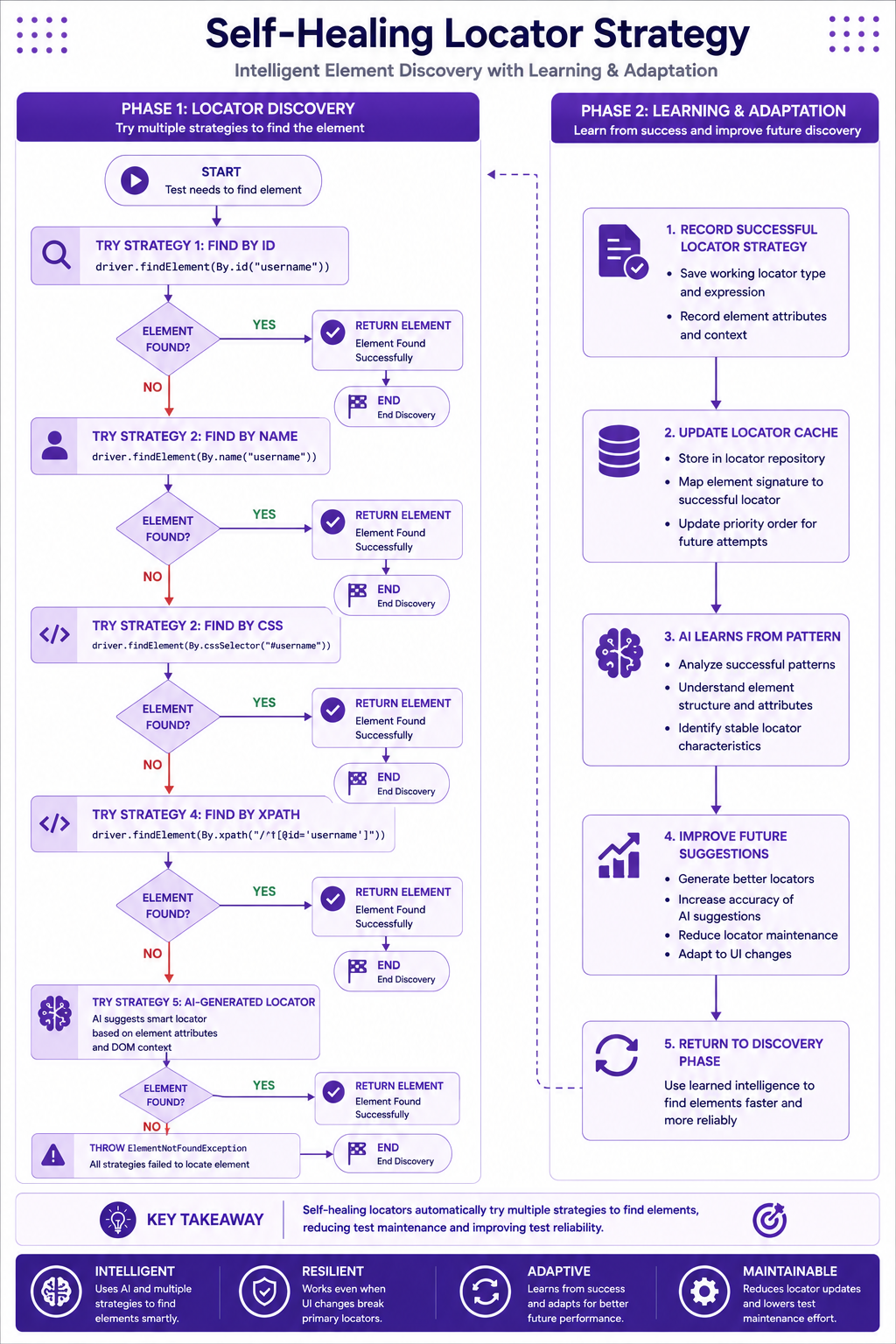
AI-Powered Test Maintenance
Detecting Flaky Tests
package com.insurance.listeners;

import org.testng.ITestResult;
import org.testng.TestListenerAdapter;

public class FlakyTestDetector extends TestListenerAdapter {

    private static final int FLAKY_THRESHOLD = 3;
    private int flakyCount = 0;

    @Override
    public void onTestFailure(ITestResult result) {
        flakyCount++;
        System.out.println("Test failed: " + result.getMethod().getMethodName());
        System.out.println("Attempt " + flakyCount + " of " + FLAKY_THRESHOLD);

        if (flakyCount >= FLAKY_THRESHOLD) {
            System.out.println("⚠️ Test might be flaky. Suggest review.");
            // Log flaky test for AI analysis
            logFlakyTest(result);
        }
    }

    private void logFlakyTest(ITestResult result) {
        // AI analysis of flaky test patterns
        // Sent to analytics for pattern detection
    }
}
AI-Powered Test Fix Suggestions
package com.insurance.utils;

import java.util.HashMap;
import java.util.Map;

public class TestFixSuggester {

    public Map<String, String> suggestFixes(Throwable exception, String testName) {
        Map<String, String> suggestions = new HashMap<>();
        String message = exception.getMessage();

        if (message.contains("NoSuchElementException")) {
            suggestions.put("issue", "Element not found");
            suggestions.put("suggestion", "Check locator or add wait");
            suggestions.put("fix", "Implement explicit wait before interacting");
        } else if (message.contains("StaleElementReferenceException")) {
            suggestions.put("issue", "Stale element reference");
            suggestions.put("suggestion", "Refresh element or re-locate");
            suggestions.put("fix", "Implement retry mechanism");
        } else if (message.contains("TimeoutException")) {
            suggestions.put("issue", "Timeout waiting for element");
            suggestions.put("suggestion", "Increase wait timeout");
            suggestions.put("fix", "Use longer wait or check application");
        }

        return suggestions;
    }
}
AI-Generated Test Reports
package com.insurance.utils;

import java.util.List;

public class AITestReport {

    public String generateSummary(List<TestResult> results) {
        StringBuilder report = new StringBuilder();

        report.append("📊 AI Test Report Summary\n");
        report.append("==========================================\n\n");

        // AI analyzes test results
        long passed = results.stream().filter(TestResult::isPassed).count();
        long failed = results.stream().filter(TestResult::isFailed).count();
        long flaky = results.stream().filter(TestResult::isFlaky).count();

        report.append("✅ Passed: ").append(passed).append("\n");
        report.append("❌ Failed: ").append(failed).append("\n");
        report.append("⚠️  Flaky Tests: ").append(flaky).append("\n\n");

        // AI suggestions
        if (flaky > 0) {
            report.append("🔄 AI Suggestion: Flaky tests detected\n");
            report.append("Consider adding retry mechanism or improving waits.\n\n");
        }

        if (failed > 0) {
            report.append("🔧 AI Suggestion: Failed tests detected\n");
            report.append("Review locators and test data for accuracy.\n\n");
        }

        // Performance analysis
        double avgExecutionTime = results.stream()
            .mapToLong(TestResult::getDuration)
            .average()
            .orElse(0);

        report.append("⏱️  Average Test Execution: ")
              .append(avgExecutionTime / 1000)
              .append(" seconds\n");

        return report.toString();
    }
}
GitHub Copilot Best Practices
Effective Prompts
❌ "Write a test"
✅ "Write a TestNG test for insurance policy creation with Page Object Model"

❌ "Create page object"
✅ "Create a LoginPage class with Page Factory and login method"

❌ "Add data provider"
✅ "Create a DataProvider for 5 different insurance policy types"
Copilot Tips
1. Write descriptive comments before code
2. Use clear variable and method names
3. Provide context about the application
4. Include expected behavior in comments
5. Review generated code for accuracy
6. Customize generated code as needed
7. Use Copilot for boilerplate code
8. Validate AI-generated locators
AI-Powered Test Design
// Copilot Prompt: "Design test cases for policy renewal"
@Test
public void testRenewPolicy_SuccessfulRenewal() {
    // Test implementation
}

@Test
public void testRenewPolicy_PolicyNotFound() {
    // Test implementation
}

@Test
public void testRenewPolicy_ExpiredPolicy() {
    // Test implementation
}

@Test
public void testRenewPolicy_InvalidUser() {
    // Test implementation
}

@Test
public void testRenewPolicy_MissingPayment() {
    // Test implementation
}
Enterprise AI Testing Framework
package com.insurance.framework;

import org.openqa.selenium.WebDriver;
import org.openqa.selenium.WebElement;

public class AIAssistedTest {

    private WebDriver driver;
    private AIAssistant aiAssistant;

    public AIAssistedTest(WebDriver driver) {
        this.driver = driver;
        this.aiAssistant = new AIAssistant();
    }

    public void executeWithAI(String testScenario) {
        // AI generates test steps
        List<String> steps = aiAssistant.generateSteps(testScenario);

        // AI identifies test data
        Map<String, String> testData = aiAssistant.generateTestData(testScenario);

        // AI suggests assertions
        List<String> assertions = aiAssistant.generateAssertions(testScenario);

        // Execute test
        executeSteps(steps, testData, assertions);
    }

    private void executeSteps(List<String> steps, Map<String, String> testData,
                              List<String> assertions) {
        // Execute generated test
    }
}
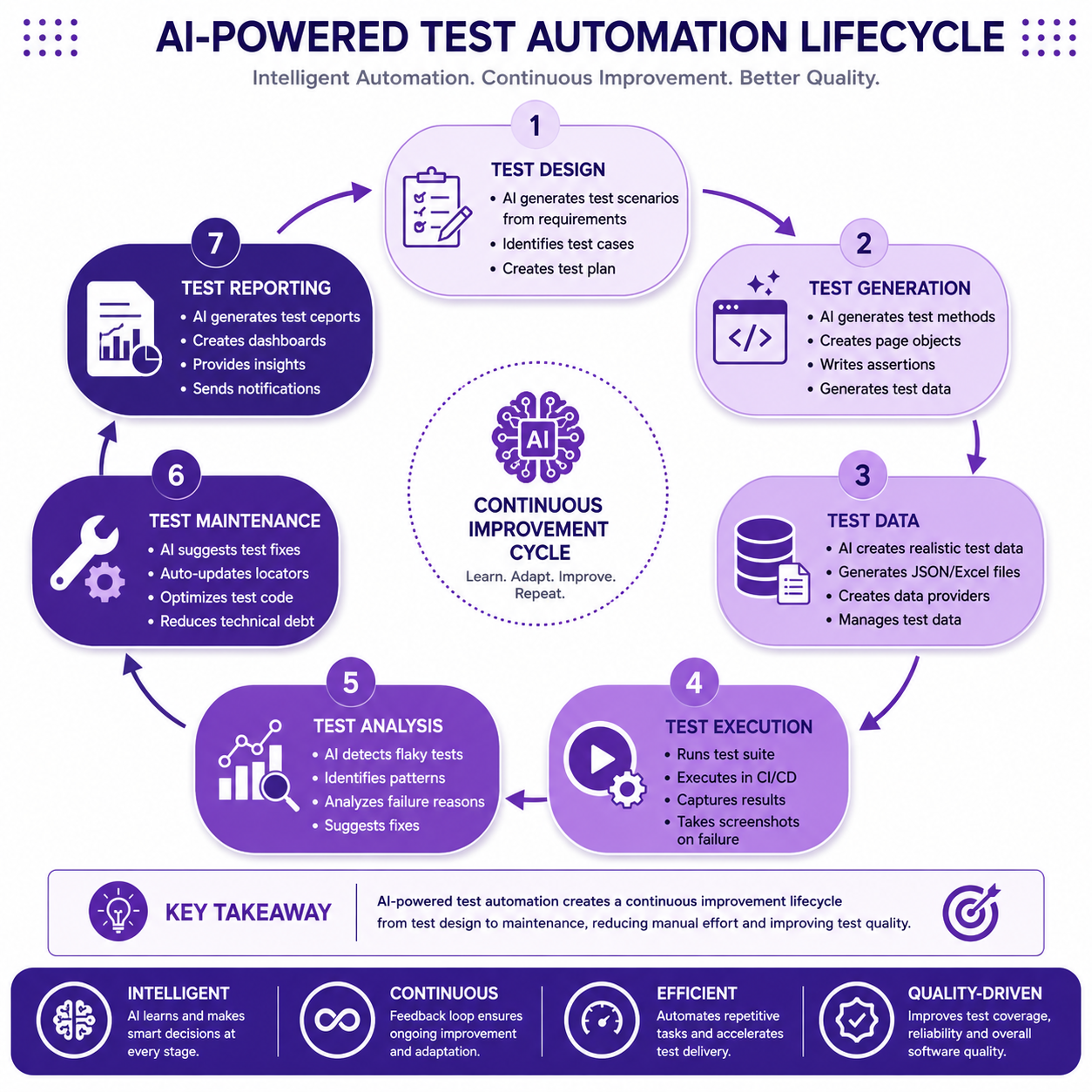
AI-Assisted Locator Strategy
package com.insurance.utils;

import org.openqa.selenium.By;
import org.openqa.selenium.WebElement;
import java.util.HashMap;
import java.util.Map;

public class AILocatorStrategy {

    private Map<String, String> elementLocators = new HashMap<>();

    public AILocatorStrategy() {
        // AI learns from previous tests
        elementLocators.put("username", "id:username");
        elementLocators.put("password", "id:password");
        elementLocators.put("loginButton", "id:loginBtn");
        elementLocators.put("policyType", "id:policyType");
        elementLocators.put("coverageAmount", "id:coverageAmount");
    }

    public By getLocator(String elementName) {
        String locator = elementLocators.get(elementName);
        if (locator == null) {
            // AI suggests a new locator
            return suggestLocator(elementName);
        }
        return parseLocator(locator);
    }

    private By suggestLocator(String elementName) {
        // AI generates smart locator
        // Returns By.id or By.xpath based on pattern
        return By.id(elementName);
    }

    private By parseLocator(String locator) {
        String[] parts = locator.split(":");
        switch (parts[0]) {
            case "id": return By.id(parts[1]);
            case "name": return By.name(parts[1]);
            case "css": return By.cssSelector(parts[1]);
            case "xpath": return By.xpath(parts[1]);
            default: return null;
        }
    }
}
Best Practices
✅ Use Copilot for boilerplate generation
✅ Review and validate all AI-generated code
✅ Use descriptive prompts for better results
✅ Implement self-healing mechanisms
✅ Use AI for test data generation
✅ Monitor flaky tests with AI detection
✅ Generate comprehensive test scenarios
✅ Document AI-generated code
Common Mistakes
❌ Accepting AI-generated code without review
❌ Using vague prompts
❌ Not validating AI-generated locators
❌ Over-relying on AI for complex logic
❌ Ignoring AI suggestions for test maintenance
❌ Not customizing generated code
Interview Questions
-
What is GitHub Copilot?
-
How can Copilot help with test automation?
-
What are self-healing tests?
-
How does AI help with test maintenance?
-
What are AI-generated locators?
-
How do you validate AI-generated code?
-
What are best practices for Copilot?
-
How can AI help with test data generation?
Practice Exercises
-
Use Copilot to generate a complete test class.
-
Generate test data using Copilot prompts.
-
Implement self-healing locator mechanism.
-
Create AI-powered test report generator.
-
Design AI-assisted test scenarios.
Key Takeaways
- GitHub Copilot accelerates test automation development.
- AI generates quality test code and data.
- Self-healing tests reduce maintenance.
- AI helps identify flaky tests.
- Proper prompts improve AI output quality.
Chapter Summary
In this chapter, you learned:
- GitHub Copilot setup and capabilities
- AI-assisted test generation
- Self-healing locator strategies
- AI-powered test maintenance
- Test data generation with AI
- AI test report generation
- Best practices for AI in testing
You now have AI-powered test automation capabilities for enterprise testing.
Next Chapter
👉 Next Chapter: CI/CD Integration and Parallel Execution