
Chapter 4: Advanced Selenium and Test Data Management
In the previous chapter, we implemented the Page Object Model and built a solid framework foundation.
In this chapter, we will explore advanced Selenium features, implement robust test data management strategies, and enhance our framework with enterprise-grade capabilities.
🎯 Learning Objectives
By the end of this chapter, you will be able to:
- Handle dynamic elements and complex UI interactions
- Implement advanced waits and synchronization
- Manage test data effectively
- Implement data-driven testing
- Handle file uploads and downloads
- Work with iframes and alerts
- Take screenshots on test failure
- Implement retry mechanisms
Advanced Wait Strategies
Custom Expected Conditions
package com.insurance.utils;

import org.openqa.selenium.WebDriver;
import org.openqa.selenium.WebElement;
import org.openqa.selenium.support.ui.ExpectedCondition;

public class CustomConditions {

    public static ExpectedCondition<Boolean> elementHasText(
            WebElement element, String expectedText) {
        return new ExpectedCondition<Boolean>() {
            @Override
            public Boolean apply(WebDriver driver) {
                return element.getText().contains(expectedText);
            }

            @Override
            public String toString() {
                return "Element to have text: " + expectedText;
            }
        };
    }

    public static ExpectedCondition<Boolean> elementValueContains(
            WebElement element, String expectedValue) {
        return new ExpectedCondition<Boolean>() {
            @Override
            public Boolean apply(WebDriver driver) {
                return element.getAttribute("value").contains(expectedValue);
            }
        };
    }
}
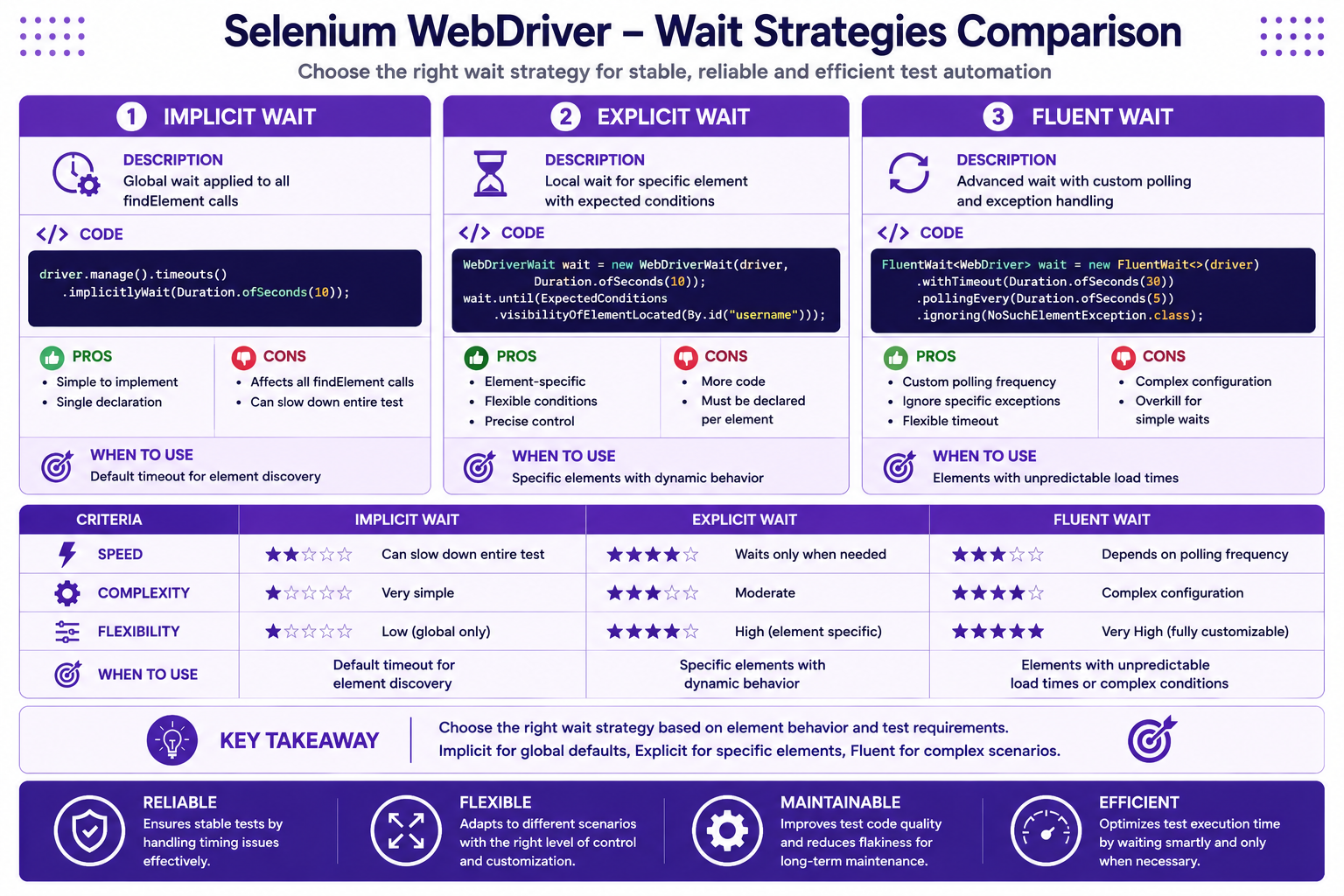
Using Custom Conditions
public class LoginPage extends BasePage {

    public DashboardPage login(String username, String password) {
        type(usernameField, username);
        type(passwordField, password);
        click(loginButton);

        // Wait for URL to change
        wait.until(ExpectedConditions.urlContains("/dashboard"));

        // Wait for specific element
        wait.until(ExpectedConditions.visibilityOfElementLocated(
            By.cssSelector(".dashboard-container")));

        return new DashboardPage(driver);
    }

    public void waitForErrorMessage(String expectedError) {
        wait.until(CustomConditions.elementHasText(errorMessage, expectedError));
    }
}
Handling Dynamic Elements
Dynamic ID Handling
public class PolicyPage extends BasePage {

    // Dynamic ID pattern: policy-{id}-name
    public WebElement getPolicyNameElement(String policyId) {
        String dynamicId = "policy-" + policyId + "-name";
        return driver.findElement(By.id(dynamicId));
    }

    // Dynamic XPath
    public WebElement getPolicyByNumber(String policyNumber) {
        return driver.findElement(By.xpath(
            "//div[@data-policy-number='" + policyNumber + "']"));
    }
}
StaleElementReferenceException Handling
package com.insurance.utils;

import org.openqa.selenium.StaleElementReferenceException;
import org.openqa.selenium.WebDriver;
import org.openqa.selenium.WebElement;
import org.openqa.selenium.support.ui.ExpectedConditions;

public class ElementUtils {

    private WebDriver driver;

    public ElementUtils(WebDriver driver) {
        this.driver = driver;
    }

    public WebElement refreshElement(WebElement element, int maxAttempts) {
        for (int attempt = 0; attempt < maxAttempts; attempt++) {
            try {
                // Attempt to interact with element
                element.isDisplayed();
                return element;
            } catch (StaleElementReferenceException e) {
                // Wait and retry
                waitForPageLoad();
                element = driver.findElement(By.id("elementId"));
            }
        }
        throw new RuntimeException("Failed to refresh element after " + maxAttempts + " attempts");
    }

    private void waitForPageLoad() {
        new WebDriverWait(driver, Duration.ofSeconds(10))
            .until(webDriver -> ((JavascriptExecutor) webDriver)
                .executeScript("return document.readyState").equals("complete"));
    }
}
Working with Iframes
package com.insurance.pages;

import org.openqa.selenium.WebDriver;
import org.openqa.selenium.WebElement;
import org.openqa.selenium.support.FindBy;

public class PaymentPage extends BasePage {

    @FindBy(id = "paymentIframe")
    private WebElement paymentIframe;

    @FindBy(id = "cardNumber")
    private WebElement cardNumberField;

    @FindBy(id = "expiryDate")
    private WebElement expiryDateField;

    @FindBy(id = "cvv")
    private WebElement cvvField;

    @FindBy(id = "payNow")
    private WebElement payNowButton;

    public PaymentPage(WebDriver driver) {
        super(driver);
    }

    public void processPayment(String cardNumber, String expiry, String cvv) {
        // Switch to iframe
        driver.switchTo().frame(paymentIframe);

        // Enter payment details
        type(cardNumberField, cardNumber);
        type(expiryDateField, expiry);
        type(cvvField, cvv);
        click(payNowButton);

        // Switch back to main content
        driver.switchTo().defaultContent();
    }

    public void processPaymentWithFrame(String frameId, String cardNumber,
                                        String expiry, String cvv) {
        driver.switchTo().frame(frameId);
        processPayment(cardNumber, expiry, cvv);
        driver.switchTo().defaultContent();
    }
}
Handling Alerts
package com.insurance.pages;

import org.openqa.selenium.Alert;
import org.openqa.selenium.WebDriver;
import org.openqa.selenium.WebElement;
import org.openqa.selenium.support.FindBy;

public class PolicyPage extends BasePage {

    @FindBy(id = "deletePolicy")
    private WebElement deleteButton;

    public PolicyPage(WebDriver driver) {
        super(driver);
    }

    public void deletePolicy(String policyNumber) {
        click(deleteButton);

        // Wait for alert
        wait.until(ExpectedConditions.alertIsPresent());

        // Switch to alert
        Alert alert = driver.switchTo().alert();

        // Get alert text
        String alertText = alert.getText();
        System.out.println("Alert message: " + alertText);

        // Accept alert (click OK)
        alert.accept();

        // Or dismiss alert (click Cancel)
        // alert.dismiss();

        // Or type text in prompt
        // alert.sendKeys("Confirmation text");
    }
}
File Upload Handling
package com.insurance.pages;

import org.openqa.selenium.WebDriver;
import org.openqa.selenium.WebElement;
import org.openqa.selenium.support.FindBy;
import java.io.File;

public class DocumentUploadPage extends BasePage {

    @FindBy(id = "documentUpload")
    private WebElement fileUploadInput;

    @FindBy(id = "uploadButton")
    private WebElement uploadButton;

    @FindBy(css = ".upload-success")
    private WebElement successMessage;

    public DocumentUploadPage(WebDriver driver) {
        super(driver);
    }

    public void uploadDocument(String filePath) {
        // Send file path directly to input element
        fileUploadInput.sendKeys(filePath);
        click(uploadButton);
    }

    public void uploadDocument(File file) {
        uploadDocument(file.getAbsolutePath());
    }

    public boolean isUploadSuccess() {
        waitForVisibility(successMessage);
        return successMessage.isDisplayed();
    }
}
Handling Multiple Windows
package com.insurance.pages;

import org.openqa.selenium.WebDriver;
import org.openqa.selenium.WebElement;
import org.openqa.selenium.support.FindBy;
import java.util.Set;

public class ExternalLinkPage extends BasePage {

    @FindBy(linkText = "Open in New Window")
    private WebElement externalLink;

    public ExternalLinkPage(WebDriver driver) {
        super(driver);
    }

    public void openNewWindowAndSwitch() {
        String mainWindow = driver.getWindowHandle();

        // Click link that opens new window
        click(externalLink);

        // Wait for new window to open
        wait.until(ExpectedConditions.numberOfWindowsToBe(2));

        // Get all window handles
        Set<String> allWindows = driver.getWindowHandles();

        // Switch to new window
        for (String window : allWindows) {
            if (!window.equals(mainWindow)) {
                driver.switchTo().window(window);
                break;
            }
        }
    }

    public void closeChildWindowAndSwitchBack() {
        String mainWindow = driver.getWindowHandle();
        Set<String> allWindows = driver.getWindowHandles();

        // Close all windows except main
        for (String window : allWindows) {
            if (!window.equals(mainWindow)) {
                driver.switchTo().window(window);
                driver.close();
            }
        }

        // Switch back to main window
        driver.switchTo().window(mainWindow);
    }
}
JavaScript Execution
package com.insurance.utils;

import org.openqa.selenium.JavascriptExecutor;
import org.openqa.selenium.WebDriver;
import org.openqa.selenium.WebElement;

public class JavaScriptUtils {

    private JavascriptExecutor js;

    public JavaScriptUtils(WebDriver driver) {
        this.js = (JavascriptExecutor) driver;
    }

    // Highlight element
    public void highlightElement(WebElement element) {
        js.executeScript(
            "arguments[0].style.border='3px solid purple'",
            element
        );
    }

    // Scroll to element
    public void scrollToElement(WebElement element) {
        js.executeScript(
            "arguments[0].scrollIntoView(true)",
            element
        );
    }

    // Scroll to bottom of page
    public void scrollToBottom() {
        js.executeScript(
            "window.scrollTo(0, document.body.scrollHeight)"
        );
    }

    // Click via JavaScript
    public void clickElement(WebElement element) {
        js.executeScript("arguments[0].click()", element);
    }

    // Get page title
    public String getPageTitle() {
        return js.executeScript("return document.title").toString();
    }

    // Set attribute value
    public void setAttribute(WebElement element, String attribute, String value) {
        js.executeScript(
            "arguments[0].setAttribute(arguments[1], arguments[2])",
            element, attribute, value
        );
    }
}
Screenshot on Failure
package com.insurance.utils;

import org.openqa.selenium.OutputType;
import org.openqa.selenium.TakesScreenshot;
import org.openqa.selenium.WebDriver;
import org.apache.commons.io.FileUtils;
import java.io.File;
import java.time.LocalDateTime;
import java.time.format.DateTimeFormatter;

public class ScreenshotUtils {

    private WebDriver driver;
    private static final String SCREENSHOT_PATH = "./test-output/screenshots/";

    public ScreenshotUtils(WebDriver driver) {
        this.driver = driver;
    }

    public String captureScreenshot(String testName) {
        try {
            TakesScreenshot ts = (TakesScreenshot) driver;
            File source = ts.getScreenshotAs(OutputType.FILE);

            String timestamp = LocalDateTime.now()
                .format(DateTimeFormatter.ofPattern("yyyyMMdd_HHmmss"));
            String fileName = testName + "_" + timestamp + ".png";

            File destination = new File(SCREENSHOT_PATH + fileName);
            FileUtils.copyFile(source, destination);

            return destination.getAbsolutePath();
        } catch (Exception e) {
            System.err.println("Failed to capture screenshot: " + e.getMessage());
            return null;
        }
    }
}
TestNG Listeners for Screenshots
package com.insurance.listeners;

import com.insurance.utils.ScreenshotUtils;
import org.openqa.selenium.WebDriver;
import org.testng.ITestContext;
import org.testng.ITestListener;
import org.testng.ITestResult;

public class TestListener implements ITestListener {

    private WebDriver driver;
    private ScreenshotUtils screenshotUtils;

    @Override
    public void onTestFailure(ITestResult result) {
        // Get WebDriver from test class
        Object testClass = result.getInstance();

        try {
            java.lang.reflect.Field driverField = testClass
                .getClass()
                .getDeclaredField("driver");
            driverField.setAccessible(true);
            driver = (WebDriver) driverField.get(testClass);

            if (driver != null) {
                screenshotUtils = new ScreenshotUtils(driver);
                String testName = result.getMethod().getMethodName();
                String screenshotPath = screenshotUtils.captureScreenshot(testName);
                System.out.println("Screenshot saved at: " + screenshotPath);
            }
        } catch (Exception e) {
            System.err.println("Failed to capture screenshot: " + e.getMessage());
        }
    }
}
Data-Driven Testing
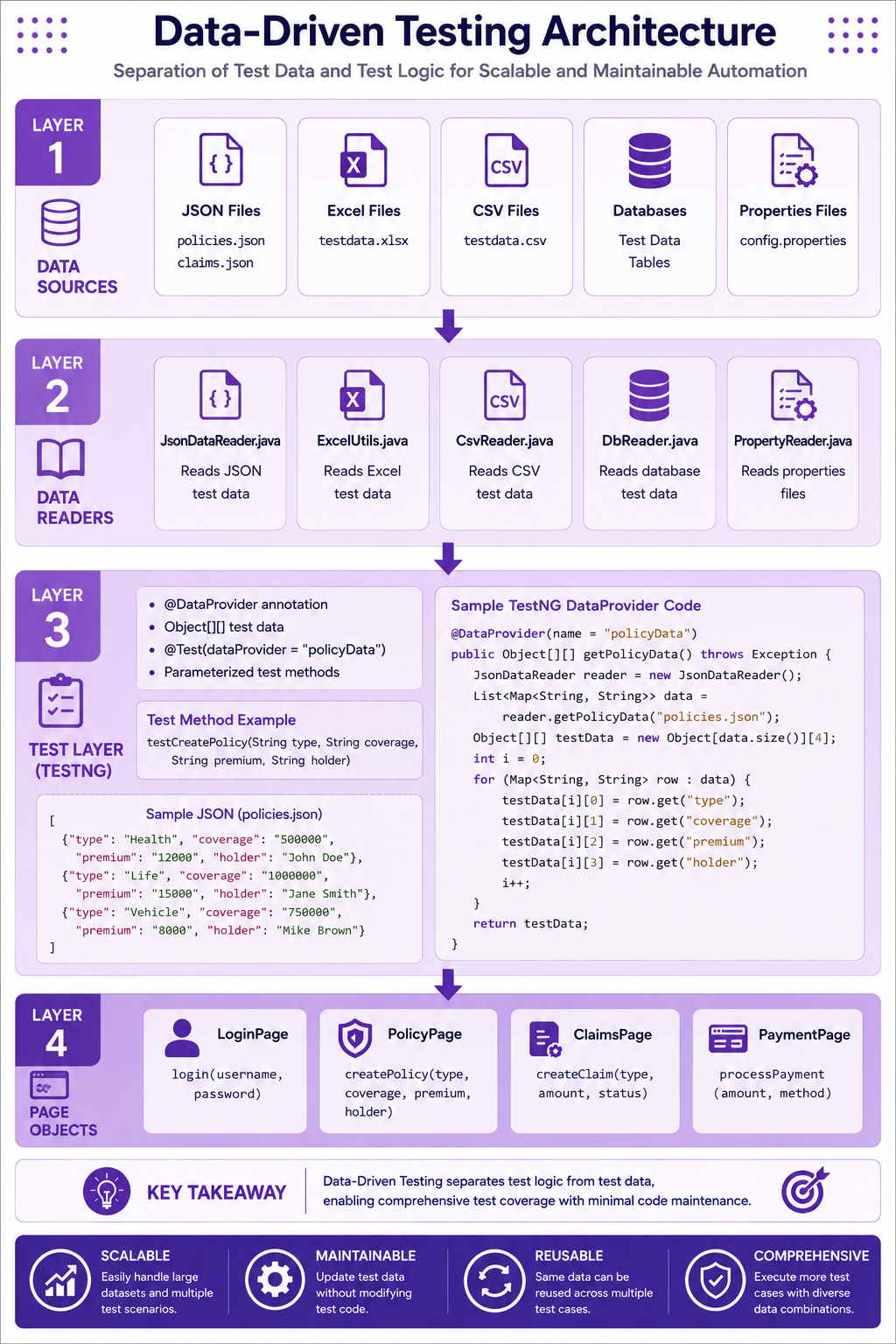
JSON Test Data
{
  "policies": [
    {
      "type": "Term Life",
      "coverageAmount": "500000",
      "premiumAmount": "2500",
      "policyHolder": "John Smith"
    },
    {
      "type": "Whole Life",
      "coverageAmount": "1000000",
      "premiumAmount": "5000",
      "policyHolder": "Jane Doe"
    },
    {
      "type": "Universal Life",
      "coverageAmount": "250000",
      "premiumAmount": "1250",
      "policyHolder": "Bob Wilson"
    }
  ]
}
JSON Data Reader
package com.insurance.utils;

import com.fasterxml.jackson.databind.ObjectMapper;
import java.io.InputStream;
import java.util.List;
import java.util.Map;

public class JsonDataReader {

    private static final ObjectMapper mapper = new ObjectMapper();

    public static List<Map<String, String>> getTestData(String fileName, String key) {
        try {
            InputStream input = JsonDataReader.class
                .getClassLoader()
                .getResourceAsStream("testdata/" + fileName);

            Map<String, List<Map<String, String>>> data = mapper.readValue(
                input,
                mapper.getTypeFactory()
                    .constructMapType(Map.class, String.class,
                    mapper.getTypeFactory()
                        .constructCollectionType(List.class, Map.class))
            );

            return data.get(key);
        } catch (Exception e) {
            throw new RuntimeException("Failed to load test data from: " + fileName, e);
        }
    }
}
Data-Driven Test
package com.insurance.tests;

import com.insurance.pages.DashboardPage;
import com.insurance.pages.LoginPage;
import com.insurance.pages.PolicyPage;
import com.insurance.utils.JsonDataReader;
import com.insurance.utils.DriverManager;
import com.insurance.utils.ConfigReader;
import org.openqa.selenium.WebDriver;
import org.testng.Assert;
import org.testng.annotations.BeforeMethod;
import org.testng.annotations.Test;
import java.util.List;
import java.util.Map;

public class DataDrivenPolicyTest {

    private WebDriver driver;
    private LoginPage loginPage;
    private DashboardPage dashboardPage;
    private PolicyPage policyPage;

    @BeforeMethod
    public void setup() {
        driver = DriverManager.getDriver();
        driver.get(ConfigReader.getBaseUrl() + "/login");
        loginPage = new LoginPage(driver);
        dashboardPage = loginPage.login(
            ConfigReader.getProperty("username"),
            ConfigReader.getProperty("password")
        );
        policyPage = dashboardPage.navigateToPolicies();
    }

    @Test(dataProvider = "policyData")
    public void testCreatePolicy(String type, String coverage, String premium, String holder) {
        policyPage.clickCreatePolicy();
        policyPage.selectPolicyType(type);
        policyPage.enterCoverageAmount(coverage);
        policyPage.enterPremiumAmount(premium);
        policyPage.searchPolicyHolder(holder);
        policyPage.submitPolicy();

        Assert.assertTrue(policyPage.isPolicyCreated(),
            "Policy creation failed for: " + type);
    }

    @org.testng.annotations.DataProvider(name = "policyData")
    public Object[][] getPolicyData() {
        List<Map<String, String>> policies =
            JsonDataReader.getTestData("policies.json", "policies");

        Object[][] data = new Object[policies.size()][4];
        for (int i = 0; i < policies.size(); i++) {
            data[i][0] = policies.get(i).get("type");
            data[i][1] = policies.get(i).get("coverageAmount");
            data[i][2] = policies.get(i).get("premiumAmount");
            data[i][3] = policies.get(i).get("policyHolder");
        }
        return data;
    }
}
Excel Data Provider
package com.insurance.utils;

import org.apache.poi.ss.usermodel.*;
import org.apache.poi.xssf.usermodel.XSSFWorkbook;
import java.io.InputStream;
import java.util.ArrayList;
import java.util.List;

public class ExcelUtils {

    public static Object[][] getTestData(String fileName, String sheetName) {
        try {
            InputStream input = ExcelUtils.class
                .getClassLoader()
                .getResourceAsStream("testdata/" + fileName);

            Workbook workbook = new XSSFWorkbook(input);
            Sheet sheet = workbook.getSheet(sheetName);

            int rowCount = sheet.getPhysicalNumberOfRows();
            int colCount = sheet.getRow(0).getPhysicalNumberOfCells();

            Object[][] data = new Object[rowCount - 1][colCount];

            for (int row = 1; row < rowCount; row++) {
                Row currentRow = sheet.getRow(row);
                for (int col = 0; col < colCount; col++) {
                    Cell cell = currentRow.getCell(col);
                    data[row - 1][col] = getCellValue(cell);
                }
            }

            workbook.close();
            return data;

        } catch (Exception e) {
            throw new RuntimeException("Failed to load Excel data: " + fileName, e);
        }
    }

    private static Object getCellValue(Cell cell) {
        if (cell == null) {
            return "";
        }

        switch (cell.getCellType()) {
            case STRING:
                return cell.getStringCellValue();
            case NUMERIC:
                return String.valueOf((long) cell.getNumericCellValue());
            case BOOLEAN:
                return String.valueOf(cell.getBooleanCellValue());
            default:
                return "";
        }
    }
}
Retry Mechanism for Flaky Tests
package com.insurance.listeners;

import org.testng.IRetryAnalyzer;
import org.testng.ITestResult;

public class RetryAnalyzer implements IRetryAnalyzer {

    private int retryCount = 0;
    private static final int MAX_RETRY_COUNT = 2;

    @Override
    public boolean retry(ITestResult result) {
        if (retryCount < MAX_RETRY_COUNT) {
            retryCount++;
            System.out.println("Retrying test: " + result.getMethod().getMethodName() +
                " (Attempt " + retryCount + " of " + MAX_RETRY_COUNT + ")");
            return true;
        }
        return false;
    }
}
Test with Retry
package com.insurance.tests;

import com.insurance.listeners.RetryAnalyzer;
import org.testng.annotations.Test;

public class FlakyTest {

    @Test(retryAnalyzer = RetryAnalyzer.class)
    public void testFlakyOperation() {
        // Test that may fail intermittently
        // Will retry up to MAX_RETRY_COUNT times
    }
}
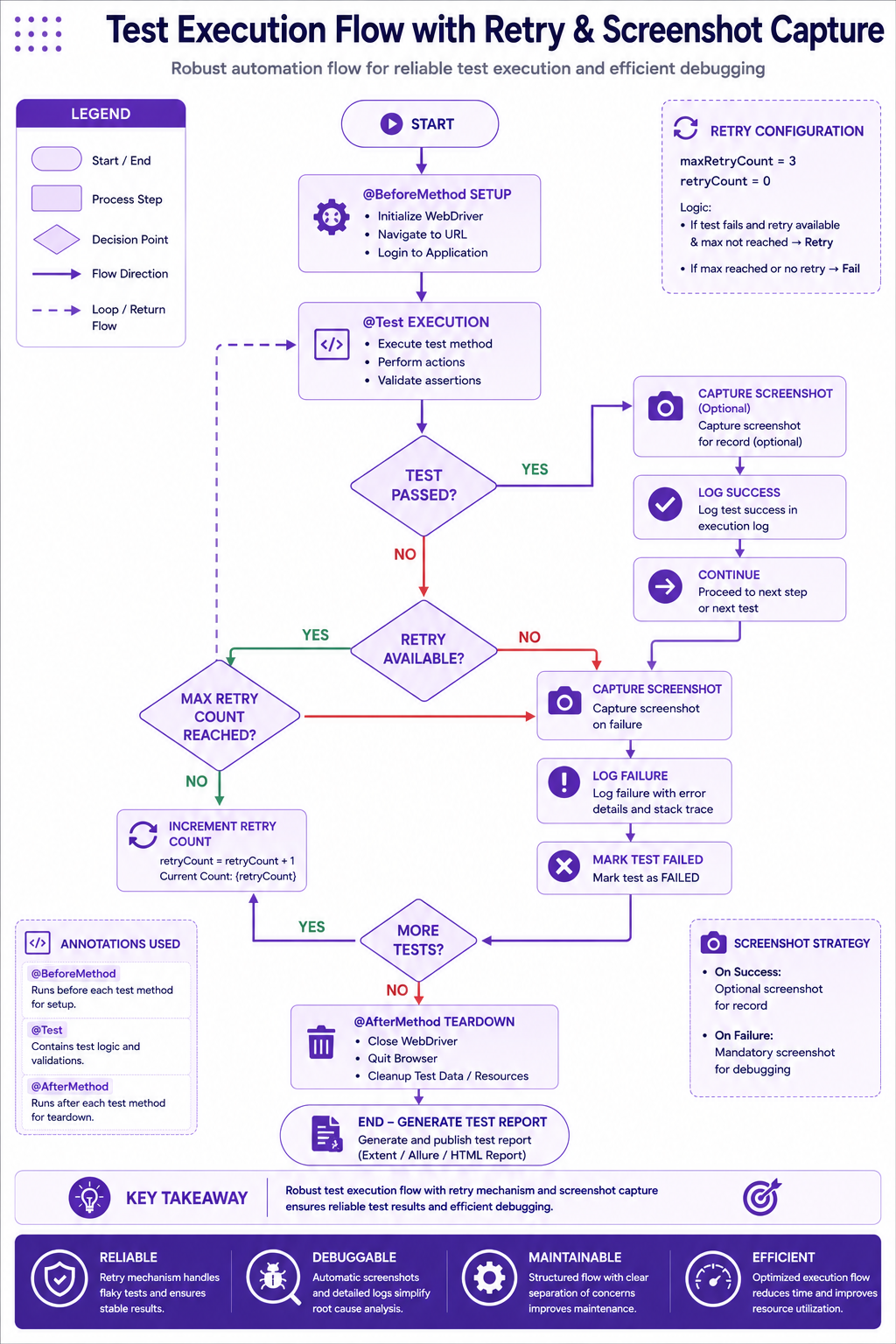
Best Practices
✅ Use custom waits for complex conditions
✅ Handle StaleElementReferenceException
✅ Always switch back from iframes
✅ Handle alerts properly
✅ Use JavaScriptExecutor sparingly
✅ Capture screenshots on failure
✅ Use data providers for data-driven testing
✅ Implement retry mechanisms for flaky tests
Common Mistakes
❌ Using Thread.sleep() for waits
❌ Not handling iframe switches properly
❌ Forgetting to switch back to default content
❌ Not handling alerts before interacting
❌ Hardcoding test data
❌ Not implementing retry mechanisms
❌ Ignoring stale element exceptions
Interview Questions
-
How do you handle dynamic elements?
-
What is StaleElementReferenceException?
-
How do you work with iframes?
-
How do you handle alerts?
-
What are different wait strategies?
-
How do you implement data-driven testing?
-
How do you capture screenshots?
-
What is a retry analyzer?
-
How do you handle multiple windows?
-
How do you upload files in Selenium?
Practice Exercises
-
Implement handling for a dynamic table with pagination.
-
Write a test that interacts with an iframe.
-
Implement data-driven testing with JSON.
-
Add screenshot capture on test failure.
-
Implement retry mechanism for flaky tests.
Key Takeaways
- Advanced waits improve test reliability.
- Dynamic elements require careful handling.
- Iframes and alerts need explicit switching.
- Data-driven testing improves test coverage.
- Screenshots help with debugging.
- Retry mechanisms handle flaky tests.
Chapter Summary
In this chapter, you learned:
- Advanced wait strategies
- Handling dynamic elements
- Iframe and alert handling
- JavaScript execution
- Screenshot capture
- Data-driven testing
- JSON and Excel data providers
- Retry mechanisms
You now have a comprehensive test automation framework with enterprise-grade capabilities.
Next Chapter
👉 Next Chapter: GitHub Copilot for Test Automation