
Chapter 6: CI/CD Integration and Parallel Execution
In the previous chapter, we explored GitHub Copilot and AI-powered test automation.
In this chapter, we will integrate our test automation framework with CI/CD pipelines, implement parallel test execution, and enable enterprise-scale test execution.
🎯 Learning Objectives
By the end of this chapter, you will be able to:
- Integrate Selenium tests with Jenkins
- Configure GitHub Actions for CI/CD
- Implement parallel test execution
- Set up Selenium Grid
- Run tests in headless mode
- Generate test reports
- Configure Docker for test execution
- Implement cross-browser testing
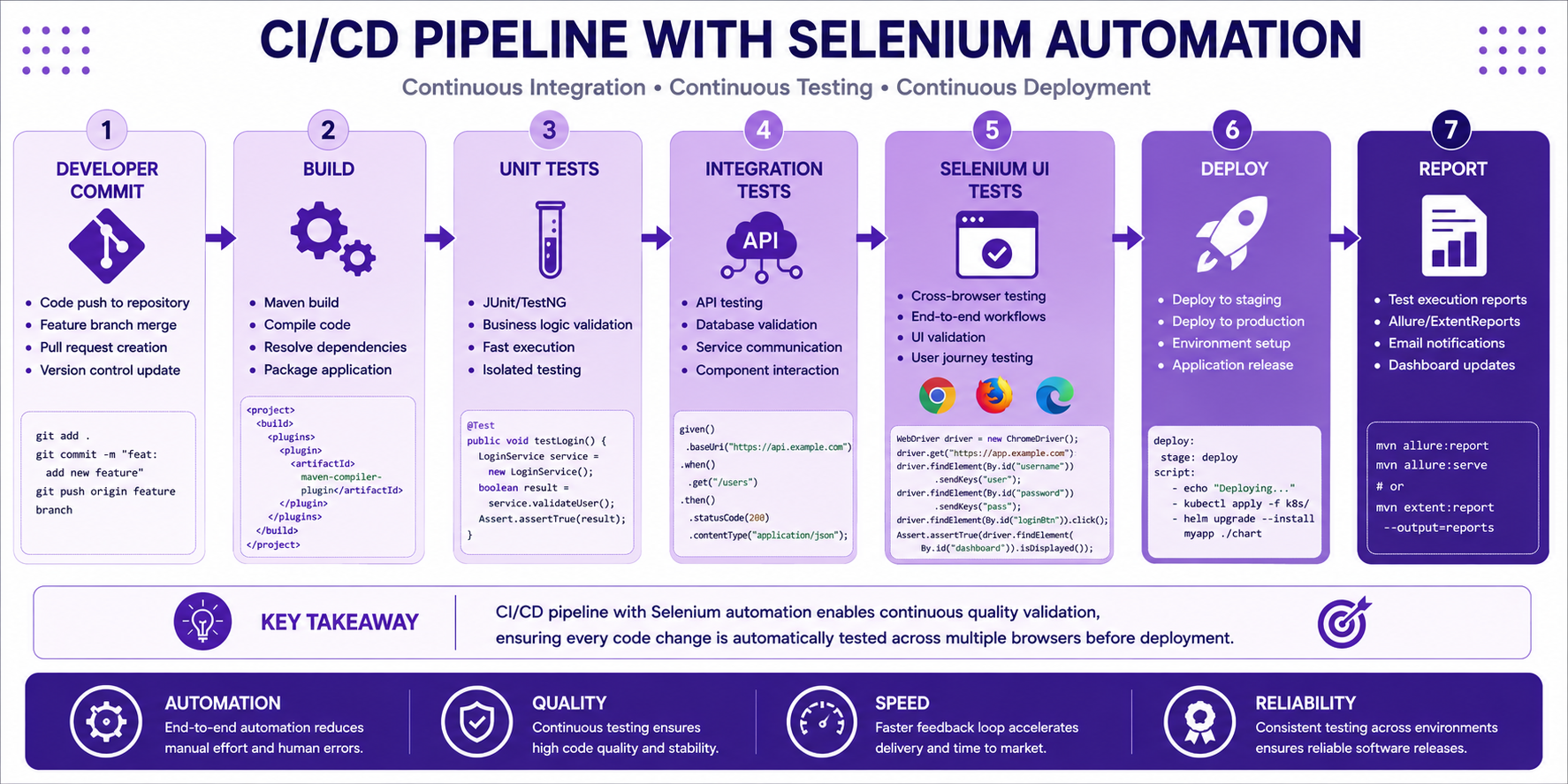
CI/CD Pipeline Overview
Continuous Integration and Continuous Delivery pipeline enables automated test execution.
Developer
    ↓
Code Commit
    ↓
Build
    ↓
Unit Tests
    ↓
Integration Tests
    ↓
UI Tests (Selenium)
    ↓
Deploy
Jenkins Integration
Jenkins Pipeline Configuration
pipeline {
    agent any

    tools {
        maven 'Maven_3_9'
        jdk 'JDK_21'
    }

    stages {
        stage('Checkout') {
            steps {
                git branch: 'main',
                    url: 'https://github.com/company/insurance-test-automation.git'
            }
        }

        stage('Build') {
            steps {
                sh 'mvn clean compile'
            }
        }

        stage('Unit Tests') {
            steps {
                sh 'mvn test -Dtest=*Test'
            }
        }

        stage('Selenium Tests') {
            steps {
                sh 'mvn test -Dtest=*SeleniumTest'
            }
            post {
                always {
                    publishHTML([
                        reportDir: 'target/surefire-reports',
                        reportFiles: 'index.html',
                        reportName: 'Test Reports'
                    ])
                }
            }
        }
    }
}
Jenkinsfile with Parallel Execution
pipeline {
    agent none

    stages {
        stage('Parallel Selenium Tests') {
            parallel {
                stage('Chrome Tests') {
                    agent {
                        docker {
                            image 'selenium/standalone-chrome'
                        }
                    }
                    steps {
                        sh 'mvn test -Dbrowser=chrome'
                    }
                }
                stage('Firefox Tests') {
                    agent {
                        docker {
                            image 'selenium/standalone-firefox'
                        }
                    }
                    steps {
                        sh 'mvn test -Dbrowser=firefox'
                    }
                }
                stage('Edge Tests') {
                    agent {
                        docker {
                            image 'selenium/standalone-edge'
                        }
                    }
                    steps {
                        sh 'mvn test -Dbrowser=edge'
                    }
                }
            }
        }
    }
}
GitHub Actions Integration
GitHub Actions Workflow
name: Selenium Test Automation

on:
  push:
    branches: [ main, develop ]
  pull_request:
    branches: [ main ]
  schedule:
    - cron: '0 2 * * *'  # Daily run at 2 AM

jobs:
  test:
    runs-on: ubuntu-latest

    strategy:
      matrix:
        browser: [chrome, firefox, edge]

    steps:
    - name: Checkout repository
      uses: actions/checkout@v3

    - name: Setup JDK 21
      uses: actions/setup-java@v3
      with:
        java-version: '21'
        distribution: 'temurin'

    - name: Setup Chrome
      if: matrix.browser == 'chrome'
      uses: browser-actions/setup-chrome@v1

    - name: Setup Firefox
      if: matrix.browser == 'firefox'
      uses: browser-actions/setup-firefox@v1

    - name: Setup Edge
      if: matrix.browser == 'edge'
      uses: browser-actions/setup-edge@v1

    - name: Cache Maven dependencies
      uses: actions/cache@v3
      with:
        path: ~/.m2/repository
        key: ${{ runner.os }}-maven-${{ hashFiles('**/pom.xml') }}
        restore-keys: |
          ${{ runner.os }}-maven-

    - name: Run Selenium Tests
      run: mvn test -Dbrowser=${{ matrix.browser }}

    - name: Upload Test Reports
      if: always()
      uses: actions/upload-artifact@v3
      with:
        name: test-reports-${{ matrix.browser }}
        path: target/surefire-reports/
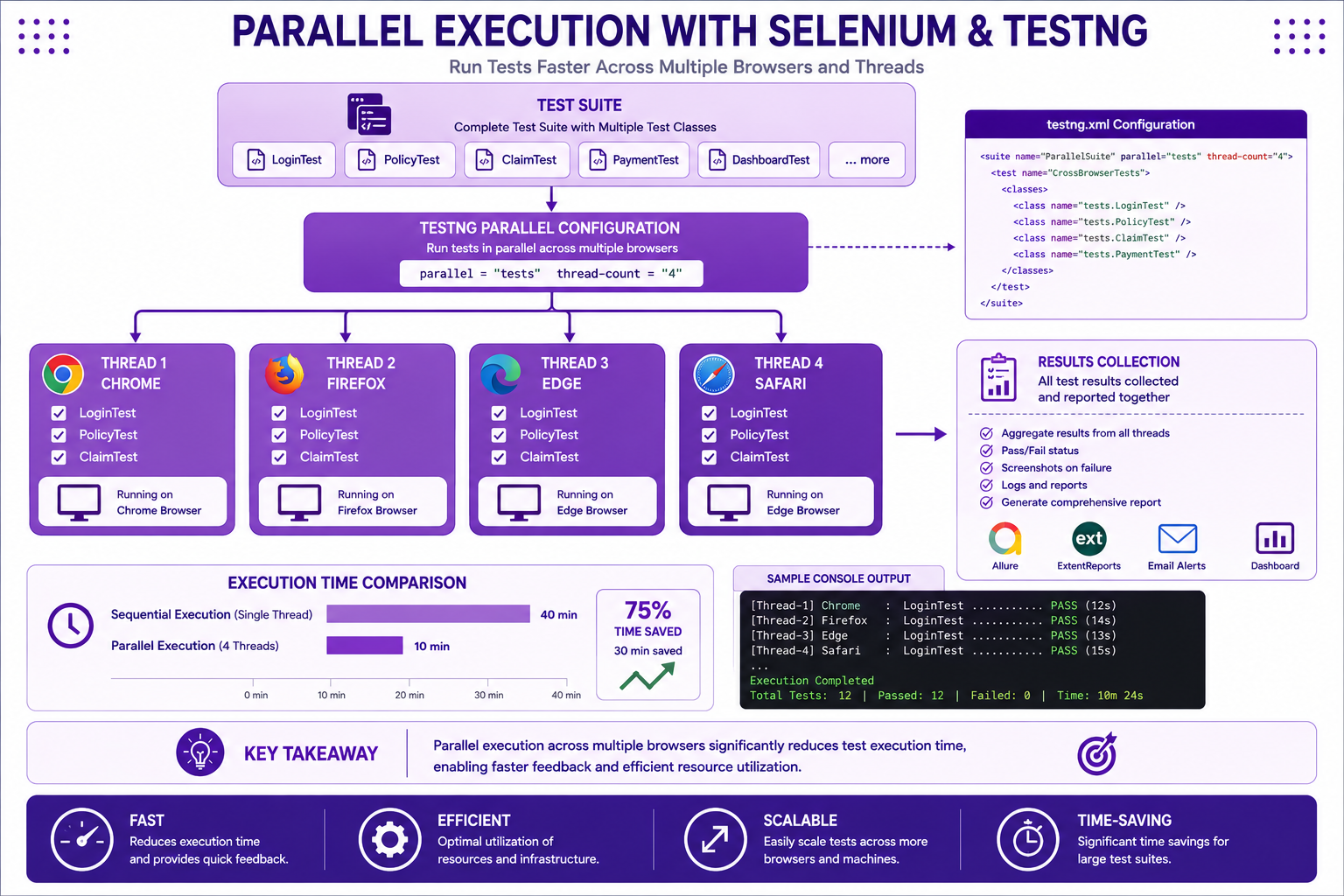
Parallel Execution with TestNG
testng.xml with Parallel Execution
<!DOCTYPE suite SYSTEM "http://testng.org/testng-1.0.dtd">
<suite name="Insurance Test Suite" parallel="tests" thread-count="4">

    <test name="Chrome Tests">
        <parameter name="browser" value="chrome"/>
        <classes>
            <class name="com.insurance.tests.LoginTest"/>
            <class name="com.insurance.tests.PolicyTest"/>
            <class name="com.insurance.tests.ClaimTest"/>
        </classes>
    </test>

    <test name="Firefox Tests">
        <parameter name="browser" value="firefox"/>
        <classes>
            <class name="com.insurance.tests.LoginTest"/>
            <class name="com.insurance.tests.PolicyTest"/>
            <class name="com.insurance.tests.ClaimTest"/>
        </classes>
    </test>

    <test name="Edge Tests">
        <parameter name="browser" value="edge"/>
        <classes>
            <class name="com.insurance.tests.LoginTest"/>
            <class name="com.insurance.tests.PolicyTest"/>
            <class name="com.insurance.tests.ClaimTest"/>
        </classes>
    </test>

</suite>
Parallel Test Configuration
package com.insurance.tests;

import com.insurance.utils.DriverManager;
import org.openqa.selenium.WebDriver;
import org.testng.annotations.AfterMethod;
import org.testng.annotations.BeforeMethod;
import org.testng.annotations.Parameters;

public class BaseTest {

    protected WebDriver driver;
    protected String browser;

    @Parameters({"browser"})
    @BeforeMethod
    public void setup(String browser) {
        this.browser = browser;
        DriverManager.setBrowser(browser);
        driver = DriverManager.getDriver();
    }

    @AfterMethod
    public void teardown() {
        DriverManager.quitDriver();
    }
}
Selenium Grid Setup
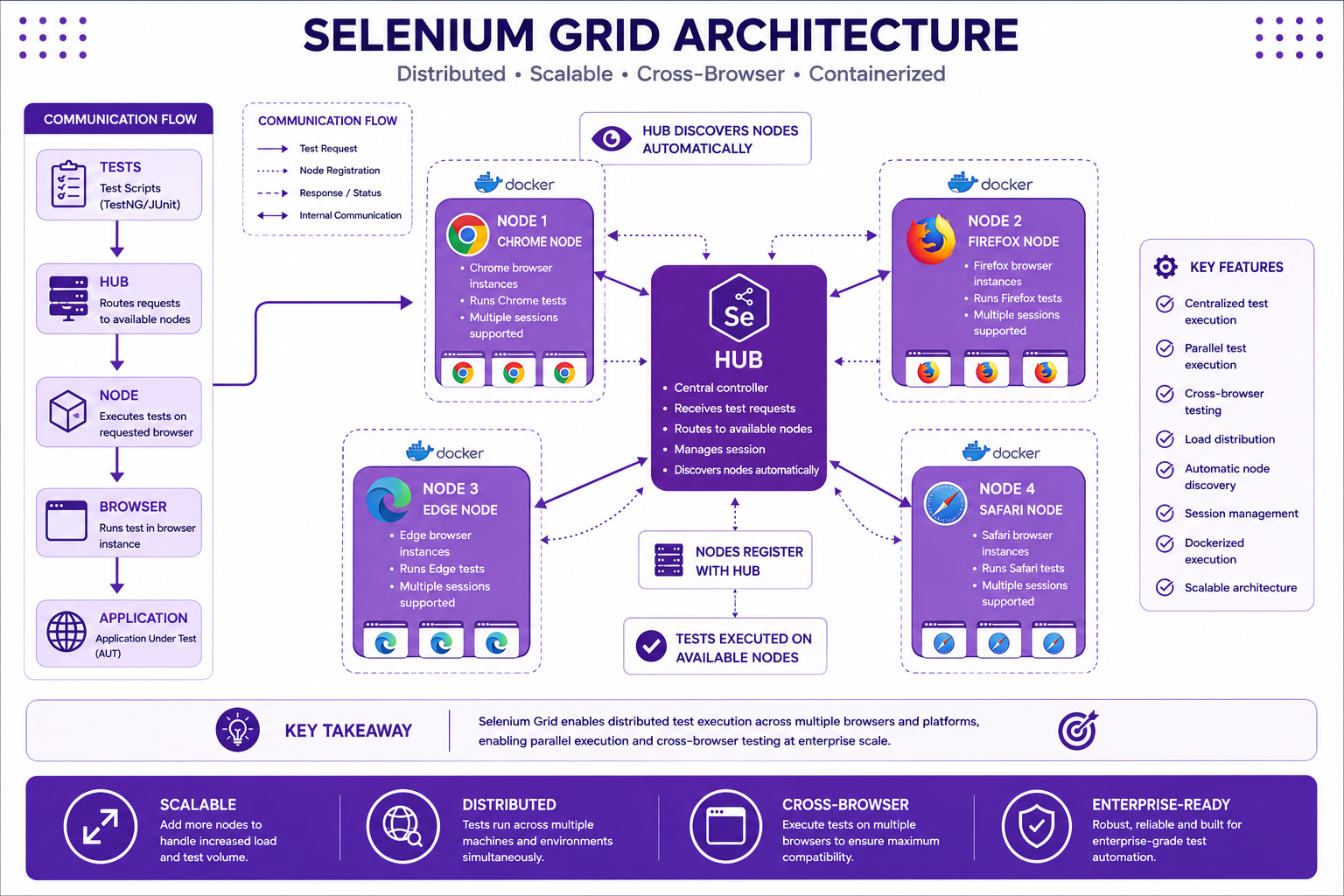
Selenium Grid Architecture
┌─────────────────────────────────────────────────────────────┐
│                    SELENIUM GRID                            │
│                                                             │
│  ┌──────────────────────────────────────────────────────┐   │
│  │                    HUB                                │   │
│  │  ┌────────┐  ┌────────┐  ┌────────┐                │   │
│  │  │ Node 1 │  │ Node 2 │  │ Node 3 │                │   │
│  │  │ Chrome │  │ Firefox│  │  Edge  │                │   │
│  │  └────────┘  └────────┘  └────────┘                │   │
│  └──────────────────────────────────────────────────────┘   │
│                                                             │
│  Tests → Hub → Node → Browser → Application                │
└─────────────────────────────────────────────────────────────┘
Docker Selenium Grid Setup
docker-compose.yml
version: '3.8'

services:
  selenium-hub:
    image: selenium/hub:4.15.0
    container_name: selenium-hub
    ports:
      - "4442:4442"
      - "4443:4443"
      - "4444:4444"
    environment:
      - SE_SESSION_REQUEST_TIMEOUT=300
      - SE_SESSION_RETRY_INTERVAL=5

  chrome-node:
    image: selenium/node-chrome:4.15.0
    depends_on:
      - selenium-hub
    environment:
      - SE_EVENT_BUS_HOST=selenium-hub
      - SE_EVENT_BUS_PUBLISH_PORT=4442
      - SE_EVENT_BUS_SUBSCRIBE_PORT=4443
    volumes:
      - /dev/shm:/dev/shm

  firefox-node:
    image: selenium/node-firefox:4.15.0
    depends_on:
      - selenium-hub
    environment:
      - SE_EVENT_BUS_HOST=selenium-hub
      - SE_EVENT_BUS_PUBLISH_PORT=4442
      - SE_EVENT_BUS_SUBSCRIBE_PORT=4443
    volumes:
      - /dev/shm:/dev/shm

  edge-node:
    image: selenium/node-edge:4.15.0
    depends_on:
      - selenium-hub
    environment:
      - SE_EVENT_BUS_HOST=selenium-hub
      - SE_EVENT_BUS_PUBLISH_PORT=4442
      - SE_EVENT_BUS_SUBSCRIBE_PORT=4443
    volumes:
      - /dev/shm:/dev/shm
Remote WebDriver Configuration
package com.insurance.utils;

import org.openqa.selenium.WebDriver;
import org.openqa.selenium.remote.RemoteWebDriver;
import org.openqa.selenium.remote.DesiredCapabilities;
import java.net.URL;

public class GridDriverManager {

    private static final String GRID_URL = "http://localhost:4444";

    public static WebDriver getRemoteDriver(String browser) {
        try {
            DesiredCapabilities capabilities = new DesiredCapabilities();

            switch (browser.toLowerCase()) {
                case "chrome":
                    capabilities.setBrowserName("chrome");
                    break;
                case "firefox":
                    capabilities.setBrowserName("firefox");
                    break;
                case "edge":
                    capabilities.setBrowserName("MicrosoftEdge");
                    break;
                default:
                    throw new IllegalArgumentException("Unsupported browser: " + browser);
            }

            return new RemoteWebDriver(new URL(GRID_URL), capabilities);

        } catch (Exception e) {
            throw new RuntimeException("Failed to connect to Selenium Grid", e);
        }
    }
}
Cross-Browser Testing
Browser Configuration
package com.insurance.utils;

import org.openqa.selenium.WebDriver;
import org.openqa.selenium.chrome.ChromeDriver;
import org.openqa.selenium.chrome.ChromeOptions;
import org.openqa.selenium.firefox.FirefoxDriver;
import org.openqa.selenium.firefox.FirefoxOptions;
import org.openqa.selenium.edge.EdgeDriver;
import org.openqa.selenium.edge.EdgeOptions;

public class BrowserFactory {

    public static WebDriver getBrowser(String browser, boolean headless) {
        switch (browser.toLowerCase()) {
            case "chrome":
                return getChromeDriver(headless);
            case "firefox":
                return getFirefoxDriver(headless);
            case "edge":
                return getEdgeDriver(headless);
            default:
                throw new IllegalArgumentException("Unsupported browser: " + browser);
        }
    }

    private static WebDriver getChromeDriver(boolean headless) {
        ChromeOptions options = new ChromeOptions();
        options.addArguments("--start-maximized");
        options.addArguments("--disable-notifications");
        options.addArguments("--disable-popup-blocking");

        if (headless) {
            options.addArguments("--headless");
            options.addArguments("--window-size=1920,1080");
        }

        WebDriverManager.chromedriver().setup();
        return new ChromeDriver(options);
    }

    private static WebDriver getFirefoxDriver(boolean headless) {
        FirefoxOptions options = new FirefoxOptions();
        options.addArguments("--start-maximized");

        if (headless) {
            options.addArguments("--headless");
            options.addArguments("--window-size=1920,1080");
        }

        WebDriverManager.firefoxdriver().setup();
        return new FirefoxDriver(options);
    }

    private static WebDriver getEdgeDriver(boolean headless) {
        EdgeOptions options = new EdgeOptions();
        options.addArguments("--start-maximized");

        if (headless) {
            options.addArguments("--headless");
            options.addArguments("--window-size=1920,1080");
        }

        WebDriverManager.edgedriver().setup();
        return new EdgeDriver(options);
    }
}
Headless Test Execution
Running Headless Tests
// Run with headless flag
mvn test -Dheadless=true

// Or in pom.xml
<plugin>
    <groupId>org.apache.maven.plugins</groupId>
    <artifactId>maven-surefire-plugin</artifactId>
    <configuration>
        <systemPropertyVariables>
            <headless>true</headless>
        </systemPropertyVariables>
    </configuration>
</plugin>
Headless Configuration
public class HeadlessTest {

    @BeforeMethod
    public void setup() {
        boolean headless = Boolean.parseBoolean(
            System.getProperty("headless", "false")
        );

        ChromeOptions options = new ChromeOptions();
        if (headless) {
            options.addArguments("--headless");
            options.addArguments("--window-size=1920,1080");
            options.addArguments("--no-sandbox");
            options.addArguments("--disable-dev-shm-usage");
            options.addArguments("--disable-gpu");
        }

        driver = new ChromeDriver(options);
    }
}
Test Reporting
Allure Reports
<!-- pom.xml -->
<dependency>
    <groupId>io.qameta.allure</groupId>
    <artifactId>allure-testng</artifactId>
    <version>2.25.0</version>
</dependency>
Allure Configuration
package com.insurance.listeners;

import io.qameta.allure.Attachment;
import org.openqa.selenium.OutputType;
import org.openqa.selenium.TakesScreenshot;
import org.openqa.selenium.WebDriver;
import org.testng.ITestResult;
import org.testng.TestListenerAdapter;

public class AllureListener extends TestListenerAdapter {

    @Override
    public void onTestFailure(ITestResult result) {
        WebDriver driver = getDriver(result);
        if (driver != null) {
            attachScreenshot(driver);
        }
    }

    @Attachment(value = "Screenshot", type = "image/png")
    public byte[] attachScreenshot(WebDriver driver) {
        return ((TakesScreenshot) driver).getScreenshotAs(OutputType.BYTES);
    }
}
Docker Test Execution
Dockerfile
FROM maven:3.9-openjdk-21

WORKDIR /app

COPY pom.xml .
RUN mvn dependency:go-offline

COPY src ./src

CMD ["mvn", "test", "-Dheadless=true"]
Docker Commands
# Build image
docker build -t insurance-tests .

# Run tests
docker run --rm -v $(pwd)/test-output:/app/target/surefire-reports insurance-tests

# Run with specific browser
docker run --rm -e BROWSER=chrome insurance-tests

# Run with Selenium Grid
docker-compose up -d
docker run --rm --network selenium-grid insurance-tests
JUnit vs TestNG for Selenium
| Feature | JUnit | TestNG |
|---|---|---|
| Annotations | @Test, @BeforeEach, @AfterEach | @Test, @BeforeMethod, @AfterMethod |
| Parallel Execution | Limited | Excellent |
| Data Providers | @ParameterizedTest | @DataProvider |
| Dependencies | Not supported | dependsOnMethods |
| Grouping | @Tag | @Test(groups = "...") |
| XML Configuration | Limited | testng.xml |
Best Practices
✅ Use Selenium Grid for cross-browser testing
✅ Implement parallel execution for speed
✅ Run headless tests in CI/CD
✅ Generate comprehensive test reports
✅ Use Docker for consistent execution
✅ Implement test retry mechanisms
✅ Monitor test execution time
✅ Separate test environments
Common Mistakes
❌ Not using parallel execution
❌ Running UI tests without headless mode in CI/CD
❌ Not using Selenium Grid
❌ Ignoring test reports
❌ Not handling browser-specific issues
❌ Not using Docker for consistency
Interview Questions
-
How do you integrate Selenium with Jenkins?
-
What is Selenium Grid?
-
How do you run tests in parallel?
-
What is headless testing?
-
How do you configure GitHub Actions for Selenium?
-
What are different reporting frameworks?
-
How do you handle cross-browser testing?
-
How do you use Docker for test execution?
Practice Exercises
-
Create a Jenkins pipeline for Selenium tests.
-
Configure parallel execution with TestNG.
-
Set up Selenium Grid with Docker.
-
Implement cross-browser testing.
-
Generate Allure reports.
-
Run tests headless in GitHub Actions.
Key Takeaways
- CI/CD integration automates test execution.
- Parallel execution speeds up test suites.
- Selenium Grid enables cross-browser testing.
- Headless mode is essential for CI/CD.
- Good reporting helps identify issues quickly.
Chapter Summary
In this chapter, you learned:
- Jenkins pipeline configuration
- GitHub Actions workflow
- Parallel execution with TestNG
- Selenium Grid setup
- Headless test execution
- Test reporting with Allure
- Docker for test execution
- Cross-browser testing strategies
You now have enterprise-grade test execution capabilities.
Next Chapter
👉 Next Chapter: Capstone Project - Enterprise Insurance Test Automation