
Chapter 3: Networking for Security — IP, Ports, DNS, and HTTP/HTTPS
Understand how devices locate one another, how applications communicate through ports, how DNS resolves names, and how HTTP and HTTPS carry web requests. These fundamentals help developers, support engineers, and security analysts investigate connectivity problems and recognise common network-related risks.
Lab environment: Use your own laptop, WSL 2 Ubuntu, or an instructor-approved browser terminal. The examples below use public demonstration domains and read-only commands. Do not scan, probe, or intercept networks or systems unless you have explicit authorisation. Use fictional addresses and synthetic scenarios for written exercises.
Learning objectives
By the end of this chapter, you should be able to:
- Explain the role of IP addresses, subnets, private address ranges, and public addresses.
- Describe the purpose of TCP, UDP, and common service ports.
- Explain how DNS converts domain names into records such as A, AAAA, and CNAME.
- Describe the basic journey of a browser request to a web server.
- Distinguish HTTP from HTTPS and explain the role of TLS certificates.
- Use safe commands such as
ipconfig,nslookup,curl -I, andTest-NetConnectionto gather basic evidence. - Interpret simple results without assuming that one successful test proves a service is secure.
1. Industry scenario: a college portal is unreachable
Imagine that students report that a fictional college portal, portal.example.test, is not loading. Some users see a DNS error; others see a timeout; a few can open the home page but receive an error when signing in. These symptoms may look similar to users, but they can occur at different stages: name resolution, network connectivity, transport, TLS, or the web application itself.
A security-minded technician investigates methodically rather than immediately blaming the website or changing firewall settings. They check whether the hostname resolves, whether the destination service is reachable, whether HTTPS responds, and what HTTP status is returned. Each test answers a limited question and should be recorded with its time and result.
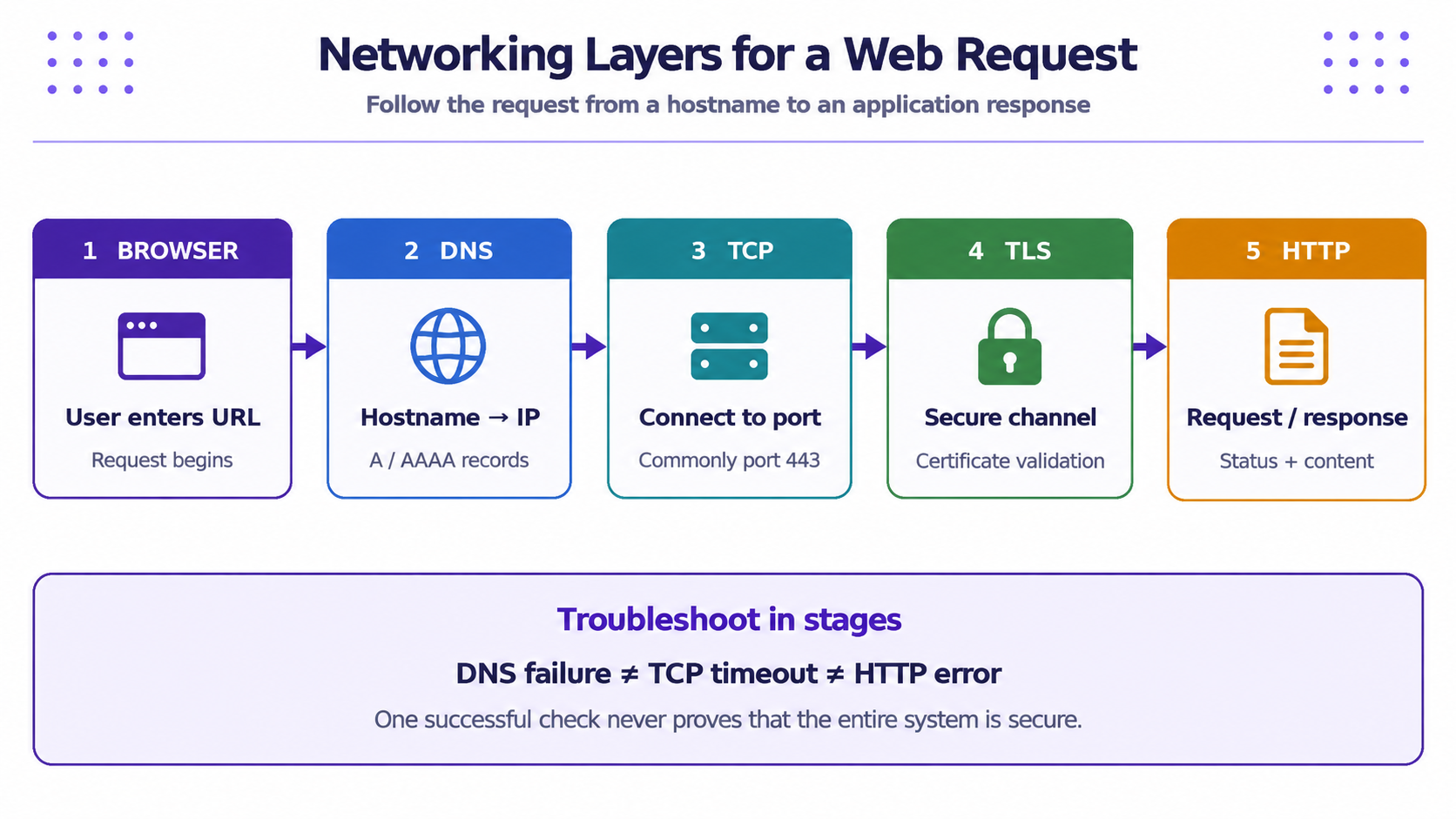
A simplified request path is: browser → DNS lookup → IP address → TCP connection → TLS negotiation for HTTPS → HTTP request → web server/application response. A failure at one stage does not automatically indicate a security attack; it is evidence to investigate.
2. IP addresses and network boundaries
An IP address identifies a network interface for communication using the Internet Protocol. IPv4 addresses are commonly written as four decimal numbers separated by dots, such as 192.0.2.10. IPv6 uses a longer hexadecimal format, such as 2001:db8::10. The examples use documentation ranges and are not intended as real service endpoints.
Private and public addresses
Private IPv4 ranges are used inside local networks and are not directly routed across the public internet. Common private ranges include 10.0.0.0/8, 172.16.0.0/12, and 192.168.0.0/16. A router often uses Network Address Translation (NAT) to let devices with private addresses share a public-facing connection. Public addresses are globally routable, subject to routing and policy.
An address alone does not prove that a device is trustworthy. A private address can belong to an insecure device, and a public address can host a legitimate service. Security decisions should consider identity, authorisation, network policy, and context—not merely whether an address is private or public.
Subnets and the default gateway
A subnet describes a range of addresses treated as a network segment. A prefix such as /24 indicates how many leading bits identify the network. The default gateway is the router a device uses to reach destinations outside its local subnet. You do not need to calculate complex subnet masks for this introductory chapter; focus on the idea that local and remote destinations may take different paths.
3. Ports, TCP, and UDP
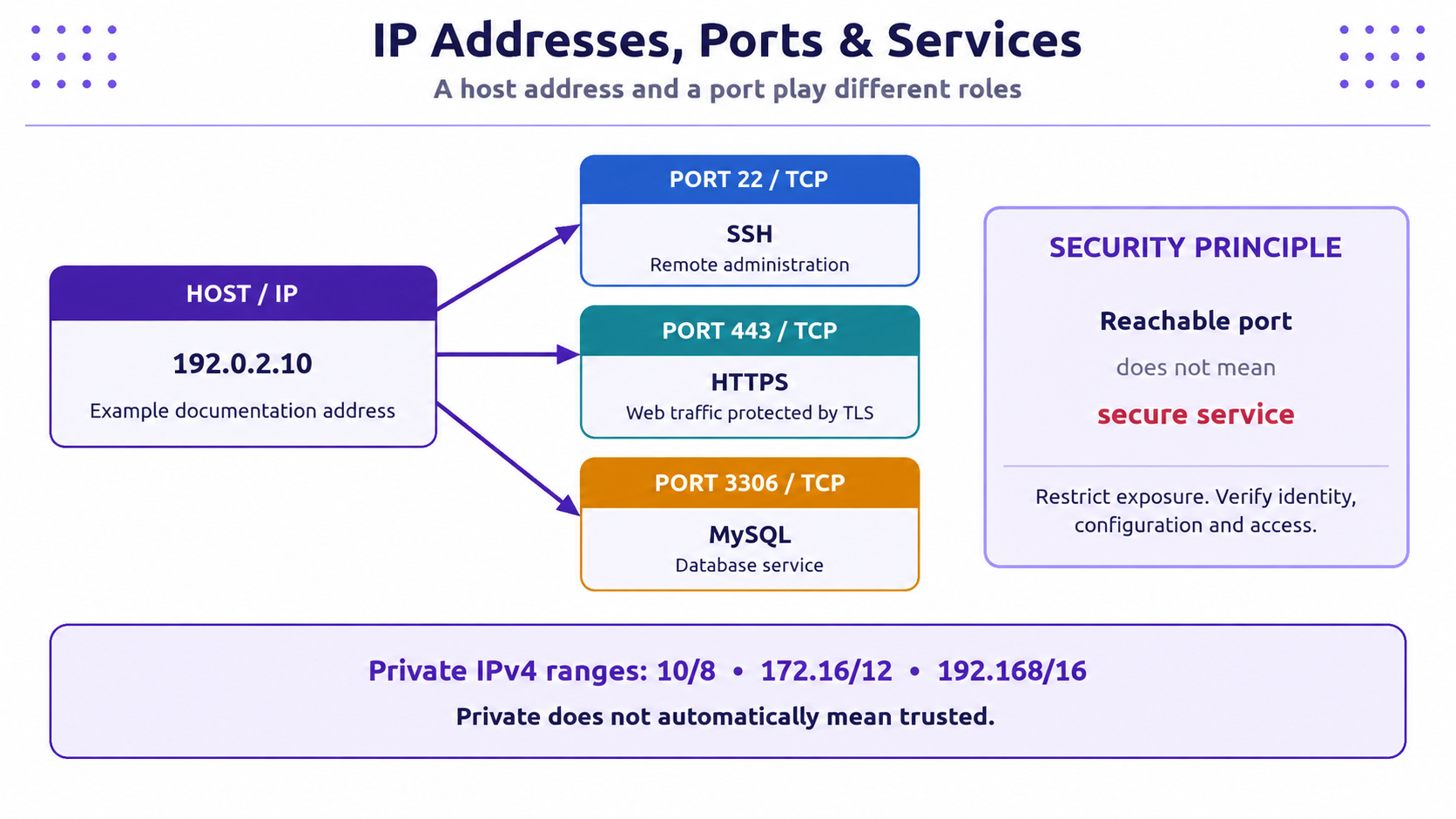
An IP address helps identify a host/interface, while a port helps the operating system deliver traffic to a particular service or process. Ports range from 0 to 65535. Common examples include:
| Port | Typical protocol/service | Why it matters |
|---|---|---|
| 22/TCP | SSH | Remote administration; should be restricted and authenticated securely |
| 53/UDP or TCP | DNS | Name resolution; TCP is also used for some responses and transfers |
| 80/TCP | HTTP | Web traffic without TLS protection |
| 443/TCP | HTTPS over TLS | Encrypted web traffic in the common deployment model |
| 3306/TCP | MySQL | Database service; usually should not be exposed broadly to the internet |
A port number is a convention, not proof of what is actually running. Services can use non-default ports, and a reachable port does not establish that authentication, configuration, or application code is secure.
TCP provides a connection-oriented byte stream with sequencing and retransmission. It is widely used for web traffic and remote administration. UDP sends datagrams without establishing the same kind of connection; it is useful where low overhead or application-managed timing is important. DNS commonly uses UDP, but may also use TCP.
4. DNS: turning names into records
People usually remember domain names, while network connections need IP addresses. The Domain Name System (DNS) is a distributed naming system that lets clients look up records for a domain. A typical browser flow asks a configured resolver for records, then uses the returned address to contact the service.
Common record types include:
- A: maps a name to an IPv4 address.
- AAAA: maps a name to an IPv6 address.
- CNAME: aliases one name to another canonical name.
- MX: identifies mail servers for a domain.
- TXT: stores text used for domain verification and some email-security policies.
DNS results can be cached, so changes may not appear everywhere immediately. A failed lookup may be caused by a typo, resolver problem, missing record, local configuration, or a deliberate filtering policy. It is not, by itself, proof of compromise.
Security considerations
Attackers may use lookalike domains, compromised DNS settings, or misleading links to direct users to the wrong destination. Check the actual registered domain and use bookmarks or manually entered known addresses for sensitive services. DNSSEC can help validate DNS data authenticity where correctly deployed, but it does not make a website or its content inherently trustworthy.
5. HTTP and HTTPS
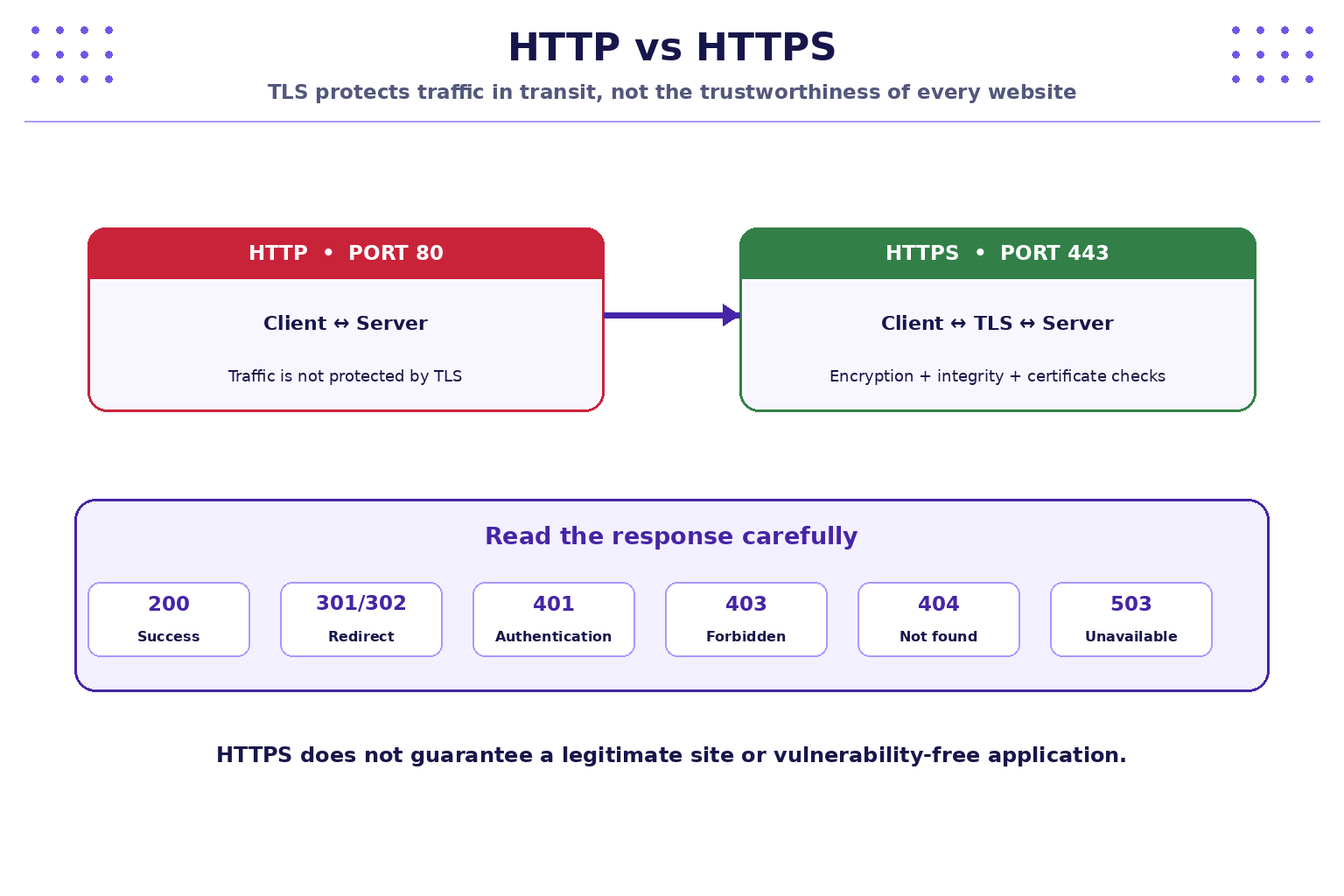
HTTP defines how a client and server exchange requests and responses. A request commonly includes a method, path, headers, and sometimes a body. The server returns a status code, headers, and possibly content.
| Method/status | Meaning | Example |
|---|---|---|
GET |
Request a representation | Load a public page |
POST |
Submit data for processing | Send a login form |
200 OK |
Request succeeded | Page returned successfully |
301 / 302 |
Redirect | Move the browser to another URL |
401 Unauthorized |
Authentication is required or failed | Login needed |
403 Forbidden |
Server refuses the request | User lacks permission |
404 Not Found |
Resource not found | Incorrect or unavailable path |
500 Internal Server Error |
Server encountered an error | Application failure |
Status codes are clues, not complete diagnoses. A 200 response does not mean the page is safe, and a 403 does not necessarily mean an attack occurred.
HTTPS is HTTP carried over TLS. TLS helps protect confidentiality and integrity in transit and lets the client validate the server's certificate and hostname. It does not guarantee that the site operator is honest, that the application has no vulnerabilities, or that information is safe after it reaches the server. Phishing sites can also use HTTPS certificates.
6. Safe command-line checks
Use these commands to collect basic connectivity evidence. Output varies by operating system and network. Run only the commands relevant to your environment.
Windows: inspect network configuration
ipconfig
Look for the active adapter, IPv4 address, subnet mask, and default gateway. Do not publish screenshots that expose sensitive internal network details in a public forum.
Windows: test a TCP connection
Test-NetConnection example.com -Port 443
This tests whether a TCP connection to the host and port can be established from your machine. It does not test the quality of TLS, application security, or whether the destination is safe.
Windows or Linux: inspect DNS
nslookup example.com
Observe the DNS server used and the returned address records. A different address from a classmate may result from CDN routing, geographic distribution, or caching; it is not automatically suspicious.
Linux / WSL: inspect HTTP response headers
curl -I https://example.com
The -I option requests response headers. Review the status line and selected headers. Some servers handle HEAD requests differently from GET requests, so an unexpected response is not conclusive. Do not include passwords, session cookies, API keys, or other secrets in command examples or shared output.
7. Practical exercise: diagnose a fictional web issue
Scenario: A student says, “The portal is down.” You receive three fictional observations:
- Case A:
nslookup portal.example.testreports that the name cannot be resolved. - Case B: the hostname resolves, but a TCP test to port 443 times out.
- Case C: HTTPS responds with
HTTP/1.1 503 Service Unavailable.
Tasks
- For each case, identify the stage that should be investigated first: DNS, network/transport connectivity, or web service/application availability.
- List two possible explanations for each observation without assuming malicious activity.
- Choose one safe follow-up check and explain what it can—and cannot—prove.
- Record the time, command, exact output, interpretation, and next step in a short incident note.
- Explain why you should not run a broad port scan against the real college network to “check everything.”
Suggested reasoning
- Case A: Start with the hostname spelling, DNS record, and configured resolver. A lookup failure says the name was not resolved in that test; it does not prove the server is offline.
- Case B: Check whether the destination/port is correct and whether routing, firewall rules, or service availability could explain the timeout. A timeout alone cannot identify which device dropped the traffic.
- Case C: The connection reached a service that returned a 503 response. The service may be overloaded, under maintenance, or unable to reach a dependency. Review authorised server-side monitoring/logs if available.
8. Mini-lab: build a network evidence table
Use example.com for the basic checks and your own device's configuration. Do not test a third-party system beyond these ordinary, non-invasive requests.
| Check | Command | Record | Limitation |
|---|---|---|---|
| Local network settings | ipconfig (Windows) |
Active adapter, gateway | Does not test internet access by itself |
| DNS lookup | nslookup example.com |
Resolver and returned records | Results can be cached or distributed |
| HTTPS response | curl -I https://example.com |
Status line and selected headers | Does not audit the site for vulnerabilities |
| TCP port reachability | Test-NetConnection example.com -Port 443 (Windows) |
Success/failure and target | Does not prove application or TLS security |
Compare your observations with a partner or sample results supplied by the instructor. Differences are opportunities to ask what changed—network, resolver, time, or server response—rather than to assume one result is correct for every environment.
9. Key takeaways
- IP addresses identify network interfaces; ports help direct traffic to services.
- TCP and UDP have different transport characteristics, and a port number does not guarantee a particular service or security level.
- DNS maps names to records and may be affected by caching, configuration, or policy.
- HTTP communicates requests and responses; status codes provide clues, not a full diagnosis.
- HTTPS uses TLS to protect traffic in transit, but it does not prove that a website is legitimate or vulnerability-free.
- Good troubleshooting is staged, authorised, repeatable, and documented with exact evidence.
10. Knowledge check
-
Which DNS record commonly maps a hostname to an IPv4 address?
- A. MX
- B. A
- C. TXT
- D. CNAME
-
What is the primary purpose of a port number?
- A. Encrypt all traffic
- B. Identify a user's password
- C. Help deliver network traffic to a service/process
- D. Replace an IP address
-
Which statement about HTTPS is correct?
- A. It guarantees the website is honest
- B. It prevents every web vulnerability
- C. It protects traffic in transit using TLS, when correctly configured
- D. It means the site cannot be used for phishing
-
A hostname resolves, but TCP port 443 times out. What can you conclude?
- A. The server is definitely compromised
- B. The test did not establish a TCP connection; the cause still needs investigation
- C. DNS is definitely broken
- D. The website is safe
-
What does an HTTP 503 response usually indicate?
- A. Service temporarily unavailable or unable to handle the request
- B. A successful password change
- C. DNS record type A
- D. TLS is impossible
-
Which is the safest approach when diagnosing a real network?
- A. Scan every address without asking
- B. Disable security controls first
- C. Use authorised, limited checks and record evidence
- D. Share credentials in command history
Answer key: 1-B, 2-C, 3-C, 4-B, 5-A, 6-C.
Cybersecurity & Practices · JSPM University · B.Tech Year III
Practical-first learning: investigate carefully, stay authorised, and verify every result.