
Chapter 6: Web Application Security — OWASP Top 10 and Common Risks
Learn how common web application weaknesses arise, how to recognise their symptoms, and how developers reduce risk through secure design, coding, configuration, testing, and monitoring. This chapter introduces the OWASP Top 10:2025 as an awareness framework and uses fictional scenarios to practise risk identification and defensive reasoning.
Lab environment: Use fictional scenarios, instructor-provided examples, or an intentionally vulnerable training application such as OWASP Juice Shop in an authorised, isolated lab. Do not test a college portal, public website, or another person's application unless you have explicit permission and a defined scope. Do not submit real credentials or personal data to training sites. The code examples are for learning and should be adapted to the framework and database used in a real project.
Learning objectives
By the end of this chapter, you should be able to:
- Explain what the OWASP Top 10 is and why it is an awareness framework rather than a complete security checklist.
- Recognise the ten categories in the OWASP Top 10:2025.
- Identify examples of broken access control, security misconfiguration, injection, authentication failures, and insecure design.
- Explain why untrusted input must not be combined directly with SQL instructions.
- Recommend practical controls such as server-side authorisation, parameterized queries, secure configuration, dependency review, and useful logging and alerting.
- Map a fictional web-application scenario to a risk category, impact, evidence, and suitable mitigations.
- Practise responsibly in an authorised training environment and document observations without claiming more than the evidence supports.
1. Industry scenario: a student project portal
A team develops a fictional project portal where students submit assignments, view feedback, and download results. During a review, a tester notices that a user can access a record that should belong to another student. A developer also discovers that an old library is still in use, and the application returns detailed errors when unexpected input is submitted.
These observations may indicate different weaknesses. Accessing another user's record points toward an authorisation problem; an outdated dependency may create a supply-chain or component risk; and verbose errors may expose implementation details or indicate mishandled exceptional conditions. The team should record each observation, reproduce it only within the authorised test scope, assess the impact, and prioritise a fix.
A security finding should describe what was observed, what asset is affected, how the behaviour could cause harm, and what evidence supports the conclusion. Avoid labelling a system vulnerable merely because a symptom looks unusual; verify the behaviour and its context.
2. What is the OWASP Top 10?
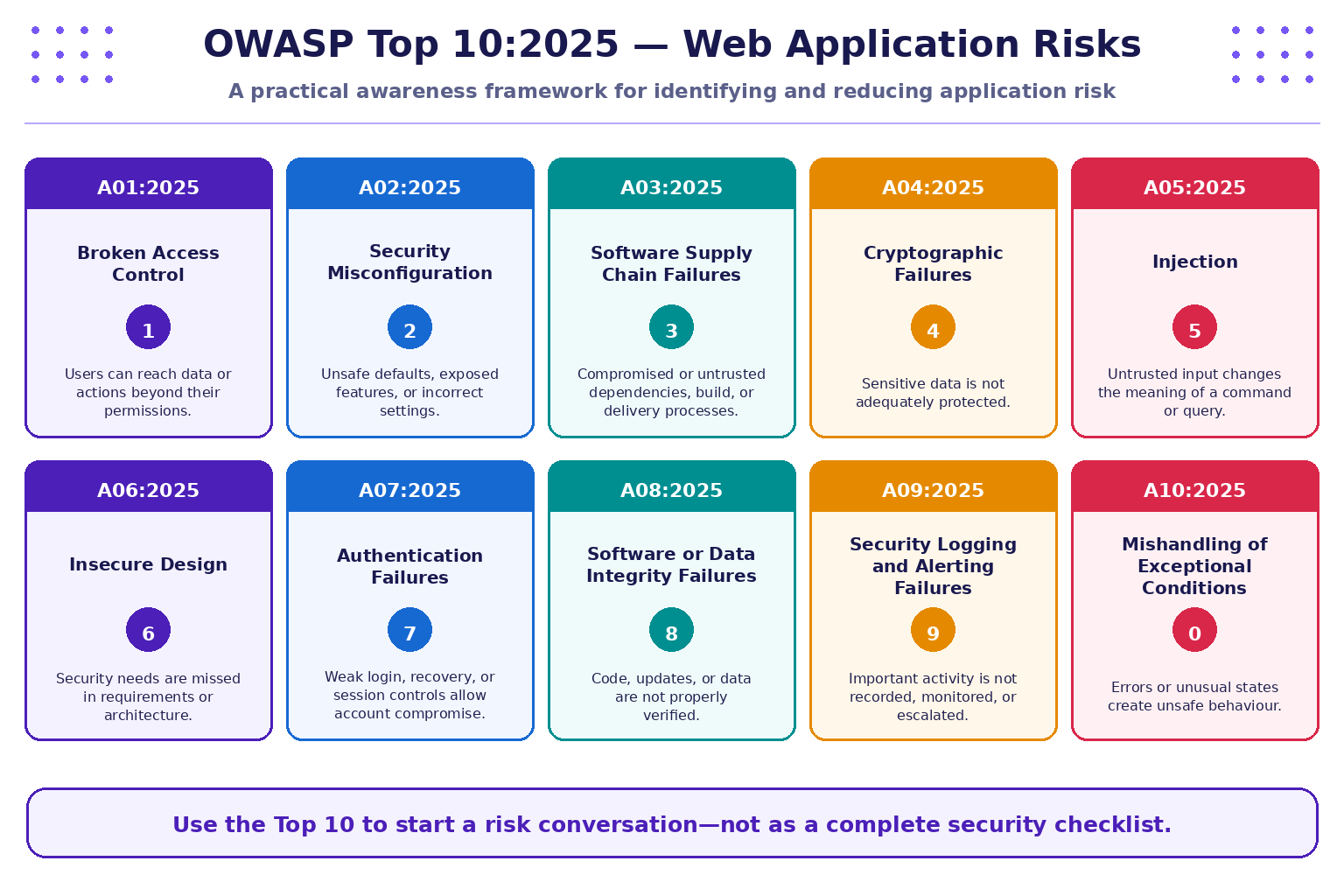
The Open Worldwide Application Security Project (OWASP) publishes the Top 10 as a widely used awareness document about important web application security risks. It helps developers, testers, students, and project teams establish a shared vocabulary for discussing common weaknesses.
The Top 10 is not a guarantee that an application is secure if it has been checked against ten categories. Applications may have risks outside the list, and each category contains many possible weakness patterns. Use it as a starting point for threat modelling, secure development, code review, and authorised testing.
OWASP Top 10:2025 categories
| ID | Category | Illustrative concern | Example defensive direction |
|---|---|---|---|
| A01:2025 | Broken Access Control | A user can view or change another user's record | Enforce server-side authorisation on every sensitive request |
| A02:2025 | Security Misconfiguration | Debug mode, default credentials, or unnecessary services are exposed | Use secure defaults, environment-specific configuration, and configuration reviews |
| A03:2025 | Software Supply Chain Failures | A dependency, build process, or software distribution path is compromised or untrusted | Inventory dependencies, review sources, protect build pipelines, and verify releases |
| A04:2025 | Cryptographic Failures | Sensitive data is stored or transmitted without appropriate protection | Minimise sensitive data and use suitable, maintained cryptographic controls |
| A05:2025 | Injection | Untrusted input changes how a query or command is interpreted | Use parameterized queries and context-appropriate handling of input and output |
| A06:2025 | Insecure Design | Required security controls were not considered in the design | Threat-model important workflows and define security requirements early |
| A07:2025 | Authentication Failures | Weak login, recovery, or session controls enable account compromise | Use established authentication mechanisms, MFA where appropriate, and secure recovery flows |
| A08:2025 | Software or Data Integrity Failures | Software or data is accepted without adequate integrity verification | Verify trusted sources, updates, and important data-changing operations |
| A09:2025 | Security Logging and Alerting Failures | Important events are not recorded, monitored, or escalated | Log security-relevant events, protect logs, and respond to actionable alerts |
| A10:2025 | Mishandling of Exceptional Conditions | Unexpected errors or abnormal states produce unsafe behaviour | Handle failures safely, validate assumptions, and avoid failing open |
The category names and IDs above follow the OWASP Top 10:2025 release. Read the official project documentation for full definitions and updates: OWASP Top 10:2025.
3. Broken access control: check permissions on the server
Access control determines which authenticated or anonymous users may perform particular actions on particular resources. A user interface can hide a button, but hiding a button is not an authorisation control: a client can make requests directly, and the server must still decide whether the requested action is allowed.
Fictional example
A student is signed in to a project portal and opens their own feedback record. If changing a record identifier in a training scenario exposes another student's feedback, the application may be missing a server-side ownership or role check. The correct response is to report the behaviour in the authorised lab—not to try the same idea on a real college portal.
Defensive controls
- Enforce authorisation on the server for each protected action and resource.
- Check that the current user is allowed to access the specific record, not just the general page.
- Deny access by default when permission cannot be established.
- Use role-based access control where it fits, but do not rely on role names alone when ownership or context also matters.
- Add automated tests for both allowed and denied access paths.
- Log important access denials without recording passwords, tokens, or unnecessary personal data.
4. Security misconfiguration and insecure design
A secure application can still be exposed by incorrect settings or a design that never considered misuse. Misconfiguration concerns how software and infrastructure are configured; insecure design concerns missing or inadequate security requirements and architecture decisions. The two can overlap, but they are not identical.
Examples of misconfiguration include debug pages enabled in production, default accounts left active, unnecessary services exposed, overly broad cloud permissions, or sensitive files placed in a public directory. Examples of insecure design include allowing a sensitive workflow without approval, failing to separate user roles, or having no safe recovery path for a critical operation.
A practical review asks:
- Are development-only features disabled in production?
- Are default credentials removed and secrets stored outside source code?
- Are services and permissions limited to what the application requires?
- Have important user journeys and abuse cases been considered before implementation?
- Do failures result in a safe denial rather than granting access by default?
Use a repeatable configuration checklist and threat-modeling exercise. Do not “fix” an unfamiliar live system by changing settings without approval, a rollback plan, and evidence of the intended configuration.
5. Injection: keep input separate from instructions
Injection can occur when untrusted input is interpreted as part of a command or query rather than as data. SQL injection is one example: code that builds a database query by concatenating raw user input can unintentionally allow the input to change the query's meaning.
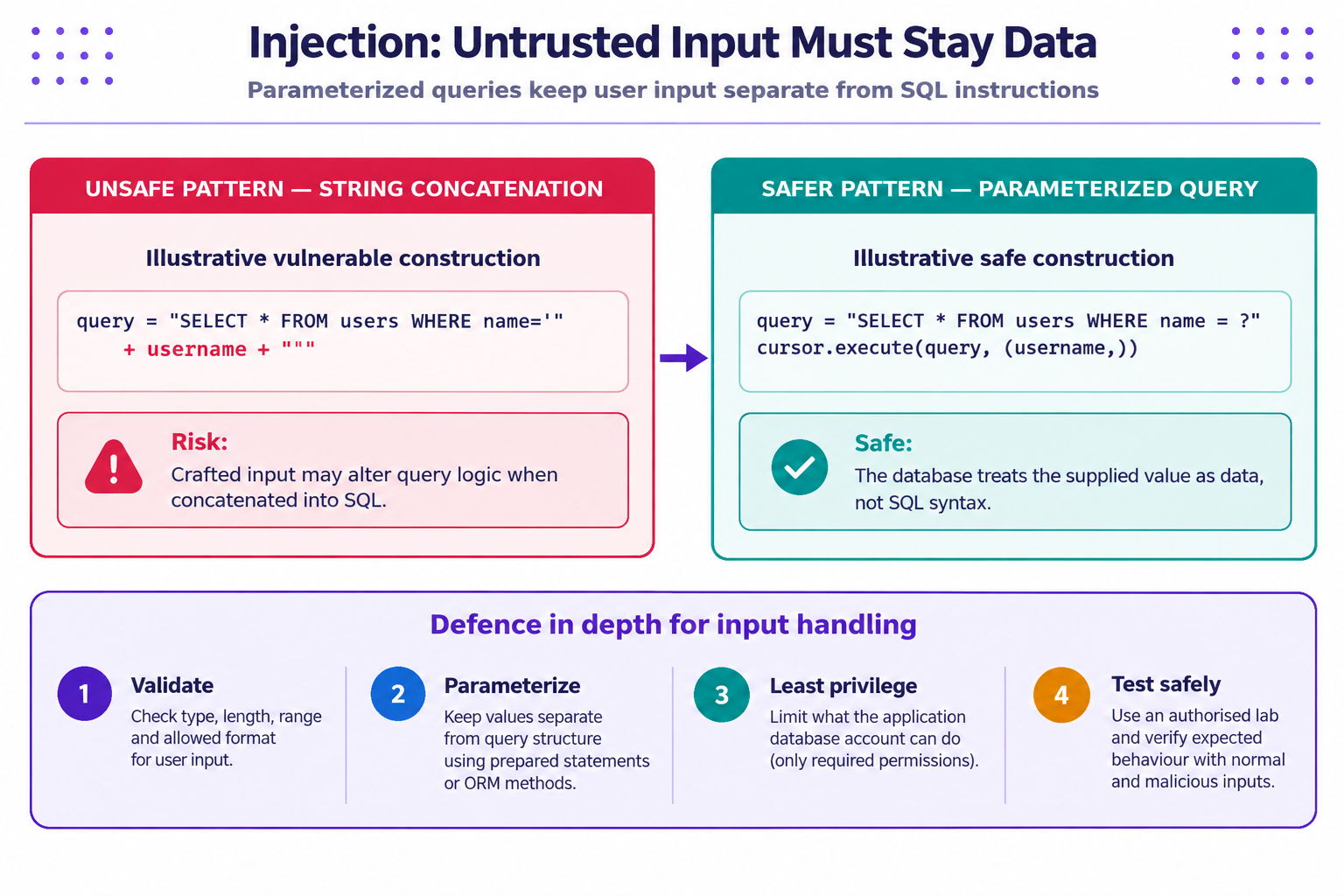
Illustrative unsafe pattern
The following pseudocode demonstrates the design problem; it is not a request to test a live system:
# Unsafe: do not build SQL by concatenating user input
query = "SELECT * FROM users WHERE username = '" + username + "'"
When input is concatenated into query text, characters in the input may be interpreted as SQL syntax. Input validation alone is not a reliable replacement for parameterized queries.
Safer parameterized pattern
# Illustrative DB-API style; exact syntax varies by database driver
query = "SELECT * FROM users WHERE username = ?"
cursor.execute(query, (username,))
The placeholder syntax varies between database drivers, so follow the official documentation for the library in use. The principle is to send the query structure separately from its parameter values.
Defensive controls
- Use parameterized queries or prepared statements for database access.
- Use well-maintained framework APIs and avoid constructing commands from raw input.
- Validate type, length, range, and format according to business requirements.
- Encode output for the context where it will be displayed; validation and output encoding solve different problems.
- Give the application database account only the permissions it needs.
- Return safe error messages to users and keep appropriate diagnostic details in protected logs.
6. Authentication failures, cryptography, and sensitive data
Authentication answers whether a user or service has proved an identity. Session management maintains that authenticated state across requests. Cryptographic controls help protect confidentiality and integrity when properly selected, implemented, and maintained. These topics interact, but one control cannot replace the others.
Common risk patterns include weak or reused passwords, unsafe account recovery, predictable or exposed session tokens, missing rate limits where needed, sensitive information stored in plain text, and cryptographic algorithms or modes used incorrectly.
Good practices include:
- Use a maintained identity or authentication framework rather than inventing a new protocol.
- Store passwords using a password-hashing algorithm designed for that purpose; do not store plaintext passwords or reversible “encrypted passwords” as a substitute.
- Use MFA where appropriate, protect recovery workflows, and invalidate sessions after important security events.
- Use HTTPS/TLS correctly for traffic in transit, while remembering that HTTPS alone does not prove a website is legitimate or secure.
- Minimise the sensitive data collected and retained, and apply appropriate access controls to stored data.
- Keep secrets out of source code, screenshots, logs, and public repositories.
For this introductory chapter, focus on recognising the design and control requirements. Do not use real passwords, production tokens, or personal information in classroom exercises.
7. Software supply chain, integrity, logging, and exceptional conditions
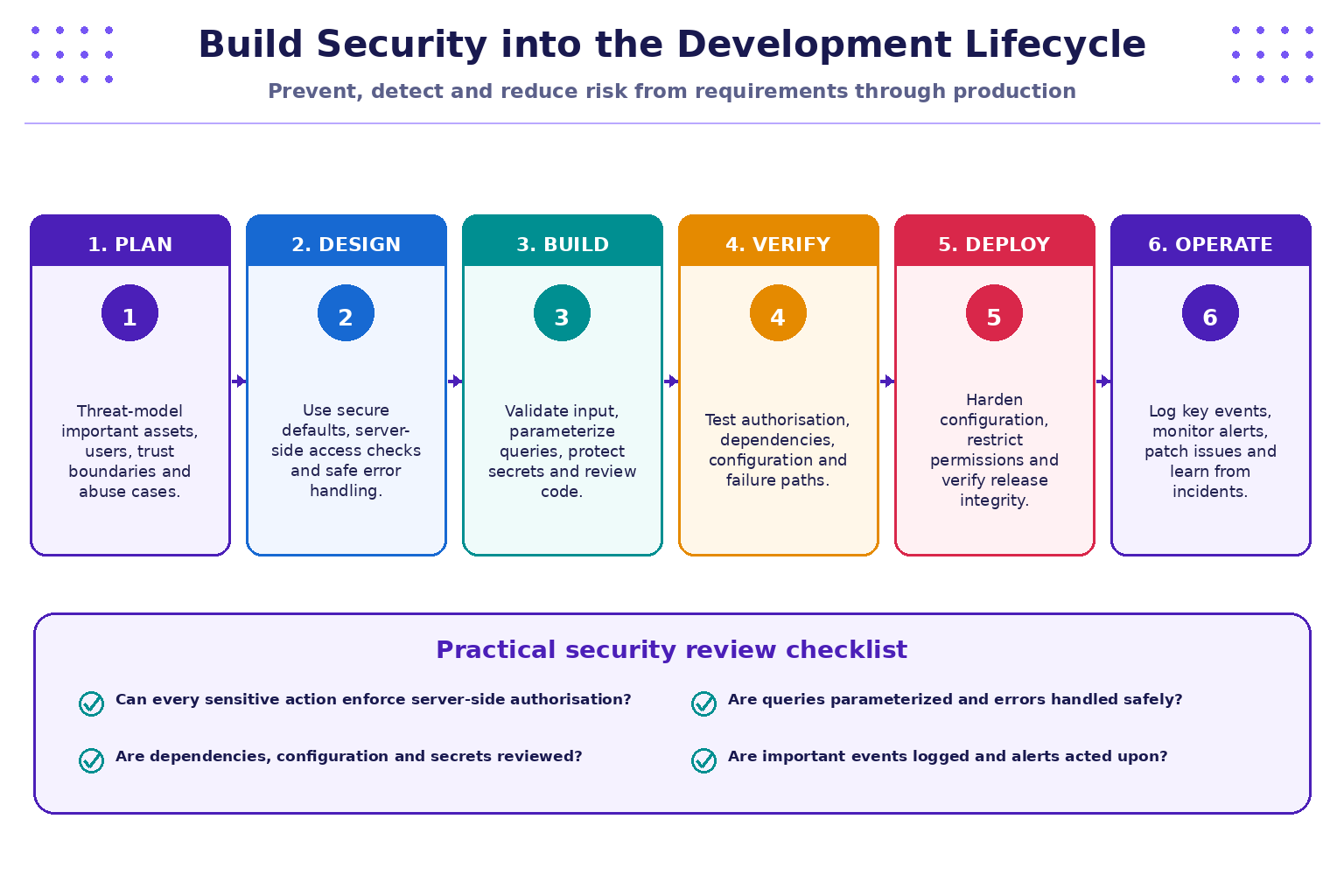
Modern applications depend on libraries, frameworks, build tools, deployment pipelines, configuration, and data. Security therefore includes more than the application's own source code.
- Software supply chain failures (A03): Risks may arise from untrusted or compromised dependencies, build systems, package sources, or release processes. Maintain a dependency inventory, update responsibly, review advisories, and protect build and publishing credentials.
- Software or data integrity failures (A08): Verify the source and integrity of software and important data. Restrict who can publish releases, protect CI/CD permissions, and validate sensitive state transitions.
- Security logging and alerting failures (A09): Record relevant events such as authentication failures, permission changes, and security-sensitive actions. Protect logs from unauthorised access or alteration, avoid logging secrets, and define who investigates alerts.
- Mishandling of exceptional conditions (A10): Unexpected input, unavailable dependencies, timeouts, or partial failures should not cause the application to expose sensitive details or grant access. Handle errors consistently and test abnormal paths.
A system may have logs yet still have weak detection if no one reviews alerts or the events are incomplete. Likewise, a successful test of one workflow does not prove the whole application is secure.
8. Practical exercise: map fictional findings to risks
Work only with the scenarios below. No real website or account is required.
| Scenario | Observation | Likely category to consider | First defensive action |
|---|---|---|---|
| A | A student can retrieve another student's feedback record | A01 Broken Access Control | Add server-side resource-level authorisation and tests for denied access |
| B | A production page displays framework debug details | A02 Security Misconfiguration; possibly A10 depending on behaviour | Disable production debug output and review error handling/configuration |
| C | A query is built by concatenating user-supplied text | A05 Injection | Replace with parameterized database access and add regression tests |
| D | A dependency comes from an unverified source and the release process has broad credentials | A03 Software Supply Chain Failures; potentially A08 | Verify source, review dependency, and restrict build/release permissions |
| E | Repeated failed logins are not recorded or alerted on | A09 Security Logging and Alerting Failures | Define relevant events, protect logs, and configure actionable alerting |
| F | An unexpected service failure causes a protected action to continue without its required check | A10 Mishandling of Exceptional Conditions; possibly A01 | Fail safely, preserve authorisation checks, and test failure paths |
Tasks
- Select two scenarios and state the asset that could be affected.
- Describe the threat and weakness separately. A threat is a potential cause of harm; a vulnerability is a weakness that may be exploited or triggered.
- Rate likelihood and impact from 1 to 5 for the fictional context, explain your assumptions, and calculate the score as likelihood × impact.
- Propose one preventive control and one detective control for each scenario.
- State what evidence would be needed to confirm the finding, and what you still cannot conclude from the observation alone.
- Write a short finding with four headings: Observation, Risk, Evidence, Recommendation.
Suggested reasoning
For Scenario A, the asset is student feedback and related personal/academic information. The concern is unauthorised disclosure or modification. Evidence should come from a permitted test account and synthetic records in the training environment. A good fix enforces server-side access checks on every request and includes regression tests for both authorised and unauthorised users.
For Scenario C, the observation suggests unsafe query construction. Review the code and test it in a controlled environment using non-sensitive data. Parameterized queries are the primary mitigation; code review and regression tests help detect recurrence. Do not attempt injection strings against real services outside an explicitly authorised scope.
9. Safe practice with OWASP learning resources
You can use these free learning resources for instructor-guided practice:
- OWASP Top 10:2025 — definitions and background for the current awareness list.
- OWASP Juice Shop — an intentionally vulnerable application for learning web security. Prefer a local, isolated instance for hands-on challenges; follow the project's setup and safety guidance.
- PortSwigger Web Security Academy — free, interactive web security lessons and purpose-built labs.
Before starting a lab, read its scope and instructions. Use only the designated training target, synthetic data, and the methods the lab permits. Do not transfer a lab technique to a real website just because it appears similar. Record the challenge name, observed behaviour, risk category, and defensive lesson rather than collecting unnecessary data.
10. Key takeaways
- OWASP Top 10:2025 is a starting point for awareness and prioritisation, not a complete guarantee of security.
- Access control must be enforced by the server for each protected resource and action.
- Secure configuration, threat modelling, and safe error handling should be considered early and reviewed regularly.
- Parameterized queries keep user-supplied values separate from SQL instructions and are a core defence against SQL injection.
- Authentication, cryptography, supply-chain integrity, logging, alerting, and safe exceptional-condition handling require different but complementary controls.
- Findings should be based on authorised tests and recorded evidence, with assumptions clearly identified.
- Practise only in approved training environments and focus on explaining the risk and its mitigation.
11. Knowledge check
-
What is the primary purpose of the OWASP Top 10?
- A. To guarantee an application has no vulnerabilities
- B. To provide an awareness framework for important web application security risks
- C. To replace code review and testing
- D. To list every possible vulnerability
-
A user can access another user's private record by making a request directly. Which category should be considered first?
- A. Broken Access Control
- B. Cryptographic Failures
- C. Software Supply Chain Failures
- D. Security Logging and Alerting Failures
-
What is the main benefit of a parameterized SQL query?
- A. It makes every database account an administrator
- B. It separates query structure from parameter values
- C. It removes the need for authorisation checks
- D. It guarantees the website is legitimate
-
Which statement about security misconfiguration is correct?
- A. It can include unsafe defaults or debug features exposed in production
- B. It only happens when passwords are weak
- C. It is always caused by an external attacker
- D. It cannot affect cloud services
-
Which OWASP Top 10:2025 category addresses untrusted or compromised dependencies and build or delivery processes?
- A. A01 Broken Access Control
- B. A03 Software Supply Chain Failures
- C. A06 Insecure Design
- D. A10 Mishandling of Exceptional Conditions
-
What is the safest way to practise a web security technique?
- A. Try it on the college portal without asking
- B. Use a training lab or target explicitly authorised for testing
- C. Use real student records to make the test realistic
- D. Ignore the lab's scope and instructions
Answer key: 1-B, 2-A, 3-B, 4-A, 5-B, 6-B.
Cybersecurity & Practices · JSPM University · B.Tech Year III
Practical-first learning: recognise web risks, verify evidence, and build security into every stage of development.