
Chapter 7: Authentication, Session Management, and Secure Access
A secure application must establish who is signing in, protect the session that represents that sign-in, and check what the user is allowed to do. This chapter explores common authentication and session risks and shows how teams review login workflows using safe, evidence-based checks.
Lab safety: Use a fictional application, instructor-provided examples, or an intentionally vulnerable training application in an authorised isolated lab. Do not test real accounts, reset passwords, bypass access controls, or send requests to a public system unless you have explicit permission and a defined scope. Never use real passwords, session cookies, access tokens, or personal information in screenshots or reports.
Learning objectives
By the end of this chapter, you should be able to:
- Distinguish identification, authentication, session management, and authorization.
- Explain how weak passwords, missing multi-factor authentication, unsafe recovery, and excessive login attempts increase risk.
- Describe how secure cookies, session rotation, expiry, and logout reduce session-related exposure.
- Explain why authorization must be checked on the server for every sensitive resource and action.
- Review a sample login workflow and document evidence without exposing credentials or session secrets.
- Recommend practical controls and explain their purpose and limitations.
1. Industry scenario: the student project portal
A fictional student project portal allows students to submit work, review feedback, and download grades. The team discovers that several users share one account, the login page reveals whether an email address exists, and a session remains usable after a user clicks Log out. A student can also change a record identifier in a request and may see another student's submission.
These are separate concerns. Shared accounts weaken accountability; overly specific login messages can help account enumeration; a session that remains valid after logout may expose an active session; and viewing another student's record points to a possible authorization failure. Investigators should reproduce only the approved test cases, capture minimal evidence, and report each issue separately.
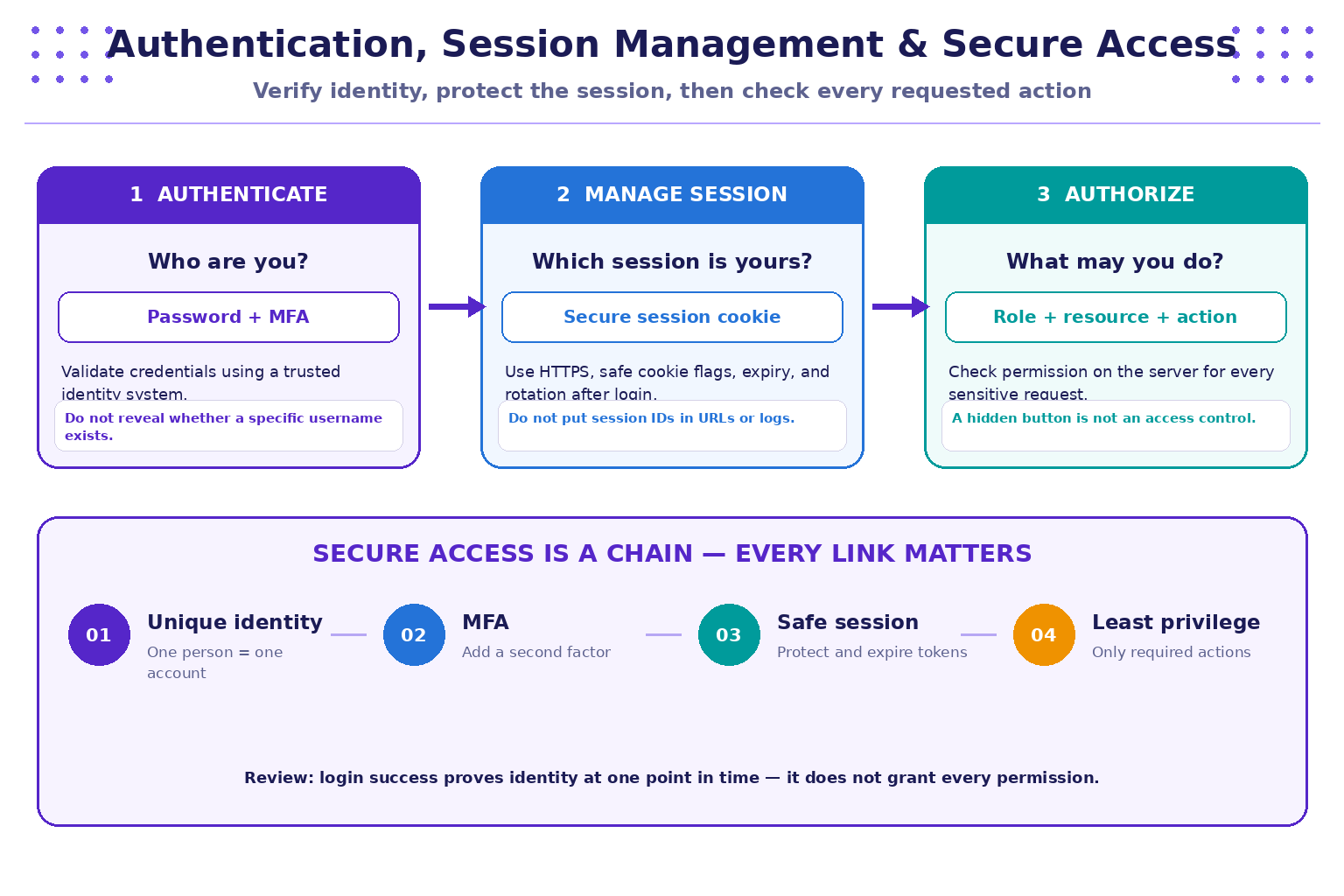
2. Four concepts that must not be confused
| Concept | Question | Example | Security focus |
|---|---|---|---|
| Identification | Which account is being claimed? | Entering a username or email address | Unique, well-managed account identifiers |
| Authentication | Can the claimant prove control of that account? | Password plus a second factor | Credential verification and account protection |
| Session management | How does the application remember a successful sign-in? | A session cookie sent with later requests | Protect, rotate, expire, and invalidate the session |
| Authorization | Is this identity permitted to perform this action on this resource? | A student can view only their own submission | Server-side policy and resource ownership checks |
Remember: authentication does not imply unrestricted authorization. A validly signed-in user must still be denied actions and records outside their permissions.
3. Authentication risks and defensive controls
Password storage and verification
Applications should not store passwords in plaintext or use reversible encryption as a substitute for password hashing. Use a well-maintained identity framework and a modern password-hashing function designed for password storage, with a unique salt and parameters appropriate to the platform. Do not invent a password-storage algorithm. Protect password reset flows as carefully as normal login.
Good practices include:
- Use unique accounts rather than shared team or administrator accounts.
- Encourage long, unique passwords and use a password manager where appropriate.
- Screen new passwords against known-compromised password lists where a suitable service or library is available.
- Apply multi-factor authentication (MFA), especially to administrator accounts and sensitive actions.
- Protect recovery codes and reset links; make them short-lived, single-use where appropriate, and difficult to guess.
- Rate-limit suspicious repeated attempts without creating an easy denial-of-service path against a victim account.
- Avoid error messages that unnecessarily disclose whether an account exists. Keep user-facing messages generic while preserving useful, privacy-aware operational logs.
MFA adds a layer of protection but does not remove the need for secure recovery, phishing-resistant options where feasible, monitoring, and appropriate authorization.
4. A safer login workflow
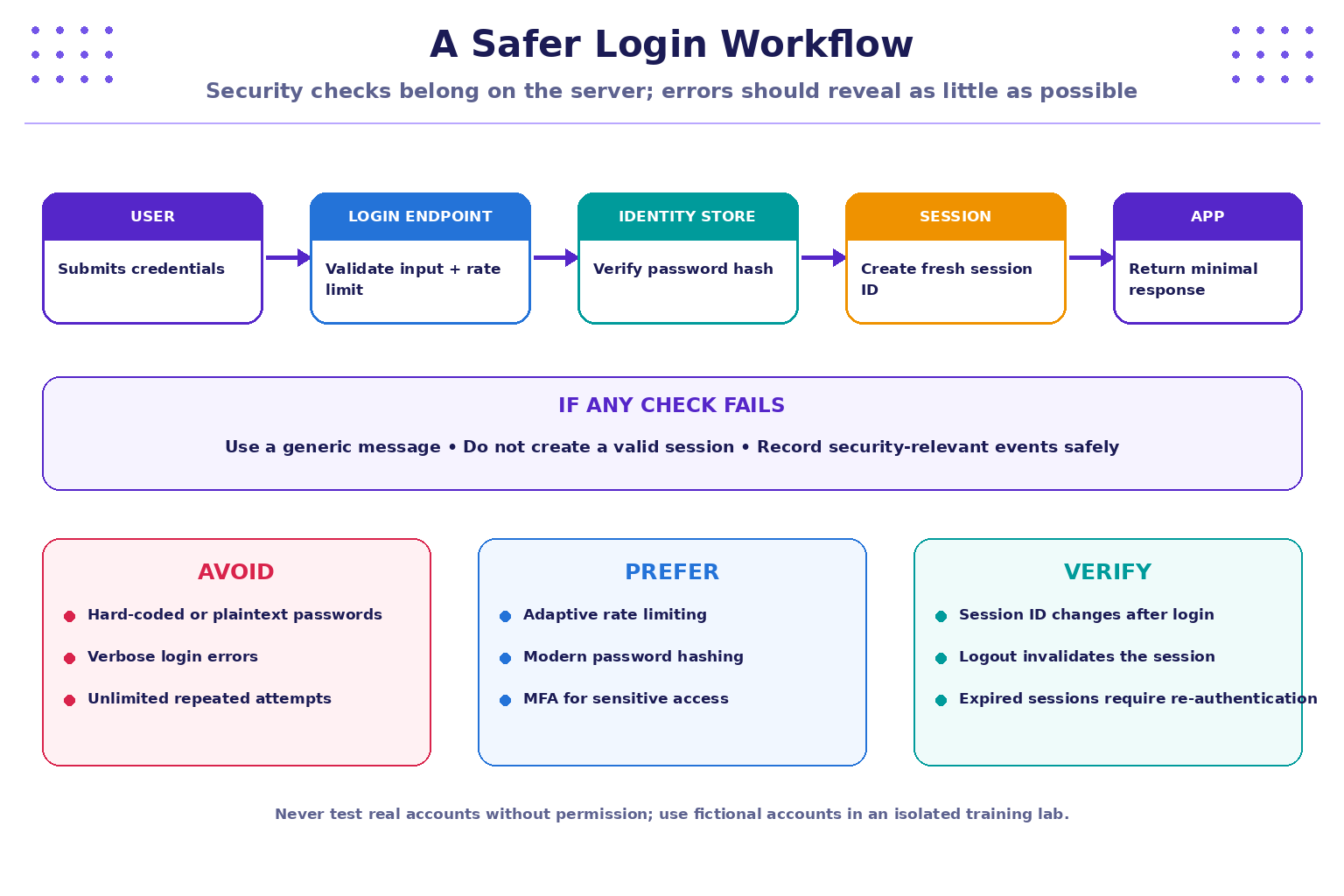
A practical review should ask what the server validates and what happens after each outcome. At a high level:
- Accept input over HTTPS and validate its expected type, length, and format.
- Apply appropriate abuse controls before repeatedly performing expensive authentication work.
- Verify credentials using a trusted identity component and secure password verification.
- Return a generic failure response that does not disclose sensitive account details.
- On successful authentication, create or rotate the session identifier so a pre-login identifier cannot simply become the authenticated session.
- Set session-cookie attributes appropriate to the application, normally including
Secure,HttpOnly, and a suitableSameSitepolicy. - Require server-side authorization for every protected action and resource.
- Log important authentication and session events without recording passwords, raw session IDs, access tokens, or other secrets.
The exact implementation depends on the framework, architecture, and identity provider. Prefer maintained framework defaults and official security guidance over hand-written authentication code.
5. Session management essentials
A session identifier is a bearer secret: anyone who obtains a valid one may be able to act as that user until the session expires or is invalidated. Treat session identifiers and access tokens like passwords.
| Control | Purpose | Review question |
|---|---|---|
| HTTPS throughout the authenticated flow | Protects session traffic in transit | Are login and authenticated pages served only over HTTPS in the intended deployment? |
Secure cookie attribute |
Sends the cookie only over secure connections | Is it enabled in the production configuration? |
HttpOnly cookie attribute |
Prevents ordinary client-side scripts from reading the cookie | Is the session cookie protected from script access? |
SameSite policy |
Helps reduce some cross-site request risks | Is the chosen policy compatible with the application while providing protection? |
| Session rotation after login or privilege change | Reduces session fixation risk | Does the authenticated session receive a fresh identifier? |
| Idle and absolute expiry | Limits how long abandoned sessions remain valid | Are timeout rules appropriate to the sensitivity of the service? |
| Server-side invalidation on logout | Ends the session rather than merely hiding the page | Does the old session stop working after logout? |
| Safe token handling | Reduces accidental disclosure | Are tokens excluded from URLs, screenshots, analytics, and logs? |
Cookie flags are important but are not a complete defense against cross-site scripting, cross-site request forgery, stolen devices, compromised endpoints, or flaws in authorization logic.
6. Authorization: check every sensitive request
Authorization decisions should be made on the server, based on the authenticated identity, role, resource ownership, and requested action. A hidden button or a disabled menu item is only a user-interface choice; it cannot replace a server-side permission check.
Consider these fictional roles:
| Role | Allowed examples | Not automatically allowed |
|---|---|---|
| Student | View own profile, submit own work, view own grades | Read another student's private submissions or change grades |
| Faculty | Review assigned submissions and enter permitted feedback | Administer unrelated accounts or alter system settings without authorization |
| Administrator | Manage explicitly assigned administrative functions | Bypass audit requirements or use a shared identity without accountability |
Use the principle of least privilege: grant only the permissions needed for the role and task. Test both permitted and denied cases. For record-based applications, check ownership and scope on the server instead of trusting an identifier supplied by the browser.
7. Practical lab: review a sample login workflow
Goal: identify authentication, session, and authorization controls in a training application without testing real accounts.
Part A — Prepare your lab
- Use an instructor-provided demo or an authorised instance of OWASP Juice Shop. Keep the lab isolated and follow the instructor's scope.
- Create fictional test accounts only if the lab instructions permit it.
- Use made-up credentials; do not reuse a personal or college password.
- Open browser developer tools only to inspect your own lab session and its cookie attributes. Do not copy session values into notes or screenshots.
Part B — Observe the expected behaviour
| Check | What to do in the authorised demo | Record without secrets |
|---|---|---|
| Login response | Try a permitted successful login and a permitted invalid login | Whether the messages disclose unnecessary account details |
| MFA/recovery | Review the available design or instructor-provided screenshots | Whether additional verification and recovery safeguards are described |
| Cookie attributes | Inspect the session cookie metadata in the lab browser | Attribute names and whether they are enabled; never record cookie values |
| Session rotation | Compare session metadata before and after login, without copying the values | Whether the identifier changes |
| Logout | Sign out, then use the lab's normal navigation to check whether the session is ended | Whether protected content requires sign-in again; do not attempt to access others' data |
| Authorization | Use the provided positive and negative test cases | Which role/action is allowed or denied, and the visible evidence |
Do not treat browser history, cached page content, or a displayed logout page as proof that the server invalidated a session. Report what you actually observed and the limits of that observation.
Part C — Write one concise finding
Use this format:
- Title: short, specific description.
- Scope: the authorised training application and test account/role (no secrets).
- Expected behaviour: what should happen.
- Observed behaviour: what happened, with timestamp or screenshot reference if appropriate.
- Impact: what could be exposed or changed if the behaviour were confirmed in a real deployment.
- Recommendation: the most direct mitigation and any follow-up validation needed.
- Limitations: what the test did not prove.
8. Session security review checklist

Before approving a login workflow, check that:
- Authentication uses maintained framework or identity-provider components.
- Passwords are not stored or logged in plaintext.
- MFA and account recovery are considered for the sensitivity of the service.
- Repeated authentication attempts are handled with proportionate abuse controls.
- Session identifiers are rotated after login and relevant privilege changes.
- Cookies use suitable security attributes and HTTPS is enforced in deployment.
- Expiry and logout invalidate sessions as intended.
- Authorization is enforced server-side for every sensitive request.
- Logs support investigation while excluding credentials and session secrets.
- Positive and negative tests are documented and repeated after fixes.
9. Key takeaways
- Identification, authentication, session management, and authorization solve different problems.
- A successful login is not permission to access every resource or perform every action.
- Password handling, MFA, recovery flows, rate limiting, and generic error messages work together to protect accounts.
- Session IDs and access tokens are secrets. Protect their transport, storage, lifetime, and invalidation.
- Authorization must be checked on the server for every sensitive action and resource.
- Safe testing uses approved scope, fictional accounts, minimal evidence, and honest statements about what was verified.
10. Knowledge check
-
What is the primary purpose of authentication?
- A. Decide whether a user can edit every record
- B. Verify a claimed identity
- C. Encrypt the database backup
- D. Hide a button in the interface
-
A user has signed in successfully but tries to view another student's private submission. Which control should decide whether access is allowed?
- A. A client-side hidden button
- B. The browser history
- C. Server-side authorization
- D. The colour of the login page
-
Why should a session identifier be rotated after login?
- A. To make the page load faster
- B. To reduce the risk of session fixation
- C. To remove the need for authorization
- D. To store the password in a cookie
-
Which statement about
HttpOnlyis correct?- A. It prevents all web attacks
- B. It prevents ordinary client-side scripts from reading the cookie
- C. It encrypts the database
- D. It makes authorization unnecessary
-
What should an application do when a user logs out?
- A. Only navigate to the home page
- B. Keep the same session valid indefinitely
- C. Invalidate the session according to the application's session design
- D. Display the session ID to the user
-
What is the safest approach for a student lab?
- A. Test a real college account without asking
- B. Copy a session cookie into the report
- C. Use an authorised isolated lab and fictional credentials
- D. Try to access another student's actual records
Answer key: 1-B, 2-C, 3-B, 4-B, 5-C, 6-C.
Further reading
- OWASP Authentication Cheat Sheet
- OWASP Session Management Cheat Sheet
- OWASP Authorization Cheat Sheet
- OWASP Juice Shop project
Cybersecurity & Practices · JSPM University · B.Tech Year III
Practical-first learning: verify identity, protect sessions, enforce permissions, and document evidence carefully.