
Chapter 5: Logs, Evidence, and Incident Investigation
Learn how operating systems, applications, and network devices record events—and how security teams use those records to investigate suspicious activity. This chapter introduces practical log-reading, timeline building, evidence handling, and incident-response thinking using fictional examples and read-only commands.
Lab environment: Use your own laptop with WSL 2 Ubuntu, an instructor-approved Linux virtual machine, or a browser-based terminal where the required commands are available. Examples use synthetic log entries and public documentation addresses. Do not inspect another person's account, collect private data, delete or alter logs, or investigate a real system without explicit authorisation. Some browser terminals do not expose system logs or
journalctl; use the supplied sample logs in that case.
Learning objectives
By the end of this chapter, you should be able to:
- Explain what a log is and why logs are useful during troubleshooting and security investigations.
- Identify common log sources, including authentication, system, application, web-server, and network logs.
- Recognise the key fields in a log entry, such as timestamp, host, process, event, source address, and result.
- Use safe, read-only commands such as
journalctl,tail,grep, andlesswhere available. - Correlate multiple events into a simple timeline without treating a single log line as conclusive proof.
- Preserve evidence, record investigative steps, and distinguish observed facts from assumptions.
- Describe the basic incident-response cycle: detect, analyse, contain, eradicate, recover, and learn.
1. Industry scenario: repeated failed logins
A support team receives an alert that a server has recorded several failed SSH login attempts followed by a successful login. A few minutes later, a privileged command is recorded. The team must decide whether the activity is expected administration, a user mistake, or a possible account compromise.
The investigator should not jump to a conclusion from one line. They should check the timestamps, account names, source addresses, authentication results, privilege-use records, and relevant application or firewall events. The team should preserve the original evidence, note the commands used, and escalate according to its incident-response procedure.
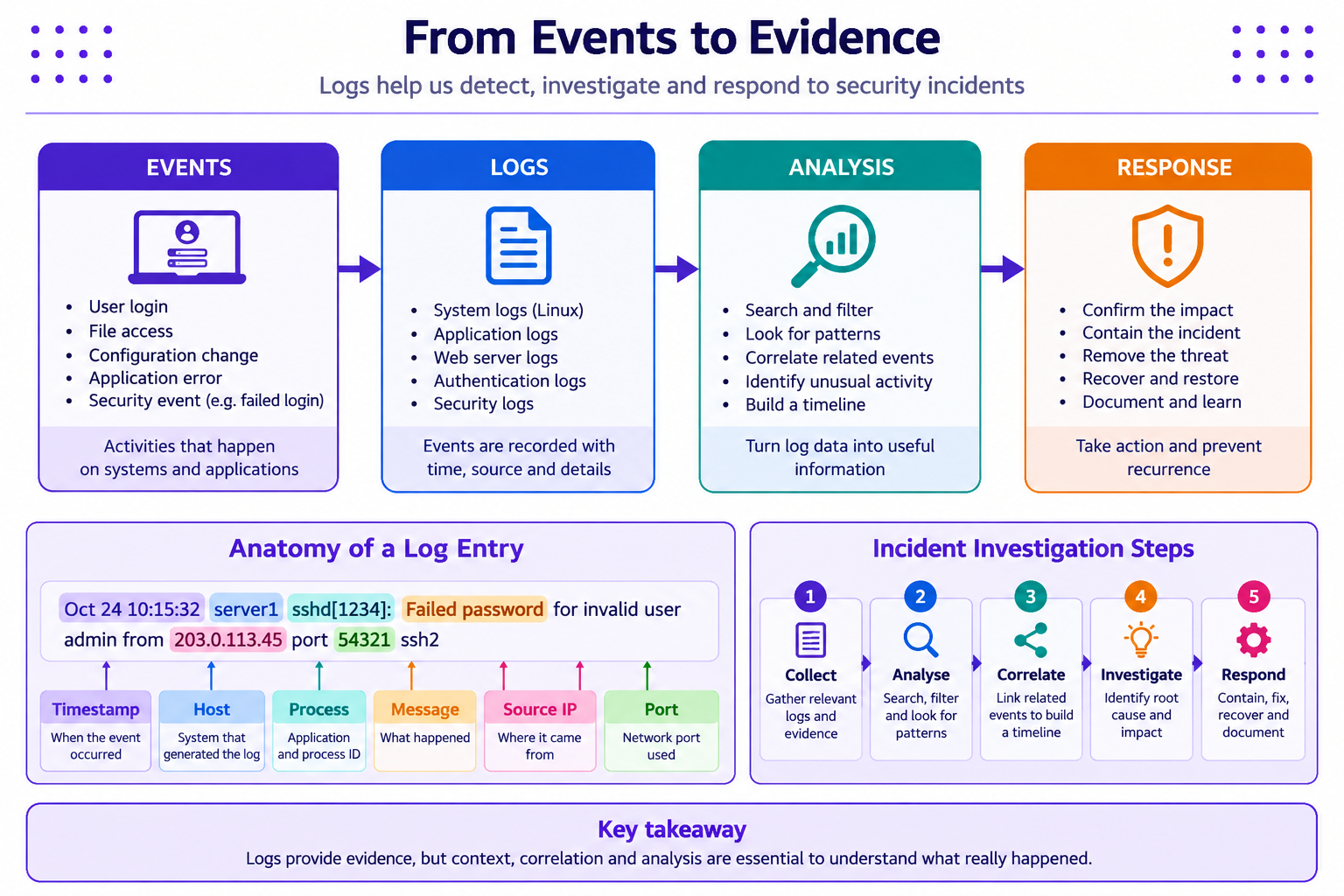
Important: Log entries are evidence of what a component recorded—not a complete, infallible account of everything that happened. Clocks can differ, logs can be incomplete, and a source address or username alone does not identify a person with certainty.
2. What are logs, and why do they matter?
A log is a time-ordered record of events produced by an operating system, application, service, or network/security device. Logs help teams troubleshoot failures, understand system behaviour, detect suspicious patterns, investigate incidents, and demonstrate that required checks were performed.
Common log sources include:
| Log source | Examples of recorded events | Investigation value |
|---|---|---|
| Authentication | Successful/failed logins, session events | Helps investigate account access |
| Operating system | Service starts, errors, kernel or system events | Helps identify system and service problems |
| Application | Login workflow errors, business actions, exceptions | Helps explain application behaviour |
| Web server | Request path, method, status code, client address | Helps investigate unusual web requests and failures |
| Firewall/network | Allowed or blocked connections, protocol, ports | Helps add network context to an event |
| Audit/security | Privilege changes, policy changes, administrative actions | Helps track sensitive changes where auditing is enabled |
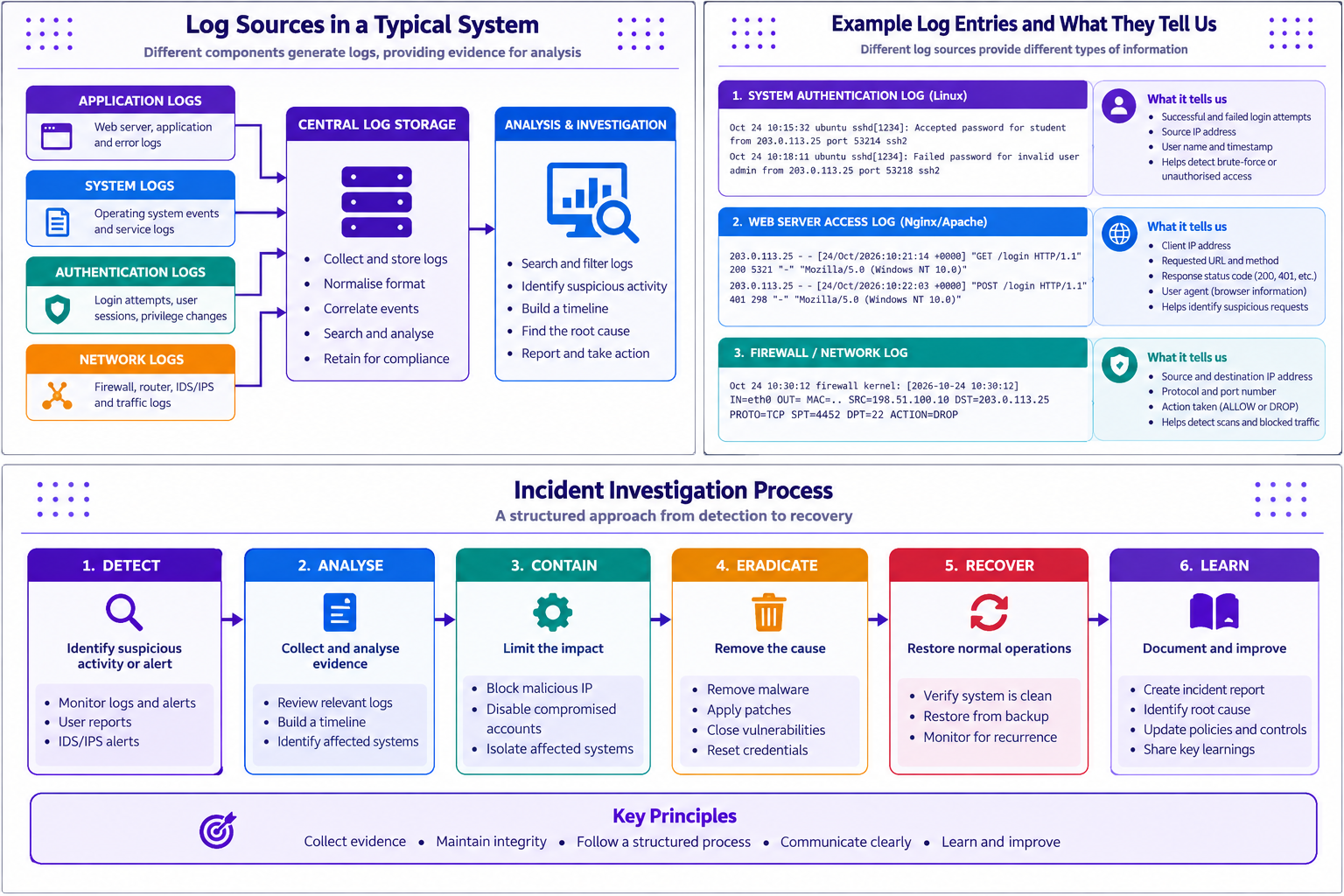
Not every system records every event. Log fields, retention periods, access permissions, and locations depend on the platform and its configuration.
3. Read the anatomy of a log entry
Consider this fictional authentication event:
Oct 24 09:12:03 server1 sshd[1234]: Failed password for invalid user admin from 203.0.113.45 port 51234 ssh2
| Field | Example | What it tells you |
|---|---|---|
| Timestamp | Oct 24 09:12:03 |
When the event was recorded; year/time zone may be absent in this format |
| Host | server1 |
System that generated the entry |
| Process and ID | sshd[1234] |
Service/process name and process ID at the time |
| Event message | Failed password for invalid user admin |
Authentication failed for the named account string |
| Source address | 203.0.113.45 |
Address reported as the source; this is a documentation address in this example |
| Source port | 51234 |
Client-side port reported for this connection |
| Protocol detail | ssh2 |
SSH protocol detail recorded by the service |
A log line may be useful without being sufficient. For example, a failed login can be caused by a mistyped password, an automated probe, or a misconfigured client. Investigators need context and correlation before deciding what it means.
4. Use read-only commands to inspect logs
The commands below are intended for systems you are authorised to inspect. They read existing records and do not intentionally modify the logs.
Linux / WSL: inspect system journal entries
journalctl --no-pager -n 30
Shows the latest 30 journal entries when systemd-journald and access permissions are available. On some WSL or browser-terminal environments, the journal may be unavailable or contain only limited events.
To view entries from the current boot, where supported:
journalctl -b --no-pager -n 30
To filter by a service, if that service is present and the journal contains its events:
journalctl -u ssh --no-pager -n 30
The service may be named sshd instead of ssh on some distributions. If the command returns no entries, do not assume there was no activity; check the platform, service name, and logging configuration.
Read a supplied sample log
Create a text file in your own practice folder containing the fictional examples in Section 6, or use a sample file supplied by your instructor. Then use:
less sample-auth.log
tail -n 20 sample-auth.log
grep -i "failed password" sample-auth.log
grep -i "accepted password" sample-auth.log
lesslets you inspect a file page by page.tail -n 20displays its last 20 lines.grep -isearches without case sensitivity for the specified text.
These commands search the content you provide. They do not automatically search every system log, and a text match is not a verdict that an incident occurred.
Windows alternative
On Windows, use Event Viewer to review authorised system and security events. Open the Start menu and search for Event Viewer, then navigate to the relevant Windows Logs category. Availability of Security events depends on local policy and permissions. Do not attempt to bypass access controls to view restricted logs.
5. Correlate events and build a timeline
Correlation means comparing related events across time and sources. A simple timeline can include authentication events, privileged commands, web requests, firewall records, and application errors. Before comparing timestamps, check whether the systems use the same time zone and whether their clocks are synchronised.
A useful timeline records:
- Time: the timestamp as recorded, including time zone where known.
- Source: the host, service, or log file that produced the event.
- Event: what the record says happened, without interpretation added.
- Context: related events or known operational changes.
- Assessment: the current interpretation and confidence level.
- Next step: a safe check or escalation that could confirm or disprove the hypothesis.
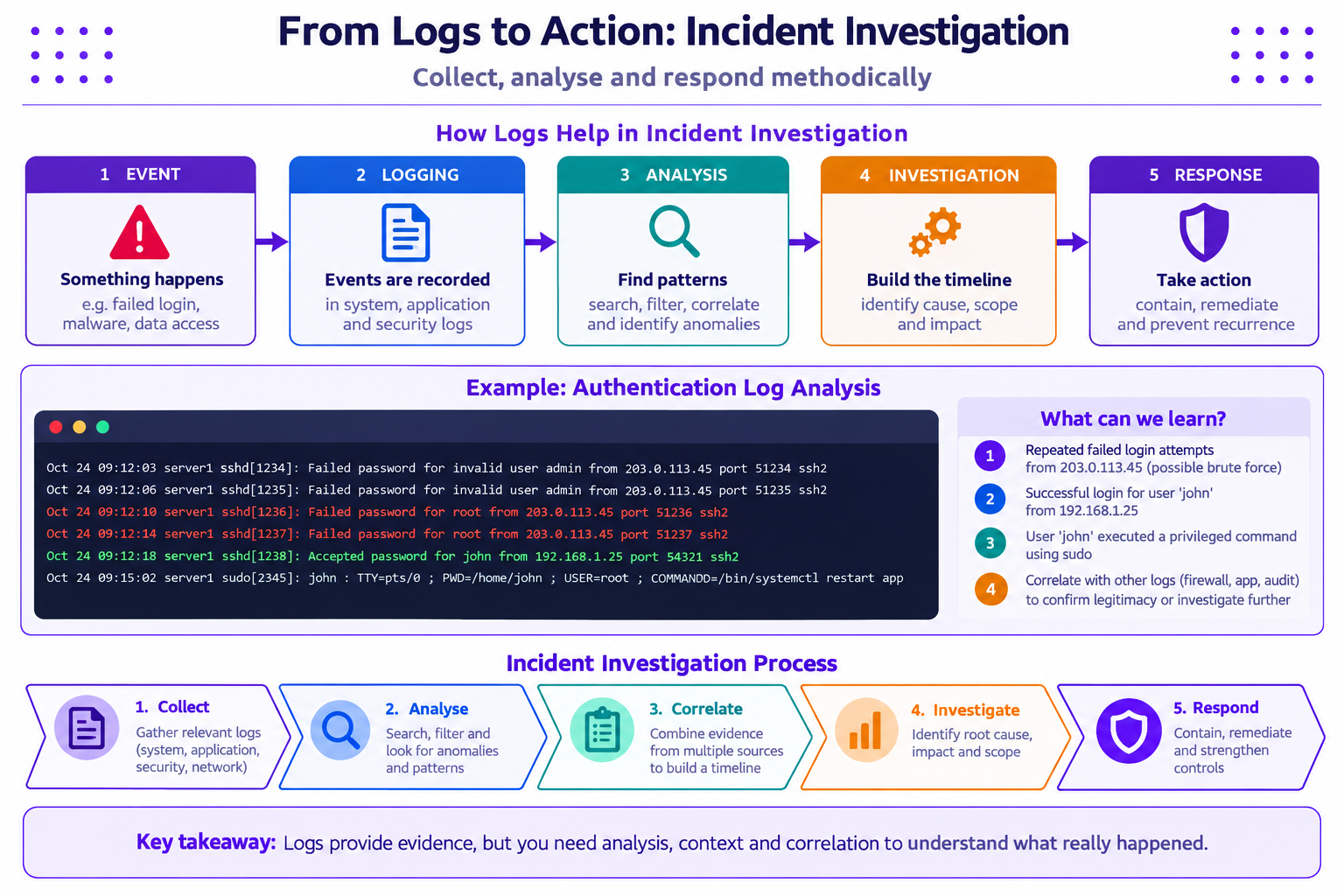
Avoid treating a username, IP address, or timestamp as definitive proof of a person's identity or intent. Addresses may be shared, translated, reassigned, or spoofed in some contexts; accounts can also be used by legitimate automation.
6. Practical exercise: analyse fictional authentication records
Use the following synthetic sample. The address 203.0.113.45 is reserved for documentation examples and does not identify a real source in this exercise.
Oct 24 09:12:03 server1 sshd[1234]: Failed password for invalid user admin from 203.0.113.45 port 51234 ssh2
Oct 24 09:12:06 server1 sshd[1235]: Failed password for invalid user admin from 203.0.113.45 port 51235 ssh2
Oct 24 09:12:10 server1 sshd[1236]: Failed password for root from 203.0.113.45 port 51236 ssh2
Oct 24 09:12:14 server1 sshd[1237]: Failed password for root from 203.0.113.45 port 51237 ssh2
Oct 24 09:12:18 server1 sshd[1238]: Accepted password for john from 192.168.1.25 port 54321 ssh2
Oct 24 09:15:02 server1 sudo[2345]: john : TTY=pts/0 ; PWD=/home/john ; USER=root ; COMMAND=/bin/systemctl restart app
Tasks
- Identify how many failed authentication events appear in the sample.
- Record the accounts and source addresses mentioned in those events.
- Identify the successful login and the later privileged command.
- Build a timeline with event time, source, observation, and a cautious interpretation.
- List at least three additional sources or checks that could help determine whether the successful login and command were expected.
- State what the sample does not prove. Do not conclude that the successful login came from the same source as the failed attempts unless the records support that claim.
Suggested reasoning
- The first four lines record failed attempts involving the account strings
adminandrootfrom the same documentation address. - The fifth line records a successful login for
johnfrom a different address. The sample alone does not establish a relationship between that login and the earlier failures. - The sixth line records a
sudocommand attributed tojohn; investigate whether restarting the application was approved and expected. - Useful context may include an authorised change ticket, the user's confirmation through an approved channel, application logs, firewall records, other authentication records, and the host's time configuration.
- Preserve the supplied sample unchanged. For a real incident, follow organisational procedures for collecting and protecting evidence.
7. Evidence handling and incident notes
Evidence handling is about preserving records so that another person can understand what was observed and how the conclusion was reached. In an authorised investigation:
- Record the date/time, time zone, host, source log, and exact command used.
- Preserve original records according to the organisation's procedure; analyse a working copy where appropriate.
- Restrict access to evidence because logs may contain usernames, addresses, session identifiers, or other sensitive information.
- Avoid editing, deleting, or selectively copying records in a way that removes important context.
- Record who collected or transferred evidence and when, where a formal chain-of-custody process is required.
- Separate fact (“the log records four failed attempts”) from hypothesis (“the attempts may be automated”) and conclusion (“the evidence supports a confirmed incident”).
A simple incident note can use this template:
| Field | What to record |
|---|---|
| Incident/reference | A ticket number or classroom exercise ID |
| Time window | Start/end time and time zone, if known |
| Systems and sources | Hosts, services, and log files reviewed |
| Observations | Exact events and outputs relevant to the question |
| Actions taken | Commands/checks performed and by whom |
| Assessment | What is known, what is uncertain, and confidence level |
| Next steps | Additional checks, escalation, containment, or closure rationale |
Do not paste real credentials, access tokens, session cookies, private customer information, or unredacted sensitive logs into public tools or classroom submissions.
8. Incident response: a structured approach
Incident response is a coordinated process, not just a search for suspicious log lines. A common high-level flow is:
- Detect: identify an alert, user report, or unusual pattern.
- Analyse: validate the signal, gather relevant evidence, assess scope, and form a timeline.
- Contain: take authorised steps to limit impact, such as isolating an affected system or disabling a compromised account under the incident procedure.
- Eradicate: remove the cause, such as malware or an exploited weakness, after the situation is understood and approved actions are planned.
- Recover: restore normal operation, validate system health, and monitor for recurrence.
- Learn: document root causes and lessons, and improve controls, monitoring, and response plans.
The precise process varies by organisation. Students should not independently disable accounts, shut down production systems, delete files, or change firewall rules as part of a classroom exercise. Escalate suspected incidents to the authorised owner or security team.
9. Mini-lab: create an evidence table
Using the fictional records in Section 6, complete the table below. If working in a terminal, you may save the sample as sample-auth.log in a personal practice directory and run the read-only search commands from Section 4.
| Check | Evidence to record | What it can show | Limitation |
|---|---|---|---|
| Failed authentication search | Matching lines and count | Number and content of matching records in this sample | Does not count events absent from the sample or logs not searched |
| Successful login search | Matching line, account, time, source | A successful login was recorded | Does not prove the user's identity or whether the login was authorised |
| Privileged action | Time, account, command recorded | A privileged command was logged | Does not by itself prove the command was malicious or successful |
| Timeline | Ordered events and sources | How recorded events relate in time | Different clocks or missing records may affect ordering |
| Follow-up hypothesis | Question and proposed authorised check | What evidence could resolve uncertainty | A hypothesis is not a finding until supported by evidence |
Finish with a short incident note of 5–8 sentences. Clearly label observed facts, possible explanations, and recommended next steps.
10. Key takeaways
- Logs record events from systems, applications, authentication services, web servers, and network controls.
- Timestamps, sources, process names, event messages, accounts, and results help investigators understand what was recorded.
- One log line rarely proves the full story; correlation, context, and validation are essential.
- Use read-only, authorised commands and preserve original evidence according to the applicable procedure.
- Record exact observations separately from assumptions and conclusions.
- Incident response follows a structured path from detection and analysis through containment, recovery, and learning.
- Protect logs because they may contain sensitive operational or personal information.
11. Knowledge check
-
What is the primary purpose of system and application logs?
- A. Guarantee that a system cannot be attacked
- B. Record events that can support troubleshooting and investigation
- C. Replace access controls
- D. Automatically prove who was responsible
-
Which information is commonly useful when interpreting a log entry?
- A. Timestamp, source, process/event, and result
- B. Only the colour of the terminal
- C. Only the filename of the application
- D. The investigator's first guess
-
Four failed login entries from one address prove that an account was compromised. True or false?
- A. True
- B. False; they indicate recorded failed attempts, and more context is needed
-
What is the main purpose of correlating logs from multiple sources?
- A. Delete duplicate records immediately
- B. Build context and a timeline from related events
- C. Avoid documenting evidence
- D. Prove that all system clocks are correct
-
Which is a sound evidence-handling practice?
- A. Edit the original log to highlight suspicious lines
- B. Share unredacted logs publicly
- C. Record source, time, commands, and observations while protecting original evidence
- D. Treat every alert as a confirmed incident
-
Which sequence best represents a common incident-response flow?
- A. Recover, ignore, delete, finish
- B. Detect, analyse, contain, eradicate, recover, learn
- C. Scan every network, disable all controls, restart
- D. Publish logs, then investigate
Answer key: 1-B, 2-A, 3-B, 4-B, 5-C, 6-B.
Cybersecurity & Practices · JSPM University · B.Tech Year III
Practical-first learning: investigate carefully, preserve evidence, stay authorised, and verify every conclusion.