
Chapter 1: Programming Fundamentals & Java Basics
Introduction
Before building enterprise applications, it is important to understand the fundamentals of programming and the Java language.
Every software application, regardless of its size, is built using the same core programming concepts:
- Variables
- Data Types
- Operators
- Control Statements
- Loops
- Functions
- Input and Output
These concepts form the foundation upon which modern software systems are built.
In this chapter, we will learn the fundamental building blocks of programming and understand how Java programs are written, compiled, and executed.
Throughout this tutorial, we will gradually build components of the Institute Placement Management System (IPMS) while learning Java concepts.
What You Will Learn
By the end of this chapter, you will:
- Understand what programming is
- Understand how software applications work
- Learn programming language categories
- Understand Java fundamentals
- Install and verify Java Development Kit (JDK)
- Write your first Java program
- Understand Java program structure
- Learn variables and data types
- Use operators
- Perform input and output operations
- Understand type conversion
- Build simple Java applications
What is Programming?
Programming is the process of writing instructions that tell a computer how to perform a task.
These instructions are called:
Programs
A program consists of a sequence of instructions executed by a computer.
Examples:
- ATM Software
- Banking Systems
- Placement Portals
- E-Commerce Applications
- Mobile Apps
All of these applications are created using programming languages.
Why Do We Need Programming?
Programming helps us:
- Automate repetitive tasks
- Process large amounts of data
- Solve business problems
- Build software applications
- Integrate systems
- Improve efficiency
Without programming, modern software systems would not exist.
Evolution of Programming Languages
Programming languages have evolved significantly over the years.
Programming Language Evolution
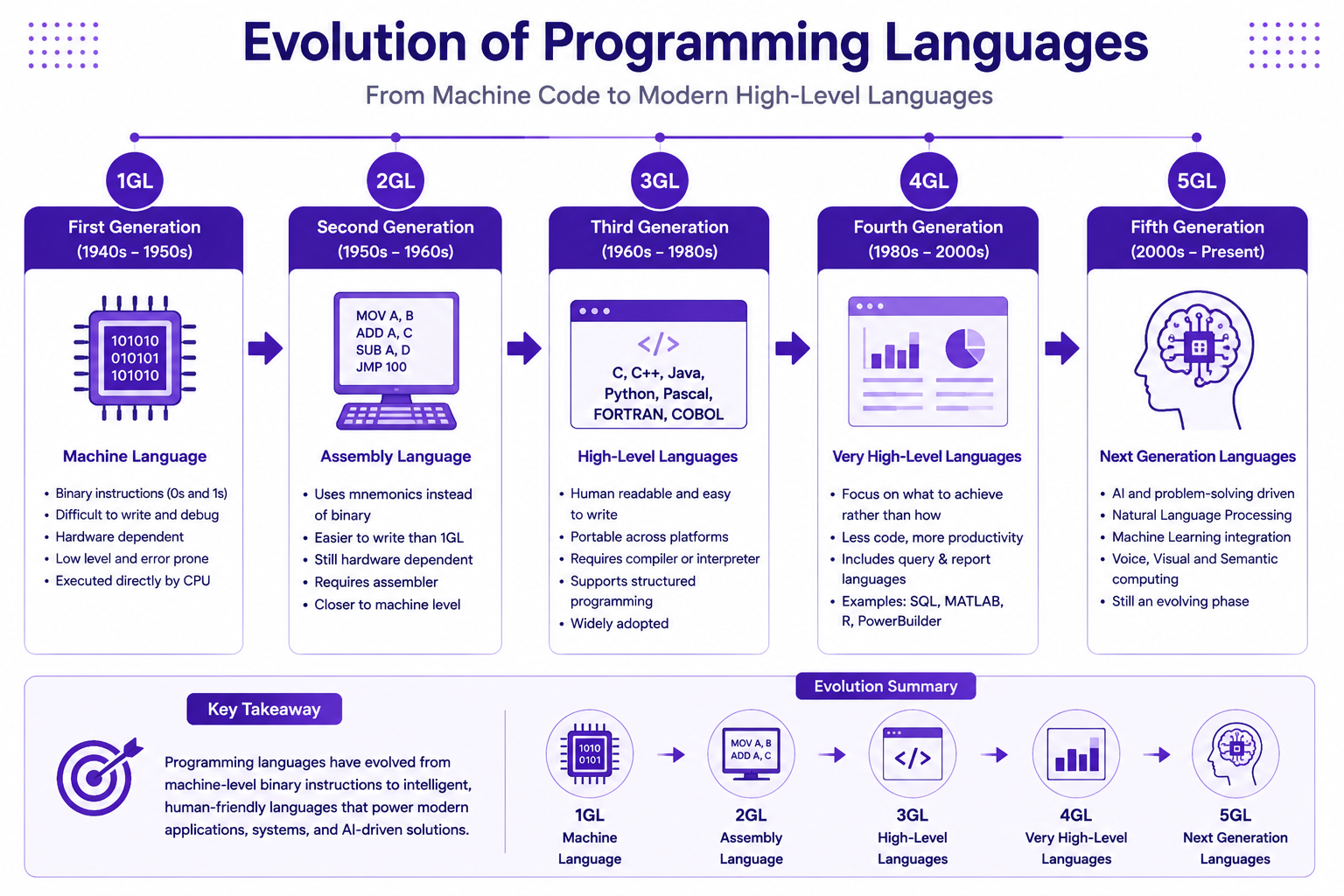
First Generation Languages (1GL)
Machine Language
Characteristics:
- Binary instructions
- Difficult to understand
- Hardware dependent
Example:
10101010
11110000
Second Generation Languages (2GL)
Assembly Language
Characteristics:
- Uses mnemonics
- Easier than machine language
- Hardware dependent
Example:
MOV A, B
ADD A, C
Third Generation Languages (3GL)
Examples:
- C
- C++
- Java
- Python
- C#
Characteristics:
- Human readable
- Portable
- Easy to maintain
Why Java Became Popular
Java introduced a revolutionary concept:
Write Once, Run Anywhere
This means Java programs can run on different operating systems without modification.
Supported platforms include:
- Windows
- Linux
- macOS
Understanding Java
Java is an object-oriented programming language developed by Sun Microsystems.
Today Java is maintained by Oracle.
Java is widely used for:
- Enterprise Applications
- Banking Systems
- Insurance Platforms
- E-Commerce Solutions
- Cloud Applications
- Android Applications
- Microservices
Features of Java
Java provides several advantages:
- Platform Independent
- Object-Oriented
- Secure
- Robust
- Multithreaded
- Distributed
- Portable
- High Performance
Java Editions
Java is available in multiple editions.
| Edition | Purpose |
|---|---|
| Java SE | Standard Applications |
| Jakarta EE | Enterprise Applications |
| Java ME | Embedded Devices |
For this tutorial we will use:
Java SE
Understanding JDK, JRE and JVM
Many beginners confuse these three terms.
JVM
JVM stands for:
Java Virtual Machine
Responsible for executing Java bytecode.
JRE
JRE stands for:
Java Runtime Environment
Provides libraries and runtime environment.
JDK
JDK stands for:
Java Development Kit
Contains:
- Compiler
- Debugger
- JVM
- JRE
- Development Tools
Relationship Between JDK, JRE and JVM
JDK
 │
 └── JRE
       │
       └── JVM
Installing Java
Download latest JDK:
https://jdk.java.net
OR
https://www.oracle.com/java
Install the latest LTS version.
Recommended:
JDK 21
Verify Installation
Open Terminal:
java -version
Expected Output:
java version "21"
First Java Program
Create:
HelloWorld.java
public class HelloWorld {

    public static void main(String[] args) {

        System.out.println("Hello Java");
    }
}
Understanding the Program
| Statement | Purpose |
|---|---|
| class | Defines class |
| main() | Entry point |
| System.out.println() | Prints output |
Java Program Execution Flow
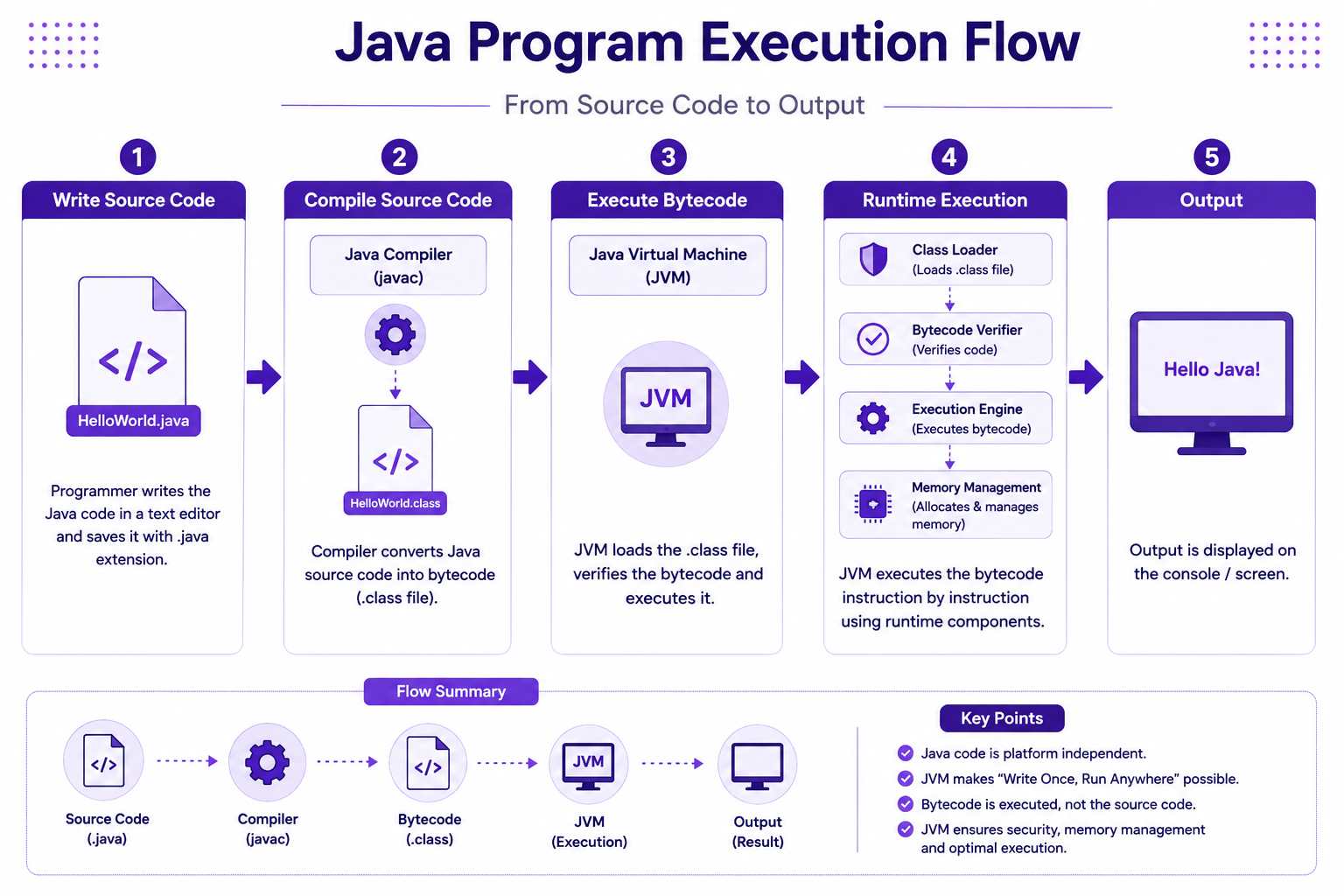
Step 1
Write Source Code
HelloWorld.java
Step 2
Compile
javac HelloWorld.java
Produces:
HelloWorld.class
Step 3
Execute
java HelloWorld
Step 4
JVM Executes Bytecode
Output:
Hello Java
Variables
Variables store data.
Example:
int age = 21;
Variable Naming Rules
Valid:
studentName
totalMarks
salary
Invalid:
1student
class
total marks
Data Types
Java supports two categories.
Primitive Data Types
| Type | Size |
|---|---|
| byte | 1 Byte |
| short | 2 Bytes |
| int | 4 Bytes |
| long | 8 Bytes |
| float | 4 Bytes |
| double | 8 Bytes |
| char | 2 Bytes |
| boolean | True/False |
Examples
int age = 21;

double percentage = 82.50;

char grade = 'A';

boolean placed = true;
Reference Data Types
Examples:
- String
- Arrays
- Objects
String studentName = "John Doe";
Operators
Operators perform operations on data.
Arithmetic Operators
+
-
*
/
%
Example:
int total = 10 + 20;
Relational Operators
==
!=
>
<
>=
<=
Example:
marks >= 60
Logical Operators
&&
||
!
User Input
Java provides Scanner class.
import java.util.Scanner;

public class Main {

    public static void main(String[] args) {

        Scanner scanner = new Scanner(System.in);

        System.out.println("Enter Name:");

        String name = scanner.nextLine();

        System.out.println(name);
    }
}
Type Conversion
Implicit Conversion
int value = 10;

double result = value;
Explicit Conversion
double value = 100.50;

int result = (int)value;
IPMS Example
Let us create our first Placement Student record.
public class Student {

    public static void main(String[] args) {

        String name = "John Doe";

        int age = 21;

        double cgpa = 8.5;

        boolean eligible = true;

        System.out.println("Name: " + name);

        System.out.println("Age: " + age);

        System.out.println("CGPA: " + cgpa);

        System.out.println("Eligible: " + eligible);
    }
}
Best Practices
- Use meaningful variable names
- Follow Java naming conventions
- Keep methods small
- Write readable code
- Use proper indentation
Common Beginner Mistakes
| Mistake | Correct Approach |
|---|---|
| Missing semicolon | Add ; |
| Wrong class name | Match filename |
| Incorrect data type | Use proper type |
| Forgetting main() | Define entry point |
| Using reserved keywords | Use valid identifiers |
Practice Exercises
- Create a program to display student information.
- Calculate total marks and percentage.
- Accept user input for student details.
- Convert temperature from Celsius to Fahrenheit.
- Calculate placement eligibility based on CGPA.
Mini Assignment
Build a simple Student Registration Console Program.
Capture:
- Student Name
- Age
- CGPA
- Branch
Display all details on screen.
Chapter Summary
In this chapter, you:
- Learned programming fundamentals
- Understood Java basics
- Installed Java
- Created your first Java program
- Learned variables and data types
- Used operators
- Accepted user input
- Performed type conversion
- Built a simple IPMS student program
In the next chapter, we will learn Object-Oriented Programming concepts including:
- Classes
- Objects
- Constructors
- Encapsulation