
Chapter 5: Exception Handling, File Handling & Java APIs
Introduction
Enterprise applications must be resilient and capable of handling unexpected situations gracefully.
Examples:
- Invalid user input
- Missing files
- Database failures
- Network interruptions
- Security issues
- System resource limitations
Without proper error handling, applications can crash unexpectedly and lead to poor user experiences.
Java provides powerful mechanisms for:
- Exception Handling
- File Handling
- Standard APIs
These capabilities help developers build reliable and maintainable applications.
In this chapter, we will learn how to handle runtime errors, work with files, and utilize important Java APIs while continuing development of our Institute Placement Management System (IPMS).
What You Will Learn
By the end of this chapter, you will:
- Understand Exceptions
- Differentiate Checked and Unchecked Exceptions
- Use try-catch-finally
- Handle Multiple Exceptions
- Create Custom Exceptions
- Work with Files and Directories
- Read and Write Files
- Use Buffered Streams
- Understand Serialization
- Use Java Date and Time APIs
- Build Error Handling for IPMS
Understanding Exceptions
An exception is an event that disrupts normal program execution.
Examples
- Divide by Zero
- Invalid Input
- File Not Found
- Network Failure
- Database Error
Exception Flow
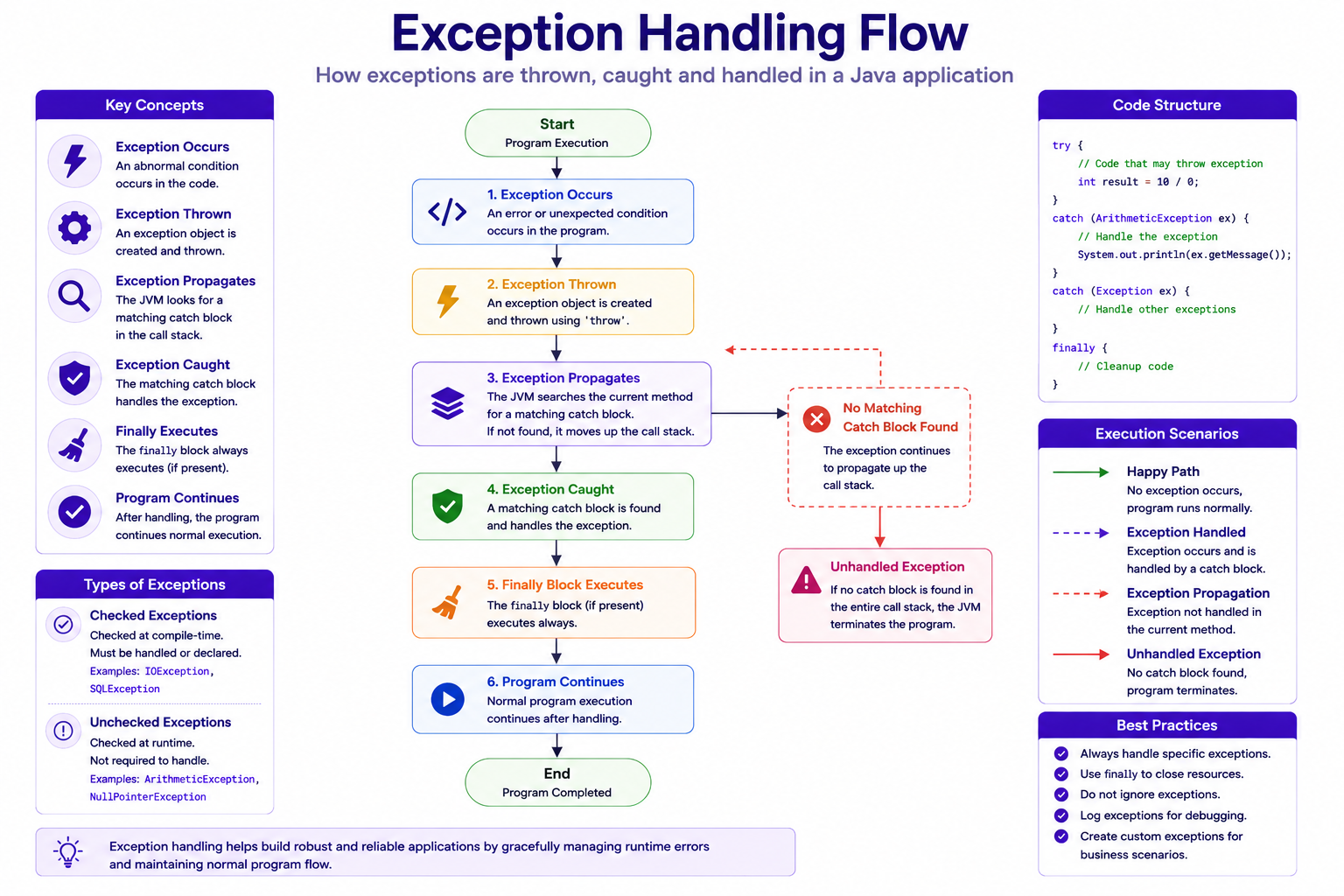
Example Without Exception Handling
public class Main {

    public static void main(String[] args) {

        int result = 10 / 0;

        System.out.println(result);
    }
}
Output
Exception in thread "main"
java.lang.ArithmeticException
Understanding Exception Hierarchy
Java exceptions derive from:
Throwable
Hierarchy
Throwable
│
├── Error
│
└── Exception
     │
     ├── Checked Exceptions
     │
     └── Runtime Exceptions
Checked Exceptions
Checked exceptions are verified during compilation.
Examples:
- IOException
- FileNotFoundException
- SQLException
Example
FileReader reader =
        new FileReader("students.txt");
Compiler requires exception handling.
Unchecked Exceptions
Occur at runtime.
Examples:
- ArithmeticException
- NullPointerException
- ArrayIndexOutOfBoundsException
Example
String name = null;

System.out.println(
        name.length());
try-catch Block
Used to handle exceptions.
Example
public class Main {

    public static void main(String[] args) {

        try {

            int result = 10 / 0;

        } catch (ArithmeticException ex) {

            System.out.println(
                    ex.getMessage());
        }
    }
}
Output
/ by zero
Multiple Catch Blocks
try {

}
catch(ArithmeticException ex) {

}
catch(NullPointerException ex) {

}
Example
try {

    String name = null;

    System.out.println(
            name.length());

}
catch(ArithmeticException ex) {

}
catch(NullPointerException ex) {

    System.out.println(
            "Null value detected");
}
finally Block
Executes regardless of exception occurrence.
Example
try {

    System.out.println(
            "Processing");

}
finally {

    System.out.println(
            "Cleanup");
}
Output
Processing

Cleanup
Complete Example
try {

    int result = 100 / 10;

}
catch(Exception ex) {

    System.out.println(
            ex.getMessage());

}
finally {

    System.out.println(
            "Completed");
}
throw Keyword
Used to create exceptions manually.
throw new RuntimeException(
        "Invalid Data");
Example
double cgpa = -1;

if(cgpa < 0) {

    throw new RuntimeException(
            "Invalid CGPA");
}
throws Keyword
Used in method declarations.
public void save()
        throws IOException {

}
Example
public static void process()
        throws Exception {

    throw new Exception(
            "Processing Failed");
}
Custom Exceptions
Enterprise applications often require custom exceptions.
Example
public class InvalidCgpaException
        extends Exception {

    public InvalidCgpaException(
            String message) {

        super(message);
    }
}
Using Custom Exception
if(cgpa < 0 || cgpa > 10) {

    throw new InvalidCgpaException(
            "Invalid CGPA");
}
IPMS Example
public class StudentService {

    public void validateCgpa(
            double cgpa)
            throws InvalidCgpaException {

        if(cgpa < 0 ||
                cgpa > 10) {

            throw new InvalidCgpaException(
                    "Invalid CGPA");
        }
    }
}
File Handling
Enterprise applications frequently read and write files.
Examples:
- Reports
- Logs
- Configuration Files
- Data Imports
- Data Exports
Java File API
Main class:
java.io.File
Creating File Object
File file =
        new File(
                "students.txt");
Checking File Exists
if(file.exists()) {

    System.out.println(
            "File Found");
}
Creating Directory
File directory =
        new File(
                "reports");

directory.mkdir();
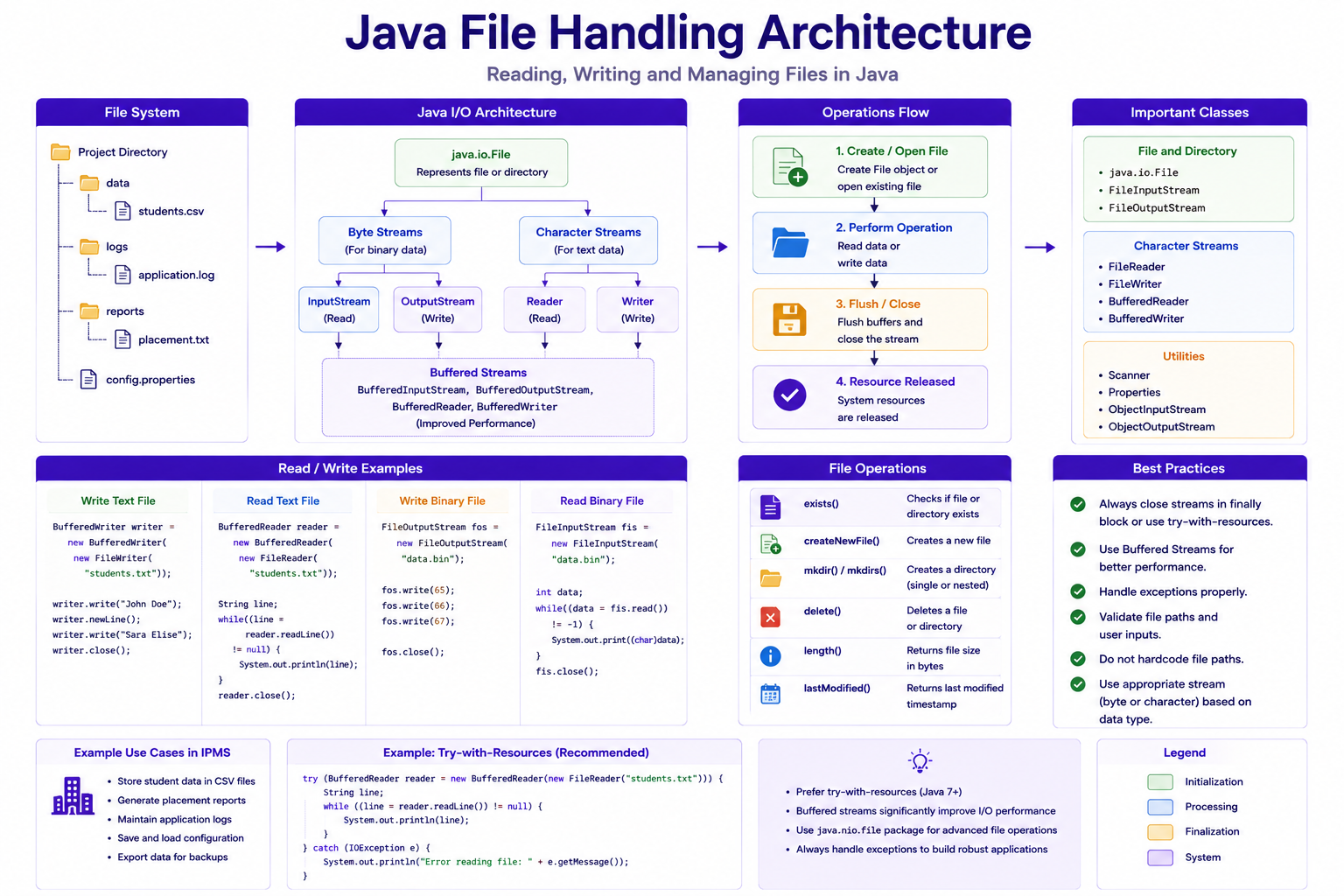
File Operations Overview
Writing Files
Using FileWriter.
FileWriter writer =
        new FileWriter(
                "students.txt");
Writing Data
writer.write(
        "John Doe");
Closing File
writer.close();
Complete Example
FileWriter writer =
        new FileWriter(
                "students.txt");

writer.write(
        "John Doe");

writer.close();
Reading Files
Using FileReader.
FileReader reader =
        new FileReader(
                "students.txt");
Example
int data;

while((data =
        reader.read()) != -1) {

    System.out.print(
            (char)data);
}
BufferedWriter
Improves performance.
BufferedWriter writer =
        new BufferedWriter(
                new FileWriter(
                        "students.txt"));
Example
writer.write(
        "Sara Elise");

writer.newLine();

writer.close();
BufferedReader
Efficient file reading.
BufferedReader reader =
        new BufferedReader(
                new FileReader(
                        "students.txt"));
Example
String line;

while((line =
        reader.readLine())
        != null) {

    System.out.println(line);
}
Writing Multiple Records
BufferedWriter writer =
        new BufferedWriter(
                new FileWriter(
                        "students.txt"));
writer.write(
        "John Doe");

writer.newLine();

writer.write(
        "Sara Elise");
Serialization
Serialization converts objects into byte streams.
Benefits
- Persistence
- Data Transfer
- Caching
Serializable Interface
public class Student
        implements Serializable {

}
Example
public class Student
        implements Serializable {

    private Long id;

    private String name;
}
Writing Object
ObjectOutputStream output =
        new ObjectOutputStream(
                new FileOutputStream(
                        "student.dat"));
output.writeObject(
        student);
Reading Object
ObjectInputStream input =
        new ObjectInputStream(
                new FileInputStream(
                        "student.dat"));
Student student =
        (Student)
        input.readObject();
Java Date and Time API
Introduced in Java 8.
Package:
java.time
LocalDate
LocalDate today =
        LocalDate.now();
Output
2026-06-21
LocalTime
LocalTime time =
        LocalTime.now();
LocalDateTime
LocalDateTime now =
        LocalDateTime.now();
Creating Date
LocalDate driveDate =
        LocalDate.of(
                2026,
                7,
                15);
Date Formatting
DateTimeFormatter formatter =
        DateTimeFormatter.ofPattern(
                "dd-MM-yyyy");
String formatted =
        driveDate.format(
                formatter);
Parsing Date
LocalDate date =
        LocalDate.parse(
                "15-07-2026",
                formatter);
Date Operations
LocalDate today =
        LocalDate.now();
today.plusDays(10);
today.minusMonths(1);
Period Calculation
Period period =
        Period.between(
                startDate,
                endDate);
Example
System.out.println(
        period.getDays());
IPMS Placement Drive Example
LocalDate driveDate =
        LocalDate.of(
                2026,
                8,
                10);
System.out.println(
        driveDate);
Student File Export
BufferedWriter writer =
        new BufferedWriter(
                new FileWriter(
                        "students.csv"));
writer.write(
        "101,John Doe,8.75");
writer.write(
        "102,Sara Elise,9.20");
Student File Import
BufferedReader reader =
        new BufferedReader(
                new FileReader(
                        "students.csv"));
String line;

while((line =
        reader.readLine())
        != null) {

    System.out.println(
            line);
}
Logging Example
BufferedWriter logWriter =
        new BufferedWriter(
                new FileWriter(
                        "application.log",
                        true));
logWriter.write(
        "Student Registered");
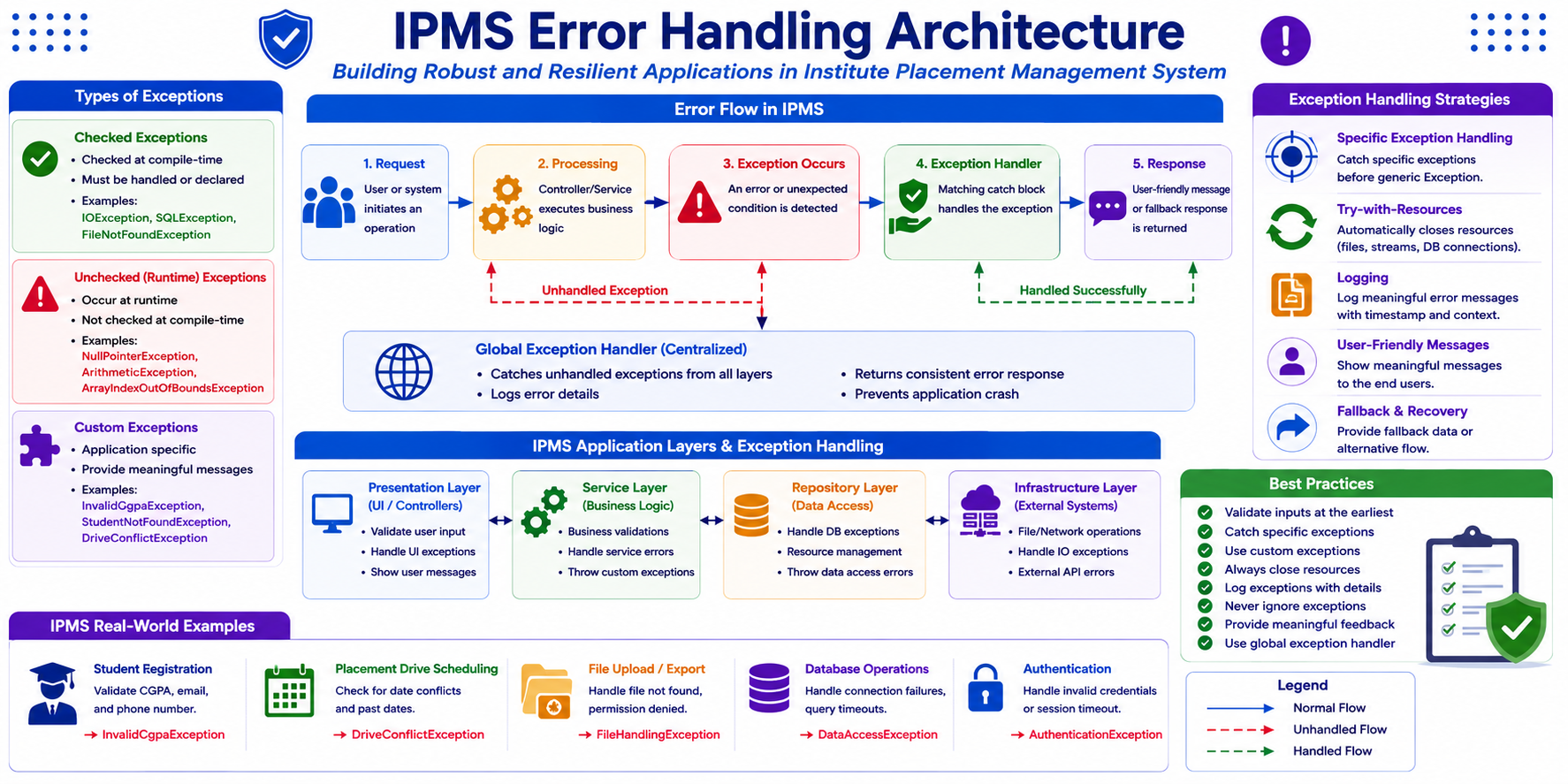
IPMS Error Handling Architecture
Mini Project
Build Student File Management Module.
Requirements:
- Student Registration
- Validate CGPA
- Custom Exceptions
- Export Students to CSV
- Import Students from CSV
- Generate Logs
- Placement Drive Scheduling
Best Practices
- Catch specific exceptions
- Avoid empty catch blocks
- Always close resources
- Use Buffered Streams
- Create custom exceptions
- Log important events
- Validate user input
Common Beginner Mistakes
| Mistake | Correct Approach |
|---|---|
| Catching Exception everywhere | Catch specific exceptions |
| Ignoring exceptions | Handle properly |
| Not closing files | Use try-with-resources |
| Using RuntimeException unnecessarily | Create custom exceptions |
| Hardcoded file paths | Use configuration |
Practice Exercises
- Handle ArithmeticException.
- Handle NullPointerException.
- Create custom exception.
- Read text file.
- Write text file.
- Create CSV export.
- Create CSV import.
- Serialize Student object.
- Deserialize Student object.
- Schedule placement drives using LocalDate.
Chapter Summary
In this chapter, you learned:
- Exception Handling
- Checked Exceptions
- Unchecked Exceptions
- try-catch-finally
- throw and throws
- Custom Exceptions
- File Handling
- Buffered Streams
- Serialization
- Date and Time API
- Enterprise Error Handling
In the next chapter, we will learn:
- Functional Programming
- Lambda Expressions
- Functional Interfaces
- Stream API
These features introduced in modern Java significantly improve productivity and code readability.