
Chapter 4: Interfaces, Collections & Generics
Introduction
Enterprise applications rarely consist of isolated classes.
Modern systems require:
- Flexible architectures
- Loose coupling
- Reusable components
- Dynamic data management
- Type safety
Java provides three powerful features that help achieve these goals:
- Interfaces
- Collections Framework
- Generics
In this chapter, we will learn how to design flexible enterprise applications using interfaces and how to manage large collections of data efficiently using Java Collections and Generics.
Throughout this chapter, we will continue building components of our Institute Placement Management System (IPMS).
What You Will Learn
By the end of this chapter, you will:
- Understand Interfaces
- Create and Implement Interfaces
- Use Multiple Interface Implementation
- Understand Default Methods
- Learn Java Collections Framework
- Use List
- Use Set
- Use Map
- Learn Collection Iteration Techniques
- Understand Generics
- Create Generic Classes
- Create Generic Methods
- Apply Collections in IPMS
Understanding Interfaces
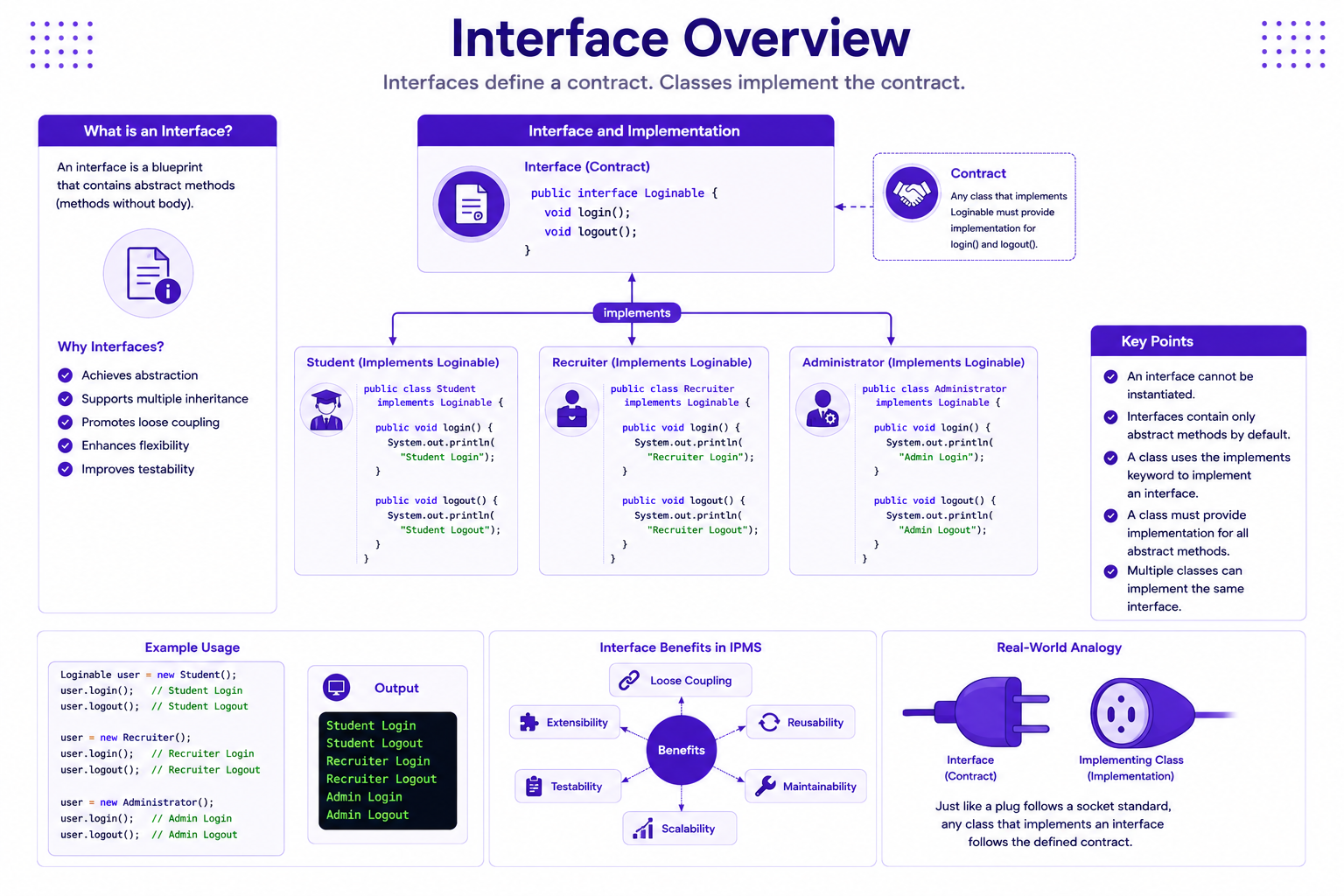
An interface defines a contract that implementing classes must follow.
An interface specifies:
- What a class must do
- Not how it should do it
Why Interfaces?
Benefits:
- Loose Coupling
- Extensibility
- Testability
- Reusability
- Enterprise Architecture Support
Real World Example
Consider a login system.
Users:
- Student
- Recruiter
- Administrator
All must support:
login()
logout()
Interface Definition
public interface Loginable {

    void login();

    void logout();
}
Implementing Interface
public class Student
        implements Loginable {

    @Override
    public void login() {

        System.out.println(
                "Student Login");
    }

    @Override
    public void logout() {

        System.out.println(
                "Student Logout");
    }
}
Recruiter Implementation
public class Recruiter
        implements Loginable {

    @Override
    public void login() {

        System.out.println(
                "Recruiter Login");
    }

    @Override
    public void logout() {

        System.out.println(
                "Recruiter Logout");
    }
}
Interface Overview
Using Interfaces
Loginable user =
        new Student();

user.login();
Output
Student Login
Multiple Interface Implementation
Java supports multiple interfaces.
Interface 1
public interface Loginable {

    void login();
}
Interface 2
public interface Reportable {

    void generateReport();
}
Implementing Multiple Interfaces
public class Administrator
        implements Loginable,
                   Reportable {

    @Override
    public void login() {

    }

    @Override
    public void generateReport() {

    }
}
Interface Inheritance
Interfaces can extend other interfaces.
public interface UserActions
        extends Loginable {

    void updateProfile();
}
Default Methods
Introduced in Java 8.
public interface Loginable {

    default void logout() {

        System.out.println(
                "Logout Successful");
    }
}
Static Methods in Interfaces
public interface Validator {

    static boolean isValidEmail(
            String email) {

        return email.contains("@");
    }
}
Functional Interfaces
Contains only one abstract method.
@FunctionalInterface
public interface Notification {

    void send(String message);
}
Collections Framework
Collections Framework helps manage groups of objects.
Why Collections?
Arrays have limitations:
- Fixed Size
- Difficult Insertions
- Difficult Deletions
Collections solve these problems.
Collections Framework Overview
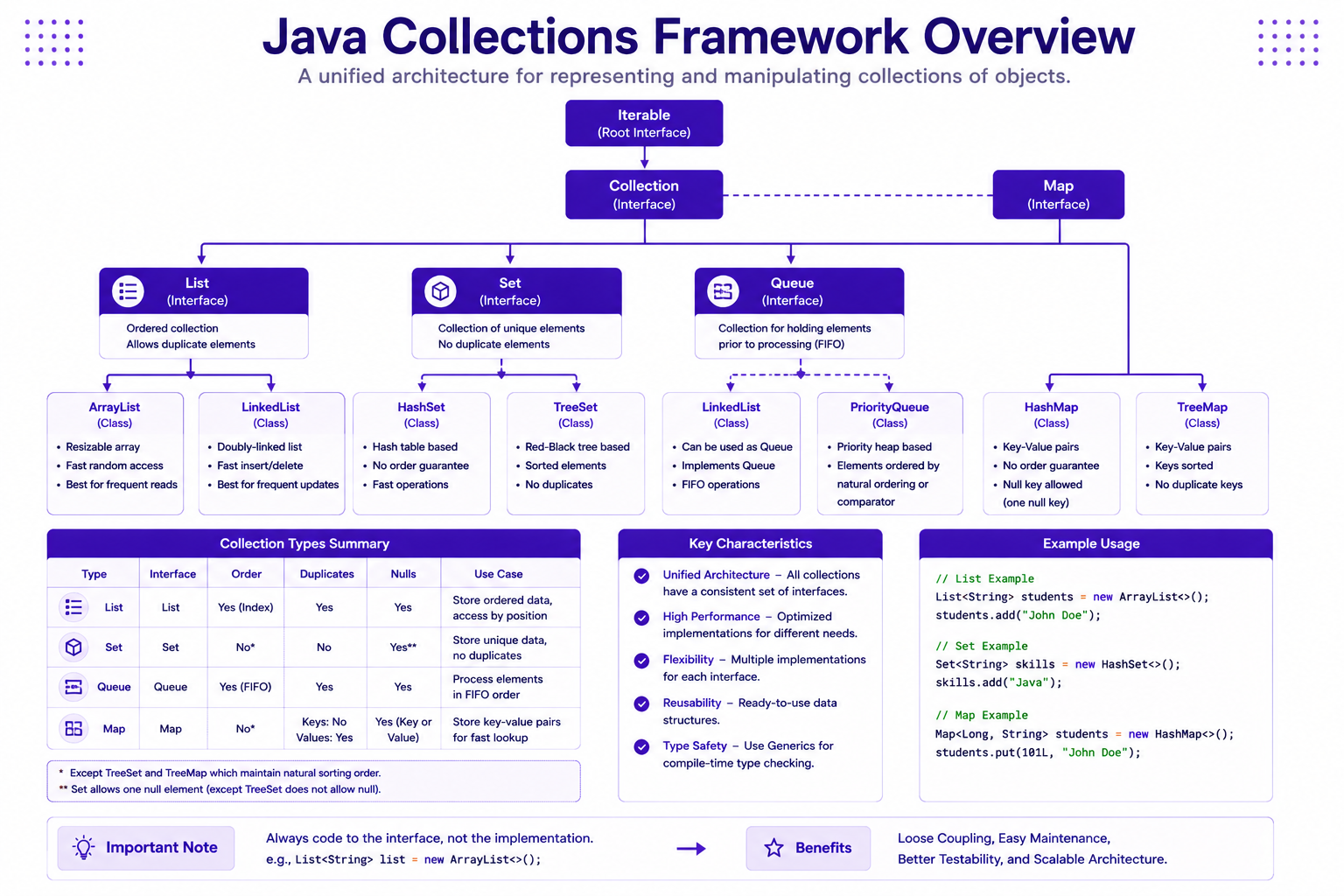
Main Collection Types
| Collection | Purpose |
|---|---|
| List | Ordered Data |
| Set | Unique Data |
| Map | Key Value Data |
| Queue | FIFO Processing |
List Interface
List stores ordered elements.
Duplicates allowed.
Creating ArrayList
List<String> students =
        new ArrayList<>();
Adding Elements
students.add("John Doe");

students.add("Sara Elise");

students.add("Michael Brown");
Accessing Elements
System.out.println(
        students.get(0));
Output
John Doe
Iterating List
for(String student : students) {

    System.out.println(student);
}
Removing Elements
students.remove(
        "Michael Brown");
LinkedList
List<String> drives =
        new LinkedList<>();
List Example
List<String> companies =
        new ArrayList<>();

companies.add("Google");

companies.add("Microsoft");

companies.add("Amazon");
Set Interface
Stores unique elements.
Duplicates not allowed.
Creating HashSet
Set<String> skills =
        new HashSet<>();
Adding Values
skills.add("Java");

skills.add("Spring Boot");

skills.add("Java");
Output
Java

Spring Boot
Set Example
Set<String> technologies =
        new HashSet<>();
TreeSet
Stores sorted values.
Set<String> cities =
        new TreeSet<>();
Map Interface
Stores key-value pairs.
Creating HashMap
Map<Long, String> students =
        new HashMap<>();
Adding Data
students.put(
        101L,
        "John Doe");

students.put(
        102L,
        "Sara Elise");
Retrieving Data
System.out.println(
        students.get(101L));
Output
John Doe
Iterating Map
for(Map.Entry<Long,String> entry
        : students.entrySet()) {

    System.out.println(
            entry.getKey());

    System.out.println(
            entry.getValue());
}
Collection Iteration
Three common approaches:
- For Loop
- Enhanced For Loop
- Iterator
Iterator Example
Iterator<String> iterator =
        students.iterator();

while(iterator.hasNext()) {

    System.out.println(
            iterator.next());
}
Collection Comparison
| Collection | Ordered | Duplicate |
|---|---|---|
| ArrayList | Yes | Yes |
| LinkedList | Yes | Yes |
| HashSet | No | No |
| TreeSet | Sorted | No |
| HashMap | Key Value | Keys Unique |
Understanding Generics
Generics provide:
- Type Safety
- Compile-Time Checking
- Better Readability
Before Generics
List students =
        new ArrayList();
Problem
students.add("John Doe");

students.add(100);
With Generics
List<String> students =
        new ArrayList<>();
Type Safety
students.add("John Doe");
students.add(100);
Compilation Error.
Generic List
List<Student> students =
        new ArrayList<>();
Generic Map
Map<Long, Student> students =
        new HashMap<>();
Generic Method
public static <T> void print(
        T value) {

    System.out.println(value);
}
Calling Generic Method
print("John Doe");

print(100);

print(true);
Generic Class
public class Box<T> {

    private T value;

    public T getValue() {

        return value;
    }

    public void setValue(
            T value) {

        this.value = value;
    }
}
Using Generic Class
Box<String> box =
        new Box<>();
box.setValue(
        "Java");
Generic Repository Example
public interface Repository<T> {

    void save(T entity);

    T findById(Long id);
}
Student Repository
public class StudentRepository
        implements Repository<Student> {

}
IPMS Student Collection
List<Student> students =
        new ArrayList<>();
Adding Students
students.add(
        new Student(
                101L,
                "John Doe",
                8.75));
students.add(
        new Student(
                102L,
                "Sara Elise",
                9.20));
Processing Students
for(Student student
        : students) {

    System.out.println(
            student.getName());
}
IPMS Company Registry
Map<Long,String> companies =
        new HashMap<>();
companies.put(
        1L,
        "Google");
companies.put(
        2L,
        "Microsoft");
IPMS Skill Repository
Set<String> skills =
        new HashSet<>();
skills.add("Java");

skills.add("Spring Boot");

skills.add("Java");
IPMS Collection Architecture

Mini Project
Build Student Registry Module.
Requirements:
- Store Students using ArrayList
- Store Companies using HashMap
- Store Skills using HashSet
- Create Repository Interface
- Create Generic Repository
Best Practices
- Program to Interfaces
- Use ArrayList by default
- Use Set for uniqueness
- Use Map for lookups
- Always use Generics
- Avoid raw collections
Common Beginner Mistakes
| Mistake | Correct Approach |
|---|---|
| Using raw collections | Use Generics |
| Using arrays everywhere | Use Collections |
| Duplicates in Set | Understand Set behavior |
| Wrong collection selection | Choose proper collection |
| No interfaces | Program to interfaces |
Practice Exercises
- Create Loginable interface.
- Create Reportable interface.
- Implement Student class.
- Implement Recruiter class.
- Create Student List.
- Create Company Map.
- Create Skill Set.
- Create Generic Repository.
- Create Generic Box.
- Build Student Registry Module.
Chapter Summary
In this chapter, you learned:
- Interfaces
- Multiple Interface Implementation
- Default Methods
- Functional Interfaces
- Collections Framework
- List
- Set
- Map
- Collection Iteration
- Generics
- Generic Classes
- Generic Methods
- Enterprise Repository Design
In the next chapter, we will learn:
- Exception Handling
- File Handling
- Java APIs
These concepts are essential for building robust enterprise applications.