
Chapter 7: Multithreading & Concurrent Programming
Introduction
Modern enterprise applications often need to perform multiple tasks simultaneously.
Examples:
- Processing multiple user requests
- Generating reports
- Sending notifications
- Importing files
- Processing payments
- Running background jobs
Executing all tasks sequentially can reduce application performance and responsiveness.
Java provides powerful support for:
- Multithreading
- Concurrent Programming
- Thread Pools
- Task Scheduling
- Synchronization
In this chapter, we will learn how to build scalable and responsive applications using Java concurrency features and apply them to our Institute Placement Management System (IPMS).
What You Will Learn
By the end of this chapter, you will:
- Understand Processes and Threads
- Create Threads
- Implement Runnable
- Use Thread Lifecycle
- Work with Synchronization
- Avoid Race Conditions
- Use Executor Framework
- Create Thread Pools
- Work with Callable and Future
- Use Concurrent Collections
- Build Background Processing Features
- Apply Concurrency in IPMS
Understanding Processes
A process is an executing program.
Examples:
- Chrome Browser
- IntelliJ IDEA
- VS Code
- Java Application
Each process has:
- Memory
- Resources
- Threads
Understanding Threads
A thread is the smallest unit of execution within a process.
Example
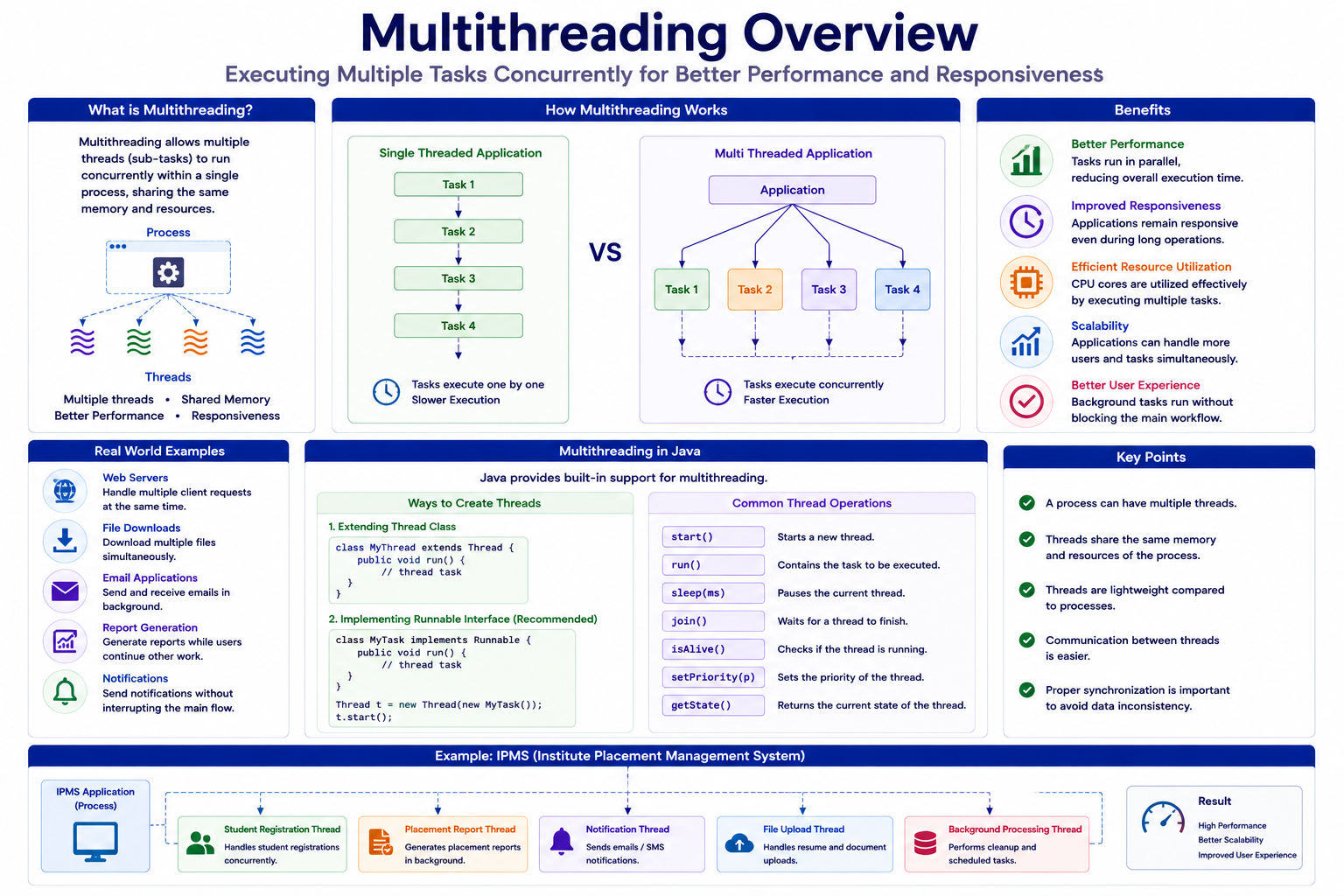
IPMS Application
│
├── Student Registration Thread
├── Placement Report Thread
├── Notification Thread
└── Background Processing Thread
Benefits of Multithreading
- Better Performance
- Improved Responsiveness
- Efficient Resource Utilization
- Parallel Processing
- Scalability
Process vs Thread
| Feature | Process | Thread |
|---|---|---|
| Memory | Separate | Shared |
| Communication | Expensive | Easy |
| Creation Cost | High | Low |
| Performance | Slower | Faster |
Multithreading Overview
Creating Threads
Java provides multiple approaches.
Approach 1: Extending Thread
public class StudentThread
        extends Thread {

    @Override
    public void run() {

        System.out.println(
                "Processing Student");
    }
}
Starting Thread
StudentThread thread =
        new StudentThread();

thread.start();
Output
Processing Student
Understanding start()
thread.start();
Creates a new thread.
Incorrect Approach
thread.run();
Executes in current thread.
Approach 2: Runnable Interface
Recommended approach.
Example
public class ReportTask
        implements Runnable {

    @Override
    public void run() {

        System.out.println(
                "Generating Report");
    }
}
Creating Thread
Thread thread =
        new Thread(
                new ReportTask());

thread.start();
Lambda Version
Thread thread =
        new Thread(
                () ->
                        System.out.println(
                                "Generating Report"));
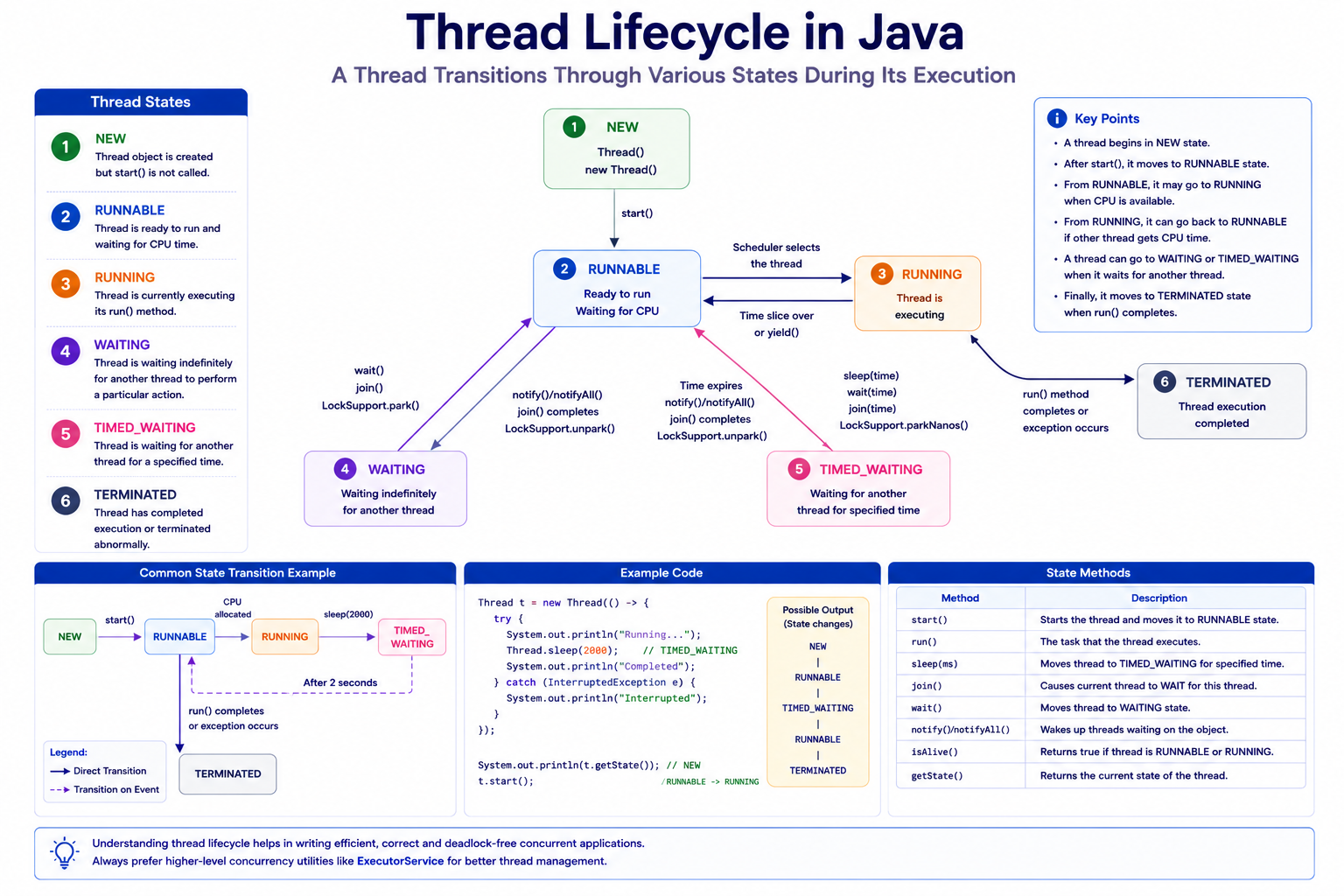
Thread Lifecycle
A thread passes through multiple states.
States
NEW

RUNNABLE

RUNNING

WAITING

TIMED_WAITING

TERMINATED
Thread Lifecycle Diagram
Example
Thread thread =
        new Thread(
                () ->
                        System.out.println(
                                "Running"));
System.out.println(
        thread.getState());
Output
NEW
Sleep Method
Pauses thread execution.
Thread.sleep(2000);
Example
try {

    Thread.sleep(1000);

}
catch(Exception ex) {

}
Joining Threads
Waits for thread completion.
thread.join();
Example
Thread reportThread =
        new Thread(
                () ->
                        System.out.println(
                                "Generating Report"));

reportThread.start();

reportThread.join();

System.out.println(
        "Completed");
Thread Priority
Controls execution preference.
thread.setPriority(
        Thread.MAX_PRIORITY);
Priority Values
MIN_PRIORITY = 1

NORM_PRIORITY = 5

MAX_PRIORITY = 10
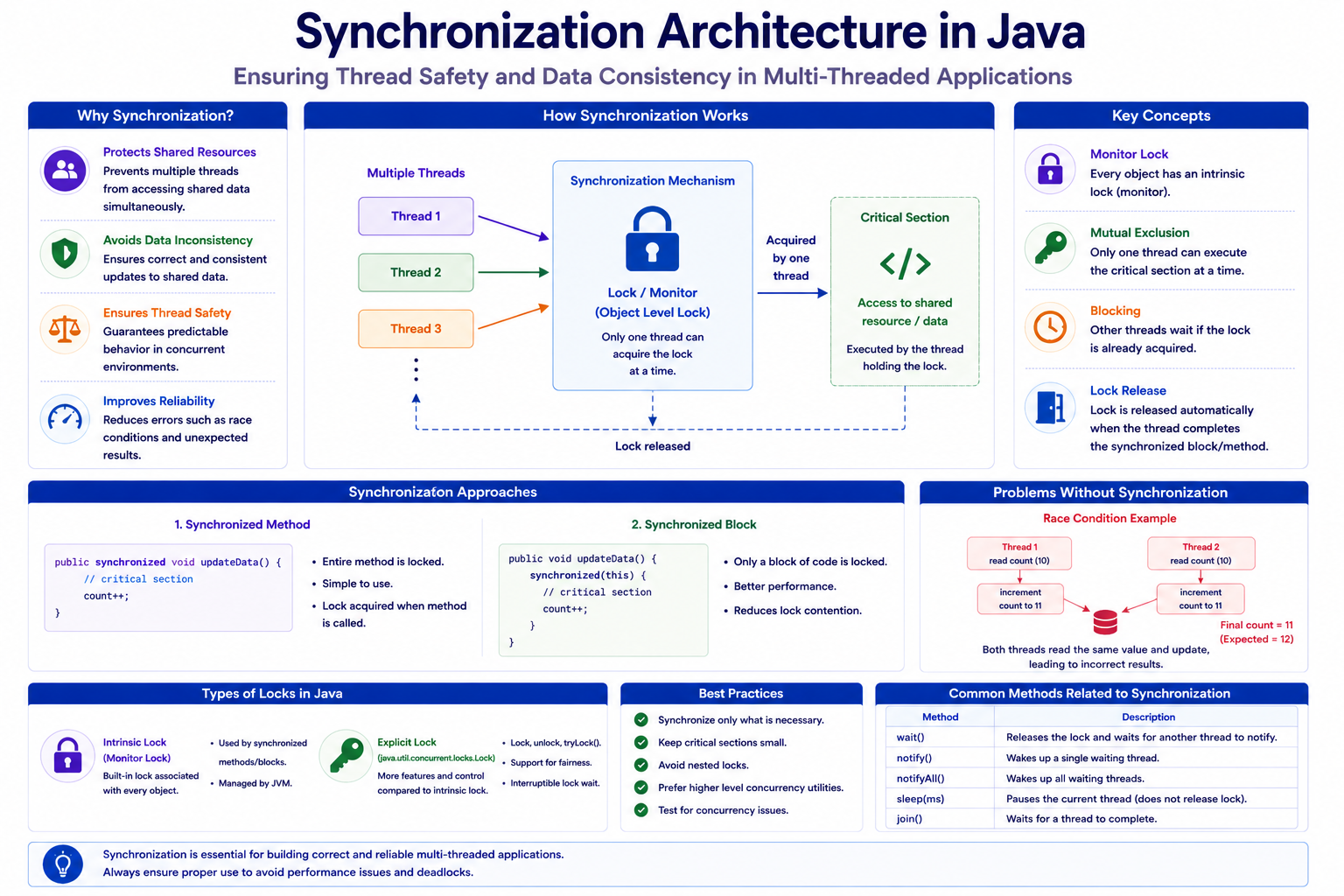
Race Condition
Occurs when multiple threads modify shared data simultaneously.
Example
private int count = 0;
count++;
Problem
Multiple threads can update count incorrectly.
Synchronization
Prevents concurrent access to shared resources.
Synchronized Method
public synchronized void increment() {

    count++;
}
Example
public class Counter {

    private int count = 0;

    public synchronized void increment() {

        count++;
    }
}
Synchronized Block
synchronized(this) {

    count++;
}
Example
public void increment() {

    synchronized(this) {

        count++;
    }
}
Synchronization Architecture
Deadlock
Occurs when threads wait indefinitely for each other.
Example
Thread A waits for Thread B

Thread B waits for Thread A
Avoiding Deadlocks
- Lock Ordering
- Timeout Strategies
- Reduce Shared Resources
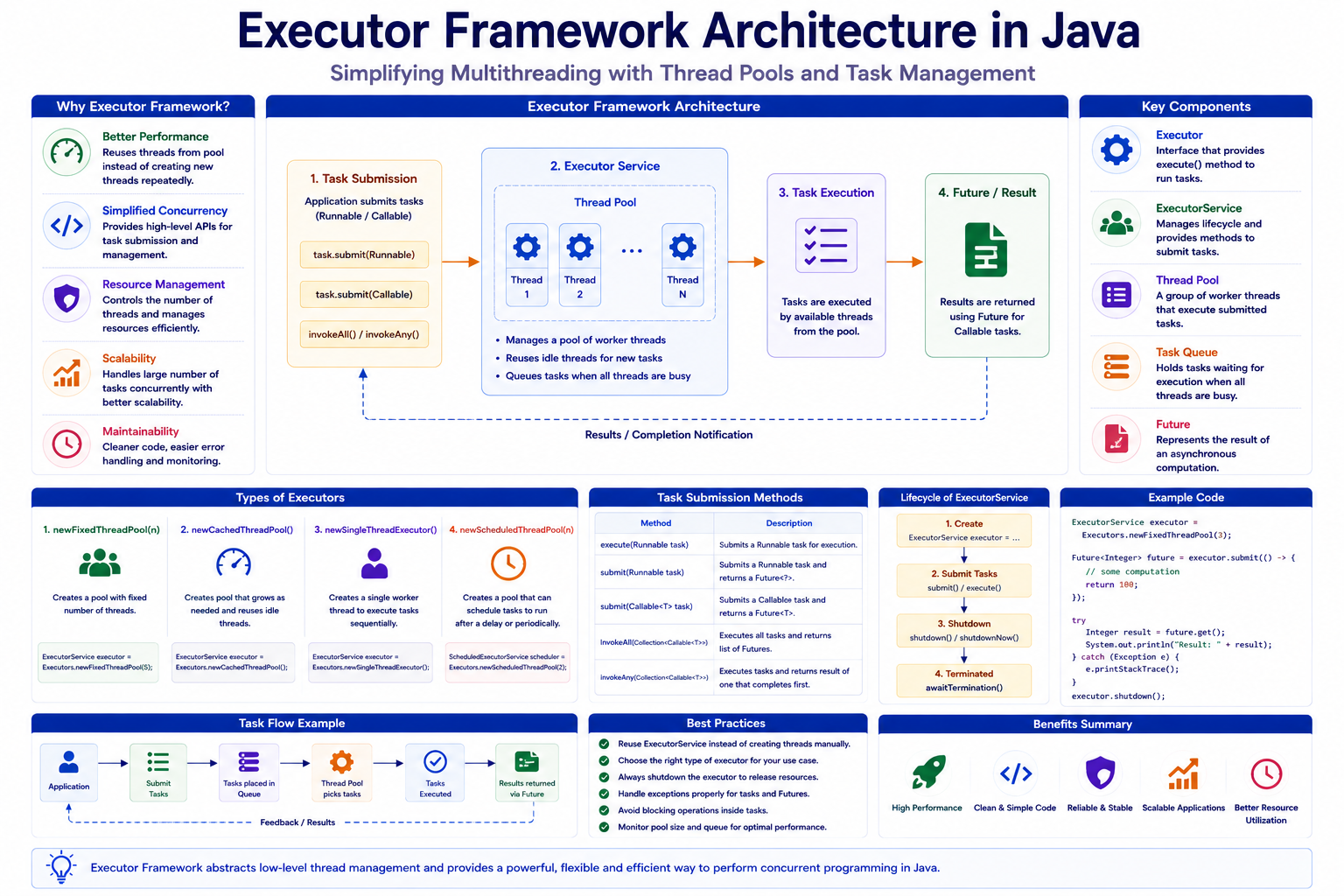
Executor Framework
Introduced to simplify thread management.
Benefits
- Thread Reuse
- Better Performance
- Simplified Code
- Thread Pooling
Creating Executor Service
ExecutorService executor =
        Executors.newFixedThreadPool(5);
Submitting Tasks
executor.submit(
        () ->
                System.out.println(
                        "Task Executed"));
Shutting Down
executor.shutdown();
Fixed Thread Pool
ExecutorService executor =
        Executors.newFixedThreadPool(10);
Cached Thread Pool
ExecutorService executor =
        Executors.newCachedThreadPool();
Single Thread Executor
ExecutorService executor =
        Executors.newSingleThreadExecutor();
Executor Architecture
Callable Interface
Runnable cannot return results.
Callable can.
Example
Callable<String> task =
        () -> "Completed";
Submitting Callable
Future<String> future =
        executor.submit(task);
Getting Result
String result =
        future.get();
Output
Completed
Future Interface
Represents asynchronous result.
Example
Future<Integer> result =
        executor.submit(
                () -> 100);
Check Completion
result.isDone();
Concurrent Collections
Thread-safe collections.
Examples
- ConcurrentHashMap
- CopyOnWriteArrayList
- BlockingQueue
ConcurrentHashMap
ConcurrentHashMap<Long,String>
students =
new ConcurrentHashMap<>();
Example
students.put(
        101L,
        "John Doe");
students.put(
        102L,
        "Sara Elise");
CopyOnWriteArrayList
CopyOnWriteArrayList<String>
students =
new CopyOnWriteArrayList<>();
BlockingQueue
Useful for producer-consumer scenarios.
BlockingQueue<String> queue =
        new LinkedBlockingQueue<>();
Adding Elements
queue.put(
        "Placement Drive");
Reading Elements
String value =
        queue.take();
Scheduled Tasks
Execute tasks periodically.
Example
ScheduledExecutorService scheduler =
        Executors.newScheduledThreadPool(2);
Schedule Task
scheduler.schedule(
        () ->
                System.out.println(
                        "Reminder"),
        5,
        TimeUnit.SECONDS);
Repeated Task
scheduler.scheduleAtFixedRate(
        () ->
                System.out.println(
                        "Generating Report"),
        0,
        10,
        TimeUnit.SECONDS);
IPMS Student Registration Task
Runnable registrationTask =
        () ->
                System.out.println(
                        "Student Registered");
IPMS Placement Report Task
Callable<String> reportTask =
        () -> "Report Generated";
Execute Tasks
ExecutorService executor =
        Executors.newFixedThreadPool(3);

executor.submit(
        registrationTask);

executor.submit(
        reportTask);
Notification Processing
executor.submit(
        () ->
                System.out.println(
                        "Email Sent"));
Bulk Student Processing
students.parallelStream()
        .forEach(
                System.out::println);
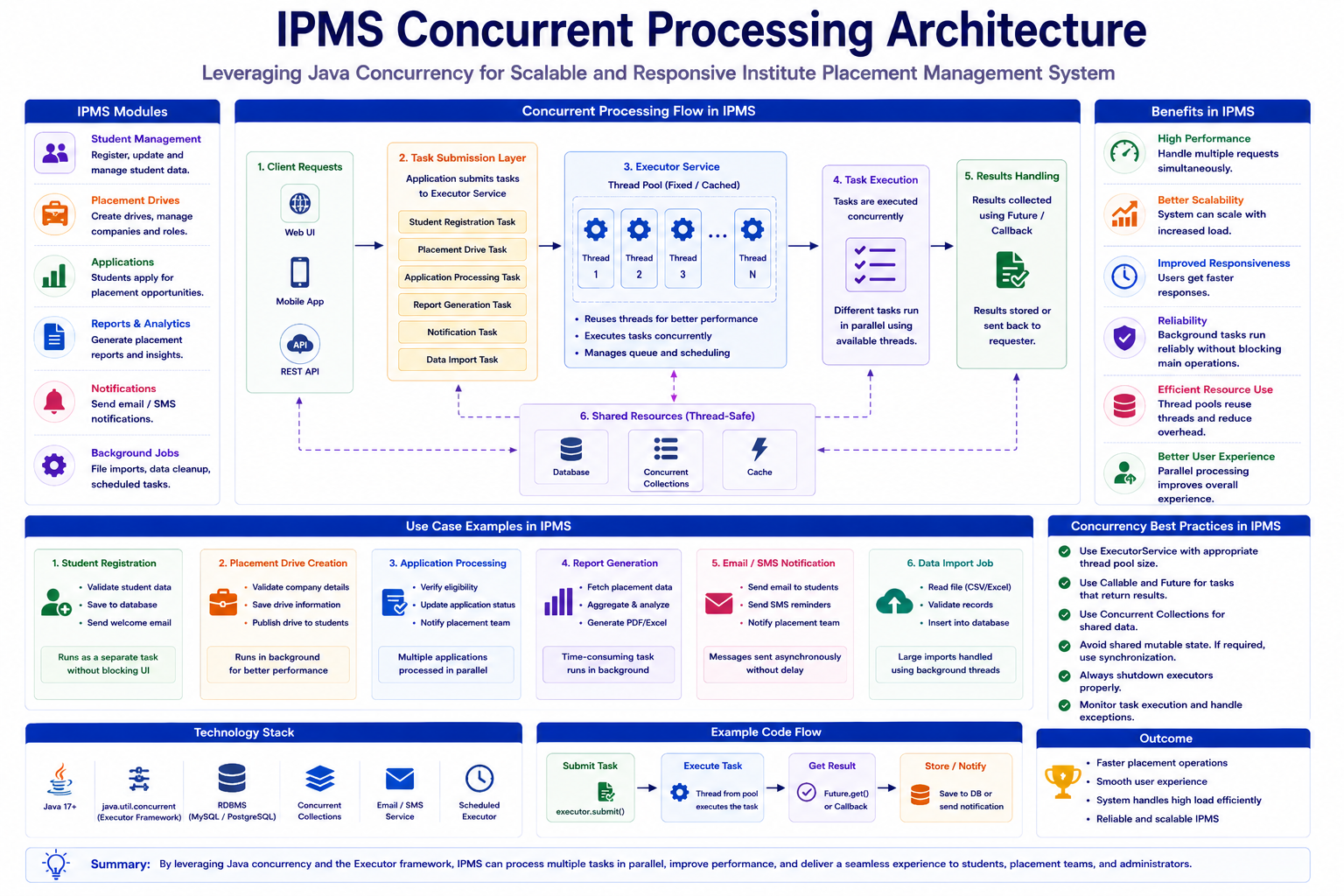
IPMS Concurrent Processing Architecture
Mini Project
Build Placement Processing Engine.
Requirements:
- Student Registration Task
- Report Generation Task
- Email Notification Task
- Executor Framework
- Callable Tasks
- Scheduled Reports
- Concurrent Collections
Best Practices
- Prefer Executor Framework
- Use Thread Pools
- Minimize Shared State
- Use Concurrent Collections
- Avoid Excessive Synchronization
- Shutdown Executors Properly
Common Beginner Mistakes
| Mistake | Correct Approach |
|---|---|
| Creating too many threads | Use Thread Pool |
| Ignoring synchronization | Protect shared resources |
| Not shutting down executors | Call shutdown() |
| Using ArrayList in concurrent code | Use Concurrent Collections |
| Blocking unnecessarily | Use asynchronous processing |
Practice Exercises
- Create Thread using Thread class.
- Create Runnable implementation.
- Create Callable implementation.
- Use ExecutorService.
- Create Fixed Thread Pool.
- Create Scheduled Task.
- Implement Counter using synchronization.
- Use ConcurrentHashMap.
- Process Student data concurrently.
- Build Placement Processing Engine.
Chapter Summary
In this chapter, you learned:
- Processes and Threads
- Thread Lifecycle
- Runnable
- Callable
- Synchronization
- Race Conditions
- Executor Framework
- Thread Pools
- Future
- Concurrent Collections
- Scheduled Tasks
- Concurrent Processing
In the next chapter, we will learn:
- SOLID Principles
- Design Patterns
- Enterprise Application Design
These concepts help build maintainable, scalable and professional Java applications.