
Chapter 2: Object-Oriented Programming – Classes, Objects & Encapsulation
Introduction
Object-Oriented Programming (OOP) is the foundation of modern enterprise application development.
Most enterprise applications are built by modeling real-world entities as software objects.
Examples:
- Students
- Employees
- Customers
- Companies
- Placement Drives
- Orders
- Products
Java is primarily an Object-Oriented Programming language and provides powerful features for building modular, reusable, maintainable, and scalable software systems.
In this chapter, we will learn the core building blocks of Object-Oriented Programming and apply them to our Institute Placement Management System (IPMS).
What You Will Learn
By the end of this chapter, you will:
- Understand Object-Oriented Programming
- Create Classes
- Create Objects
- Define Fields and Methods
- Understand Constructors
- Use Constructor Overloading
- Learn Access Modifiers
- Implement Encapsulation
- Create Getters and Setters
- Understand Packages
- Follow JavaBean Conventions
- Build domain models for IPMS
What is Object-Oriented Programming?
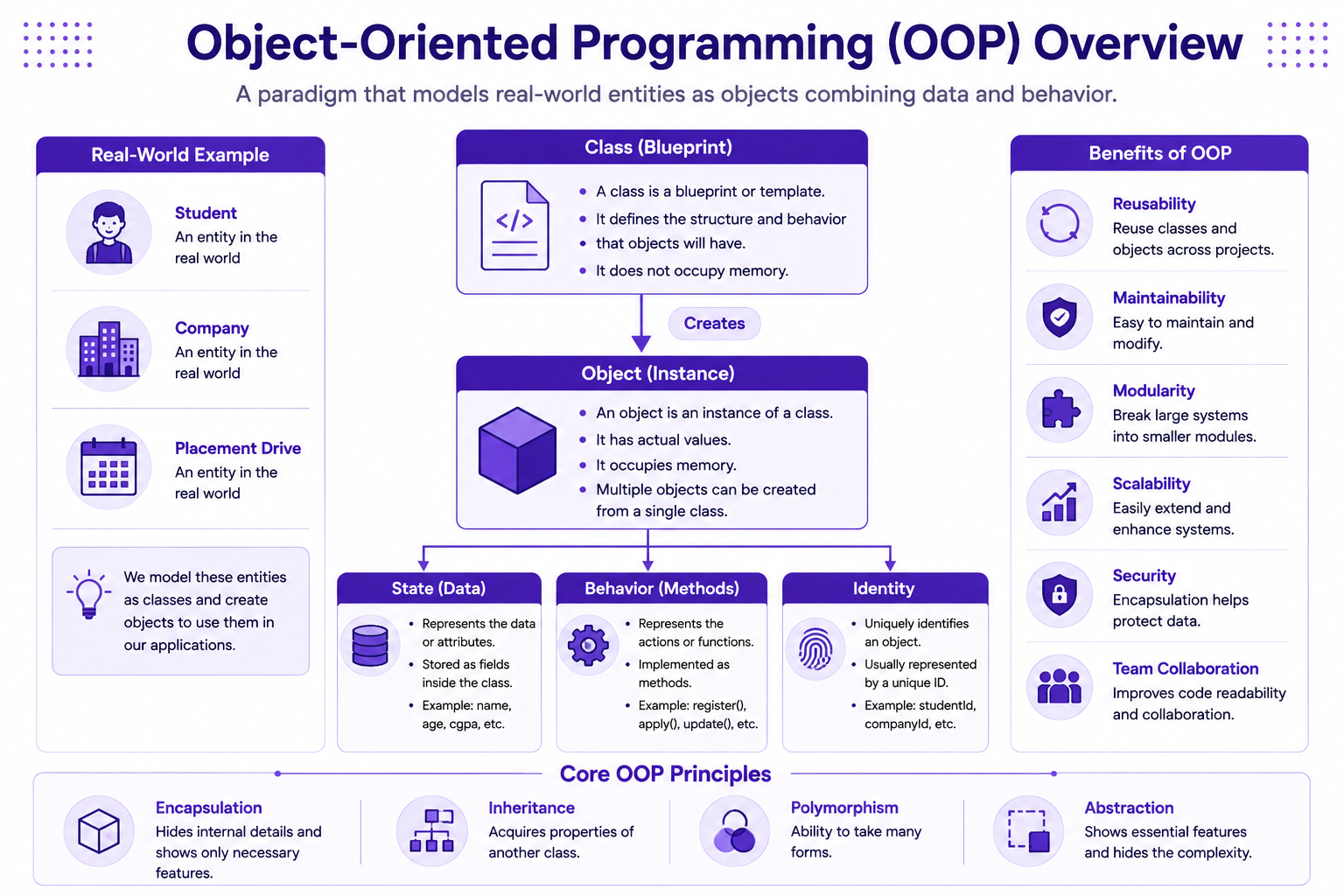
Object-Oriented Programming is a programming paradigm that organizes software around objects rather than functions.
An object represents a real-world entity.
Examples:
| Real World Entity | Software Object |
|---|---|
| Student | Student |
| Company | Company |
| Placement Drive | PlacementDrive |
| Interview | Interview |
| Administrator | Admin |
Core Concepts of OOP
Every object contains:
- State
- Behavior
- Identity
Example:
Student
State:
- Name
- Roll Number
- CGPA
Behavior:
- Register
- Apply
- Update Profile
Identity:
- Student ID
Benefits of OOP
- Code Reusability
- Maintainability
- Modularity
- Scalability
- Better Organization
- Easier Testing
- Enterprise Readiness
OOP Overview
Understanding Classes
A class is a blueprint used to create objects.
A class defines:
- Properties
- Behaviors
Example:
public class Student {

}
Creating First Class
public class Student {

    String name;

    int age;

    double cgpa;
}
Understanding Fields
Fields store object data.
Example:
String name;

int age;

double cgpa;
Field Types
Common field types:
String name;

int age;

double cgpa;

boolean eligible;
Creating Objects
Objects are instances of classes.
Example:
Student student = new Student();
Understanding Object Creation
new Student();
creates an object in memory.
Student student
creates a reference variable.
Assigning Values
Student student = new Student();

student.name = "John Doe";

student.age = 21;

student.cgpa = 8.5;
Displaying Object Data
System.out.println(student.name);

System.out.println(student.age);

System.out.println(student.cgpa);
Complete Example
public class Student {

    String name;

    int age;

    double cgpa;

    public static void main(String[] args) {

        Student student = new Student();

        student.name = "John Doe";

        student.age = 21;

        student.cgpa = 8.5;

        System.out.println(student.name);

        System.out.println(student.age);

        System.out.println(student.cgpa);
    }
}
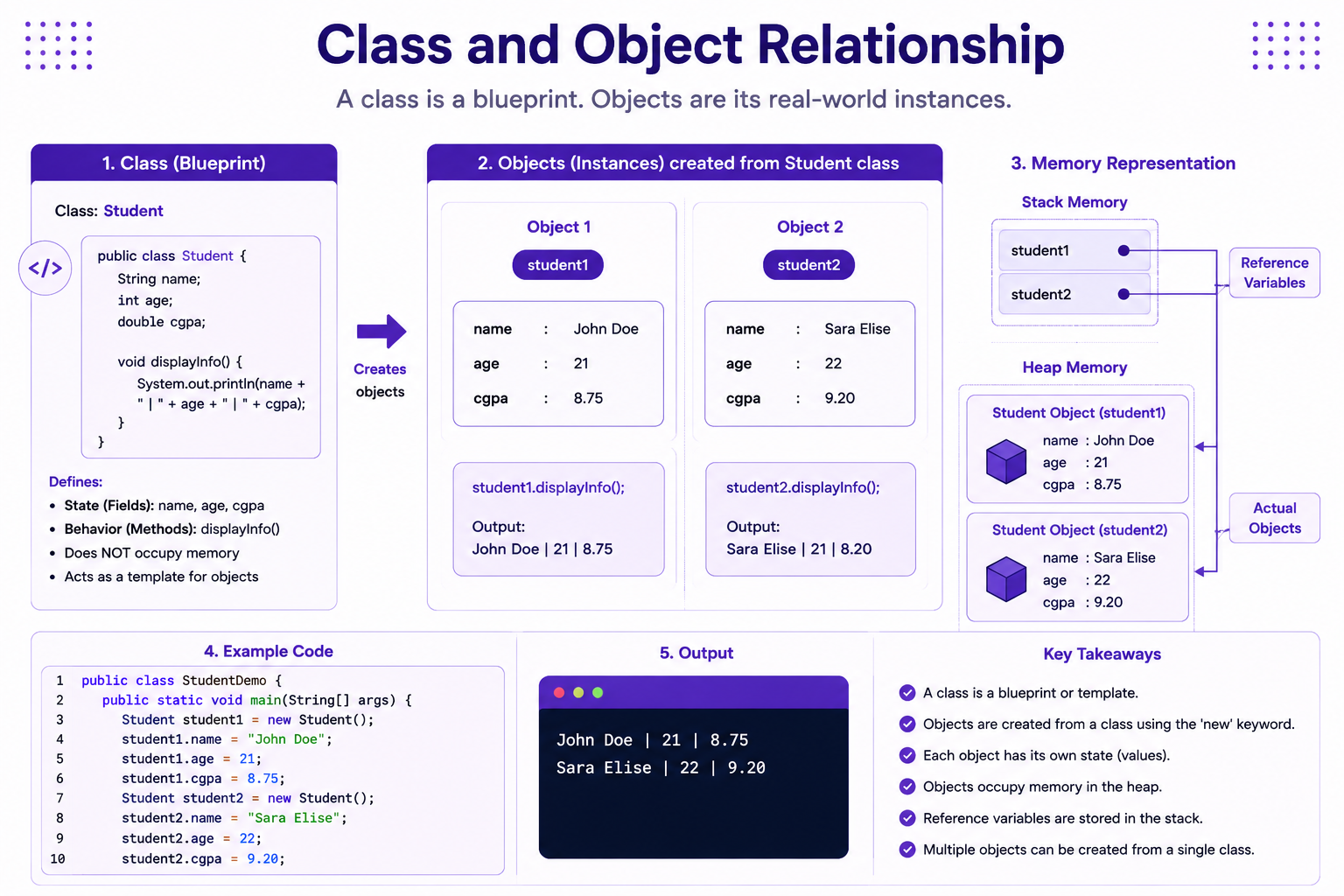
Creating Multiple Objects
Student student1 = new Student();

Student student2 = new Student();
Example
student1.name = "John Doe";

student2.name = "Sara Elise";
Class and Object Relationship
Understanding Methods
Methods define object behavior.
Example:
public void displayInfo() {

}
Creating a Method
public void displayInfo() {

    System.out.println(name);

    System.out.println(age);

    System.out.println(cgpa);
}
Calling a Method
student.displayInfo();
Example
public class Student {

    String name;

    int age;

    double cgpa;

    public void displayInfo() {

        System.out.println(name);

        System.out.println(age);

        System.out.println(cgpa);
    }
}
Using Methods
Student student = new Student();

student.name = "John Doe";

student.age = 21;

student.cgpa = 8.5;

student.displayInfo();
Methods with Parameters
public void updateCgpa(double cgpa) {

    this.cgpa = cgpa;
}
Calling Method with Parameter
student.updateCgpa(8.75);
Methods Returning Values
public double getCgpa() {

    return cgpa;
}
Using Return Values
double result = student.getCgpa();
Understanding Constructors
A constructor initializes an object.
Constructor name must match class name.
Default Constructor
public Student() {

}
Example
public class Student {

    public Student() {

        System.out.println("Student Created");
    }
}
Creating Object
Student student = new Student();
Parameterized Constructor
public Student(
        String name,
        int age,
        double cgpa) {

    this.name = name;

    this.age = age;

    this.cgpa = cgpa;
}
Example
Student student =
        new Student(
                "John Doe",
                21,
                8.5);
Complete Example
public class Student {

    String name;

    int age;

    double cgpa;

    public Student(
            String name,
            int age,
            double cgpa) {

        this.name = name;

        this.age = age;

        this.cgpa = cgpa;
    }
}
Understanding this Keyword
this.name = name;
Constructor Overloading
public Student() {

}

public Student(String name) {

}

public Student(
        String name,
        int age) {

}

public Student(
        String name,
        int age,
        double cgpa) {

}
Access Modifiers
Java provides access control using modifiers.
Public
public class Student {

}
Private
private String name;
Protected
protected String name;
Default
String name;
Access Modifier Comparison
| Modifier | Same Class | Same Package | Subclass | Other Package |
|---|---|---|---|---|
| public | Yes | Yes | Yes | Yes |
| protected | Yes | Yes | Yes | No |
| default | Yes | Yes | No | No |
| private | Yes | No | No | No |
Encapsulation
Encapsulation protects object data from unauthorized access.
Poor Design
public class Student {

    public double cgpa;
}
Better Design
public class Student {

    private double cgpa;
}
Getter Method
public double getCgpa() {

    return cgpa;
}
Setter Method
public void setCgpa(double cgpa) {

    this.cgpa = cgpa;
}
Encapsulated Class
public class Student {

    private double cgpa;

    public double getCgpa() {

        return cgpa;
    }

    public void setCgpa(double cgpa) {

        this.cgpa = cgpa;
    }
}
Using Encapsulation
Student student = new Student();

student.setCgpa(8.5);

System.out.println(student.getCgpa());
Validation Using Setters
public void setCgpa(double cgpa) {

    if (cgpa >= 0 && cgpa <= 10) {

        this.cgpa = cgpa;
    }
}
JavaBean Convention
Enterprise Java applications commonly follow JavaBean standards.
Rules
- Private fields
- Public getters
- Public setters
- No argument constructor
Example
public class Student {

    private String name;

    public Student() {

    }

    public String getName() {

        return name;
    }

    public void setName(String name) {

        this.name = name;
    }
}
Understanding Packages
Packages organize classes.
Package Example
package com.ipms.student;
Package Structure
src
│
└── com
    └── ipms
        ├── student
        ├── company
        └── drive
Student Package
package com.ipms.student;
Company Package
package com.ipms.company;
Drive Package
package com.ipms.drive;
Import Statement
import com.ipms.student.Student;
Object Lifecycle
Objects go through three stages.
Stage 1
Creation
Student student = new Student();
Stage 2
Usage
student.displayInfo();
Stage 3
Garbage Collection
Object becomes eligible for cleanup.
Understanding Memory
Objects are stored in:
Heap Memory
References are stored in:
Stack Memory
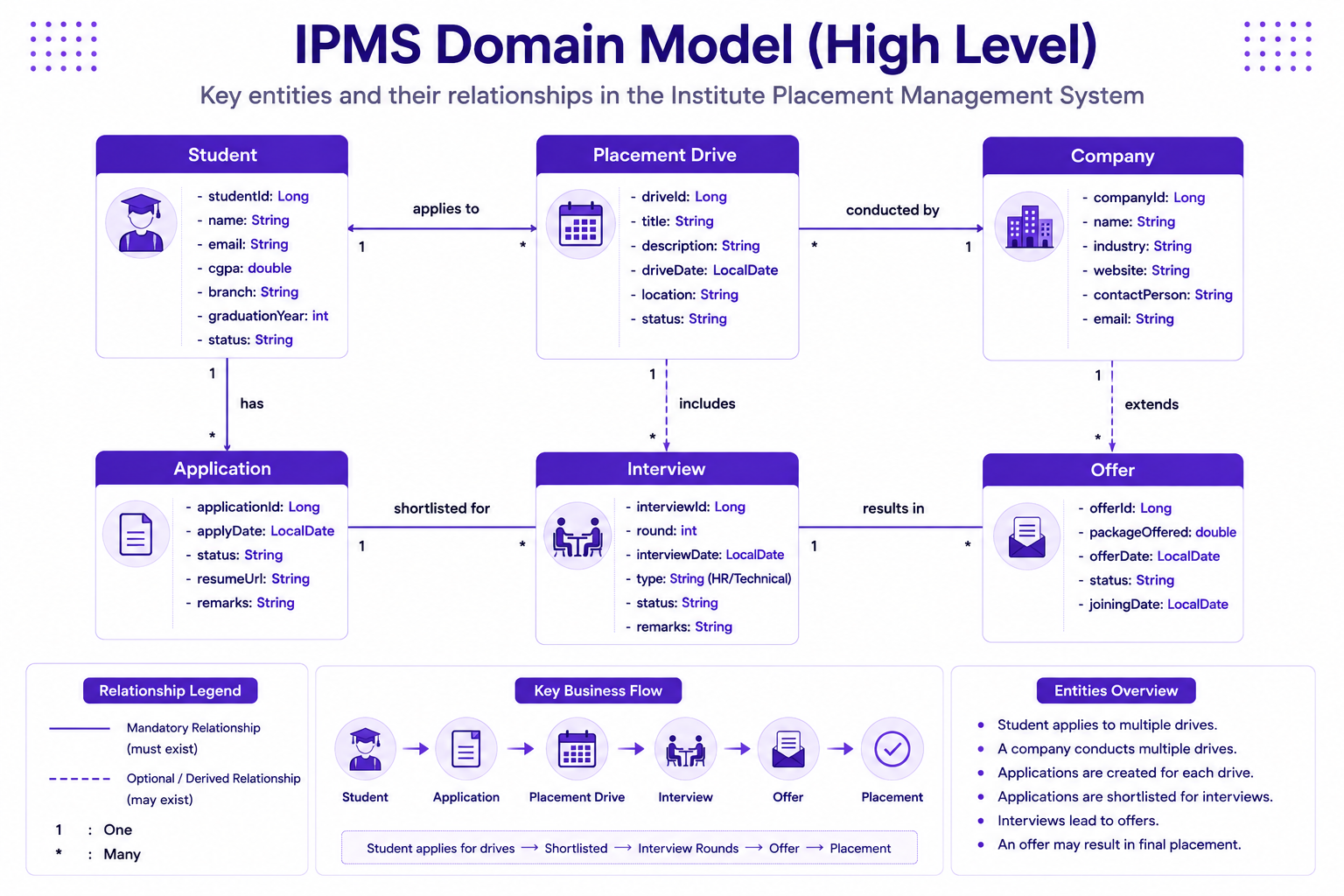
IPMS Domain Model
Student Class
package com.ipms.student;

public class Student {

    private Long studentId;

    private String name;

    private double cgpa;
}
Company Class
package com.ipms.company;

public class Company {

    private Long companyId;

    private String companyName;
}
PlacementDrive Class
package com.ipms.drive;

public class PlacementDrive {

    private Long driveId;

    private String title;
}
Complete Student Example
package com.ipms.student;

public class Student {

    private Long studentId;

    private String name;

    private double cgpa;

    public Student() {

    }

    public Student(
            Long studentId,
            String name,
            double cgpa) {

        this.studentId = studentId;

        this.name = name;

        this.cgpa = cgpa;
    }

    public Long getStudentId() {

        return studentId;
    }

    public void setStudentId(Long studentId) {

        this.studentId = studentId;
    }

    public String getName() {

        return name;
    }

    public void setName(String name) {

        this.name = name;
    }

    public double getCgpa() {

        return cgpa;
    }

    public void setCgpa(double cgpa) {

        this.cgpa = cgpa;
    }
}
Mini Project
Build Student Registration Module.
Features:
- Create Student
- Update Student
- Display Student
- Validate CGPA
- Organize using Packages
Best Practices
- Keep fields private
- Use constructors
- Use getters and setters
- Follow JavaBean conventions
- Organize classes using packages
- Keep classes focused
Common Beginner Mistakes
| Mistake | Correct Approach |
|---|---|
| Public fields | Private fields |
| Missing constructor | Create constructors |
| No package structure | Organize packages |
| Large classes | Small focused classes |
| Duplicate code | Create reusable methods |
Practice Exercises
- Create Employee class.
- Create Department class.
- Implement encapsulation.
- Implement constructors.
- Create JavaBeans.
- Organize classes using packages.
- Create Student Registration Module.
Chapter Summary
In this chapter, you learned:
- Object-Oriented Programming
- Classes
- Objects
- Fields
- Methods
- Constructors
- Constructor Overloading
- Access Modifiers
- Encapsulation
- Getters and Setters
- JavaBean Convention
- Packages
- Object Lifecycle
In the next chapter, we will learn:
- Inheritance
- Polymorphism
- Abstraction
These concepts help build reusable and extensible enterprise applications.