
Chapter 6: Building REST APIs with Spring Boot
In the previous chapter, we designed the architecture of our Insurance Policy Management System (IPMS) using Spring Boot.
We learned about:
- Layered Architecture
- Controller-Service-Repository Pattern
- DTOs and Entities
- Dependency Injection
- Request Processing Flow
Now it is time to build our first REST APIs.
In this chapter, we will implement APIs for the Policy domain and understand how Spring Boot maps HTTP requests to Java methods.
We will continue using the same Insurance Policy Management System (IPMS) introduced in earlier chapters.
🎯 Learning Objectives
By the end of this chapter, you will be able to:
- Create REST Controllers
- Map HTTP endpoints
- Handle Path Variables
- Handle Query Parameters
- Handle Request Bodies
- Return Responses
- Use DTOs
- Build CRUD APIs
- Implement API response standards
What is a REST Controller?
A REST Controller is the entry point of a Spring Boot API.
Responsibilities:
- Receive HTTP requests
- Extract request data
- Invoke business services
- Return HTTP responses
Example:
GET /policies/LIFE-100001
Spring routes this request to a controller method.
Creating Our First Controller
PolicyController
@RestController
@RequestMapping("/api/v1/policies")
public class PolicyController {

}
Annotations:
@RestController
Marks the class as a REST endpoint.
@RequestMapping
Defines the base URL.
Result:
/api/v1/policies
Controller Layer in IPMS
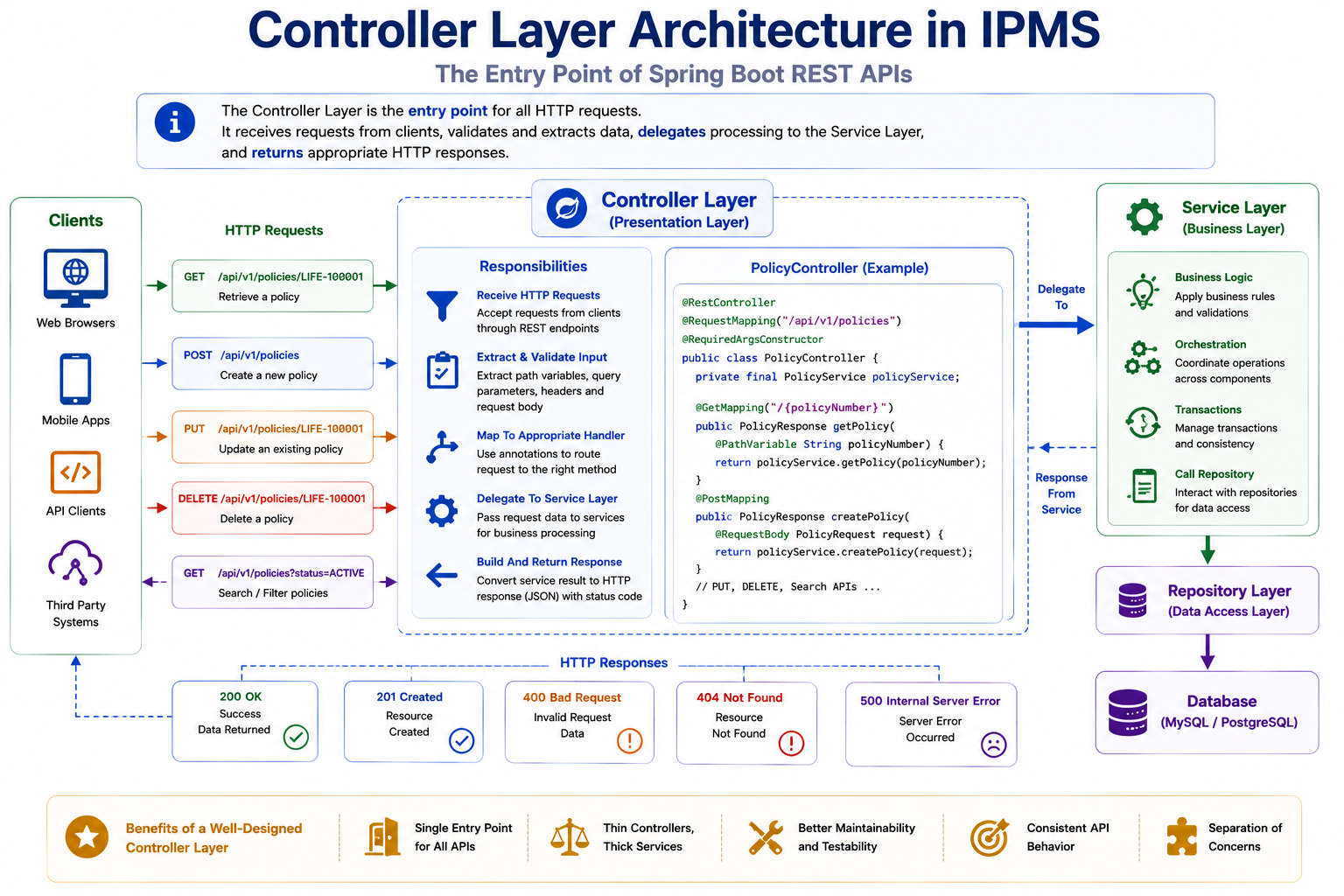
The controller layer receives requests and delegates processing to the service layer.
Creating DTOs
Remember from Chapter 5:
Never expose entities directly.
We create DTOs instead.
PolicyResponse DTO
public class PolicyResponse {

    private String policyNumber;

    private String policyType;

    private String status;

    private BigDecimal coverageAmount;

}
PolicyRequest DTO
public class PolicyRequest {

    private String policyType;

    private BigDecimal coverageAmount;

}
GET API
Retrieve a policy.
Endpoint
GET /api/v1/policies/LIFE-100001
Controller Method
@GetMapping("/{policyNumber}")
public PolicyResponse getPolicy(
        @PathVariable String policyNumber) {

    return policyService.getPolicy(policyNumber);
}
Request Processing Flow
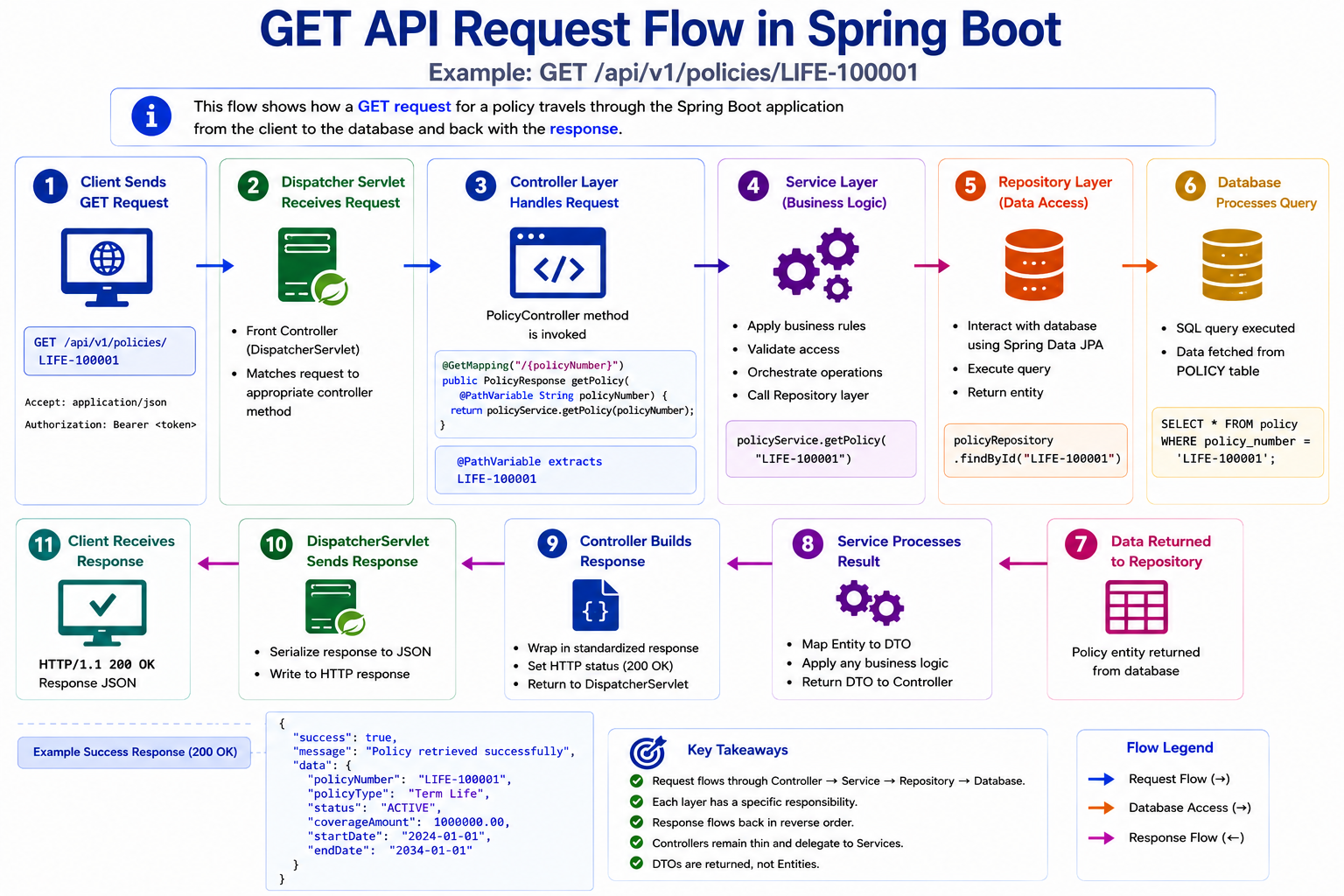
Path Variables
Path variables identify resources.
Example:
GET /policies/LIFE-100001
Value:
LIFE-100001
Spring extracts it automatically.
@PathVariable String policyNumber
POST API
Create a new policy.
Endpoint
POST /api/v1/policies
Request
{
  "policyType": "Term Life",
  "coverageAmount": 1000000
}
Controller
@PostMapping
public PolicyResponse createPolicy(
        @RequestBody PolicyRequest request) {

    return policyService.createPolicy(request);
}
Request Body Handling
Spring automatically converts JSON into Java objects.
JSON:
{
  "policyType": "Term Life"
}
becomes:
PolicyRequest request
using Jackson.
POST Request Flow
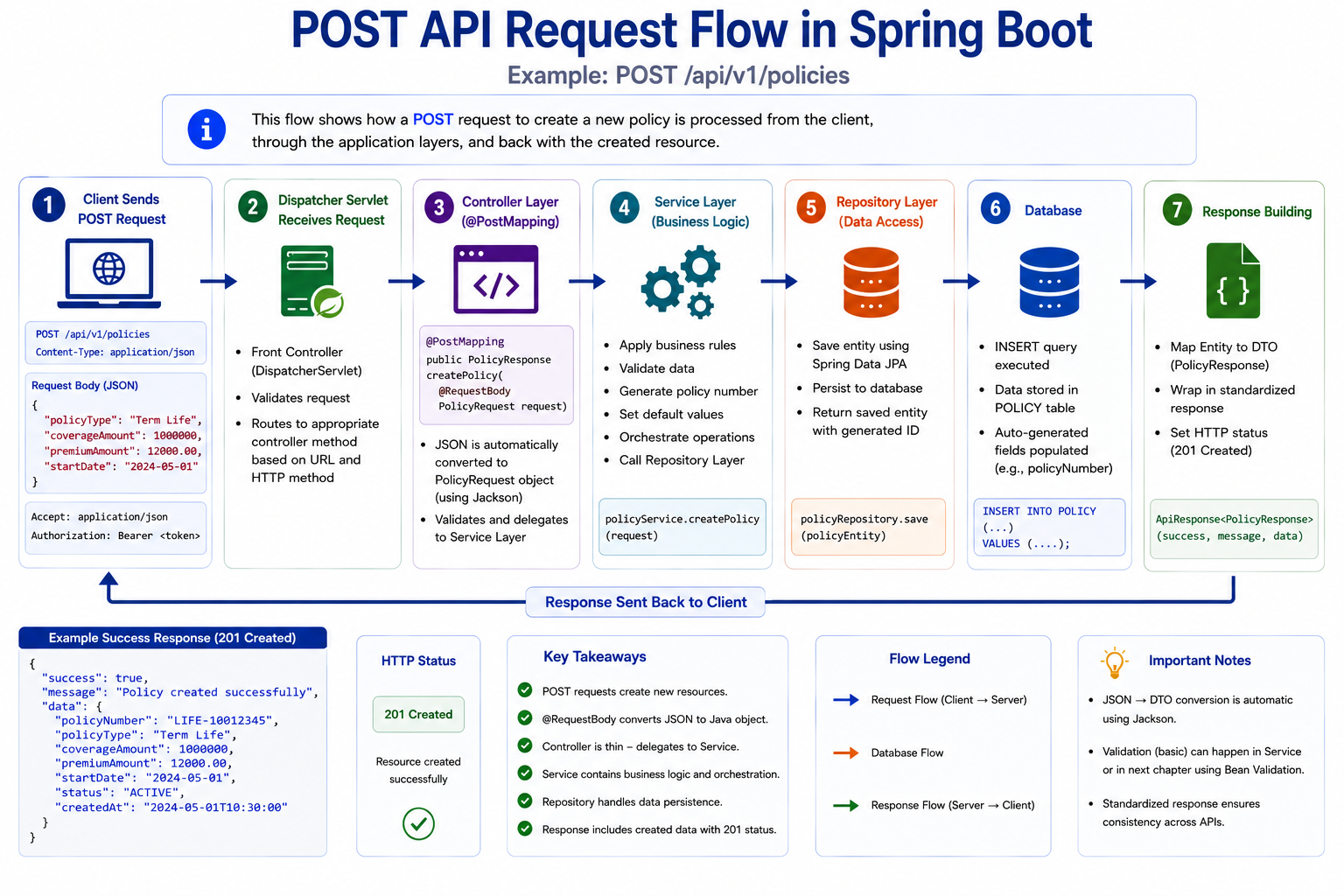
PUT API
Replace an existing policy.
Endpoint
PUT /api/v1/policies/LIFE-100001
Controller
@PutMapping("/{policyNumber}")
public PolicyResponse updatePolicy(
        @PathVariable String policyNumber,
        @RequestBody PolicyRequest request) {

    return policyService.updatePolicy(
            policyNumber,
            request);
}
DELETE API
Delete a policy.
Endpoint
DELETE /api/v1/policies/LIFE-100001
Controller
@DeleteMapping("/{policyNumber}")
public void deletePolicy(
        @PathVariable String policyNumber) {

    policyService.deletePolicy(policyNumber);
}
Query Parameters
Query parameters support filtering and searching.
Example:
GET /policies?status=ACTIVE
Controller
@GetMapping
public List<PolicyResponse> getPolicies(
        @RequestParam String status) {

    return policyService.getPolicies(status);
}
Request Mapping Annotations
Spring provides specialized mapping annotations.
| Annotation | HTTP Method |
|---|---|
| @GetMapping | GET |
| @PostMapping | POST |
| @PutMapping | PUT |
| @PatchMapping | PATCH |
| @DeleteMapping | DELETE |
Spring Request Mapping
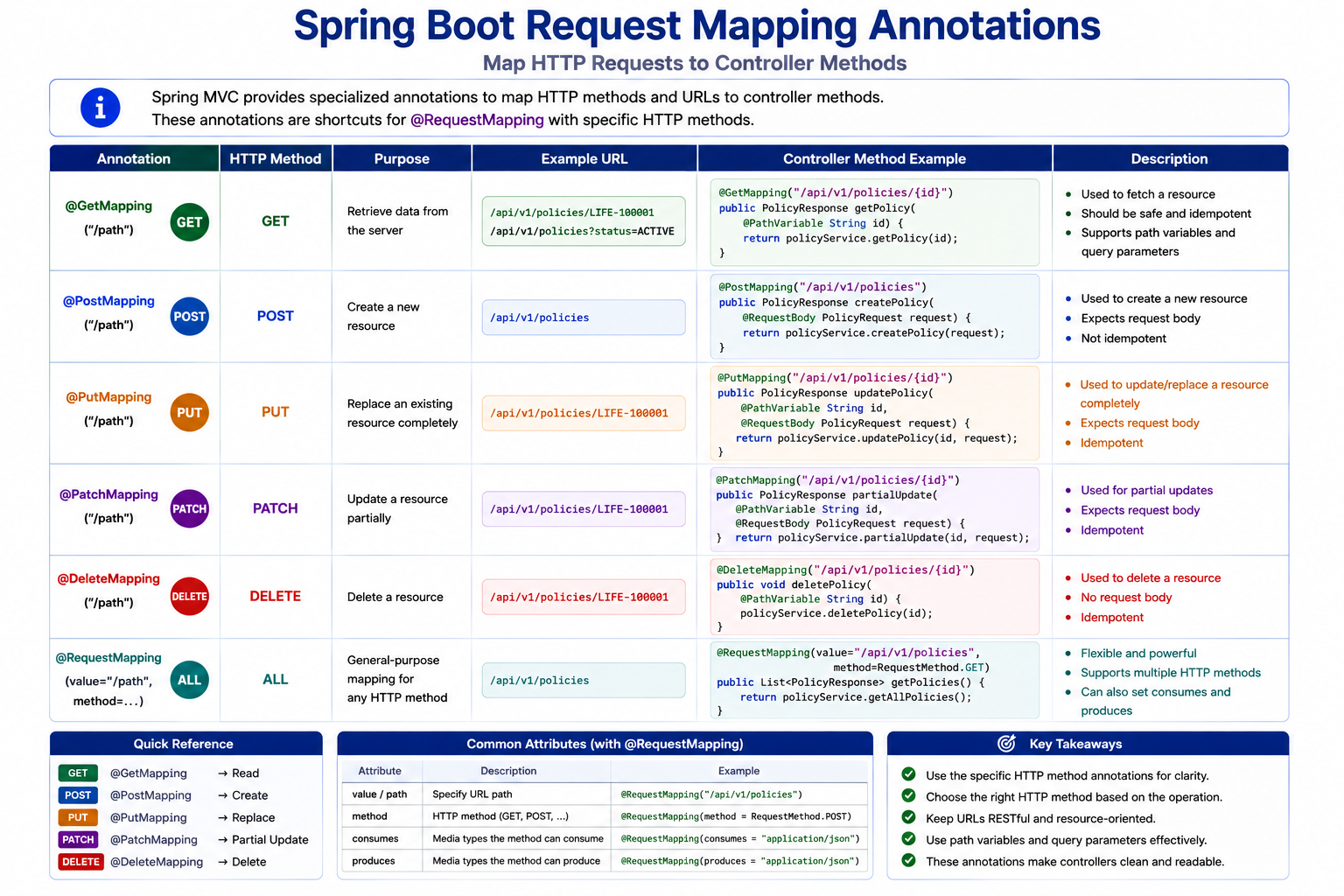
Returning HTTP Responses
Many APIs require custom status codes.
Example:
@GetMapping("/{policyNumber}")
public ResponseEntity<PolicyResponse>
getPolicy(String policyNumber) {

    return ResponseEntity.ok(
            policyService.getPolicy(policyNumber));
}
ResponseEntity
Benefits:
- Status code control
- Headers
- Response customization
Example:
return ResponseEntity
        .status(HttpStatus.CREATED)
        .body(response);
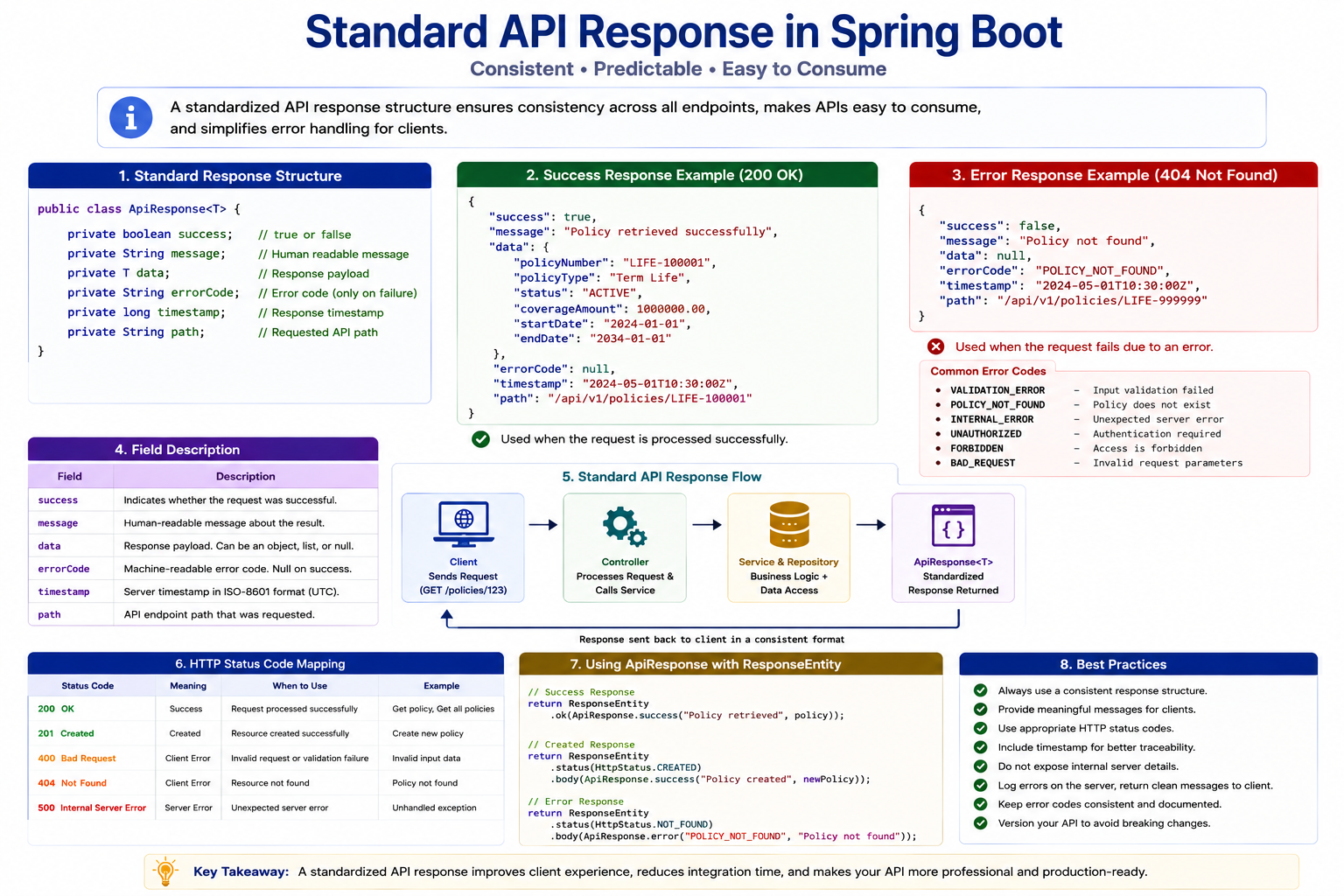
API Response Standardization
Enterprise APIs often use a standard response structure.
Standard Success Response
{
  "success": true,
  "message": "Policy retrieved successfully",
  "data": {
    "policyNumber": "LIFE-100001"
  }
}
Generic API Response
public class ApiResponse<T> {

    private boolean success;

    private String message;

    private T data;

}
Standardized Response Flow
Service Integration
Controller delegates to service layer.
@RestController
@RequiredArgsConstructor
public class PolicyController {

    private final PolicyService policyService;

}
Service:
@Service
public class PolicyService {

}
Dependency Injection is performed automatically by Spring.
Complete PolicyController
@RestController
@RequestMapping("/api/v1/policies")
@RequiredArgsConstructor
public class PolicyController {

    private final PolicyService policyService;

    @GetMapping("/{policyNumber}")
    public PolicyResponse getPolicy(
            @PathVariable String policyNumber) {

        return policyService.getPolicy(policyNumber);
    }

    @PostMapping
    public PolicyResponse createPolicy(
            @RequestBody PolicyRequest request) {

        return policyService.createPolicy(request);
    }

    @PutMapping("/{policyNumber}")
    public PolicyResponse updatePolicy(
            @PathVariable String policyNumber,
            @RequestBody PolicyRequest request) {

        return policyService.updatePolicy(
                policyNumber,
                request);
    }

    @DeleteMapping("/{policyNumber}")
    public void deletePolicy(
            @PathVariable String policyNumber) {

        policyService.deletePolicy(policyNumber);
    }
}
Best Practices
✅ Keep controllers thin
✅ Use DTOs
✅ Return proper status codes
✅ Standardize responses
✅ Use constructor injection
✅ Delegate business logic to services
Common Mistakes
❌ Business logic in controllers
❌ Returning entities directly
❌ Missing response standards
❌ Incorrect status codes
❌ Fat controllers
Interview Questions
-
What is a REST Controller?
-
Difference between @Controller and @RestController?
-
What is @RequestBody?
-
What is @PathVariable?
-
What is @RequestParam?
-
Why use DTOs?
-
What is ResponseEntity?
-
Why keep controllers thin?
-
How does Spring convert JSON to Java objects?
-
What is API response standardization?
Practice Exercises
-
Create ClaimController.
-
Create PremiumPaymentController.
-
Implement GET and POST APIs.
-
Create request and response DTOs.
-
Standardize API responses.
Key Takeaways
- Controllers are the entry point of APIs.
- Spring maps HTTP requests using annotations.
- DTOs separate API contracts from entities.
- Path variables identify resources.
- Request bodies contain payload data.
- ResponseEntity provides response control.
- Controllers should delegate business logic to services.
- Standardized responses improve API consistency.
Chapter Summary
In this chapter, you learned:
- REST Controllers
- GET, POST, PUT and DELETE APIs
- Request Mapping
- Path Variables
- Query Parameters
- Request Bodies
- ResponseEntity
- API Response Standardization
You can now build REST APIs using Spring Boot. In the next chapter, we will add validation and exception handling to make these APIs production ready.