
Chapter 11: Enterprise Integration with Feign and WebClient
In the previous chapter, we secured our APIs using Spring Security, OAuth2, JWT, and RBAC.
Our Insurance Policy Management System (IPMS) can now:
- Authenticate Users
- Authorize Requests
- Secure Endpoints
- Protect Sensitive Data
However, enterprise applications rarely operate in isolation.
Insurance systems must communicate with:
- Payment Gateways
- Notification Services
- Identity Providers
- Government Systems
- Banking Systems
- Partner Insurance Providers
In this chapter, we will learn how Spring Boot applications integrate with external systems using Feign Clients and Spring WebClient.
🎯 Learning Objectives
By the end of this chapter, you will be able to:
- Understand Enterprise Integration
- Understand Synchronous Communication
- Implement Feign Clients
- Implement WebClient
- Consume External APIs
- Configure Timeouts
- Handle Integration Errors
- Apply Integration Best Practices
- Design Insurance Service Integrations
Why Enterprise Integration Matters
Modern enterprise systems are interconnected.
Example:
Customer Purchases Policy
            ↓
Payment Gateway
            ↓
Policy Service
            ↓
Notification Service
            ↓
Customer Receives Confirmation
A single business transaction may involve multiple systems.
Integration in Insurance Systems
Common integrations include:
Payment Providers

SMS Providers

Email Providers

Identity Providers

KYC Verification Systems

Government Databases

Partner Insurance Systems
Enterprise Integration Overview
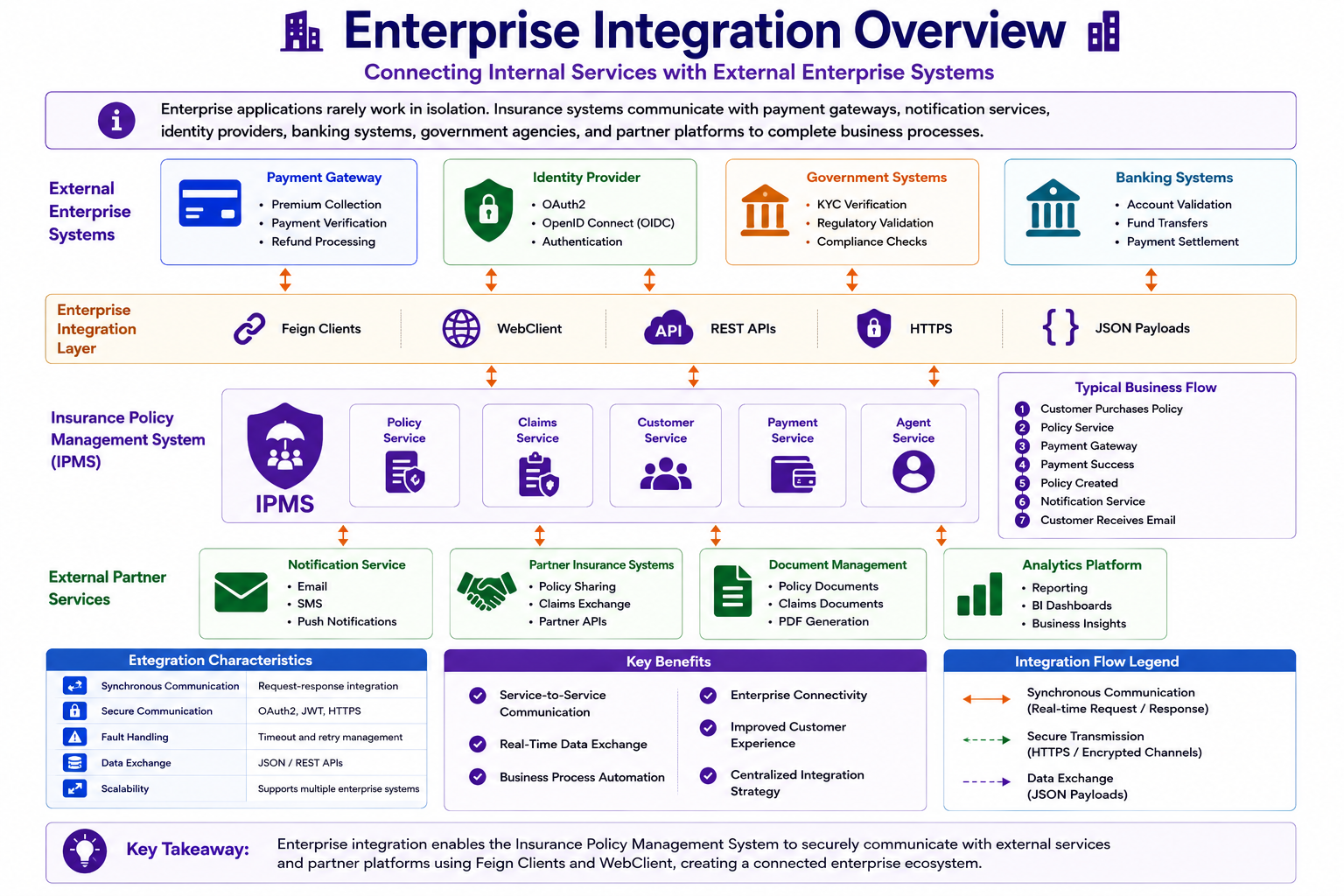
Enterprise systems constantly exchange information with external services.
Integration Patterns
Two major communication styles exist.
Synchronous Communication

Asynchronous Communication
Synchronous Communication
Request-response model.
Service A
     ↓ Request
Service B
     ↓ Response
Service A
Caller waits for response.
Examples
Policy Service
      ↓
Customer Service

Claim Service
      ↓
Policy Service

Payment Service
      ↓
Bank API
Spring Integration Options
Spring Boot provides:
RestTemplate (Legacy)

Feign Client

WebClient
Evolution of Spring Clients
RestTemplate
      ↓

Feign Client
      ↓

WebClient
Modern applications prefer:
Feign

WebClient
What is OpenFeign?
Feign is a declarative HTTP client.
Instead of writing:
HttpURLConnection
or
RestTemplate
we simply define an interface.
Feign Architecture
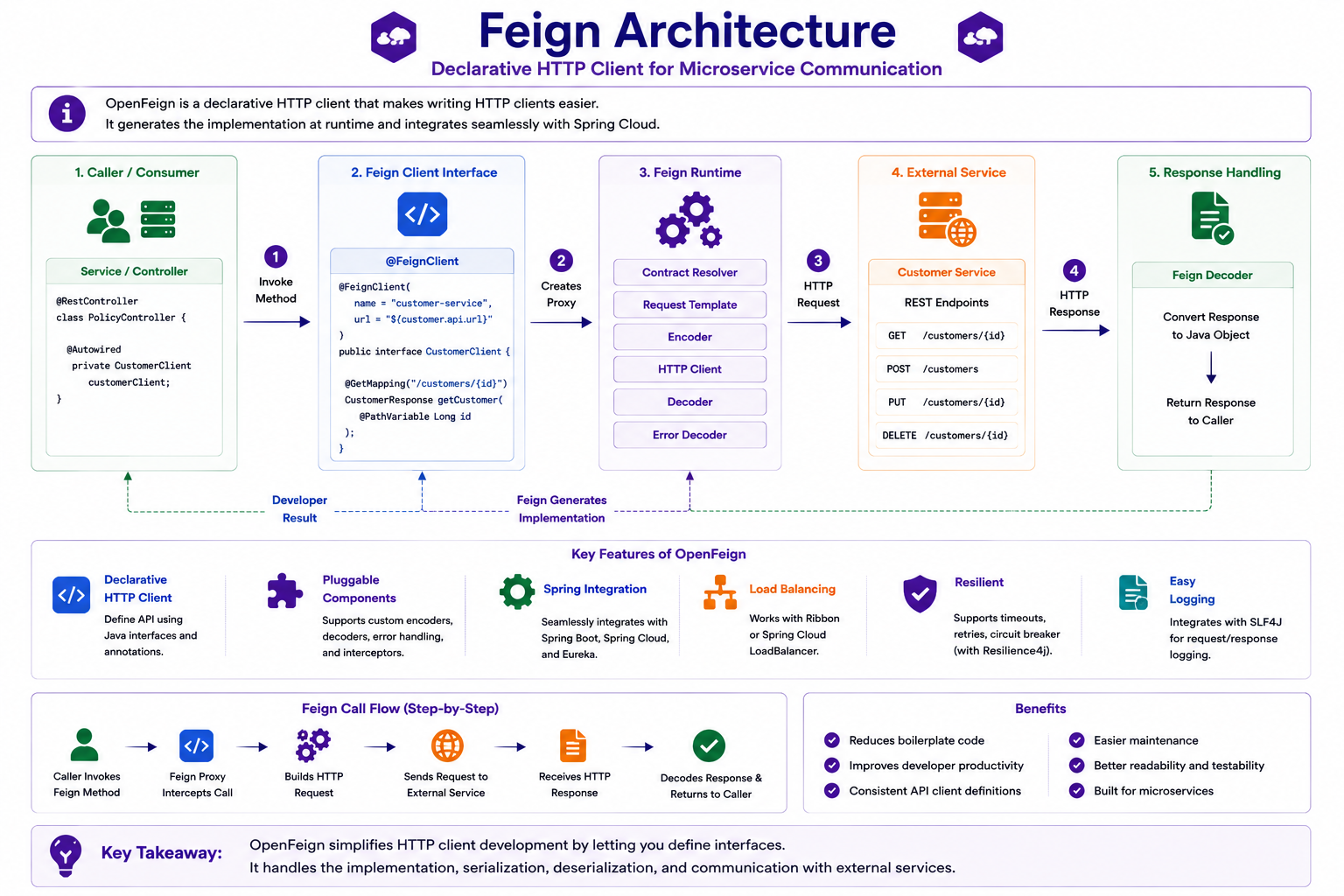
Feign automatically generates the client implementation.
Adding OpenFeign
Maven Dependency
<dependency>
    <groupId>
        org.springframework.cloud
    </groupId>

    <artifactId>
        spring-cloud-starter-openfeign
    </artifactId>
</dependency>
Enable Feign
@SpringBootApplication

@EnableFeignClients

public class Application {

}
Creating a Feign Client
@FeignClient(
    name = "customer-service",
    url = "${customer.api.url}"
)
public interface CustomerClient {

    @GetMapping(
        "/customers/{id}"
    )
    CustomerResponse getCustomer(
        @PathVariable Long id);

}
Feign Request Flow
CustomerResponse customer =
        customerClient.getCustomer(1L);
Feign automatically:
Builds Request

Calls Remote API

Converts Response

Returns DTO
Service Layer Example
@Service
@RequiredArgsConstructor
public class PolicyService {

    private final CustomerClient
            customerClient;

}
Policy Creation Example
CustomerResponse customer =
    customerClient.getCustomer(
        request.getCustomerId());
External data is retrieved seamlessly.
Feign Advantages
Simple

Readable

Declarative

Minimal Boilerplate

Spring Integration
What is WebClient?
WebClient is Spring's modern reactive HTTP client.
Introduced as a replacement for:
RestTemplate
WebClient Architecture
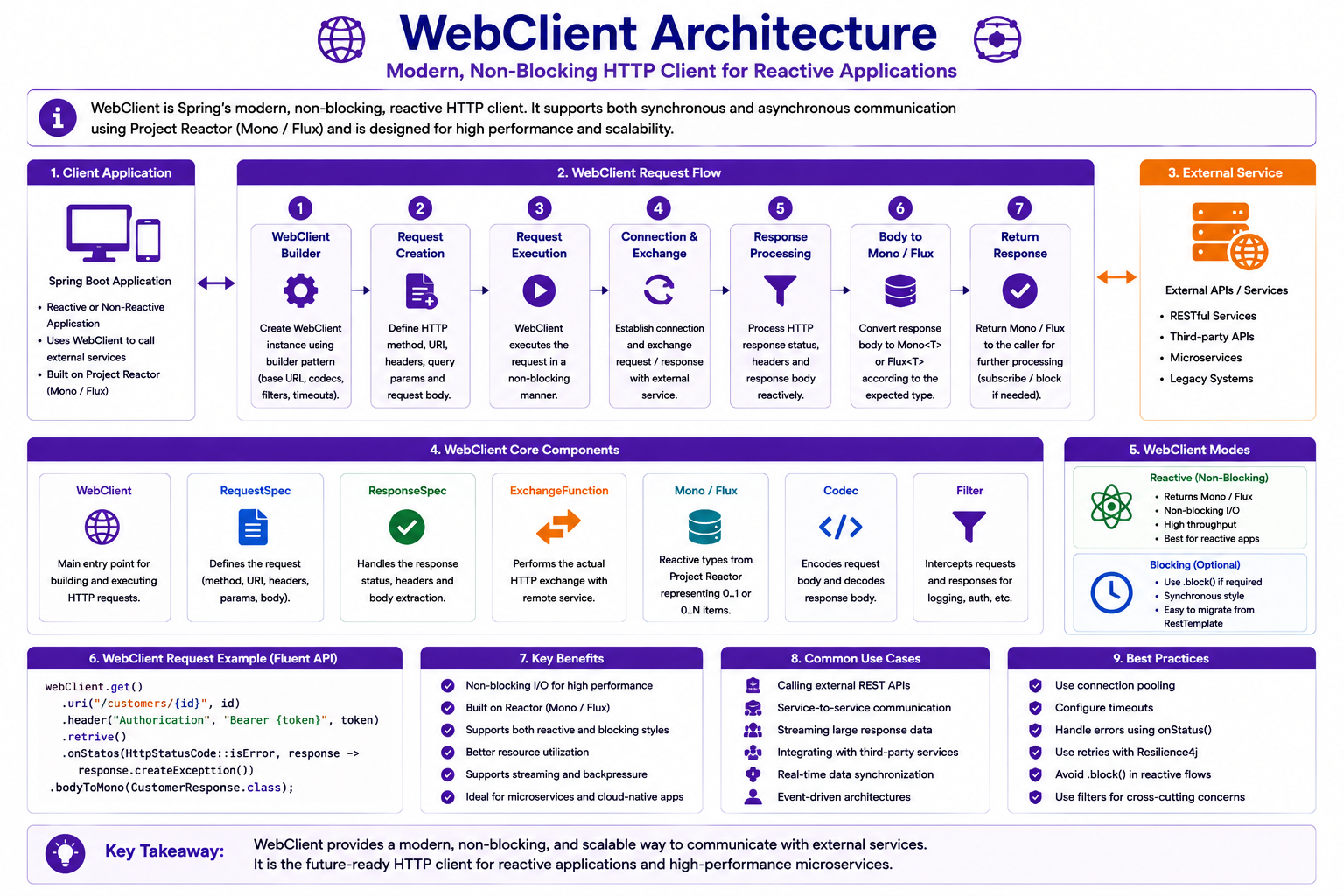
WebClient supports synchronous and reactive communication.
Adding WebFlux
<dependency>
    <groupId>
        org.springframework.boot
    </groupId>

    <artifactId>
        spring-boot-starter-webflux
    </artifactId>
</dependency>
Creating WebClient
@Bean
public WebClient webClient() {

    return WebClient.builder()
            .build();
}
Calling External API
webClient.get()
    .uri("/customers/{id}", id)
    .retrieve()
    .bodyToMono(
        CustomerResponse.class);
Response Handling
Mono<CustomerResponse>
Represents:
Future Response
without blocking threads.
Feign vs WebClient
| Feature | Feign | WebClient |
|---|---|---|
| Programming Style | Declarative | Fluent API |
| Learning Curve | Easy | Moderate |
| Reactive Support | No | Yes |
| Boilerplate | Very Low | Low |
| Enterprise Adoption | Very High | Very High |
Choosing Between Feign and WebClient
Use Feign when:
Simple Service Integration

Microservice Communication

Synchronous APIs
Use WebClient when:
Reactive Applications

Streaming APIs

High Throughput Workloads
Integration Error Handling
External services may fail.
Examples:
Timeout

Network Failure

Server Error

Authentication Error

Rate Limiting
Error Handling Architecture
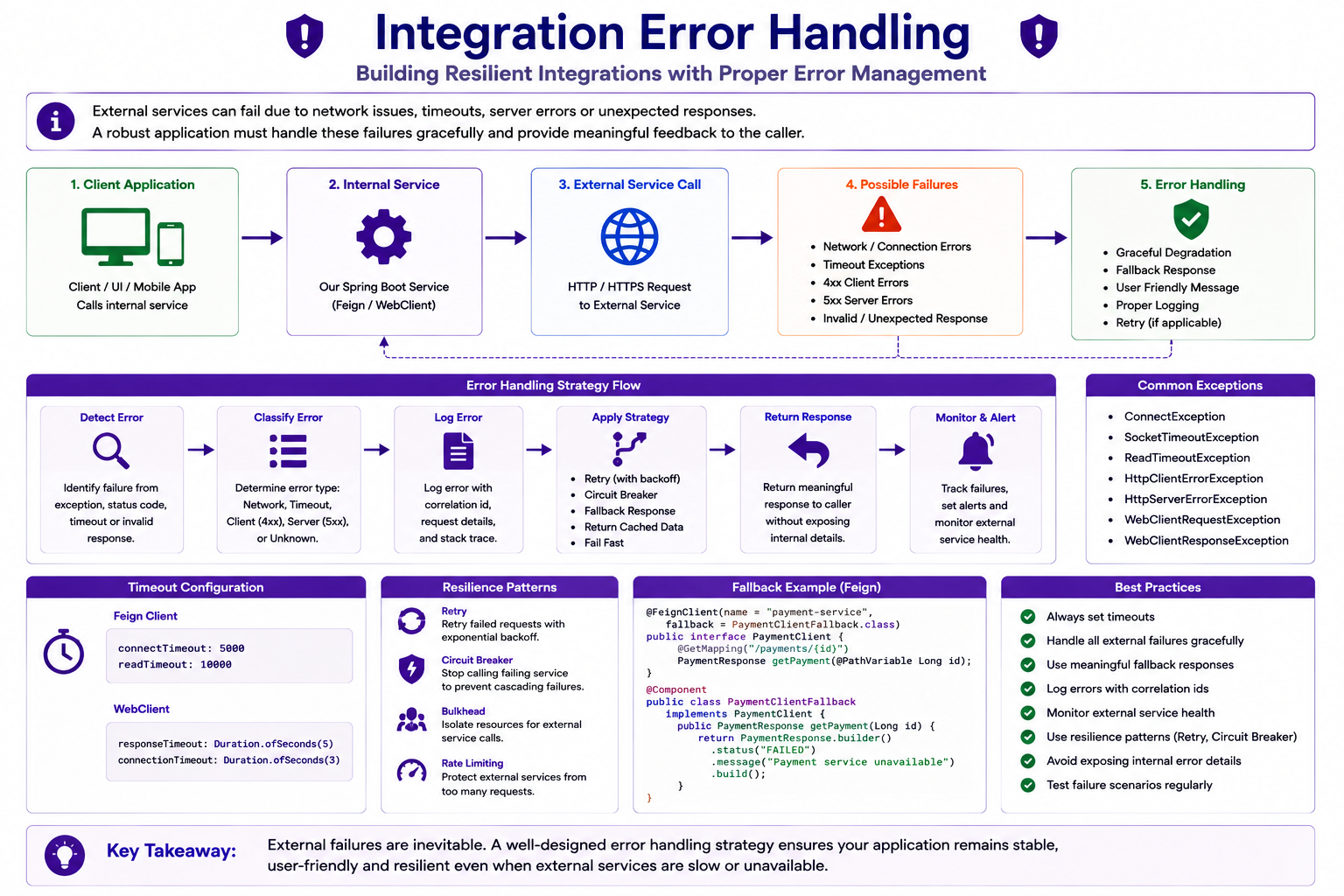
Integration failures must be handled gracefully.
Feign Exception Handling
try {

    customerClient.getCustomer(id);

}
catch (Exception ex) {

}
WebClient Error Handling
webClient.get()

.retrieve()

.onStatus(
    HttpStatusCode::isError,
    response -> ...
)
Timeouts
External services should never block indefinitely.
Connect Timeout
feign:
  client:
    config:
      default:
        connectTimeout: 5000
Read Timeout
feign:
  client:
    config:
      default:
        readTimeout: 10000
Why Timeouts Matter
Without timeout:
Request Hangs
With timeout:
Request Fails Fast
Better user experience.
Integration Security
External API calls often require:
API Keys

OAuth2 Tokens

JWT Tokens

Mutual TLS
Secured Integration Flow
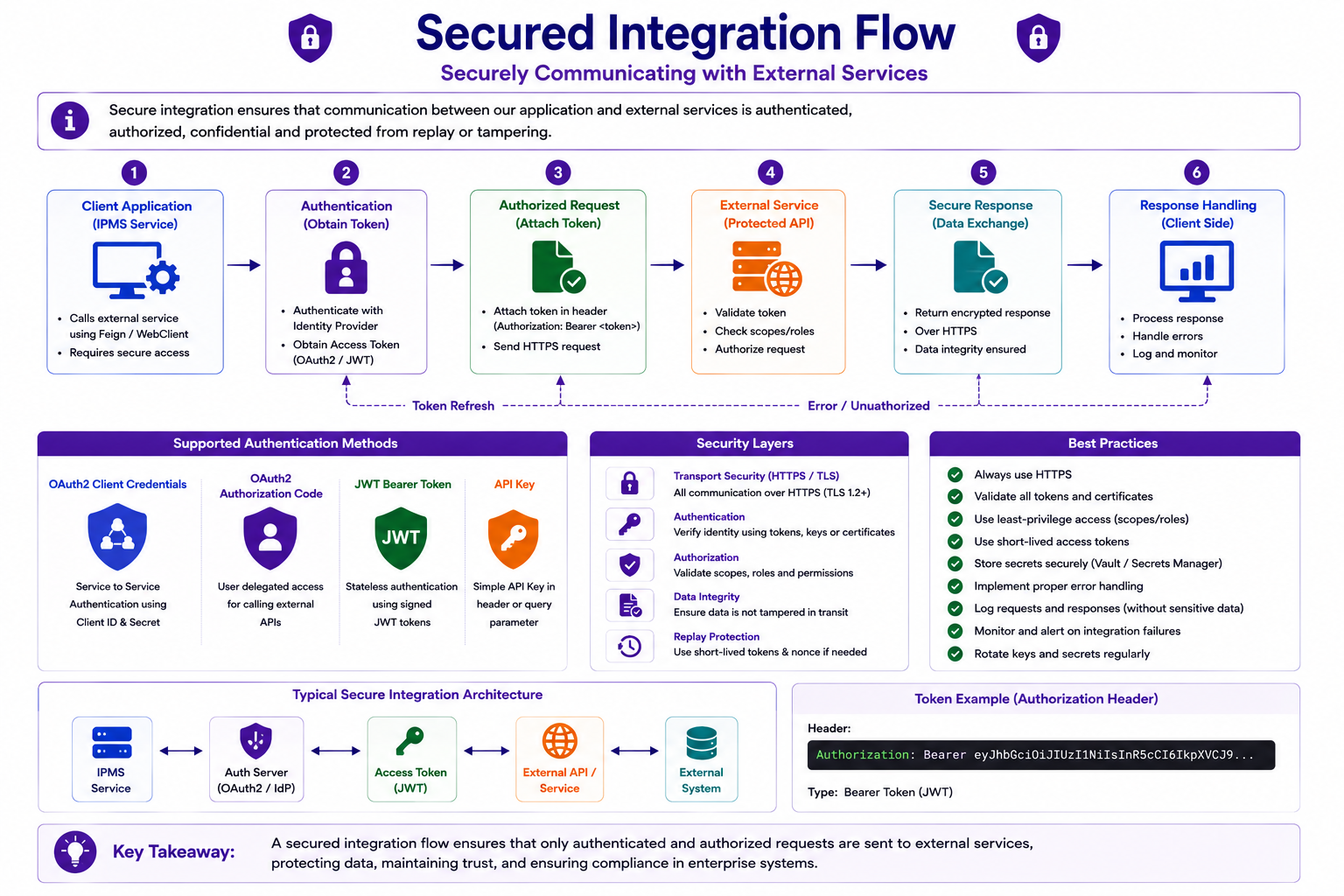
Security must extend beyond internal APIs.
Insurance Integration Example
Policy Purchase:
Customer
      ↓
Policy Service
      ↓
Payment Gateway
      ↓
Payment Success
      ↓
Policy Created
      ↓
Notification Service
      ↓
Email Sent
Insurance Integration Architecture
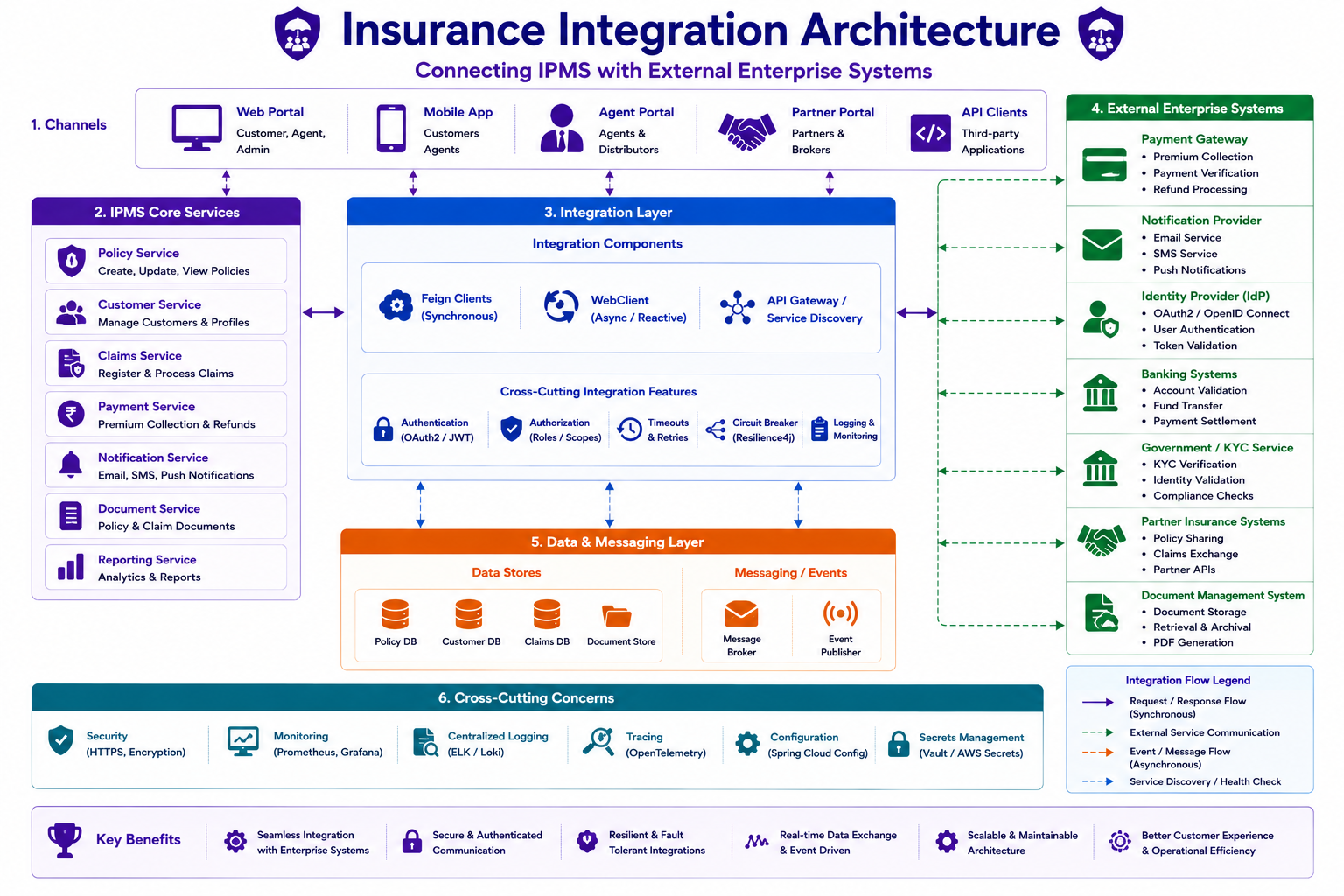
A single business operation often involves multiple external services.
Best Practices
✅ Use Feign for simple service-to-service communication
✅ Use WebClient for reactive integrations
✅ Configure timeouts
✅ Handle external failures gracefully
✅ Secure external communications
✅ Centralize integration configurations
✅ Log requests and responses carefully
Common Mistakes
❌ No timeout configuration
❌ Ignoring API failures
❌ Hardcoding endpoint URLs
❌ Exposing API keys
❌ Excessive retry attempts
❌ Tight coupling with external APIs
Interview Questions
-
What is Feign Client?
-
What is WebClient?
-
Difference between Feign and WebClient?
-
Why is RestTemplate deprecated?
-
What is reactive communication?
-
Why are timeouts important?
-
How do you handle integration failures?
-
What is Mono?
-
When should WebClient be preferred?
-
How do you secure external API calls?
Practice Exercises
-
Create a Customer Feign Client.
-
Integrate with a Payment API.
-
Configure connection timeout.
-
Configure read timeout.
-
Create a WebClient bean.
-
Call a Customer API using WebClient.
-
Handle external service failures.
-
Secure API integrations with JWT.
Key Takeaways
- Enterprise systems require external integrations.
- Feign simplifies synchronous API communication.
- WebClient is Spring's modern HTTP client.
- Reactive communication improves scalability.
- Timeouts are essential.
- External failures must be handled gracefully.
- Secure communication is mandatory.
- Integration architecture is a core enterprise skill.
Chapter Summary
In this chapter, you learned:
- Enterprise Integration
- Feign Client
- WebClient
- Synchronous Communication
- External API Consumption
- Timeout Configuration
- Error Handling
- Secure Integrations
Our Insurance Policy Management System can now communicate with external systems and partner services using modern Spring integration technologies.
In the next chapter, we will focus on Resilience Patterns using Resilience4j, including Retry, Circuit Breaker, Bulkhead, and Rate Limiting.