
Chapter 15: Containerization with Docker and Kubernetes
In the previous chapter, we transformed our Insurance Policy Management System (IPMS) into an event-driven architecture using Apache Kafka.
Our platform now consists of multiple independent services:
- Policy Service
- Claim Service
- Payment Service
- Notification Service
- API Gateway
While microservices improve scalability and maintainability, they also introduce new deployment challenges.
How do we ensure that an application behaves consistently across:
- Developer laptops
- Testing environments
- Staging servers
- Production clusters
How do we deploy dozens or hundreds of service instances efficiently?
This is where containerization and orchestration become essential.
Docker enables us to package applications and their dependencies into portable containers, while Kubernetes provides the platform to deploy, manage, scale, and monitor those containers in production environments.
In this chapter, we will containerize our Spring Boot microservices and deploy them using Kubernetes.
🎯 Learning Objectives
By the end of this chapter, you will be able to:
- Understand containerization concepts
- Differentiate virtual machines and containers
- Build Docker images using Dockerfiles
- Run Spring Boot applications inside containers
- Use Docker Compose for multi-container applications
- Understand Kubernetes architecture
- Deploy applications using Pods and Deployments
- Configure Services, ConfigMaps, and Secrets
- Scale applications using Kubernetes
- Deploy the complete IPMS platform to Kubernetes
Why Containerization?
Traditional application deployments often encounter environment inconsistencies.
A common problem is:
Works on My Machine
Example:
Developer Machine
      ↓
Java 21

Testing Server
      ↓
Java 17

Production Server
      ↓
Java Missing
Result:
Application Failure
Applications become difficult to deploy and maintain because environments differ.
Containerization solves this problem by packaging everything required to run an application into a single deployable unit.
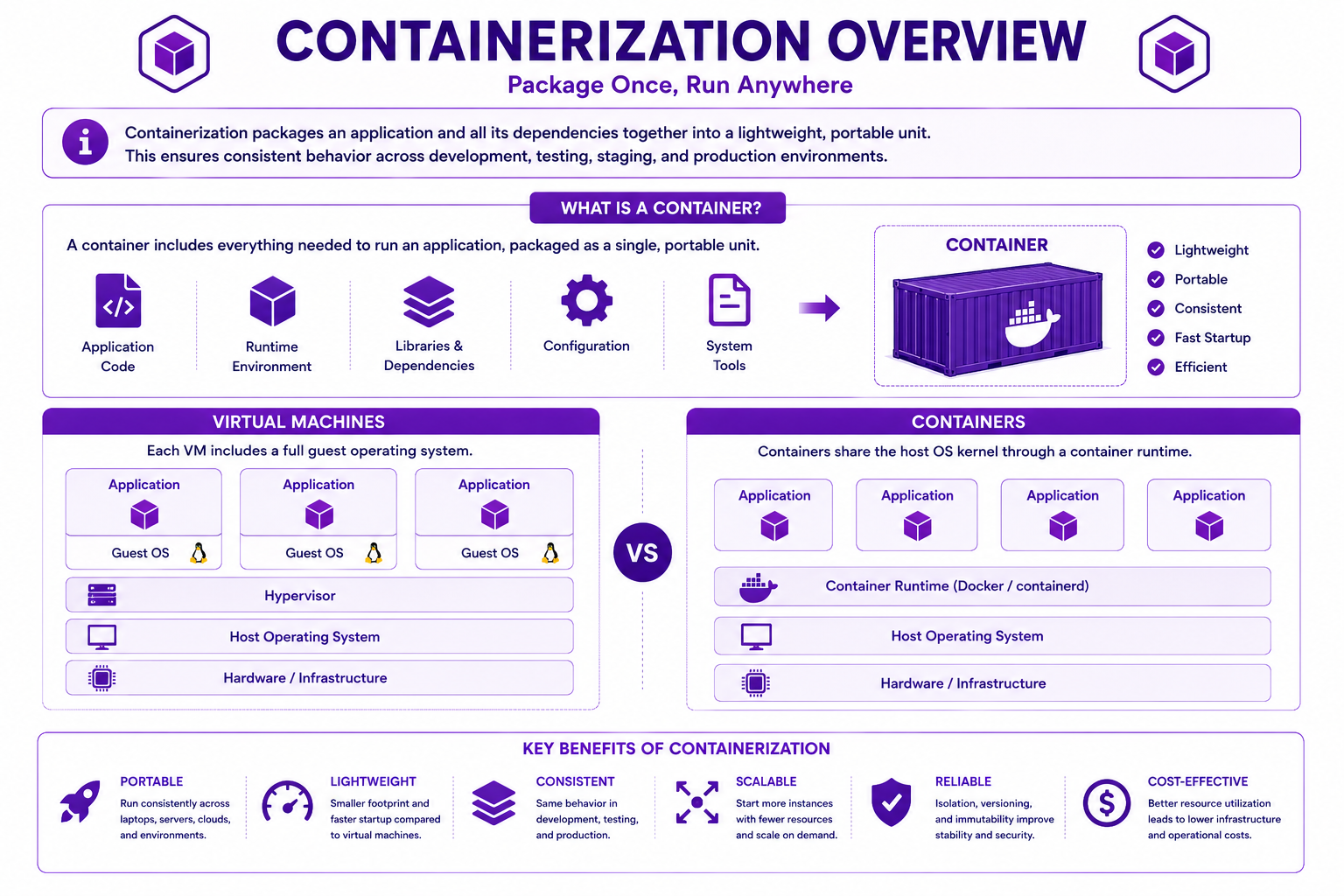
What is a Container?
A container is a lightweight package that contains:
- Application Code
- Runtime Environment
- Libraries
- Dependencies
- Configuration
All required components travel together.
This ensures consistent behavior across environments.
Virtual Machines vs Containers
Virtual Machines
Each virtual machine contains its own operating system.
Application
Guest OS
Hypervisor
Host OS
Hardware
Advantages:
- Strong isolation
- Multiple operating systems
Disadvantages:
- Large size
- Slow startup
- Higher resource consumption
Containers
Containers share the host operating system kernel.
Application
Container Runtime
Host OS
Hardware
Advantages:
- Lightweight
- Fast startup
- Portable
- Efficient resource utilization
Containerization Overview
Docker Fundamentals
Docker is the most widely used containerization platform.
Docker provides tools to:
- Build containers
- Run containers
- Manage containers
- Distribute containers
Key concepts include:
Dockerfile
      ↓
Image
      ↓
Container
      ↓
Registry
Understanding Docker Components
Dockerfile
A text file containing instructions for building an image.
Docker Image
A read-only template used to create containers.
Docker Container
A running instance of an image.
Docker Registry
A repository for storing images.
Examples:
- Docker Hub
- AWS ECR
- Azure Container Registry
Creating a Dockerfile
Let us containerize the Policy Service.
FROM eclipse-temurin:21-jre

WORKDIR /app

COPY target/policy-service.jar app.jar

EXPOSE 8080

ENTRYPOINT ["java","-jar","app.jar"]
Explanation:
FROM       → Base image
WORKDIR    → Working directory
COPY       → Copies application artifact
EXPOSE     → Exposed port
ENTRYPOINT → Startup command
Building a Docker Image
Build the image:
docker build -t policy-service:1.0 .
Result:
policy-service:1.0
Docker image successfully created.
Running a Docker Container
Start the application:
docker run -p 8080:8080 policy-service:1.0
Application becomes available at:
http://localhost:8080
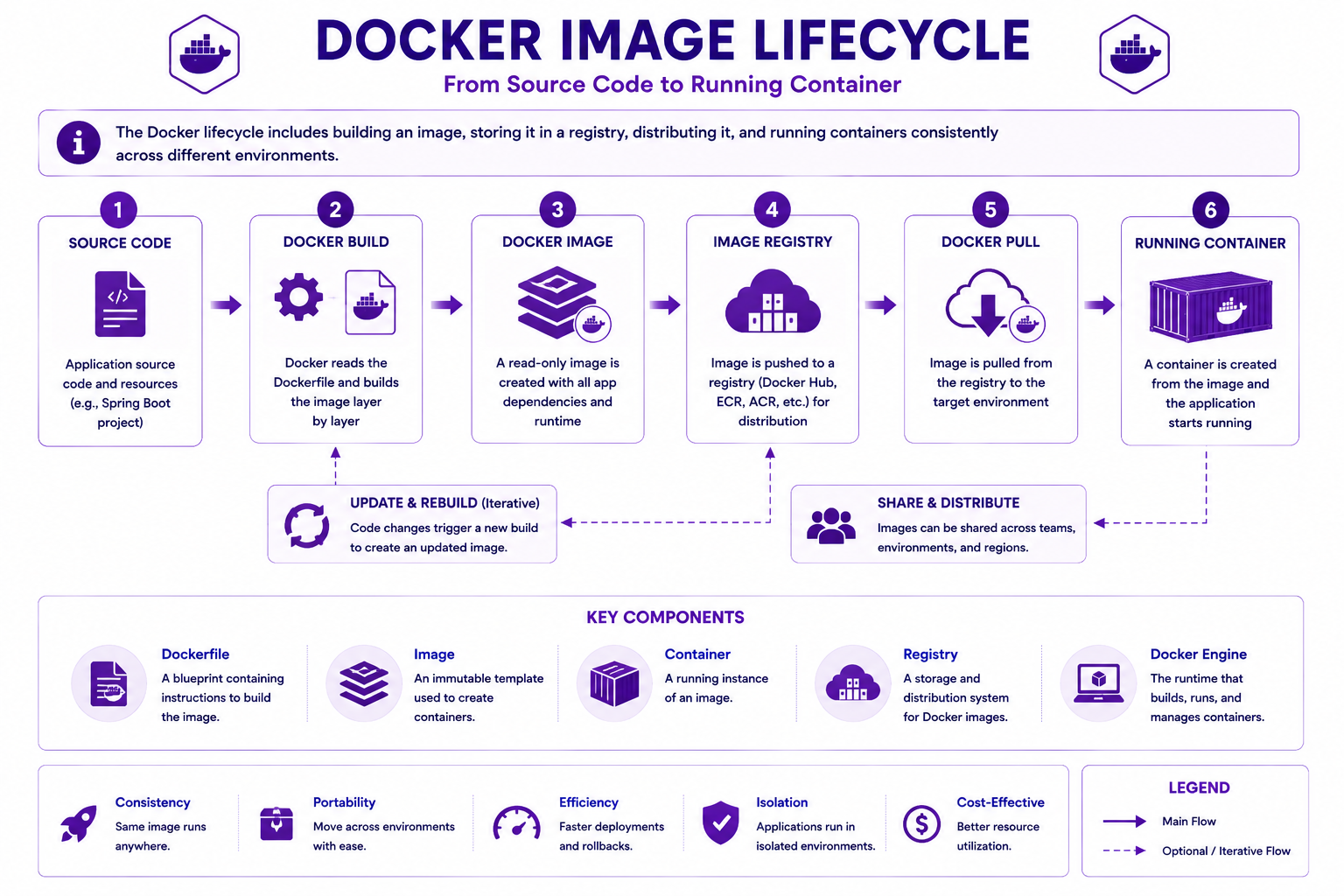
Docker Image Lifecycle
The complete Docker workflow consists of:
Source Code
      ↓
Docker Build
      ↓
Docker Image
      ↓
Docker Registry
      ↓
Docker Pull
      ↓
Running Container
Docker Image Lifecycle
Multi-Stage Builds
Enterprise applications typically use multi-stage builds.
Example:
FROM maven:3.9-eclipse-temurin-21 AS build

COPY . .

RUN mvn clean package

FROM eclipse-temurin:21-jre

COPY --from=build \
target/policy-service.jar \
app.jar

ENTRYPOINT ["java","-jar","app.jar"]
Benefits:
- Smaller image size
- Improved security
- Faster deployment
- Reduced attack surface
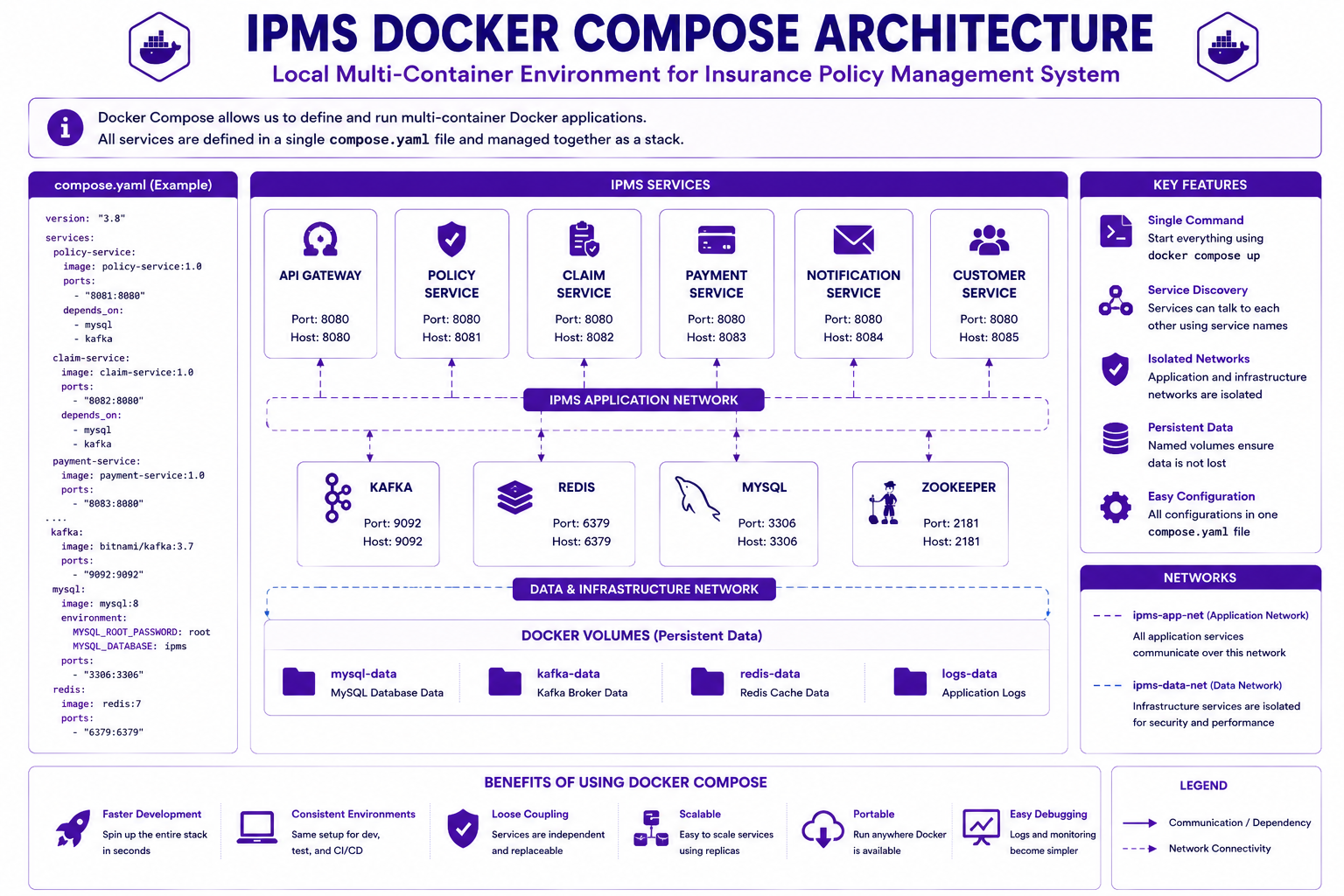
Managing Multiple Containers
Our IPMS solution includes:
Policy Service
Claim Service
Payment Service
Notification Service
Kafka
Redis
MySQL
Starting each container manually becomes difficult.
Docker Compose solves this challenge.
Docker Compose
Docker Compose allows multiple containers to be started and managed using a single configuration file.
Example:
version: "3.8"

services:
  mysql:
    image: mysql:8

  kafka:
    image: bitnami/kafka

  policy-service:
    image: policy-service:1.0

  claim-service:
    image: claim-service:1.0
Start all services:
docker compose up
IPMS Docker Compose Architecture
Why Kubernetes?
Docker manages individual containers.
Production systems require much more:
Scaling
High Availability
Load Balancing
Self Healing
Rolling Updates
Service Discovery
Kubernetes provides these capabilities.
What is Kubernetes?
Kubernetes is an open-source container orchestration platform.
It automates:
- Deployment
- Scaling
- Networking
- Monitoring
- Recovery
Kubernetes has become the industry standard for container orchestration.
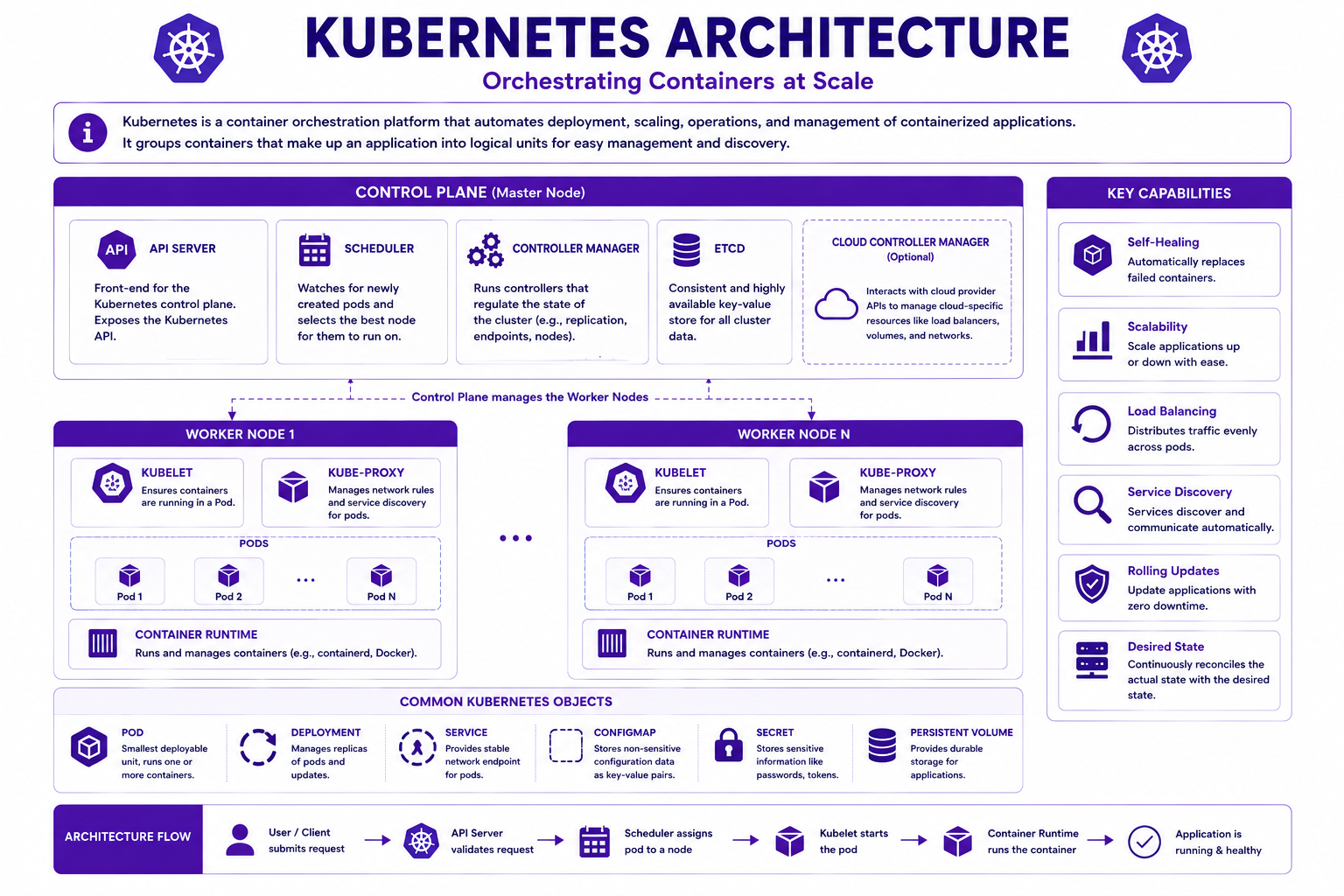
Kubernetes Architecture
A Kubernetes cluster consists of:
Control Plane
Responsible for cluster management.
Components:
- API Server
- Scheduler
- Controller Manager
Worker Nodes
Run application workloads.
Each worker node contains:
- Kubelet
- Container Runtime
- Pods
Kubernetes Architecture
Understanding Pods
A Pod is the smallest deployable unit in Kubernetes.
Example:
Policy Service Container
runs inside:
Policy Service Pod
Pods may contain:
- One Container
- Multiple Containers
Most Spring Boot applications use one container per pod.
Deployments
Deployments manage Pods automatically.
Responsibilities:
- Create Pods
- Replace Failed Pods
- Scale Pods
- Perform Rolling Updates
Example:
apiVersion: apps/v1
kind: Deployment

metadata:
  name: policy-service
Scaling Applications
To increase capacity:
replicas: 3
Result:
Policy Service

Pod-1
Pod-2
Pod-3
Kubernetes distributes traffic automatically across pods.
Kubernetes Services
Pods are temporary.
Their IP addresses may change.
Services provide stable networking.
Example:
kind: Service
Services enable communication between applications.
Service Types
ClusterIP
Internal communication only.
NodePort
Accessible through worker node ports.
LoadBalancer
Accessible externally through cloud load balancers.
ConfigMaps
Configuration should never be hardcoded.
Bad:
jdbc:mysql://localhost:3306/ipms
Better:
Configuration stored externally
Example:
kind: ConfigMap

data:
  DB_HOST: mysql
Benefits:
- Environment independence
- Easier maintenance
- Better portability
Secrets
Sensitive information should be stored separately.
Examples:
Database Passwords
JWT Secrets
OAuth Client Secrets
API Keys
Example:
kind: Secret
Benefits:
- Improved security
- Centralized management
- Better compliance
Rolling Updates
Production deployments should avoid downtime.
Kubernetes supports rolling updates.
Process:
Version 1
      ↓
Version 2
      ↓
Gradual Replacement
Benefits:
- Zero downtime
- Reduced deployment risk
- Easy rollback
Deploying a Spring Boot Application
Deploy application:
kubectl apply -f policy-deployment.yaml
Create service:
kubectl apply -f policy-service.yaml
Verify:
kubectl get pods

kubectl get services
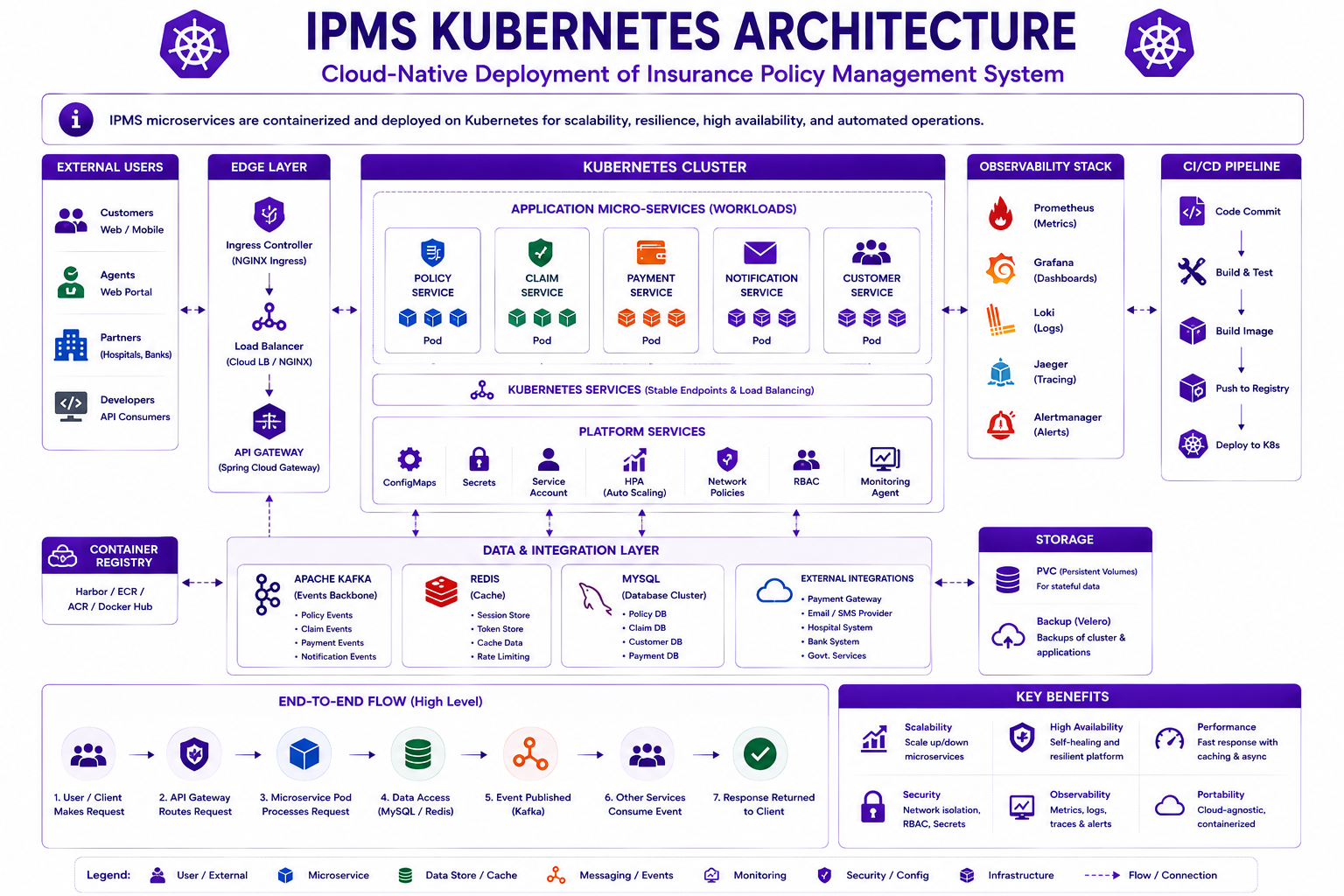
IPMS Kubernetes Deployment Architecture
The complete IPMS deployment includes:
API Gateway

Policy Service
Claim Service
Payment Service
Notification Service

Kafka
Redis
MySQL

ConfigMaps
Secrets
IPMS Kubernetes Architecture
Best Practices
✅ Use multi-stage Docker builds
✅ Keep images small
✅ Use Kubernetes Deployments
✅ Externalize configuration
✅ Store secrets securely
✅ Implement health checks
✅ Use rolling updates
✅ Monitor containers continuously
Common Mistakes
❌ Hardcoding configuration
❌ Storing secrets in source code
❌ Creating oversized images
❌ Running multiple applications inside one container
❌ Ignoring readiness and liveness probes
❌ Not configuring resource limits
Interview Questions
-
What is containerization?
-
What is the difference between virtual machines and containers?
-
What is a Docker image?
-
What is a Dockerfile?
-
What is Docker Compose?
-
What is Kubernetes?
-
What is a Pod?
-
What is a Deployment?
-
What is a Service?
-
What is a ConfigMap?
-
What is a Secret?
-
What are rolling updates?
-
Why are multi-stage builds used?
-
What are the advantages of Kubernetes?
Practice Exercises
-
Containerize the Policy Service.
-
Create a Dockerfile for Claim Service.
-
Build and run Docker images.
-
Create an IPMS Docker Compose configuration.
-
Deploy Policy Service to Kubernetes.
-
Configure ConfigMaps and Secrets.
-
Scale Policy Service to three replicas.
-
Perform a rolling update.
Key Takeaways
- Containers package applications and dependencies together.
- Docker simplifies application deployment.
- Docker images are created using Dockerfiles.
- Docker Compose manages multi-container environments.
- Kubernetes orchestrates containers at scale.
- Pods are the smallest deployable units.
- Deployments manage application lifecycle.
- Services provide stable networking.
- ConfigMaps externalize configuration.
- Secrets securely store sensitive data.
- Kubernetes enables scalable and resilient deployments.
Chapter Summary
In this chapter, you learned:
- Containerization Fundamentals
- Virtual Machines vs Containers
- Docker Architecture
- Dockerfiles
- Docker Images
- Multi-Stage Builds
- Docker Compose
- Kubernetes Fundamentals
- Pods
- Deployments
- Services
- ConfigMaps
- Secrets
- Rolling Updates
Our Insurance Policy Management System is now fully cloud-native and deployment-ready.
In the next chapter, we will focus on API Performance, Redis Caching, Database Optimization, Performance Testing, and Scalability.