
Chapter 02: OLTP, OLAP, HTAP and Modern Analytics
In the previous chapter, we explored the evolution of enterprise data platforms and learned how data architectures have transformed from silos to AI-ready platforms.
In this chapter, we will dive deep into different data processing paradigms—OLTP, OLAP, and HTAP—and understand how modern analytics platforms handle diverse workloads.
Using our Digital Banking Platform case study, we will understand when and why to use each approach, and how they work together in a modern data ecosystem.
🎯 Learning Objectives
By the end of this chapter, you will be able to:
- Understand the differences between OLTP, OLAP, and HTAP systems
- Explain the characteristics of each processing paradigm
- Recognize appropriate use cases for each approach
- Understand how modern cloud platforms support hybrid workloads
- Differentiate between transactional and analytical processing
- Identify banking use cases for each paradigm
- Understand the role of HTAP in modern architectures
- Recognize the trends shaping modern analytics
What Are OLTP, OLAP, and HTAP?
These three paradigms represent different ways of processing data:
OLTP  - Online Transaction Processing
OLAP  - Online Analytical Processing
HTAP  - Hybrid Transactional/Analytical Processing
Think of them as different tools for different jobs:
OLTP = Day-to-day operations (like a cash register)
OLAP = Business intelligence (like a financial report)
HTAP = Both at the same time (like real-time analytics)
Real-World Banking Example
Suppose a bank processes a customer's transaction:
OLTP System (Transactional)
Customer withdraws $100 from ATM
↓
Update account balance immediately
↓
Record transaction details
↓
Return success/failure to customer
OLAP System (Analytical)
Data from all transactions (millions)
↓
Aggregate by branch, region, customer type
↓
Analyze spending patterns
↓
Generate monthly reports
HTAP System (Hybrid)
Transaction is processed (OLTP)
↓
Updated data is immediately available for analytics
↓
Real-time fraud detection runs on transaction
↓
Customer receives instant notification
Deep Dive: OLTP Systems
OLTP systems are the backbone of day-to-day business operations.
What is OLTP?
Online Transaction Processing
- High volume of short transactions
- Fast response time (milliseconds)
- High concurrency (many users)
- Data integrity is critical
- ACID compliance is essential
Characteristics of OLTP
| Characteristic | Description |
|---|---|
| Transaction Volume | Very high (thousands per second) |
| Response Time | Milliseconds |
| Data Model | Normalized (3NF) |
| Query Complexity | Simple, known queries |
| Data Freshness | Current data only |
| Concurrency | High (many users) |
| ACID Compliance | Required |
| Data Size | Small to medium |
Banking OLTP Use Cases
1. ATM Withdrawals
   - Update account balance
   - Record transaction
   - Check available funds

2. Online Payments
   - Verify account
   - Process payment
   - Update balances
   - Generate confirmation

3. Customer Registration
   - Validate customer data
   - Create customer record
   - Open accounts
   - Send confirmation

4. Loan Applications
   - Validate application
   - Check eligibility
   - Create loan record
   - Update status
OLTP Technologies
Relational Databases:
- Google Cloud SQL (PostgreSQL, MySQL)
- Google Cloud Spanner
- Oracle, SQL Server
- PostgreSQL, MySQL

NoSQL Databases:
- Firestore
- Bigtable
- MongoDB
- Cassandra
Deep Dive: OLAP Systems
OLAP systems are designed for complex analysis and business intelligence.
What is OLAP?
Online Analytical Processing
- Complex queries on large datasets
- Slower response time (seconds to minutes)
- Read-intensive workloads
- Historical and aggregated data
- Optimized for analytics
Characteristics of OLAP
| Characteristic | Description |
|---|---|
| Transaction Volume | Low (few queries) |
| Response Time | Seconds to minutes |
| Data Model | Denormalized (Star/Snowflake) |
| Query Complexity | Complex, ad-hoc queries |
| Data Freshness | Historical data |
| Concurrency | Moderate |
| ACID Compliance | Not required |
| Data Size | Very large (terabytes to petabytes) |
Banking OLAP Use Cases
1. Customer Analytics
   - Customer segmentation
   - Lifetime value analysis
   - Churn prediction
   - Cross-sell opportunities

2. Transaction Analytics
   - Spending patterns
   - Payment trends
   - Merchant analytics
   - Channel performance

3. Risk Analytics
   - Credit risk assessment
   - Portfolio performance
   - Regulatory reporting
   - Stress testing

4. Fraud Analytics
   - Pattern detection
   - Anomaly detection
   - Investigation support
   - Regulatory compliance
OLAP Technologies
Cloud Data Warehouses:
- Google BigQuery
- Amazon Redshift
- Azure Synapse
- Snowflake

Business Intelligence:
- Looker
- Tableau
- Power BI
- MicroStrategy

ETL/ELT Tools:
- Dataform
- dbt
- Dataflow
- Dataproc
Deep Dive: HTAP Systems
HTAP is the convergence of transactional and analytical processing.
What is HTAP?
Hybrid Transactional/Analytical Processing
- Process transactions and analytics simultaneously
- Real-time insights on operational data
- No data movement between systems
- Single system for both workloads
Characteristics of HTAP
| Characteristic | Description |
|---|---|
| Transaction Volume | High |
| Response Time | Milliseconds to seconds |
| Data Model | Hybrid (normalized + denormalized) |
| Query Complexity | Mixed (simple + complex) |
| Data Freshness | Real-time |
| Concurrency | High |
| ACID Compliance | Required |
| Data Size | Large |
Banking HTAP Use Cases
1. Real-time Fraud Detection
   - Process transaction (OLTP)
   - Run fraud analysis (OLAP)
   - Block/approve immediately (HTAP)

2. Real-time Personalization
   - Customer transaction (OLTP)
   - Analyze behavior (OLAP)
   - Offer personalized product (HTAP)

3. Live Risk Monitoring
   - Update loan exposure (OLTP)
   - Calculate risk metrics (OLAP)
   - Alert if threshold exceeded (HTAP)

4. Regulatory Compliance
   - Record transactions (OLTP)
   - Analyze for compliance (OLAP)
   - Flag violations in real-time (HTAP)
HTAP Technologies
Cloud Platforms:
- Google AlloyDB
- SingleStore
- CitusDB
- TiDB

Hybrid Architectures:
- OLTP + BigQuery (with streaming)
- Spanner + BigQuery
- Cloud SQL + BigQuery
Comparison Matrix
| Feature | OLTP | OLAP | HTAP |
|---|---|---|---|
| Primary Use | Operational | Analytical | Both |
| Data Freshness | Current | Historical | Real-time |
| Query Type | Simple | Complex | Mixed |
| Write Frequency | High | Low | High |
| Read Frequency | High | High | High |
| Data Model | Normalized | Denormalized | Hybrid |
| Response Time | Milliseconds | Seconds | Milliseconds |
| Concurrency | Very High | Moderate | High |
| ACID | Required | Not Required | Required |
| Data Volume | Small-Medium | Very Large | Large |
The Modern Analytics Landscape
Modern data platforms support all three paradigms in a unified architecture.
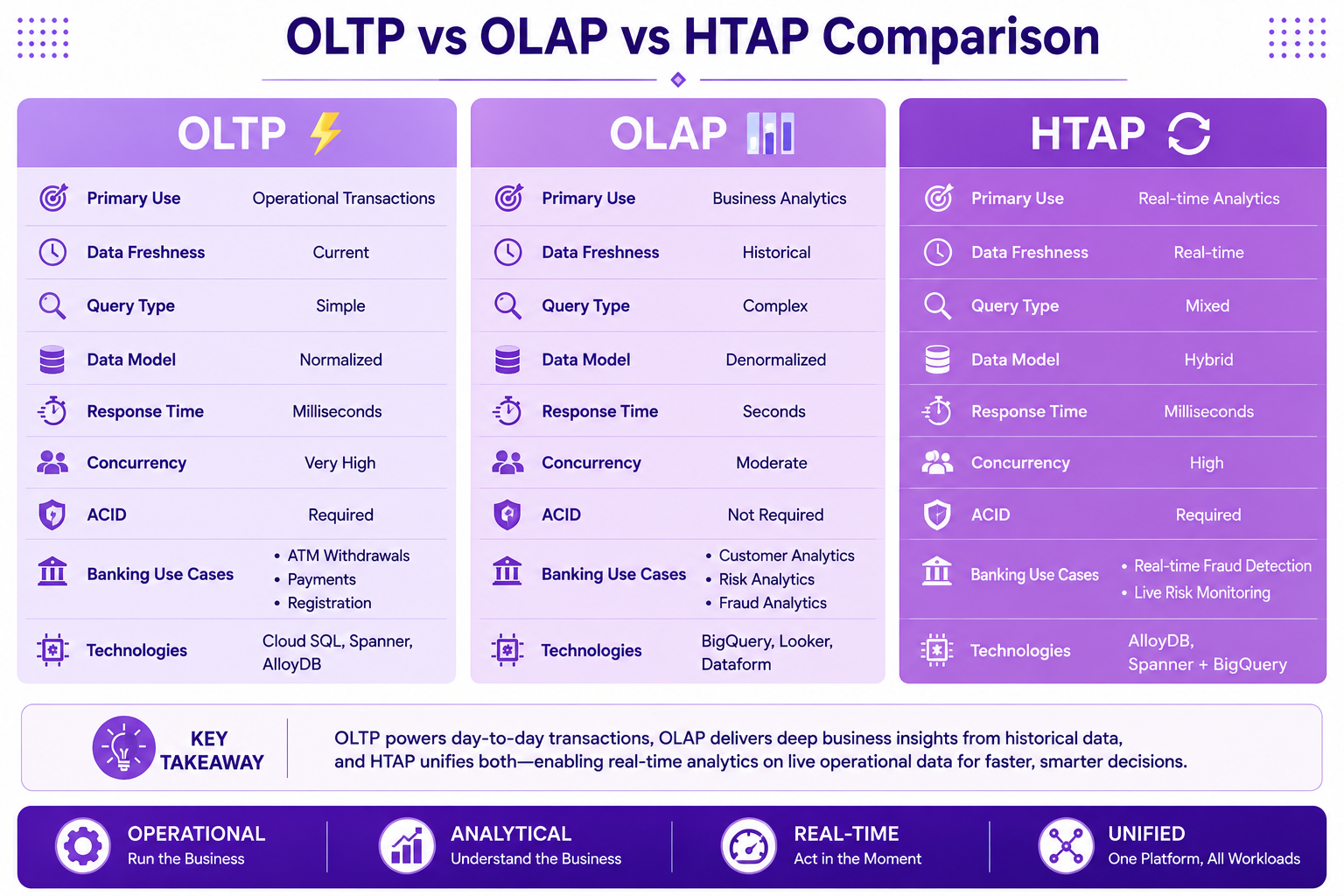
Prompt: Create a comprehensive comparison diagram showing OLTP, OLAP, and HTAP with the following structure:
Header: OLTP vs OLAP vs HTAP Comparison
Three columns with gradient purple backgrounds:
Column 1: OLTP (Left) - Purple #E1BEE7
- Icon: ⚡ (Lightning bolt)
- Primary Use: Operational Transactions
- Data Freshness: Current
- Query Type: Simple
- Data Model: Normalized
- Response Time: Milliseconds
- Concurrency: Very High
- ACID: Required
- Banking Use Cases: ATM Withdrawals, Payments, Registration
- Technologies: Cloud SQL, Spanner, AlloyDB
Column 2: OLAP (Middle) - Purple #CE93D8
- Icon: 📊 (Chart)
- Primary Use: Business Analytics
- Data Freshness: Historical
- Query Type: Complex
- Data Model: Denormalized
- Response Time: Seconds
- Concurrency: Moderate
- ACID: Not Required
- Banking Use Cases: Customer Analytics, Risk Analytics, Fraud Analytics
- Technologies: BigQuery, Looker, Dataform
Column 3: HTAP (Right) - Purple #AB47BC
- Icon: 🔄 (Cycle)
- Primary Use: Real-time Analytics
- Data Freshness: Real-time
- Query Type: Mixed
- Data Model: Hybrid
- Response Time: Milliseconds
- Concurrency: High
- ACID: Required
- Banking Use Cases: Real-time Fraud Detection, Live Risk Monitoring
- Technologies: AlloyDB, Spanner + BigQuery
At bottom: Key takeaway with footer tags: Operational, Analytical, Real-time, Unified. Enterprise-style clean layout with rounded corners.
Modern Analytics Architecture
A modern analytics platform integrates all three paradigms:
┌─────────────────────────────────────────────────────────────┐
│                     Data Sources                            │
├─────────────────────────────────────────────────────────────┤
│  OLTP Systems   │  SaaS Apps   │  External Data   │  Logs   │
├─────────────────────────────────────────────────────────────┤
│                    Data Integration                         │
├─────────────────────────────────────────────────────────────┤
│  CDC (Debezium)  │  Batch (Dataflow)  │  Streaming (Pub/Sub)│
├─────────────────────────────────────────────────────────────┤
│                    Data Storage                             │
├─────────────────────────────────────────────────────────────┤
│  Data Lake (GCS)  │  Data Warehouse (BigQuery)  │  OLTP (Spanner) │
├─────────────────────────────────────────────────────────────┤
│                    Data Processing                          │
├─────────────────────────────────────────────────────────────┤
│  Batch (Dataproc) │  Streaming (Dataflow)  │  ML (Vertex AI) │
├─────────────────────────────────────────────────────────────┤
│                    Data Consumption                         │
├─────────────────────────────────────────────────────────────┤
│  BI (Looker)  │  Dashboards  │  ML Models  │  Applications  │
└─────────────────────────────────────────────────────────────┘
GCP Services for Each Paradigm
Google Cloud provides comprehensive services for all paradigms:
OLTP Services
Cloud SQL         - Managed PostgreSQL, MySQL, SQL Server
Cloud Spanner     - Global distributed database
AlloyDB           - PostgreSQL-compatible with HTAP
Firestore         - NoSQL document database
Bigtable          - NoSQL wide-column database
Memorystore       - Redis and Memcached
OLAP Services
BigQuery          - Enterprise data warehouse
Looker            - Business intelligence platform
Dataform          - Data transformation and orchestration
BigQuery Studio   - Data analysis and exploration
Looker Studio     - Self-service visualization
HTAP Services
AlloyDB           - HTAP-ready PostgreSQL
BigQuery + Stream - Real-time analytics on operational data
Spanner + BigQuery - Global transactions + analytics
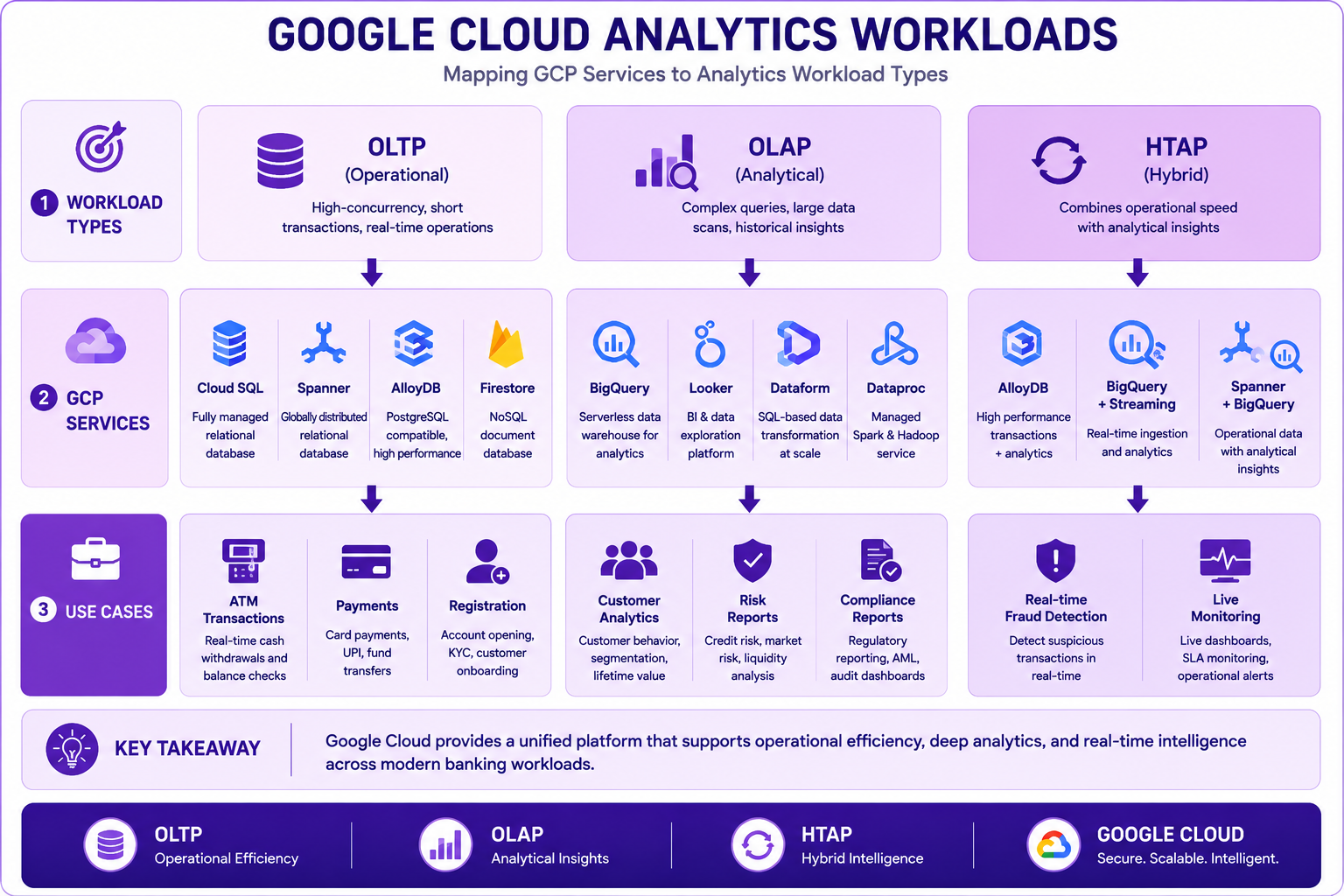
Prompt: Create a Google Cloud analytics workloads diagram showing how different GCP services map to OLTP, OLAP, and HTAP workloads. Use a 3-layer structure:
Top Layer: Workload Types
- OLTP (Operational) - Purple #F3E5F5
- OLAP (Analytical) - Purple #E1BEE7
- HTAP (Hybrid) - Purple #CE93D8
Middle Layer: GCP Services
- Under OLTP: Cloud SQL, Spanner, AlloyDB, Firestore
- Under OLAP: BigQuery, Looker, Dataform, Dataproc
- Under HTAP: AlloyDB, BigQuery + Streaming, Spanner + BigQuery
Bottom Layer: Use Cases
- Under OLTP: ATM Transactions, Payments, Registration
- Under OLAP: Customer Analytics, Risk Reports, Compliance
- Under HTAP: Real-time Fraud Detection, Live Monitoring
Use downward flow from workload types to services to use cases. Purple gradient theme. Include key takeaway at bottom. Footer tags: OLTP, OLAP, HTAP, Google Cloud. Enterprise-style clean layout with rounded corners.
Banking Workload Classification
| Workload | OLTP | OLAP | HTAP | Description |
|---|---|---|---|---|
| ATM Withdrawal | ✅ | Process transaction, update balance | ||
| Payment Processing | ✅ | Process payment, update accounts | ||
| Customer Registration | ✅ | Create customer profile, open accounts | ||
| Customer 360 Analytics | ✅ | Complete view of customer | ||
| Transaction Analytics | ✅ | Analyze spending patterns | ||
| Risk Portfolio Analysis | ✅ | Evaluate portfolio risk | ||
| Real-time Fraud Detection | ✅ | Detect and block fraud | ||
| Live Risk Monitoring | ✅ | Monitor risk in real-time | ||
| Personalization Engine | ✅ | Offer based on real-time behavior | ||
| Compliance Reporting | ✅ | Regulatory reports | ||
| Batch Billing | ✅ | Monthly billing processing |
Data Flow in a Modern Platform
Understanding how data flows through a modern platform:
Batch Processing (Traditional)
Operational Data (Daily)
↓
Extract (ETL)
↓
Transform (Cleaning, Aggregation)
↓
Load (Data Warehouse)
↓
Analytics (Reports, Dashboards)
Streaming Processing (Real-time)
Operational Events (Continuous)
↓
Ingest (Kafka, Pub/Sub)
↓
Process (Streaming)
↓
Store (Data Lake/Warehouse)
↓
Analytics (Real-time)
Hybrid (Unified)
Operational Systems
↓
Change Data Capture (CDC)
↓
                ↓
        Stream Processing    Batch Processing
                ↓                     ↓
        Real-time Analytics    Historical Analytics
                ↓                     ↓
        HTAP Platform          Data Warehouse
                ↓                     ↓
        Real-time & Historical Analytics
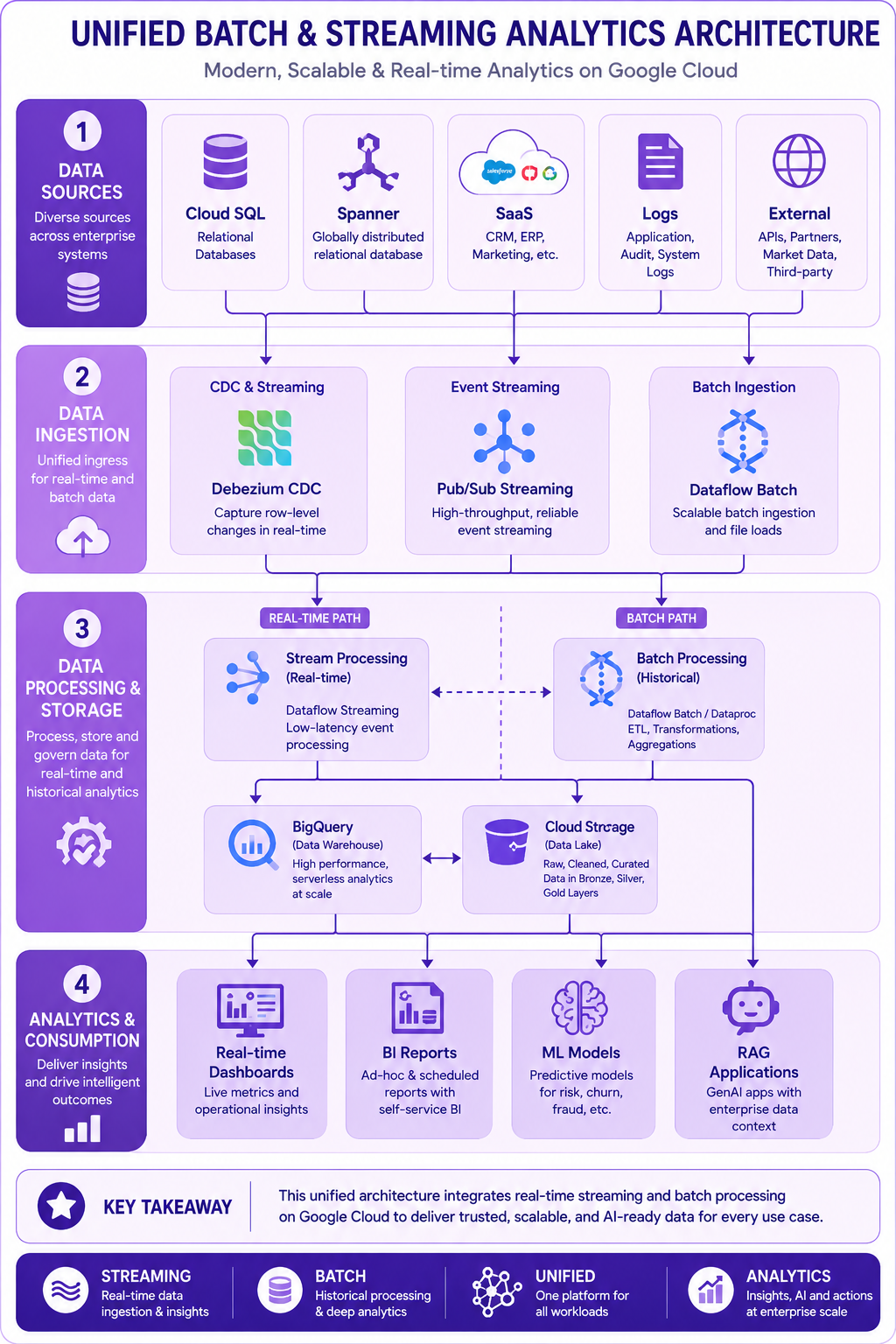
Prompt: Create a modern analytics data flow diagram showing the unified batch and streaming architecture. Use a 4-layer structure:
Layer 1: Data Sources (Top)
- Cloud SQL, Spanner, SaaS, Logs, External
- Color: Purple #F3E5F5
Layer 2: Data Ingestion (CDC & Streaming)
- Debezium CDC, Pub/Sub Streaming, Dataflow Batch
- Color: Purple #E1BEE7
Layer 3: Data Processing & Storage
- Stream Processing (Real-time), Batch Processing (Historical), BigQuery (Data Warehouse), Cloud Storage (Data Lake)
- Color: Purple #CE93D8
Layer 4: Analytics & Consumption (Bottom)
- Real-time Dashboards, BI Reports, ML Models, RAG Applications
- Color: Purple #AB47BC
Add flow arrows showing data moving from sources to consumption. Include a dotted line separating real-time and batch paths. Purple gradient theme. Include key takeaway at bottom. Footer tags: Streaming, Batch, Unified, Analytics. Enterprise-style clean layout with rounded corners.
When to Use Each Approach
Use OLTP When:
✅ Processing transactions (orders, payments)
✅ Updating records frequently
✅ Need ACID compliance
✅ Many concurrent users
✅ Fast response required
✅ Simple, known queries
Use OLAP When:
✅ Complex analytical queries
✅ Large historical datasets
✅ Business intelligence/reporting
✅ Trend analysis
✅ Data mining
✅ No need for real-time
Use HTAP When:
✅ Need real-time analytics
✅ Operational and analytical workloads
✅ No data movement between systems
✅ Faster decision making
✅ Reduced system complexity
✅ Modern cloud platform available
Trends Shaping Modern Analytics
1. Real-Time Analytics
- Streaming data processing
- Sub-second latency
- Event-driven architectures
- Real-time dashboards
- Immediate insights
2. Unification of Workloads
- Lakehouse architecture
- Unified storage
- Single platform for all workloads
- Reduced data movement
- Simplified management
3. AI Integration
- Built-in ML capabilities
- Automated insights
- Natural language queries
- Predictive analytics
- Feature stores
4. Data Fabric
- Distributed data architecture
- Multi-cloud/on-premise
- Data virtualization
- Consistent governance
- Unified access
5. Embedded Analytics
- Analytics in applications
- User-facing insights
- Self-service analytics
- Augmented analytics
- Decision automation
Best Practices
| # | Best Practice |
|---|---|
| 1 | Use the right paradigm for the right workload |
| 2 | Design for scalability from the start |
| 3 | Implement proper data governance |
| 4 | Use managed services where possible |
| 5 | Monitor performance and cost |
| 6 | Implement data quality checks |
| 7 | Plan for data lineage |
| 8 | Use appropriate data models |
| 9 | Optimize for query patterns |
| 10 | Document architecture decisions |
Common Mistakes
| # | Common Mistake | Better Approach |
|---|---|---|
| 1 | Using OLTP for analytics | Use OLAP or HTAP |
| 2 | Using OLAP for transactions | Use OLTP |
| 3 | Ignoring real-time requirements | Consider HTAP |
| 4 | Not planning for growth | Design for scale |
| 5 | Moving data unnecessarily | Consider in-place analytics |
| 6 | Over-engineering the solution | Start simple, evolve |
| 7 | Ignoring cost optimization | Monitor and optimize |
| 8 | Not understanding use cases | Align with business needs |
| 9 | Using outdated architectures | Adopt modern patterns |
| 10 | No governance strategy | Implement from day one |
Interview Questions
-
What is the difference between OLTP and OLAP?
-
Explain HTAP and its advantages.
-
When would you use OLTP vs OLAP vs HTAP?
-
What are the characteristics of each paradigm?
-
How does Google Cloud support all three paradigms?
-
Give banking examples for each approach.
-
What is the role of BigQuery in modern analytics?
-
How does streaming processing differ from batch processing?
-
What are the trends in modern analytics?
-
Explain the concept of real-time analytics.
-
How does HTAP reduce data movement?
-
What is the difference between ACID and BASE?
Practice Exercises
-
Classify the following banking workloads as OLTP, OLAP, or HTAP:
- ATM withdrawal processing
- Monthly customer statements
- Real-time fraud detection
- Customer 360 analytics
- Loan application processing
- Risk portfolio analysis
- Regulatory reporting
- Transaction monitoring
-
Draw a diagram showing how OLTP and OLAP systems interact in a bank.
-
Identify three HTAP use cases in your organization.
-
Compare the technology stacks for OLTP, OLAP, and HTAP.
-
Design a modern analytics architecture for a bank.
Key Takeaways
| # | Takeaway |
|---|---|
| 1 | OLTP, OLAP, and HTAP serve different purposes |
| 2 | OLTP is for operational transactions |
| 3 | OLAP is for analytical queries |
| 4 | HTAP combines both in real-time |
| 5 | Modern platforms support all three |
| 6 | Choose the right paradigm for the use case |
| 7 | Real-time analytics is increasingly important |
| 8 | Google Cloud provides services for all paradigms |
| 9 | Understanding data processing helps design better architectures |
Chapter Summary
In this chapter, you learned:
- ✅ What OLTP, OLAP, and HTAP are
- ✅ Characteristics of each processing paradigm
- ✅ Banking use cases for each approach
- ✅ How modern cloud platforms support all three
- ✅ The role of Google Cloud services
- ✅ Best practices and common mistakes
- ✅ Trends in modern analytics
- ✅ How to choose the right approach
You now understand the different data processing paradigms and how they work together in modern analytics platforms.
Next Chapter
👉 Next Chapter: Google Cloud Data Platform Overview