
Chapter 11: Historical Data Modeling
In the previous chapter, we explored keys, relationships, and entity lifecycle management, learning how to design comprehensive entity models with proper keys and relationships.
In this chapter, we will dive into Historical Data Modeling—understanding how to track data changes over time, implement slowly changing dimensions, and design temporal data models that support point-in-time analysis.
Using our Digital Banking Platform case study, we will implement historical data models for customer profiles, account balances, and transaction histories.
🎯 Learning Objectives
By the end of this chapter, you will be able to:
- Understand the importance of historical data modeling
- Implement Slowly Changing Dimensions (SCD) Types 0-6
- Design effective dating and versioning strategies
- Implement temporal tables for historical tracking
- Query historical data effectively
- Balance storage costs with historical accuracy
- Apply best practices for historical data modeling
- Design banking historical data models
What is Historical Data Modeling?
Historical data modeling is the practice of tracking and managing changes to data over time to support historical analysis, auditing, and point-in-time reporting.
Historical Data Modeling = Tracking changes over time
                        + Preserving historical context
                        + Enabling point-in-time analysis
Think of historical data modeling as:
- A time machine for your data
- An audit trail of changes
- A way to see "what was true then"
- A foundation for trend analysis
Real-World Banking Example
A bank needs to track customer address changes for regulatory compliance:
Customer Address History:
2020-01-01: 123 Main St, New York
2021-06-15: 456 Oak Ave, New York  (Moved)
2023-03-01: 789 Pine Rd, Boston     (Moved)

Business Questions:
- What was the customer's address on 2022-01-01?
- How many times has the customer moved?
- When did the customer move to Boston?
- What is the current address?

Without Historical Modeling:
- Only current address stored
- Cannot answer any historical questions
- Compliance issues

With Historical Modeling:
- All addresses preserved
- All historical questions answered
- Full audit trail available
Slowly Changing Dimensions (SCD)
What are Slowly Changing Dimensions?
Slowly Changing Dimensions are dimension attributes that change slowly over time, requiring special handling to track historical changes.
SCD = Dimensions that change gradually over time
    + Need to track historical changes
    + Support point-in-time analysis
SCD Types
| Type | Description | When to Use | Banking Example |
|---|---|---|---|
| Type 0 | No changes allowed | Fixed attributes | Date of birth, SSN |
| Type 1 | Overwrite old values | No history needed | Customer email |
| Type 2 | Add new row for each change | Full history needed | Customer address |
| Type 3 | Add current and previous columns | Partial history | Customer status |
| Type 4 | Separate history table | History rarely accessed | Historical transactions |
| Type 6 | Hybrid of Types 1,2,3 | Complex requirements | Customer 360 |
SCD Type 0: No Changes Allowed
Characteristics
- Values never change
- Immutable attributes
- No historical tracking needed
- Simple implementation
Implementation
-- SCD Type 0 - Fixed attributes
CREATE TABLE banking.customer_fixed (
  customer_id STRING PRIMARY KEY,
  date_of_birth DATE,           -- Never changes
  ssn_hash STRING,              -- Never changes
  created_at TIMESTAMP
);

-- Attempted update fails or is ignored
UPDATE banking.customer_fixed
SET date_of_birth = '1990-01-01'
WHERE customer_id = 'C001';
-- Should be prevented or logged
Banking Example
- Customer Date of Birth
- Social Security Number
- Customer Registration Date
- Country of Citizenship
- Government ID Number
SCD Type 1: Overwrite Changes
Characteristics
- Values overwritten with new values
- No historical tracking
- Simple implementation
- Only current state available
Implementation
-- SCD Type 1 - Overwrite changes
CREATE TABLE banking.customer_type1 (
  customer_id STRING PRIMARY KEY,
  first_name STRING,
  last_name STRING,
  email STRING,                 -- Can be updated
  phone STRING,                 -- Can be updated
  updated_at TIMESTAMP
);

-- Update overwrites old value
UPDATE banking.customer_type1
SET
  email = 'john.doe@new.com',
  updated_at = CURRENT_TIMESTAMP()
WHERE customer_id = 'C001';
-- Previous email is lost
Banking Example
- Customer Email
- Customer Phone Number
- Customer Marital Status
- Preferred Language
- Marketing Preferences
SCD Type 2: Add New Row
Characteristics
- Add new row for each change
- Full historical tracking
- Multiple rows per entity
- Need effective dating
Implementation
-- SCD Type 2 - Historical tracking
CREATE TABLE banking.customer_type2 (
  customer_sk STRING PRIMARY KEY,    -- Surrogate key
  customer_id STRING,                 -- Natural key
  first_name STRING,
  last_name STRING,
  address STRING,
  city STRING,
  state STRING,
  zip_code STRING,
  -- SCD Type 2 columns
  valid_from DATE,
  valid_to DATE,                      -- NULL means current
  is_current BOOLEAN,
  change_reason STRING,
  created_at TIMESTAMP
);

-- Update customer address
-- Step 1: Close current record
UPDATE banking.customer_type2
SET
  valid_to = CURRENT_DATE(),
  is_current = FALSE
WHERE customer_id = 'C001'
  AND is_current = TRUE;

-- Step 2: Insert new record
INSERT INTO banking.customer_type2 (
  customer_sk, customer_id, first_name, last_name,
  address, city, state, zip_code,
  valid_from, valid_to, is_current, change_reason, created_at
)
SELECT
  GENERATE_UUID() AS customer_sk,
  customer_id,
  first_name,
  last_name,
  '789 Pine Rd' AS address,      -- New address
  'Boston' AS city,
  'MA' AS state,
  '02101' AS zip_code,
  CURRENT_DATE() AS valid_from,
  NULL AS valid_to,
  TRUE AS is_current,
  'Address Change' AS change_reason,
  CURRENT_TIMESTAMP() AS created_at
FROM banking.customer_type2
WHERE customer_id = 'C001'
  AND is_current = TRUE;
Banking Example
- Customer Address History
- Customer Name Changes
- Account Status Changes
- Employment History
- Customer Segmentation
SCD Type 3: Current and Previous
Characteristics
- Store current and previous values
- Limited history (only one previous)
- Simple to query
- Limited analytical capabilities
Implementation
-- SCD Type 3 - Current and previous
CREATE TABLE banking.customer_type3 (
  customer_id STRING PRIMARY KEY,
  current_address STRING,
  current_city STRING,
  current_state STRING,
  current_zip_code STRING,
  previous_address STRING,
  previous_city STRING,
  previous_state STRING,
  previous_zip_code STRING,
  address_change_date DATE,
  updated_at TIMESTAMP
);

-- Update with previous tracking
UPDATE banking.customer_type3
SET
  previous_address = current_address,
  previous_city = current_city,
  previous_state = current_state,
  previous_zip_code = current_zip_code,
  current_address = '789 Pine Rd',
  current_city = 'Boston',
  current_state = 'MA',
  current_zip_code = '02101',
  address_change_date = CURRENT_DATE(),
  updated_at = CURRENT_TIMESTAMP()
WHERE customer_id = 'C001';
Banking Example
- Current and Previous Address
- Current and Previous Status
- Current and Previous Credit Rating
- Current and Previous Risk Profile
- Current and Previous Segment
SCD Type 4: Separate History Table
Characteristics
- Separate history table for changes
- Current table for active data
- History rarely accessed
- Better performance
Implementation
-- SCD Type 4 - Separate history table
-- Current table (SCD Type 1)
CREATE TABLE banking.customer_type4_current (
  customer_id STRING PRIMARY KEY,
  first_name STRING,
  last_name STRING,
  address STRING,
  city STRING,
  state STRING,
  zip_code STRING,
  updated_at TIMESTAMP
);

-- History table
CREATE TABLE banking.customer_type4_history (
  history_id STRING PRIMARY KEY,
  customer_id STRING,
  first_name STRING,
  last_name STRING,
  address STRING,
  city STRING,
  state STRING,
  zip_code STRING,
  effective_date DATE,
  end_date DATE,
  change_reason STRING,
  created_at TIMESTAMP
);

-- Insert into history table on change
CREATE OR REPLACE PROCEDURE banking.update_customer_address(
  p_customer_id STRING,
  p_address STRING,
  p_city STRING,
  p_state STRING,
  p_zip_code STRING
)
BEGIN
  -- Save current to history
  INSERT INTO banking.customer_type4_history
  SELECT
    GENERATE_UUID() AS history_id,
    customer_id,
    first_name,
    last_name,
    address,
    city,
    state,
    zip_code,
    CURRENT_DATE() AS effective_date,
    NULL AS end_date,
    'Address Change' AS change_reason,
    CURRENT_TIMESTAMP() AS created_at
  FROM banking.customer_type4_current
  WHERE customer_id = p_customer_id;

  -- Update current
  UPDATE banking.customer_type4_current
  SET
    address = p_address,
    city = p_city,
    state = p_state,
    zip_code = p_zip_code,
    updated_at = CURRENT_TIMESTAMP()
  WHERE customer_id = p_customer_id;
END;
Banking Example
- Historical Transactions
- Customer Audit History
- Account Activity Log
- Customer Service Interactions
- Compliance Reporting
SCD Type 6: Hybrid Approach
Characteristics
- Combines Types 1, 2, and 3
- Stores current, previous, and history
- Maximum flexibility
- Complex implementation
Implementation
-- SCD Type 6 - Hybrid approach
CREATE TABLE banking.customer_type6 (
  customer_sk STRING PRIMARY KEY,    -- Surrogate key
  customer_id STRING,                 -- Natural key
  current_address STRING,             -- Type 1 (current)
  current_city STRING,
  current_state STRING,
  current_zip_code STRING,
  previous_address STRING,            -- Type 3 (previous)
  previous_city STRING,
  previous_state STRING,
  previous_zip_code STRING,
  valid_from DATE,                    -- Type 2 (history)
  valid_to DATE,
  is_current BOOLEAN,
  change_reason STRING,
  created_at TIMESTAMP
);

-- Update using hybrid approach
-- Combines Type 2 and Type 3 updates
Banking Example
- Complete Customer 360
- Full Audit Trail
- Current and Historical Views
- Regulatory Compliance
- Trend Analysis
SCD Type Comparison
| Aspect | Type 0 | Type 1 | Type 2 | Type 3 | Type 4 | Type 6 |
|---|---|---|---|---|---|---|
| History Tracked | None | None | Full | Limited | Full (separate) | Full |
| Storage Cost | Low | Low | High | Medium | Medium | High |
| Query Complexity | Simple | Simple | Complex | Medium | Medium | Complex |
| Implementation | Simple | Simple | Complex | Medium | Medium | Complex |
| Use Case | Fixed | No History | Full History | Partial History | Performance | Complete |
| Banking Use | DOB | Address | Status | Transactions | Customer 360 |
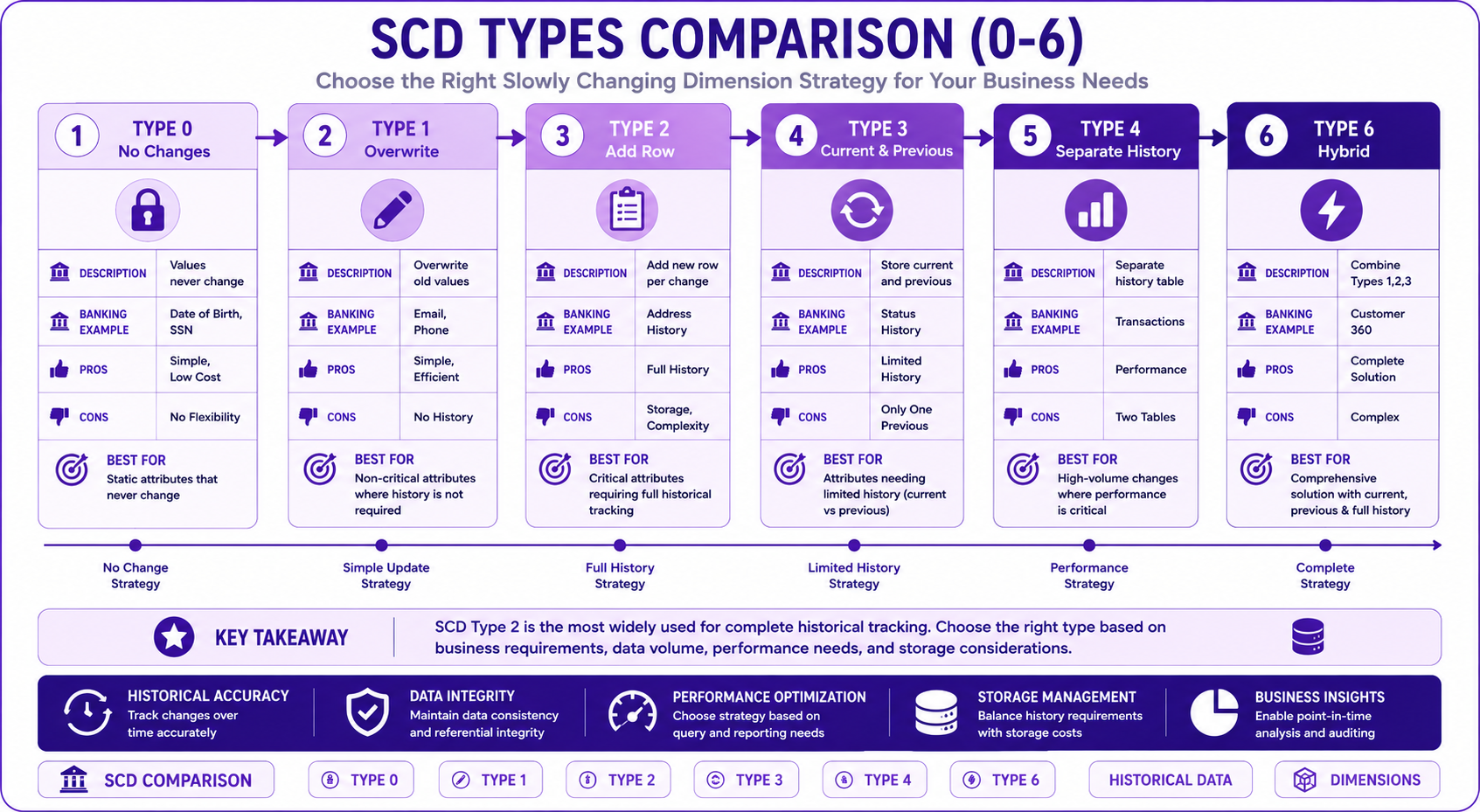
Prompt: Create a comprehensive SCD types comparison diagram showing Types 0-6. Use a 6-step horizontal flow with purple gradient theme:
Step 1: SCD Type 0 (First) - Purple #E1BEE7
- Title: "Type 0 - No Changes"
- Icon: 🔒
- Description: "Values never change"
- Banking Example: "Date of Birth, SSN"
- Pros: "Simple, Low Cost"
- Cons: "No Flexibility"
Step 2: SCD Type 1 - Purple #CE93D8
- Title: "Type 1 - Overwrite"
- Icon: ✏️
- Description: "Overwrite old values"
- Banking Example: "Email, Phone"
- Pros: "Simple, Efficient"
- Cons: "No History"
Step 3: SCD Type 2 - Purple #AB47BC
- Title: "Type 2 - Add Row"
- Icon: 📋
- Description: "Add new row per change"
- Banking Example: "Address History"
- Pros: "Full History"
- Cons: "Storage, Complexity"
Step 4: SCD Type 3 - Purple #7B1FA2
- Title: "Type 3 - Current & Previous"
- Icon: 🔄
- Description: "Store current and previous"
- Banking Example: "Status History"
- Pros: "Limited History"
- Cons: "Only One Previous"
Step 5: SCD Type 4 - Purple #4A148C
- Title: "Type 4 - Separate History"
- Icon: 📊
- Description: "Separate history table"
- Banking Example: "Transactions"
- Pros: "Performance"
- Cons: "Two Tables"
Step 6: SCD Type 6 - Purple #311B92
- Title: "Type 6 - Hybrid"
- Icon: ⚡
- Description: "Combine Types 1,2,3"
- Banking Example: "Customer 360"
- Pros: "Complete Solution"
- Cons: "Complex"
Use horizontal arrows between steps. At bottom: Key takeaway: "Choose the right SCD type based on business requirements and cost considerations." Footer tags: SCD, Type 0-6, Historical Data, Dimensions. Enterprise-style clean layout with rounded corners.
Temporal Tables in BigQuery
BigQuery Time Travel
-- BigQuery time travel (up to 7 days)
-- Query data as of 2 days ago
SELECT *
FROM banking.customers
FOR SYSTEM_TIME AS OF TIMESTAMP_SUB(CURRENT_TIMESTAMP(), INTERVAL 2 DAY);

-- Query data at specific timestamp
SELECT *
FROM banking.customers
FOR SYSTEM_TIME AS OF TIMESTAMP '2024-01-01 00:00:00';

-- Restore table to previous state
CREATE OR REPLACE TABLE banking.customers
AS
SELECT *
FROM banking.customers
FOR SYSTEM_TIME AS OF TIMESTAMP_SUB(CURRENT_TIMESTAMP(), INTERVAL 1 DAY);
Effective Dating Implementation
-- Effective dating with BigQuery
CREATE OR REPLACE TABLE banking.customer_effective (
  customer_id STRING,
  first_name STRING,
  last_name STRING,
  address STRING,
  city STRING,
  state STRING,
  zip_code STRING,
  effective_date DATE,
  end_date DATE,
  is_current BOOLEAN
)
PARTITION BY effective_date
CLUSTER BY customer_id;

-- Query current record
SELECT *
FROM banking.customer_effective
WHERE customer_id = 'C001'
  AND is_current = TRUE;

-- Query point-in-time
SELECT *
FROM banking.customer_effective
WHERE customer_id = 'C001'
  AND effective_date <= '2024-06-01'
  AND (end_date IS NULL OR end_date > '2024-06-01');

-- Get full history
SELECT *
FROM banking.customer_effective
WHERE customer_id = 'C001'
ORDER BY effective_date;
Banking Historical Data Model
Complete Historical Banking Model
-- Customer Dimension (SCD Type 2)
CREATE OR REPLACE TABLE banking.dim_customer (
  customer_sk STRING PRIMARY KEY,
  customer_id STRING,
  first_name STRING,
  last_name STRING,
  email STRING,
  phone STRING,
  date_of_birth DATE,
  address STRING,
  city STRING,
  state STRING,
  zip_code STRING,
  -- SCD Type 2 columns
  valid_from DATE,
  valid_to DATE,
  is_current BOOLEAN,
  change_reason STRING,
  created_at TIMESTAMP,
  updated_at TIMESTAMP
)
PARTITION BY valid_from
CLUSTER BY customer_id;

-- Account Dimension (SCD Type 2)
CREATE OR REPLACE TABLE banking.dim_account (
  account_sk STRING PRIMARY KEY,
  account_id STRING,
  customer_sk STRING,
  account_type STRING,
  account_status STRING,
  open_date DATE,
  close_date DATE,
  -- SCD Type 2 columns
  valid_from DATE,
  valid_to DATE,
  is_current BOOLEAN,
  change_reason STRING,
  created_at TIMESTAMP,
  updated_at TIMESTAMP
)
PARTITION BY valid_from
CLUSTER BY customer_sk;

-- Transaction Fact Table (SCD Type 4)
CREATE OR REPLACE TABLE banking.fact_transaction (
  transaction_sk STRING PRIMARY KEY,
  transaction_id STRING,
  account_sk STRING,
  customer_sk STRING,
  transaction_date DATE,
  transaction_time TIMESTAMP,
  transaction_amount NUMERIC,
  transaction_type STRING,
  merchant_category STRING,
  created_at TIMESTAMP
)
PARTITION BY transaction_date
CLUSTER BY customer_sk, account_sk;
Historical Query Patterns
Point-in-Time Analysis
-- Customer profile as of specific date
WITH customer_as_of_date AS (
  SELECT *
  FROM banking.dim_customer
  WHERE customer_id = 'C001'
    AND valid_from <= '2024-06-01'
    AND (valid_to IS NULL OR valid_to > '2024-06-01')
)
SELECT
  c.customer_id,
  c.first_name,
  c.last_name,
  c.address,
  c.city,
  c.state,
  a.account_id,
  a.account_type,
  a.account_status
FROM customer_as_of_date c
LEFT JOIN banking.dim_account a
  ON c.customer_sk = a.customer_sk
  AND a.valid_from <= '2024-06-01'
  AND (a.valid_to IS NULL OR a.valid_to > '2024-06-01');
Change Tracking
-- Track changes over time
SELECT
  customer_id,
  first_name,
  last_name,
  address,
  city,
  state,
  valid_from,
  valid_to,
  change_reason,
  LEAD(valid_from) OVER (
    PARTITION BY customer_id
    ORDER BY valid_from
  ) AS next_effective_date
FROM banking.dim_customer
WHERE customer_id = 'C001'
ORDER BY valid_from;
Trend Analysis
-- Customer address change frequency
SELECT
  customer_id,
  COUNT(*) AS address_changes,
  MIN(valid_from) AS first_address_date,
  MAX(CASE WHEN is_current THEN valid_from END) AS current_address_date
FROM banking.dim_customer
GROUP BY customer_id
HAVING COUNT(*) > 1
ORDER BY address_changes DESC;
Historical Data Best Practices
| # | Best Practice |
|---|---|
| 1 | Always use effective dating for dimension tables |
| 2 | Choose SCD type based on business requirements |
| 3 | Use surrogate keys for historical tracking |
| 4 | Implement data quality checks for historical data |
| 5 | Document historical data model decisions |
| 6 | Consider performance and storage costs |
| 7 | Use partition pruning for historical queries |
| 8 | Implement change tracking with audit columns |
| 9 | Test historical queries thoroughly |
| 10 | Plan for data retention and archiving |
Common Mistakes
| # | Common Mistake | Better Approach |
|---|---|---|
| 1 | No historical tracking | Implement SCD Type 2 |
| 2 | Using Type 2 when Type 1 would suffice | Match complexity to need |
| 3 | Not using surrogate keys | Use surrogate keys for history |
| 4 | No effective dating | Always use effective dating |
| 5 | Missing end dates | Always set end dates |
| 6 | No partition strategy | Partition by effective date |
| 7 | Complex queries without optimization | Use clustering and indexing |
| 8 | No data quality checks | Implement validation |
| 9 | Ignoring storage costs | Consider cost implications |
| 10 | Not documenting decisions | Document thoroughly |
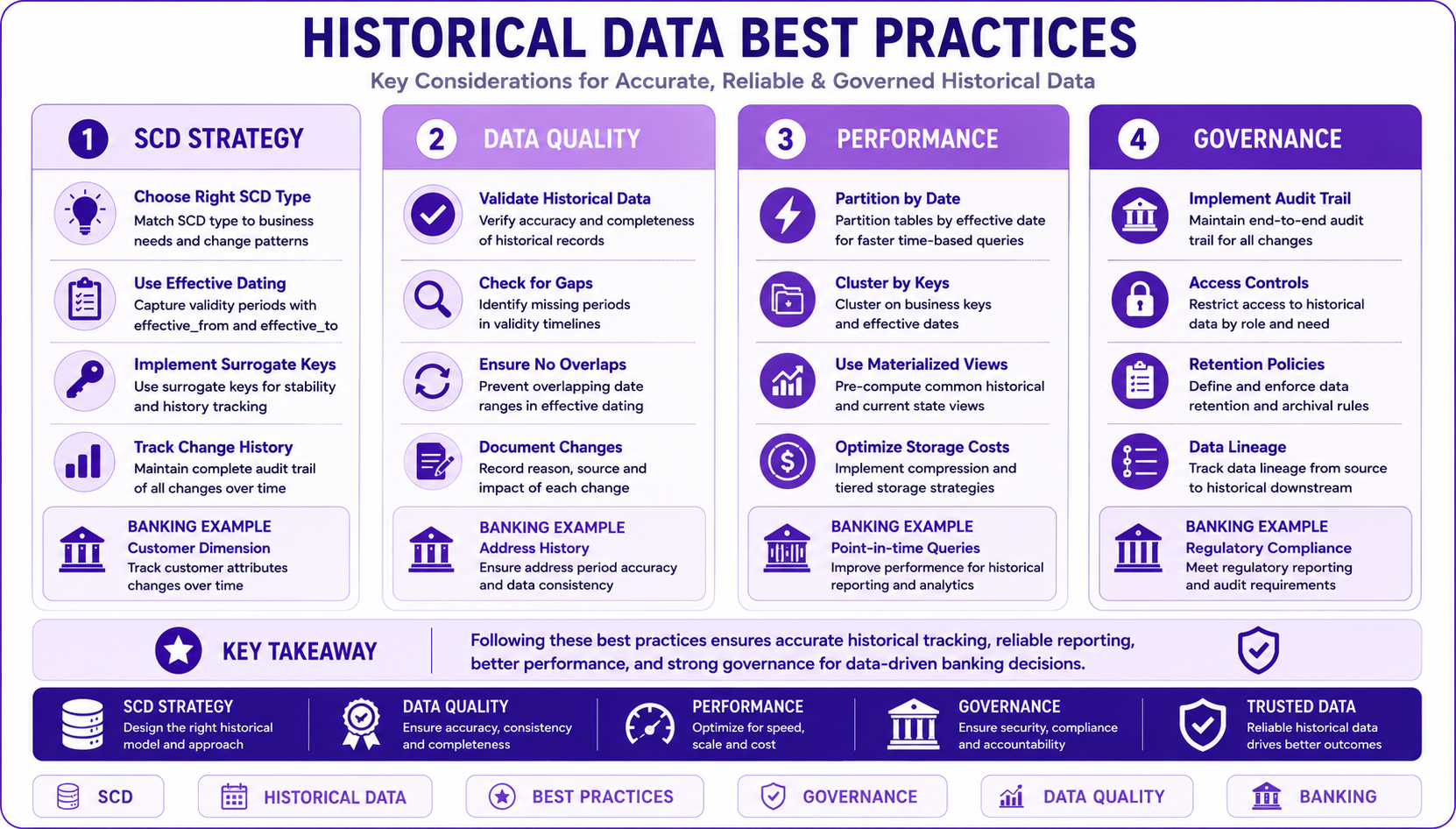
Prompt: Create a historical data best practices diagram showing key considerations. Use a 4-column structure with purple gradient theme:
Column 1: SCD Strategy (Left) - Purple #E1BEE7
- Title: "SCD Strategy"
- 💡 "Choose Right SCD Type"
- 📋 "Use Effective Dating"
- 🔑 "Implement Surrogate Keys"
- 📊 "Track Change History"
- Banking Example: "Customer Dimension"
Column 2: Data Quality - Purple #CE93D8
- Title: "Data Quality"
- ✅ "Validate Historical Data"
- 🔍 "Check for Gaps"
- 🔄 "Ensure No Overlaps"
- 📝 "Document Changes"
- Banking Example: "Address History"
Column 3: Performance - Purple #AB47BC
- Title: "Performance"
- ⚡ "Partition by Date"
- 🗂️ "Cluster by Keys"
- 📈 "Use Materialized Views"
- 💰 "Optimize Storage Costs"
- Banking Example: "Point-in-time Queries"
Column 4: Governance - Purple #7B1FA2
- Title: "Governance"
- 🏛️ "Implement Audit Trail"
- 🔒 "Access Controls"
- 📋 "Retention Policies"
- 📝 "Data Lineage"
- Banking Example: "Regulatory Compliance"
At bottom: Key takeaway: "Historical data modeling requires balancing business needs, performance, and cost." Footer tags: SCD, Historical Data, Best Practices, Governance. Enterprise-style clean layout with rounded corners.
Interview Questions
-
What are Slowly Changing Dimensions?
-
Explain the different SCD types (0-6).
-
When would you use SCD Type 2 vs Type 1?
-
What is effective dating and why is it important?
-
How do you implement historical tracking in BigQuery?
-
What are the trade-offs of different SCD types?
-
How do you handle point-in-time queries?
-
What is the difference between SCD Type 2 and Type 4?
-
How do you track changes in dimension tables?
-
What is BigQuery time travel and how does it work?
-
How do you balance storage costs with historical accuracy?
-
What are the challenges of historical data modeling?
Practice Exercises
-
Implement SCD Type 2 for a customer dimension.
-
Create effective dating for account status changes.
-
Implement point-in-time queries for customer profiles.
-
Design a transaction history table with SCD Type 4.
-
Track customer address changes with change reason.
-
Implement audit columns for all historical tables.
-
Create a materialized view for current customer profiles.
-
Implement data quality checks for historical data.
-
Design a retention policy for historical data.
-
Create historical trend analysis queries.
Key Takeaways
| # | Takeaway |
|---|---|
| 1 | SCD types provide different levels of historical tracking |
| 2 | Choose SCD type based on business requirements |
| 3 | Effective dating enables point-in-time analysis |
| 4 | Surrogate keys are essential for historical tracking |
| 5 | Partitioning and clustering improve historical query performance |
| 6 | Balance storage costs with business needs |
| 7 | Document all historical data modeling decisions |
| 8 | Implement data quality checks for historical data |
Chapter Summary
In this chapter, you learned:
- ✅ What historical data modeling is and why it matters
- ✅ SCD Types 0-6 and their characteristics
- ✅ Effective dating and versioning strategies
- ✅ Implementing historical tables in BigQuery
- ✅ Point-in-time query patterns
- ✅ Banking historical data models
- ✅ Best practices and common mistakes
- ✅ Performance and cost considerations
You now understand how to design and implement effective historical data models that support point-in-time analysis and regulatory compliance.
Next Chapter
👉 Next Chapter: Dimensional Modeling