
Chapter 13: Star Schema
In the previous chapter, we explored dimensional modeling fundamentals and learned about the Kimball methodology, fact and dimension tables, and the overall approach to designing analytical data models.
In this chapter, we will dive deep into Star Schema design—understanding its components, implementation strategies, optimization techniques, and best practices for enterprise analytics.
Using our Digital Banking Platform case study, we will design comprehensive star schemas that support business intelligence, reporting, and analytical workloads at scale.
🎯 Learning Objectives
By the end of this chapter, you will be able to:
- Understand the star schema and its components
- Design effective star schemas for analytics
- Implement fact and dimension tables
- Optimize star schemas for performance
- Apply best practices for star schema design
- Handle common star schema challenges
- Implement star schemas in BigQuery
- Design banking star schemas
What is a Star Schema?
A star schema is a dimensional modeling technique that organizes data into a central fact table surrounded by dimension tables, resembling a star shape.
Star Schema = Central Fact Table + Surrounding Dimension Tables
Think of a star schema as:
- The fact table as the center (the "sun")
- Dimension tables as the surrounding "stars"
- Simple and intuitive for business users
- Optimized for query performance
Real-World Banking Example
A bank needs to analyze transaction data across multiple dimensions:
Business Questions:
- What are total deposits by branch and customer segment?
- Which merchant categories have the highest transaction volume?
- What are monthly trends in loan disbursements?
- Which customer segments generate the most fee revenue?

Star Schema Solution:
- Fact Table: Transaction facts (amounts, fees, counts)
- Dimensions: Date, Customer, Account, Branch, Merchant, Product
- Simple queries with few joins
- Fast aggregation and filtering
Star Schema Components
Fact Table (Center)
Purpose: Store quantitative measures of business events
Characteristics:
- Contains numeric measures
- Foreign keys to dimensions
- Typically very large
- Grain defines detail level
- Additive, semi-additive, or non-additive facts
Dimension Tables (Surrounding)
Purpose: Provide descriptive context for facts
Characteristics:
- Contains descriptive attributes
- Relatively small
- Denormalized for performance
- Slowly changing over time
- Used for filtering, grouping, labeling
Fact Table Grain
What is Grain?
Grain defines the level of detail represented by each row in a fact table.
Grain = Level of Detail + Business Event + Granularity
Grain Examples
| Grain Type | Description | Banking Example |
|---|---|---|
| Transaction Grain | One row per transaction | Each ATM withdrawal |
| Daily Grain | One row per day per entity | Daily account balance |
| Monthly Grain | One row per month | Monthly branch summary |
| Event Grain | One row per event | Loan application event |
Grain Selection Criteria
1. Business Requirements
   - What questions need to be answered?
   - What level of detail is needed?

2. Data Availability
   - What data is available at what level?
   - What is the source system granularity?

3. Performance
   - How much data will be stored?
   - How fast should queries run?

4. Storage
   - What storage costs are acceptable?
   - How long will data be retained?
Banking Grain Example
-- Transaction Grain (Most Detailed)
-- One row per transaction
CREATE OR REPLACE TABLE banking.fact_transactions (
  transaction_sk STRING PRIMARY KEY,
  date_sk STRING,
  customer_sk STRING,
  account_sk STRING,
  branch_sk STRING,
  merchant_sk STRING,
  product_sk STRING,
  transaction_amount NUMERIC,
  fee_amount NUMERIC,
  tax_amount NUMERIC,
  transaction_count INT DEFAULT 1,
  transaction_id STRING
);

-- Daily Account Balance Grain
-- One row per account per day
CREATE OR REPLACE TABLE banking.fact_account_balance (
  balance_sk STRING PRIMARY KEY,
  date_sk STRING,
  account_sk STRING,
  customer_sk STRING,
  branch_sk STRING,
  opening_balance NUMERIC,
  closing_balance NUMERIC,
  average_balance NUMERIC,
  transaction_count INT,
  total_deposits NUMERIC,
  total_withdrawals NUMERIC
);
Fact Table Design
Fact Table Types
| Fact Type | Description | Banking Example |
|---|---|---|
| Transaction Fact | Captures individual transactions | ATM withdrawals, payments |
| Periodic Snapshot | Captures state at regular intervals | Daily account balances |
| Accumulating Snapshot | Tracks process lifecycle | Loan origination stages |
| Factless Fact | Captures events without measures | Customer-product enrollment |
Fact Table Design Best Practices
1. Choose the Right Grain
   - Most detailed level needed
   - Balance detail with performance

2. Include Relevant Measures
   - Additive measures (summable)
   - Semi-additive (some aggregations)
   - Non-additive (calculated)

3. Use Foreign Keys
   - Reference dimension tables
   - Enable drill-down and slicing

4. Include Degenerate Dimensions
   - Transaction IDs
   - Order numbers
   - Invoice numbers

5. Partition and Cluster
   - Date partitions
   - Key column clustering
Banking Fact Table Implementation
-- Transaction Fact with Best Practices
CREATE OR REPLACE TABLE banking.fact_transactions (
  -- Surrogate Key
  transaction_sk STRING PRIMARY KEY,

  -- Foreign Keys to Dimensions
  date_sk STRING NOT NULL,
  customer_sk STRING NOT NULL,
  account_sk STRING NOT NULL,
  branch_sk STRING,
  merchant_sk STRING,
  product_sk STRING,

  -- Additive Measures
  transaction_amount NUMERIC NOT NULL,
  fee_amount NUMERIC,
  tax_amount NUMERIC,
  discount_amount NUMERIC,
  transaction_count INT DEFAULT 1,

  -- Degenerate Dimension
  transaction_id STRING,
  reference_number STRING,

  -- Metadata
  created_at TIMESTAMP DEFAULT CURRENT_TIMESTAMP(),
  updated_at TIMESTAMP DEFAULT CURRENT_TIMESTAMP()
)
PARTITION BY date_sk
CLUSTER BY customer_sk, account_sk, date_sk
OPTIONS (
  description = 'Banking transaction fact table with star schema'
);
Dimension Table Design
Dimension Table Types
| Dimension Type | Description | Banking Example |
|---|---|---|
| Conformed Dimension | Shared across fact tables | Date, Customer |
| Degenerate Dimension | Fact table attribute | Transaction ID |
| Junk Dimension | Low-cardinality flags | Status flags |
| Role-Playing Dimension | Same dimension in different roles | Date as order, ship, delivery |
Dimension Table Design Best Practices
1. Use Surrogate Keys
   - System-generated unique IDs
   - Independent of business keys

2. Denormalize Attributes
   - Include descriptive attributes
   - Pre-join hierarchies

3. Implement SCD Appropriately
   - Type 1 for no history needed
   - Type 2 for full history tracking

4. Include Hierarchies
   - Drill-down paths
   - Aggregation levels

5. Optimize for Query Patterns
   - Frequently filtered columns
   - Group by columns
Banking Dimension Table Implementation
-- Customer Dimension
CREATE OR REPLACE TABLE banking.dim_customer (
  -- Surrogate Key
  customer_sk STRING PRIMARY KEY,

  -- Business Key
  customer_id STRING NOT NULL,

  -- Attributes
  first_name STRING,
  last_name STRING,
  full_name STRING,  -- Pre-joined for performance
  email STRING,
  phone STRING,
  date_of_birth DATE,
  age INT,           -- Calculated for performance

  -- Demographics
  gender STRING,
  marital_status STRING,
  occupation STRING,
  education_level STRING,

  -- Segments
  customer_segment STRING,
  risk_profile STRING,
  loyalty_tier STRING,

  -- Location (Hierarchy)
  country STRING,
  region STRING,
  state STRING,
  city STRING,
  postal_code STRING,

  -- SCD Type 2 Columns
  valid_from DATE,
  valid_to DATE,
  is_current BOOLEAN,
  change_reason STRING,

  -- Metadata
  created_at TIMESTAMP,
  updated_at TIMESTAMP
)
CLUSTER BY customer_id, customer_segment, is_current
OPTIONS (
  description = 'Customer dimension with SCD Type 2 tracking'
);

-- Date Dimension (Conformed)
CREATE OR REPLACE TABLE banking.dim_date (
  date_sk STRING PRIMARY KEY,
  full_date DATE NOT NULL,

  -- Date Attributes
  year INT,
  quarter INT,
  month INT,
  month_name STRING,
  day INT,
  day_name STRING,
  day_of_week INT,
  week_of_year INT,

  -- Hierarchies
  quarter_name STRING,
  year_month STRING,
  year_quarter STRING,

  -- Business Attributes
  is_weekend BOOLEAN,
  is_holiday BOOLEAN,
  holiday_name STRING,
  is_business_day BOOLEAN,

  -- Fiscal Attributes
  fiscal_year INT,
  fiscal_quarter INT,
  fiscal_period INT
)
PARTITION BY year
CLUSTER BY full_date, year, quarter
OPTIONS (
  description = 'Date dimension for time-based analysis'
);
Star Schema Query Patterns
Simple Aggregation Queries
-- Total transaction volume by month
SELECT
  d.year,
  d.month_name,
  SUM(f.transaction_amount) AS total_amount,
  COUNT(*) AS transaction_count
FROM banking.fact_transactions f
JOIN banking.dim_date d ON f.date_sk = d.date_sk
WHERE d.year = 2024
GROUP BY d.year, d.month_name
ORDER BY d.month;
Multi-Dimensional Analysis
-- Transaction volume by customer segment and branch region
SELECT
  c.customer_segment,
  b.region,
  SUM(f.transaction_amount) AS total_amount,
  COUNT(*) AS transaction_count,
  AVG(f.transaction_amount) AS avg_amount
FROM banking.fact_transactions f
JOIN banking.dim_customer c ON f.customer_sk = c.customer_sk
JOIN banking.dim_branch b ON f.branch_sk = b.branch_sk
WHERE c.is_current = TRUE
  AND f.date_sk >= '2024-01-01'
GROUP BY c.customer_segment, b.region
ORDER BY total_amount DESC;
Trend Analysis
-- Weekly transaction trends by merchant category
SELECT
  d.year,
  d.week_of_year,
  m.merchant_category,
  SUM(f.transaction_amount) AS total_amount,
  COUNT(DISTINCT f.customer_sk) AS unique_customers
FROM banking.fact_transactions f
JOIN banking.dim_date d ON f.date_sk = d.date_sk
JOIN banking.dim_merchant m ON f.merchant_sk = m.merchant_sk
WHERE d.year = 2024
GROUP BY d.year, d.week_of_year, m.merchant_category
ORDER BY d.year, d.week_of_year;
Star Schema Optimization
Partitioning Strategy
-- Optimized fact table with partitioning and clustering
CREATE OR REPLACE TABLE banking.fact_transactions_optimized
PARTITION BY date_sk                       -- Partition by date
CLUSTER BY customer_sk, account_sk, date_sk   -- Cluster for queries
AS
SELECT * FROM banking.fact_transactions;
Pre-Aggregation with Materialized Views
-- Materialized view for common aggregations
CREATE MATERIALIZED VIEW banking.mv_daily_transactions
AS
SELECT
  date_sk,
  customer_sk,
  account_sk,
  branch_sk,
  merchant_sk,
  product_sk,
  COUNT(*) AS transaction_count,
  SUM(transaction_amount) AS total_amount,
  AVG(transaction_amount) AS avg_amount,
  SUM(fee_amount) AS total_fees
FROM banking.fact_transactions
GROUP BY date_sk, customer_sk, account_sk, branch_sk, merchant_sk, product_sk;
Indexing and Query Optimization
-- Query optimization with partition pruning
SELECT
  date_sk,
  SUM(transaction_amount) AS total_amount
FROM banking.fact_transactions
WHERE date_sk BETWEEN '2024-01-01' AND '2024-12-31'  -- Partition pruning
GROUP BY date_sk
ORDER BY date_sk;

-- Use clustering columns in WHERE clause
SELECT
  customer_sk,
  account_sk,
  SUM(transaction_amount) AS total_amount
FROM banking.fact_transactions
WHERE customer_sk = 'C001'  -- Clustering column
  AND date_sk >= '2024-01-01'
GROUP BY customer_sk, account_sk;
Star Schema Best Practices
| # | Best Practice | Banking Example |
|---|---|---|
| 1 | Define grain before designing | Transaction grain |
| 2 | Use surrogate keys in dimensions | customer_sk, account_sk |
| 3 | Denormalize dimension attributes | Full name, age pre-calculated |
| 4 | Use conformed dimensions | Date dimension shared |
| 5 | Partition fact tables by date | Daily partitions |
| 6 | Cluster on frequent filter columns | customer_sk, account_sk |
| 7 | Use materialized views for performance | Daily aggregations |
| 8 | Implement SCD Type 2 for tracking | Customer changes |
| 9 | Include business-friendly names | Segment names |
| 10 | Document dimension hierarchies | Location hierarchy |
Common Star Schema Mistakes
| # | Common Mistake | Better Approach |
|---|---|---|
| 1 | Wrong grain selection | Define grain based on business needs |
| 2 | Not using surrogate keys | Always use surrogate keys |
| 3 | Normalizing dimensions | Denormalize for performance |
| 4 | Missing date dimension | Always include date dimension |
| 5 | No partitioning | Partition large fact tables |
| 6 | No clustering | Cluster on frequent columns |
| 7 | Over-normalizing fact | Keep fact table simple |
| 8 | Ignoring hierarchies | Implement hierarchies |
| 9 | No documentation | Document all tables |
| 10 | Not testing queries | Optimize based on query patterns |
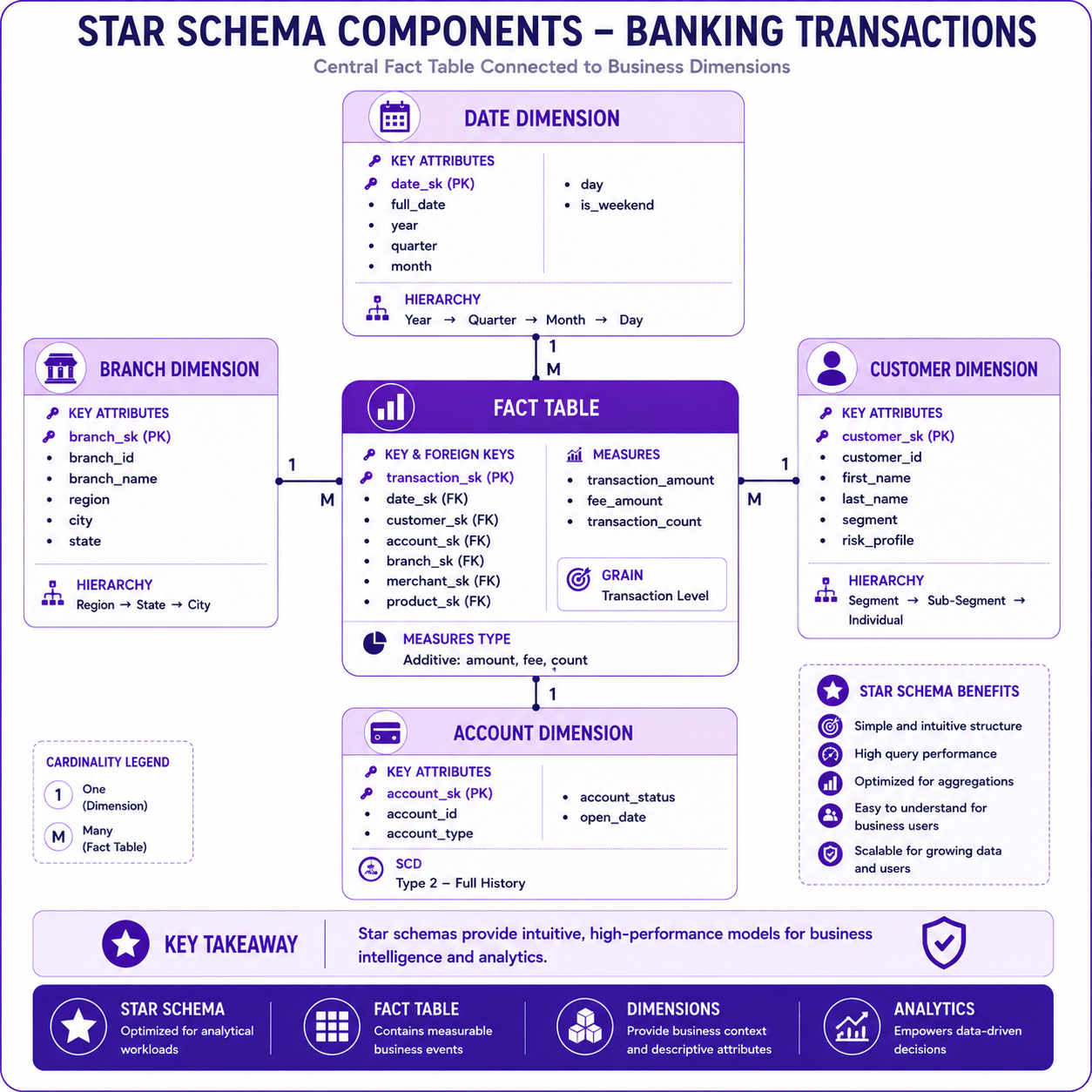
Prompt: Create a detailed Star Schema components diagram showing fact and dimension tables with their attributes. Use a 4-table structure with purple gradient theme:
Center: Fact Table - Purple #AB47BC
- Title: "Fact Table"
- Fields: transaction_sk (PK), date_sk, customer_sk, account_sk, branch_sk, merchant_sk, product_sk, transaction_amount, fee_amount, transaction_count
- Icon: 📊
- Grain: "Transaction Level"
- Measures: "Additive: amount, fee, count"
Surrounding Tables (Clockwise):
Top: Date Dimension - Purple #E1BEE7
- Title: "Date Dimension"
- Fields: date_sk (PK), full_date, year, quarter, month, day, is_weekend
- Icon: 📅
- Hierarchy: "Year → Quarter → Month → Day"
Right: Customer Dimension - Purple #CE93D8
- Title: "Customer Dimension"
- Fields: customer_sk (PK), customer_id, first_name, last_name, segment, risk_profile
- Icon: 👤
- Hierarchy: "Segment → Sub-Segment → Individual"
Bottom: Account Dimension - Purple #CE93D8
- Title: "Account Dimension"
- Fields: account_sk (PK), account_id, account_type, account_status, open_date
- Icon: 💳
- SCD: "Type 2 - Full History"
Left: Branch Dimension - Purple #E1BEE7
- Title: "Branch Dimension"
- Fields: branch_sk (PK), branch_id, branch_name, region, city, state
- Icon: 🏢
- Hierarchy: "Region → State → City"
Use connector lines from fact table to each dimension with cardinality indicators. Include key takeaway at bottom: "Star schemas provide intuitive, high-performance models for business intelligence and analytics." Footer tags: Star Schema, Fact Table, Dimensions, Analytics. Enterprise-style clean layout with rounded corners.
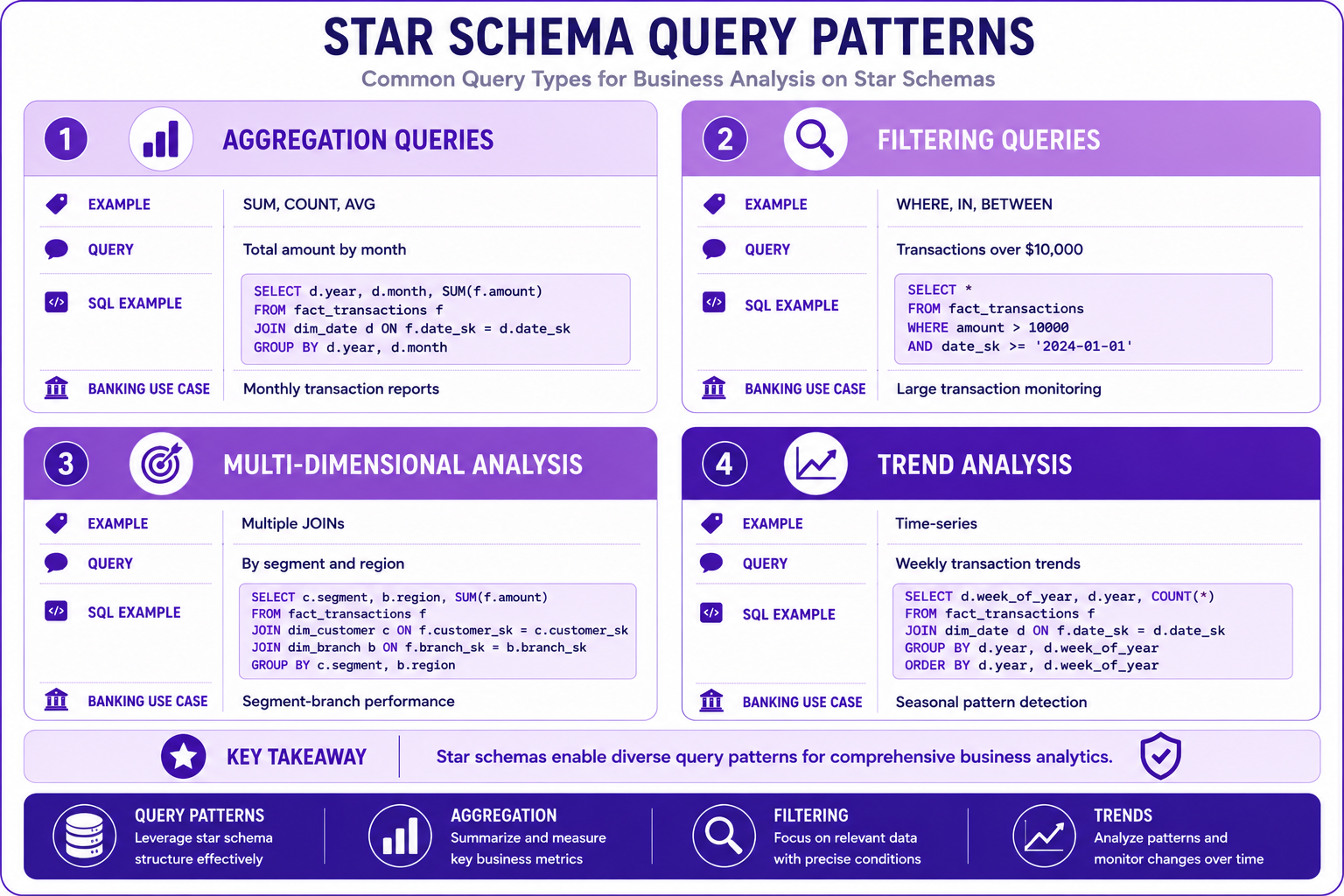
Prompt: Create a star schema query patterns diagram showing different analysis types. Use a 4-quadrant structure with purple gradient theme:
Quadrant 1: Aggregation (Top Left) - Purple #E1BEE7
- Title: "Aggregation Queries"
- Icon: 📊
- Example: "SUM, COUNT, AVG"
- Query: "Total amount by month"
- SQL: "SELECT d.year, d.month, SUM(f.amount) FROM fact_transactions f JOIN dim_date d ON f.date_sk = d.date_sk GROUP BY d.year, d.month"
- Banking Use: "Monthly transaction reports"
Quadrant 2: Filtering (Top Right) - Purple #CE93D8
- Title: "Filtering Queries"
- Icon: 🔍
- Example: "WHERE, IN, BETWEEN"
- Query: "Transactions over $10,000"
- SQL: "SELECT * FROM fact_transactions WHERE amount > 10000 AND date_sk >= '2024-01-01'"
- Banking Use: "Large transaction monitoring"
Quadrant 3: Multi-Dimensional (Bottom Left) - Purple #AB47BC
- Title: "Multi-Dimensional Analysis"
- Icon: 🎯
- Example: "Multiple JOINs"
- Query: "By segment and region"
- SQL: "SELECT c.segment, b.region, SUM(f.amount) FROM fact_transactions f JOIN dim_customer c ON f.customer_sk = c.customer_sk JOIN dim_branch b ON f.branch_sk = b.branch_sk GROUP BY c.segment, b.region"
- Banking Use: "Segment-branch performance"
Quadrant 4: Trend Analysis (Bottom Right) - Purple #7B1FA2
- Title: "Trend Analysis"
- Icon: 📈
- Example: "Time-series"
- Query: "Weekly transaction trends"
- SQL: "SELECT d.week_of_year, d.year, COUNT(*) FROM fact_transactions f JOIN dim_date d ON f.date_sk = d.date_sk GROUP BY d.year, d.week_of_year ORDER BY d.year, d.week_of_year"
- Banking Use: "Seasonal pattern detection"
At bottom: Key takeaway: "Star schemas enable diverse query patterns for comprehensive business analytics." Footer tags: Query Patterns, Aggregation, Filtering, Trends. Enterprise-style clean layout with rounded corners.
Banking Star Schema Example
Complete Banking Star Schema
-- 1. Fact Table (Transaction Grain)
CREATE OR REPLACE TABLE banking.fact_transactions (
  transaction_sk STRING PRIMARY KEY,
  date_sk STRING NOT NULL,
  customer_sk STRING NOT NULL,
  account_sk STRING NOT NULL,
  branch_sk STRING,
  merchant_sk STRING,
  product_sk STRING,
  transaction_amount NUMERIC NOT NULL,
  fee_amount NUMERIC,
  tax_amount NUMERIC,
  discount_amount NUMERIC,
  transaction_count INT DEFAULT 1,
  transaction_id STRING,
  created_at TIMESTAMP,
  updated_at TIMESTAMP
)
PARTITION BY date_sk
CLUSTER BY customer_sk, account_sk;

-- 2. Date Dimension
CREATE OR REPLACE TABLE banking.dim_date (
  date_sk STRING PRIMARY KEY,
  full_date DATE NOT NULL,
  year INT,
  quarter INT,
  month INT,
  month_name STRING,
  day INT,
  day_name STRING,
  day_of_week INT,
  week_of_year INT,
  is_weekend BOOLEAN,
  is_holiday BOOLEAN
);

-- 3. Customer Dimension (SCD Type 2)
CREATE OR REPLACE TABLE banking.dim_customer (
  customer_sk STRING PRIMARY KEY,
  customer_id STRING NOT NULL,
  first_name STRING,
  last_name STRING,
  full_name STRING,
  email STRING,
  phone STRING,
  customer_segment STRING,
  risk_profile STRING,
  valid_from DATE,
  valid_to DATE,
  is_current BOOLEAN
);

-- 4. Account Dimension
CREATE OR REPLACE TABLE banking.dim_account (
  account_sk STRING PRIMARY KEY,
  account_id STRING NOT NULL,
  account_type STRING,
  account_sub_type STRING,
  account_status STRING,
  open_date DATE,
  currency STRING
);

-- 5. Branch Dimension
CREATE OR REPLACE TABLE banking.dim_branch (
  branch_sk STRING PRIMARY KEY,
  branch_id STRING NOT NULL,
  branch_name STRING,
  branch_type STRING,
  region STRING,
  country STRING,
  state STRING,
  city STRING
);

-- 6. Merchant Dimension
CREATE OR REPLACE TABLE banking.dim_merchant (
  merchant_sk STRING PRIMARY KEY,
  merchant_id STRING NOT NULL,
  merchant_name STRING,
  merchant_category STRING,
  merchant_type STRING
);

-- 7. Product Dimension
CREATE OR REPLACE TABLE banking.dim_product (
  product_sk STRING PRIMARY KEY,
  product_id STRING NOT NULL,
  product_name STRING,
  product_category STRING,
  product_sub_category STRING
);
Interview Questions
-
What is a star schema?
-
What are the components of a star schema?
-
What is a fact table grain?
-
What are the different types of fact tables?
-
Why use surrogate keys in star schemas?
-
What is a conformed dimension?
-
How do you optimize star schema queries?
-
What is the difference between star and snowflake schemas?
-
Why partition fact tables?
-
What are dimension hierarchies?
-
How do you handle SCD in star schemas?
-
What are the best practices for star schema design?
Practice Exercises
-
Design a star schema for banking transactions.
-
Create a date dimension with hierarchies.
-
Implement SCD Type 2 in customer dimension.
-
Partition and cluster the fact table.
-
Write aggregation queries using the star schema.
-
Create a materialized view for daily summaries.
-
Implement a factless fact for customer enrollment.
-
Design a role-playing date dimension.
-
Optimize queries using partition pruning.
-
Document the star schema design.
Key Takeaways
| # | Takeaway |
|---|---|
| 1 | Star schemas are optimized for analytical queries |
| 2 | Fact tables contain measures at a specific grain |
| 3 | Dimensions provide context for measures |
| 4 | Use surrogate keys for all dimensions |
| 5 | Partition and cluster for performance |
| 6 | Conformed dimensions enable cross-fact analysis |
| 7 | SCD Type 2 tracks historical changes |
| 8 | Materialized views accelerate common queries |
Chapter Summary
In this chapter, you learned:
- ✅ What star schema is and its components
- ✅ Fact table grain and types
- ✅ Dimension table design and hierarchies
- ✅ Partitioning and clustering strategies
- ✅ Materialized views for performance
- ✅ Query patterns and optimization
- ✅ Banking star schema implementation
- ✅ Best practices and common mistakes
You now understand how to design and implement effective star schemas for enterprise analytics.
Next Chapter
👉 Next Chapter: Snowflake Schema