
Chapter 26: Knowledge Graphs and RAG
In the previous chapter, we explored vector search and embeddings and learned how to represent data as vectors for semantic similarity searches and intelligent applications.
In this chapter, we will dive into Knowledge Graphs and RAG (Retrieval-Augmented Generation) —understanding how to build semantic knowledge representations, connect entities with rich relationships, and power intelligent applications that combine retrieval with generative AI.
Using our Digital Banking Platform case study, we will implement knowledge graphs for fraud detection networks, regulatory compliance, customer 360 intelligence, and RAG-powered customer support.
🎯 Learning Objectives
By the end of this chapter, you will be able to:
- Understand knowledge graphs and their role in AI applications
- Design and implement knowledge graphs for banking
- Differentiate knowledge graphs from property graphs
- Understand RAG (Retrieval-Augmented Generation) architecture
- Implement RAG workflows on Google Cloud
- Build knowledge-graph-powered RAG applications
- Apply best practices for knowledge graph and RAG implementation
- Design banking use cases for knowledge graphs
What is a Knowledge Graph?
A knowledge graph is a semantic network that represents real-world entities and their relationships, enabling machines to understand and reason about connected information.
Knowledge Graph = Entities + Relationships + Semantic Context + Reasoning
Think of a knowledge graph as:
- A map of connected knowledge
- Entities with rich semantic meaning
- Relationships with context and reasoning
- The foundation of intelligent AI applications
- How machines "understand" the world
Real-World Banking Example
A bank needs to understand the complete picture of a customer for fraud detection:
Traditional Data:
- Customer table (name, address, ID)
- Account table (type, balance)
- Transaction table (amount, date)
- No connections between entities

Knowledge Graph:
Customer → Account → Transaction → Merchant
Customer → Address → Location → Fraud Risk
Customer → Phone → Device → Network
Customer → Social Profile → Connections → Risk

Result: Complete understanding of customer context
Knowledge Graph vs Property Graph
| Aspect | Property Graph | Knowledge Graph |
|---|---|---|
| Focus | Data relationships | Semantic understanding |
| Nodes | Entities with properties | Entities with semantics |
| Edges | Relationships | Relationships with semantics |
| Reasoning | Limited | Rich reasoning capabilities |
| Inference | None | Rule-based inference |
| Schema | Flexible | Ontology-based |
| Use Case | Data modeling | AI, semantic reasoning |
| Banking Use | Account relationships | Fraud detection, compliance |
Knowledge Graph Components
1. Entities (Nodes)
Definition: Real-world objects or concepts
Purpose: Represent things in the domain
Characteristics:
- Have types (classes)
- Have properties (attributes)
- Have unique identifiers
- Have semantic meaning

Banking Entity Examples:
- Customer: {name, ID, segment}
- Account: {type, balance, status}
- Transaction: {amount, date, type}
- Merchant: {name, category, risk}
- Location: {address, region, risk}
- Device: {type, ID, location}
2. Relationships (Edges)
Definition: Connections between entities
Purpose: Define semantic associations
Characteristics:
- Have types (predicates)
- Have properties
- Have semantic meaning
- Can be inferred

Banking Relationship Examples:
- Customer → OWN → Account
- Account → HAS_TRANSACTION → Transaction
- Transaction → WITH_MERCHANT → Merchant
- Customer → LIVES_AT → Address
- Customer → USES_DEVICE → Device
- Customer → KNOWS → Customer (social connection)
3. Attributes (Properties)
Definition: Characteristics of entities and relationships
Purpose: Provide additional context
Characteristics:
- Key-value pairs
- Rich data types
- Semantic annotations

Banking Attribute Examples:
- Entity attributes: name, ID, status
- Relationship attributes: since_date, strength
- Time attributes: created_at, updated_at
4. Ontology
Definition: Formal specification of concepts and relationships
Purpose: Define semantic meaning
Characteristics:
- Classes (entity types)
- Properties (attributes)
- Relationships (predicates)
- Constraints (rules)
- Inference rules

Banking Ontology Example:
Customer class: hasName, hasEmail, hasAccount
Account class: hasBalance, hasStatus, isOwnedBy
Transaction class: hasAmount, hasDate, occursAt
Knowledge Graph Implementation
Building a Banking Knowledge Graph
-- 1. Create Entity Tables (Nodes)
CREATE OR REPLACE TABLE banking.kg_customer (
  customer_id STRING PRIMARY KEY,
  name STRING,
  email STRING,
  phone STRING,
  segment STRING,
  risk_score NUMERIC,
  created_at TIMESTAMP
);

CREATE OR REPLACE TABLE banking.kg_account (
  account_id STRING PRIMARY KEY,
  type STRING,
  balance NUMERIC,
  status STRING,
  created_at TIMESTAMP
);

CREATE OR REPLACE TABLE banking.kg_merchant (
  merchant_id STRING PRIMARY KEY,
  name STRING,
  category STRING,
  risk_score NUMERIC,
  location STRING
);

CREATE OR REPLACE TABLE banking.kg_transaction (
  transaction_id STRING PRIMARY KEY,
  amount NUMERIC,
  transaction_date DATE,
  type STRING,
  status STRING
);

-- 2. Create Relationship Tables (Edges)
CREATE OR REPLACE TABLE banking.kg_owns (
  customer_id STRING,
  account_id STRING,
  since_date DATE,
  is_primary BOOLEAN,
  PRIMARY KEY (customer_id, account_id)
);

CREATE OR REPLACE TABLE banking.kg_transacted (
  account_id STRING,
  transaction_id STRING,
  merchant_id STRING,
  amount NUMERIC,
  transaction_date DATE,
  PRIMARY KEY (account_id, transaction_id)
);

-- 3. Create Semantic Annotations (Types, Classes)
CREATE OR REPLACE TABLE banking.kg_entity_types (
  entity_id STRING,
  entity_type STRING,  -- Customer, Account, Merchant, Transaction
  class STRING,        -- Person, Organization, FinancialProduct
  domain STRING,       -- Banking, Commerce
  PRIMARY KEY (entity_id, entity_type)
);
Knowledge Graph Query Patterns
-- Find all relationships for a customer
SELECT
  'Customer' AS source_type,
  c.customer_id AS source_id,
  c.name AS source_name,
  'OWNS' AS relationship_type,
  'Account' AS target_type,
  a.account_id AS target_id,
  a.type AS target_name
FROM banking.kg_customer c
JOIN banking.kg_owns o ON c.customer_id = o.customer_id
JOIN banking.kg_account a ON o.account_id = a.account_id
WHERE c.customer_id = 'C001'
UNION ALL
SELECT
  'Customer' AS source_type,
  c.customer_id AS source_id,
  c.name AS source_name,
  'TRANSACTED' AS relationship_type,
  'Transaction' AS target_type,
  t.transaction_id AS target_id,
  CAST(t.amount AS STRING) AS target_name
FROM banking.kg_customer c
JOIN banking.kg_owns o ON c.customer_id = o.customer_id
JOIN banking.kg_transacted tr ON o.account_id = tr.account_id
JOIN banking.kg_transaction t ON tr.transaction_id = t.transaction_id
WHERE c.customer_id = 'C001';

-- Find customer's network (2-hop relationships)
WITH customer_network AS (
  SELECT
    c.customer_id,
    c.name,
    0 AS distance
  FROM banking.kg_customer c
  WHERE c.customer_id = 'C001'
  UNION ALL
  SELECT
    c2.customer_id,
    c2.name,
    n.distance + 1
  FROM customer_network n
  JOIN banking.kg_owns o1 ON n.customer_id = o1.customer_id
  JOIN banking.kg_owns o2 ON o1.account_id = o2.account_id
  JOIN banking.kg_customer c2 ON o2.customer_id = c2.customer_id
  WHERE n.distance < 3
    AND c2.customer_id != n.customer_id
)
SELECT DISTINCT customer_id, name, distance
FROM customer_network
ORDER BY distance;
Google Cloud Knowledge Graph Services
Knowledge Graph API
-- Google Knowledge Graph API for entity recognition
-- Requires connection to Knowledge Graph API

CREATE OR REPLACE MODEL banking.kg_entity_recognition
REMOTE WITH CONNECTION `your-connection`
OPTIONS (
  endpoint = 'knowledgegraph.googleapis.com/v1/entities:search'
);

-- Extract knowledge graph entities from text
SELECT
  customer_id,
  KG_EXTRACT_ENTITIES(customer_text) AS kg_entities
FROM banking.customer_text_data;
Vertex AI Search (RAG)
-- Vertex AI Search for RAG applications
-- This is a fully managed RAG service

-- Create a data store
-- gcloud ai datastores create banking-knowledge \
--   --location=global \
--   --display-name=banking-knowledge

-- Import data into data store
-- gcloud ai datastores import \
--   --data-store=banking-knowledge \
--   --input-uri=gs://banking-knowledge/documents/*

-- Query the knowledge base
-- gcloud ai datastores search \
--   --data-store=banking-knowledge \
--   --query="What is the mortgage application process?"
RAG (Retrieval-Augmented Generation)
What is RAG?
RAG (Retrieval-Augmented Generation) is an AI architecture that combines information retrieval with generative AI to produce accurate, context-aware responses.
RAG = Retrieval (Find relevant information) + Generation (Produce answer)
Think of RAG as:
- An AI that can "look things up" before answering
- Combines the knowledge of a search engine with the creativity of an LLM
- Reduces hallucinations by grounding responses in facts
- Enables answering questions from your own data
RAG Architecture
User Query
    ↓
Query Processing (Embedding)
    ↓
Knowledge Retrieval (Vector Search)
    ↓
Context Assembly (Retrieved Documents + Query)
    ↓
Prompt Engineering (Template + Context)
    ↓
LLM Generation (Vertex AI Gemini)
    ↓
Response (Natural Language Answer)
RAG Implementation on Google Cloud
-- Step 1: Prepare Knowledge Base
-- Create knowledge base table
CREATE OR REPLACE TABLE banking.rag_knowledge_base
AS
SELECT
  document_id,
  document_title,
  document_content,
  document_category,
  ML.GENERATE_TEXT_EMBEDDING(
    MODEL banking.embedding_model,
    document_content
  ) AS embedding,
  created_date
FROM banking.documents
WHERE document_category IN ('Products', 'Policies', 'FAQ', 'Support');

-- Step 2: Create Vector Index for Fast Retrieval
CREATE VECTOR INDEX rag_knowledge_index
ON banking.rag_knowledge_base(embedding)
OPTIONS (
  distance_type = 'COSINE',
  index_type = 'IVF'
);

-- Step 3: RAG Retrieval Function
CREATE OR REPLACE FUNCTION banking.get_relevant_documents(
  query_text STRING,
  top_k INT64
)
RETURNS ARRAY<STRUCT<
  document_id STRING,
  document_title STRING,
  document_content STRING,
  similarity FLOAT64
>>
AS (
  WITH query_embedding AS (
    SELECT ML.GENERATE_TEXT_EMBEDDING(
      MODEL banking.embedding_model,
      query_text
    ) AS embedding
  )
  SELECT ARRAY_AGG(
    STRUCT(
      k.document_id,
      k.document_title,
      k.document_content,
      APPROX_DISTANCE(k.embedding, q.embedding) AS similarity
    )
    ORDER BY similarity
    LIMIT top_k
  )
  FROM banking.rag_knowledge_base k
  CROSS JOIN query_embedding q
);

-- Step 4: Generate Response with Context
CREATE OR REPLACE FUNCTION banking.generate_rag_response(
  query_text STRING
)
RETURNS STRING
AS (
  WITH relevant_docs AS (
    SELECT
      document_content,
      document_title
    FROM UNNEST(
      banking.get_relevant_documents(query_text, 3)
    )
  ),
  context AS (
    SELECT STRING_AGG(
      'Document: ' || document_title || '\n' || document_content,
      '\n\n'
    ) AS context_text
    FROM relevant_docs
  )
  SELECT ML.GENERATE_TEXT(
    MODEL banking.gemini_model,
    CONCAT(
      'Context from banking knowledge base:\n\n',
      context_text,
      '\n\nQuestion: ',
      query_text,
      '\n\nAnswer the question based on the context. If the answer is not in the context, say "I don\'t have enough information to answer that question."'
    )
  )
  FROM context
);
Complete RAG Pipeline Example
-- Complete RAG Pipeline for Customer Support
CREATE OR REPLACE PROCEDURE banking.rag_customer_support(
  customer_query STRING,
  OUT response STRING,
  OUT sources ARRAY<STRUCT<doc_id STRING, doc_title STRING>>
)
BEGIN
  DECLARE context_text STRING;
  DECLARE retrieved_docs ARRAY<STRUCT<
    document_id STRING,
    document_title STRING,
    document_content STRING,
    similarity FLOAT64
  >>;

  -- Step 1: Retrieve relevant documents
  SET retrieved_docs = banking.get_relevant_documents(customer_query, 3);

  -- Step 2: Build context
  SET context_text = (
    SELECT STRING_AGG(
      'Source: ' || doc.document_title || '\n' || doc.document_content,
      '\n\n'
    )
    FROM UNNEST(retrieved_docs) AS doc
  );

  -- Step 3: Generate response using Gemini
  SET response = (
    SELECT ML.GENERATE_TEXT(
      MODEL banking.gemini_model,
      CONCAT(
        'You are a helpful banking customer support assistant.\n\n',
        'Context from banking knowledge base:\n',
        context_text,
        '\n\nCustomer Question: ',
        customer_query,
        '\n\nProvide a helpful, accurate response based on the context. '
        'If the context doesn\'t contain the answer, politely say you don\'t have enough information '
        'and suggest the customer contact support.'
      )
    )
  );

  -- Step 4: Return sources
  SET sources = ARRAY(
    SELECT AS STRUCT
      doc.document_id,
      doc.document_title
    FROM UNNEST(retrieved_docs) AS doc
  );
END;

-- Usage example
CALL banking.rag_customer_support(
  'How do I apply for a mortgage loan?',
  @response,
  @sources
);
SELECT @response AS answer, @sources AS sources;
Knowledge Graph + RAG = Intelligent Banking
Combined Architecture
Customer Query
    ↓
Query Understanding
    ↓
    ├── Semantic Search (Vector) → Retrieve Documents → RAG Response
    ↓
    ├── Graph Traversal (Knowledge Graph) → Retrieve Entities → Context Enhancement
    ↓
Combined Context Assembly
    ↓
LLM Generation (Gemini)
    ↓
Intelligent Response
Implementation
-- Combined Knowledge Graph + RAG
CREATE OR REPLACE PROCEDURE banking.intelligent_banking_assistant(
  customer_id STRING,
  query_text STRING,
  OUT response STRING,
  OUT context_used STRING
)
BEGIN
  DECLARE kg_context STRING;
  DECLARE doc_context STRING;
  DECLARE customer_context STRING;

  -- Step 1: Get customer context from Knowledge Graph
  SET customer_context = (
    SELECT STRING_AGG(
      'Customer ' || c.name || ' owns account ' || a.account_id ||
      ' (type: ' || a.type || ', balance: ' || CAST(a.balance AS STRING) || ')',
      '\n'
    )
    FROM banking.kg_customer c
    JOIN banking.kg_owns o ON c.customer_id = o.customer_id
    JOIN banking.kg_account a ON o.account_id = a.account_id
    WHERE c.customer_id = customer_id
  );

  -- Step 2: Get document context from RAG
  SET doc_context = (
    SELECT STRING_AGG(
      'Document: ' || doc.document_title || '\n' || doc.document_content,
      '\n\n'
    )
    FROM UNNEST(banking.get_relevant_documents(query_text, 3)) AS doc
  );

  -- Step 3: Build combined context
  SET context_used = CONCAT(
    'Customer Context:\n', customer_context,
    '\n\nKnowledge Base Context:\n', doc_context
  );

  -- Step 4: Generate response
  SET response = (
    SELECT ML.GENERATE_TEXT(
      MODEL banking.gemini_model,
      CONCAT(
        'You are a personalized banking assistant.\n\n',
        'Customer Context:\n', customer_context,
        '\n\nKnowledge Base:\n', doc_context,
        '\n\nCustomer Question: ', query_text,
        '\n\nProvide a personalized, accurate response based on the customer\'s context '
        'and banking knowledge base.'
      )
    )
  );
END;
Knowledge Graph Use Cases in Banking
Use Case 1: Fraud Detection Network
-- Detect fraud rings using knowledge graph
CREATE OR REPLACE TABLE banking.fraud_network
AS
WITH fraud_customers AS (
  SELECT customer_id
  FROM banking.kg_customer
  WHERE risk_score > 0.8
),
connected_customers AS (
  SELECT
    c.customer_id,
    c.name,
    c.risk_score,
    -- Find fraud ring connections
    COUNT(DISTINCT a.account_id) AS account_count,
    COUNT(DISTINCT t.transaction_id) AS transaction_count,
    COUNT(DISTINCT m.merchant_id) AS merchant_count
  FROM banking.kg_customer c
  JOIN banking.kg_owns o ON c.customer_id = o.customer_id
  JOIN banking.kg_account a ON o.account_id = a.account_id
  LEFT JOIN banking.kg_transacted tr ON a.account_id = tr.account_id
  LEFT JOIN banking.kg_transaction t ON tr.transaction_id = t.transaction_id
  LEFT JOIN banking.kg_merchant m ON tr.merchant_id = m.merchant_id
  WHERE c.customer_id IN (SELECT customer_id FROM fraud_customers)
  GROUP BY c.customer_id, c.name, c.risk_score
)
SELECT
  customer_id,
  name,
  risk_score,
  account_count,
  transaction_count,
  merchant_count,
  CASE
    WHEN account_count > 5 AND transaction_count > 20 THEN 'SUSPICIOUS'
    WHEN account_count > 3 AND merchant_count > 5 THEN 'MODERATE_RISK'
    ELSE 'LOW_RISK'
  END AS fraud_risk_level
FROM connected_customers;
Use Case 2: AML Compliance
-- Anti-Money Laundering detection using knowledge graph
CREATE OR REPLACE TABLE banking.aml_suspicious_patterns
AS
WITH transaction_flow AS (
  SELECT
    c1.customer_id AS source_customer,
    c1.name AS source_name,
    a1.account_id AS source_account,
    t.transaction_id,
    t.amount,
    t.transaction_date,
    m.merchant_id,
    m.name AS merchant_name,
    a2.account_id AS target_account,
    c2.customer_id AS target_customer,
    c2.name AS target_name
  FROM banking.kg_customer c1
  JOIN banking.kg_owns o1 ON c1.customer_id = o1.customer_id
  JOIN banking.kg_account a1 ON o1.account_id = a1.account_id
  JOIN banking.kg_transacted tr ON a1.account_id = tr.account_id
  JOIN banking.kg_transaction t ON tr.transaction_id = t.transaction_id
  JOIN banking.kg_merchant m ON tr.merchant_id = m.merchant_id
  JOIN banking.kg_transacted tr2 ON m.merchant_id = tr2.merchant_id
  JOIN banking.kg_account a2 ON tr2.account_id = a2.account_id
  JOIN banking.kg_owns o2 ON a2.account_id = o2.account_id
  JOIN banking.kg_customer c2 ON o2.customer_id = c2.customer_id
  WHERE c1.customer_id != c2.customer_id
)
SELECT
  source_customer,
  source_name,
  source_account,
  COUNT(*) AS transaction_count,
  SUM(amount) AS total_amount,
  AVG(amount) AS avg_amount,
  COUNT(DISTINCT merchant_id) AS unique_merchants,
  COUNT(DISTINCT target_customer) AS unique_targets,
  MIN(transaction_date) AS first_transaction,
  MAX(transaction_date) AS last_transaction,
  CASE
    WHEN COUNT(*) > 50 AND SUM(amount) > 1000000 THEN 'HIGH_RISK_AML'
    WHEN COUNT(*) > 20 AND SUM(amount) > 500000 THEN 'MEDIUM_RISK_AML'
    ELSE 'NORMAL'
  END AS aml_risk_level
FROM transaction_flow
GROUP BY source_customer, source_name, source_account
HAVING COUNT(*) > 20
ORDER BY total_amount DESC;
Use Case 3: Customer 360 Intelligence
-- Customer 360 using knowledge graph
CREATE OR REPLACE VIEW banking.v_customer_360_kg AS
SELECT
  c.customer_id,
  c.name,
  c.segment,
  c.risk_score,
  -- Account summary
  COUNT(DISTINCT a.account_id) AS account_count,
  SUM(a.balance) AS total_balance,
  -- Transaction summary
  COUNT(DISTINCT t.transaction_id) AS transaction_count,
  SUM(t.amount) AS total_transactions,
  -- Merchant summary
  COUNT(DISTINCT m.merchant_id) AS merchant_count,
  -- Social network
  COUNT(DISTINCT c2.customer_id) AS network_size,
  -- Risk indicators
  CASE
    WHEN COUNT(DISTINCT c2.customer_id) > 10 AND SUM(t.amount) > 1000000 THEN 'HIGH_NETWORK_RISK'
    WHEN COUNT(DISTINCT c2.customer_id) > 5 AND SUM(t.amount) > 500000 THEN 'MEDIUM_NETWORK_RISK'
    ELSE 'LOW_NETWORK_RISK'
  END AS network_risk_level
FROM banking.kg_customer c
LEFT JOIN banking.kg_owns o ON c.customer_id = o.customer_id
LEFT JOIN banking.kg_account a ON o.account_id = a.account_id
LEFT JOIN banking.kg_transacted tr ON a.account_id = tr.account_id
LEFT JOIN banking.kg_transaction t ON tr.transaction_id = t.transaction_id
LEFT JOIN banking.kg_merchant m ON tr.merchant_id = m.merchant_id
LEFT JOIN banking.kg_owns o2 ON a.account_id = o2.account_id
LEFT JOIN banking.kg_customer c2 ON o2.customer_id = c2.customer_id
WHERE c.customer_id = 'C001'  -- Specific customer
GROUP BY c.customer_id, c.name, c.segment, c.risk_score;
Knowledge Graph Best Practices
| # | Best Practice | Banking Example |
|---|---|---|
| 1 | Define clear ontology | Customer, Account, Transaction classes |
| 2 | Use consistent naming | KG_ prefix for knowledge graph tables |
| 3 | Version your knowledge graph | Track ontology versions |
| 4 | Implement semantic validation | Validate relationships |
| 5 | Use rich relationship types | OWNS, TRANSACTED, KNOWS |
| 6 | Include time attributes | since_date, transaction_date |
| 7 | Monitor knowledge graph quality | Validate against source data |
| 8 | Enable reasoning rules | Fraud detection rules |
RAG Best Practices
| # | Best Practice | Banking Example |
|---|---|---|
| 1 | Use high-quality knowledge base | Curated banking documents |
| 2 | Chunk documents appropriately | Size for context window |
| 3 | Use metadata for filtering | Filter by document category |
| 4 | Include sources in responses | Provide source attribution |
| 5 | Monitor hallucination | Use grounded generation |
| 6 | Cache frequent queries | Improve performance |
| 7 | Version your RAG pipeline | Track iterations |
| 8 | Evaluate response quality | Human evaluation |
Common Mistakes
| # | Common Mistake | Better Approach |
|---|---|---|
| 1 | No ontology definition | Define ontology upfront |
| 2 | Inconsistent relationship types | Use standardized types |
| 3 | Missing semantic meaning | Add semantics to relationships |
| 4 | No validation | Validate knowledge graph |
| 5 | RAG without grounding | Always ground in context |
| 6 | Large chunks | Chunk appropriately |
| 7 | No source attribution | Include sources |
| 8 | Not monitoring quality | Continuous evaluation |
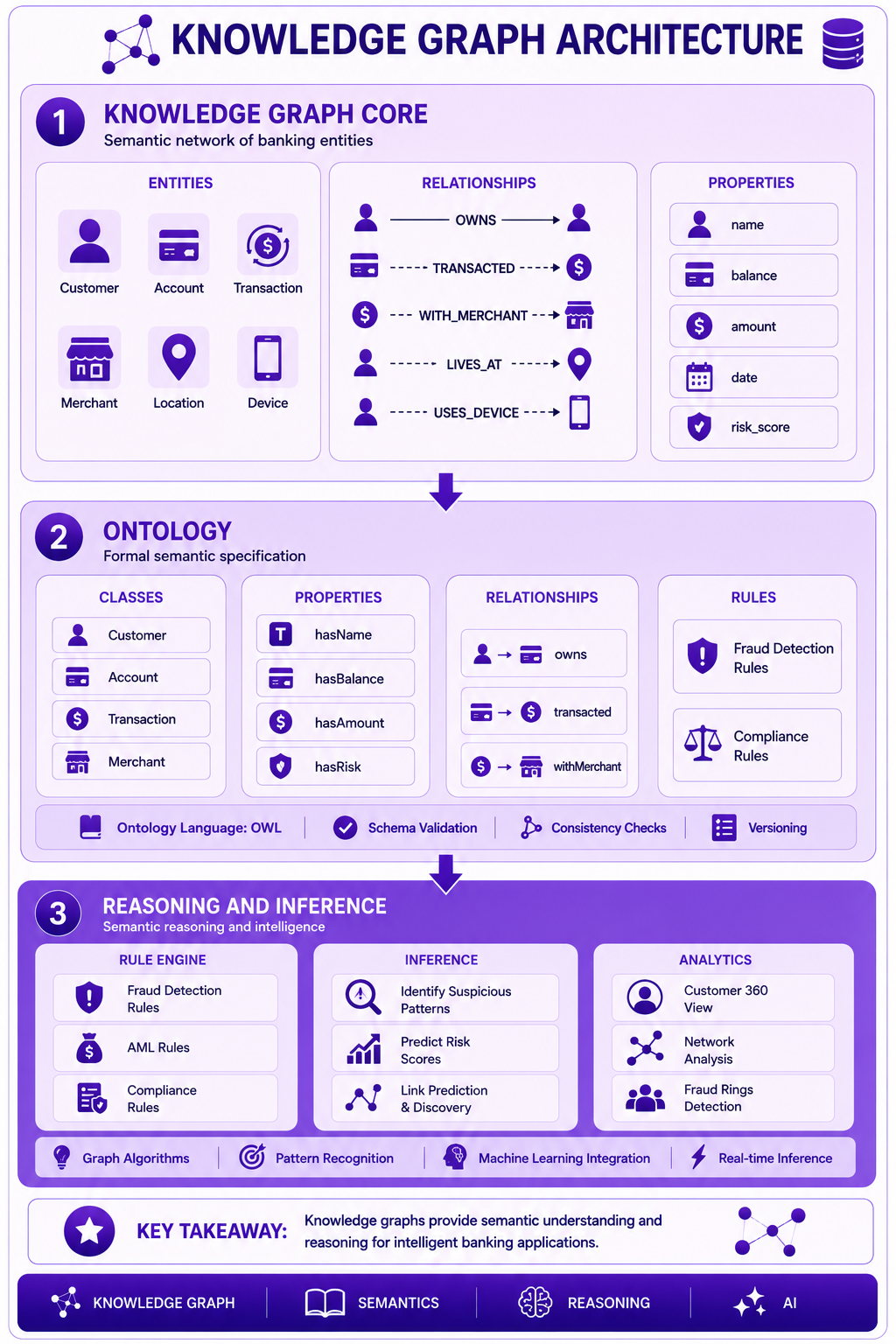
Prompt: Create a knowledge graph architecture diagram showing the complete structure. Use a 3-layer structure with purple gradient theme:
Layer 1: Knowledge Graph Core (Top) - Purple #E1BEE7
- Entities: Customer, Account, Transaction, Merchant, Location, Device
- Relationships: OWNS, TRANSACTED, WITH_MERCHANT, LIVES_AT, USES_DEVICE
- Properties: name, balance, amount, date, risk_score
- Icons for each entity type
- Description: "Semantic network of banking entities"
Layer 2: Ontology - Purple #CE93D8
- Classes: Customer, Account, Transaction, Merchant
- Properties: hasName, hasBalance, hasAmount, hasRisk
- Relationships: owns, transacted, withMerchant
- Rules: Fraud Detection Rules, Compliance Rules
- Icons for ontology components
- Description: "Formal semantic specification"
Layer 3: Reasoning and Inference - Purple #AB47BC
- Rule Engine: Frauds detection, AML, Compliance
- Inference: Identify suspicious patterns, Predict risk
- Analytics: Customer 360, Network analysis, Fraud rings
- Icons for reasoning
- Description: "Semantic reasoning and intelligence"
Use downward arrows between layers. Include key takeaway at bottom: "Knowledge graphs provide semantic understanding and reasoning for intelligent banking applications." Footer tags: Knowledge Graph, Semantics, Reasoning, AI. Enterprise-style clean layout with rounded corners.
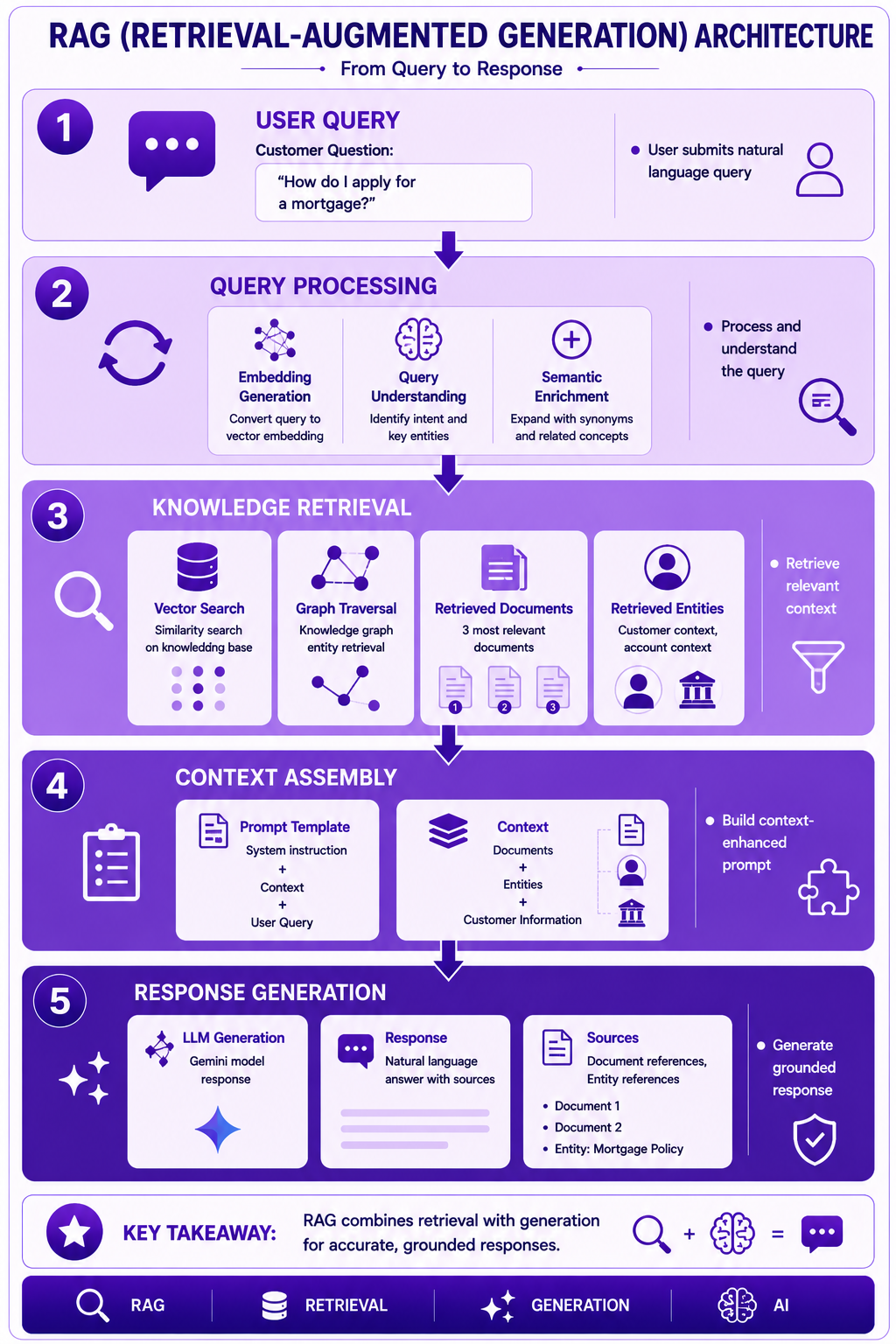
Prompt: Create a RAG (Retrieval-Augmented Generation) architecture diagram showing the complete flow from query to response. Use a 5-step vertical flow with purple gradient theme:
Step 1: User Query (Top) - Purple #E1BEE7
- Customer Question: "How do I apply for a mortgage?"
- Icon: 💬
- Description: "User submits natural language query"
Step 2: Query Processing - Purple #CE93D8
- Embedding Generation, Query Understanding, Semantic Enrichment
- Icon: 🔄
- Description: "Process and understand the query"
Step 3: Knowledge Retrieval - Purple #AB47BC
- Vector Search: Similarity search on knowledge base
- Graph Traversal: Knowledge graph entity retrieval
- Retrieved Documents: 3 most relevant documents
- Retrieved Entities: Customer context, account context
- Icons for retrieval
- Description: "Retrieve relevant context"
Step 4: Context Assembly - Purple #7B1FA2
- Prompt Template: System instruction + Context + User Query
- Context: Documents + Entities + Customer Information
- Icon: 📋
- Description: "Build context-enhanced prompt"
Step 5: Response Generation (Bottom) - Purple #4A148C
- LLM Generation: Gemini model response
- Response: Natural language answer with sources
- Sources: Document references, Entity references
- Icon: 🤖
- Description: "Generate grounded response"
Use downward arrows between steps. Include key takeaway at bottom: "RAG combines retrieval with generation for accurate, grounded responses." Footer tags: RAG, Retrieval, Generation, AI. Enterprise-style clean layout with rounded corners.
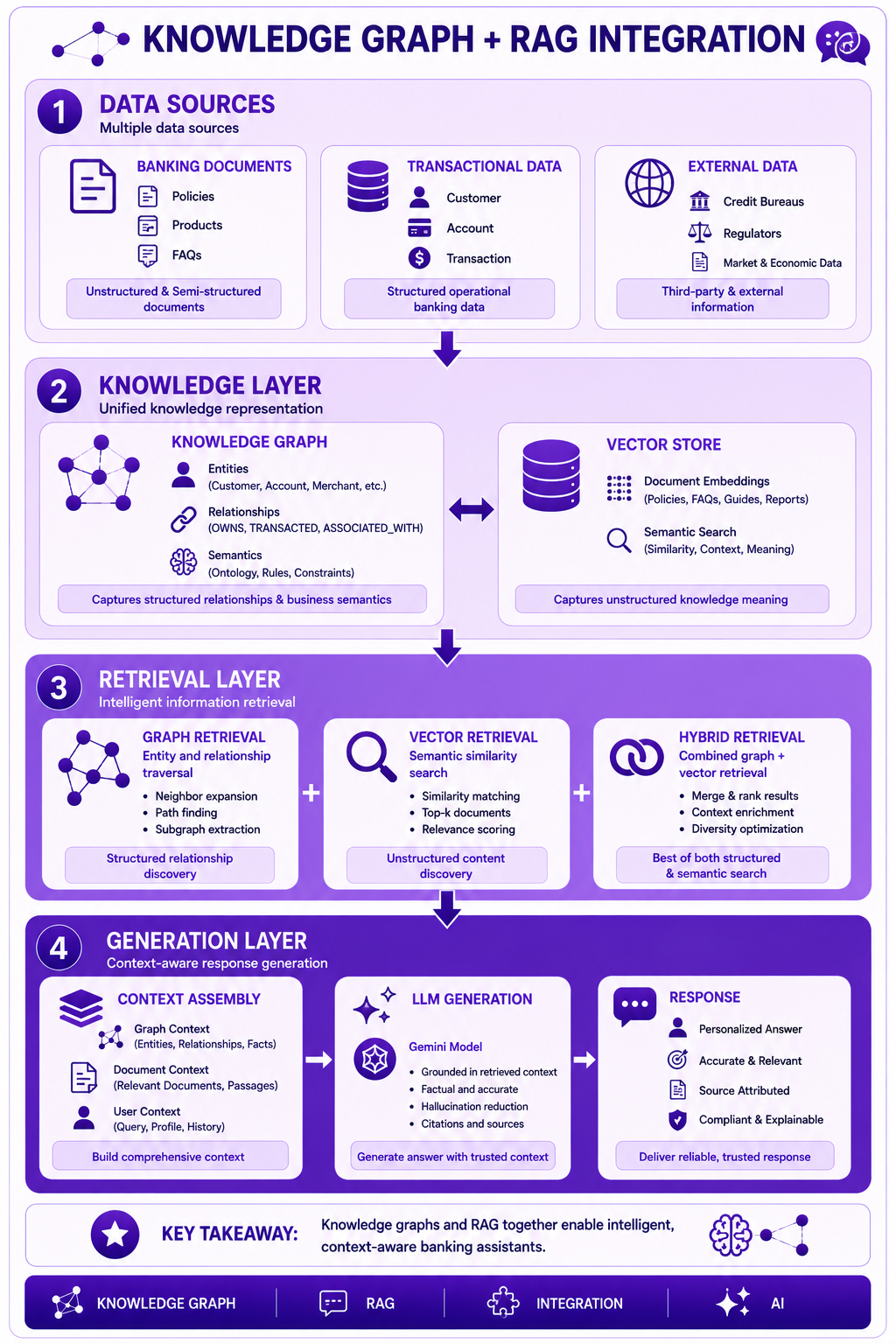
Prompt: Create a Knowledge Graph + RAG integration diagram showing the combined architecture. Use a 4-layer structure with purple gradient theme:
Layer 1: Data Sources (Top) - Purple #E1BEE7
- Banking Documents: Policies, Products, FAQs
- Transactional Data: Customer, Account, Transaction
- External Data: Credit Bureaus, Regulators
- Icons for data sources
- Description: "Multiple data sources"
Layer 2: Knowledge Layer - Purple #CE93D8
- Knowledge Graph: Entities, Relationships, Semantics
- Vector Store: Document Embeddings, Semantic Search
- Icons for knowledge components
- Description: "Unified knowledge representation"
Layer 3: Retrieval Layer - Purple #AB47BC
- Graph Retrieval: Entity and relationship traversal
- Vector Retrieval: Semantic similarity search
- Hybrid Retrieval: Combined graph + vector
- Icons for retrieval
- Description: "Intelligent information retrieval"
Layer 4: Generation Layer (Bottom) - Purple #7B1FA2
- Context Assembly: Graph context + Document context + User context
- LLM Generation: Gemini model with grounded context
- Response: Personalized, accurate, source-attributed answer
- Icons for generation
- Description: "Context-aware response generation"
Use downward arrows between layers. Include key takeaway at bottom: "Knowledge graphs and RAG together enable intelligent, context-aware banking assistants." Footer tags: Knowledge Graph, RAG, Integration, AI. Enterprise-style clean layout with rounded corners.
Interview Questions
-
What is a knowledge graph?
-
How does a knowledge graph differ from a property graph?
-
What is an ontology and why is it important?
-
What is RAG and why is it used?
-
How does RAG reduce hallucinations?
-
What are the components of a RAG system?
-
How do you implement RAG on Google Cloud?
-
What is the role of vector search in RAG?
-
How do you combine knowledge graphs with RAG?
-
What are the use cases for knowledge graphs in banking?
-
How do you ensure RAG responses are accurate?
-
What are the best practices for knowledge graph implementation?
Practice Exercises
-
Design a banking knowledge graph ontology.
-
Build a knowledge graph with customer, account, and transaction entities.
-
Implement fraud detection using knowledge graph reasoning.
-
Create a RAG pipeline for customer support.
-
Combine knowledge graphs and RAG for intelligent banking.
-
Implement semantic search on knowledge graph.
-
Build AML detection using knowledge graph.
-
Create a Customer 360 view using knowledge graph.
-
Implement rule-based reasoning in knowledge graph.
-
Build a personalized banking assistant with RAG.
Key Takeaways
| # | Takeaway |
|---|---|
| 1 | Knowledge graphs represent semantic relationships |
| 2 | RAG combines retrieval with generative AI |
| 3 | Knowledge graphs enable semantic reasoning |
| 4 | RAG reduces hallucinations with grounding |
| 5 | Google Cloud provides comprehensive RAG and KG services |
| 6 | Knowledge graphs and RAG work together |
| 7 | Fraud detection and AML are key banking use cases |
| 8 | Quality knowledge base is essential for RAG |
Chapter Summary
In this chapter, you learned:
- ✅ What knowledge graphs are and their components
- ✅ Knowledge graph vs property graph differences
- ✅ Ontology design and implementation
- ✅ RAG architecture and implementation
- ✅ Knowledge graph + RAG integration
- ✅ Banking use cases (fraud, AML, Customer 360)
- ✅ Google Cloud services for KG and RAG
- ✅ Best practices and common mistakes
You now understand how to implement knowledge graphs and RAG for intelligent banking applications.
Next Chapter
👉 Next Chapter: AI-Assisted Data Modeling