
Chapter 15: One Big Table (OBT)
In the previous chapter, we explored snowflake schemas and learned how normalized dimensions can reduce redundancy while increasing query complexity.
In this chapter, we will dive into One Big Table (OBT) —understanding its design principles, benefits, trade-offs, and when to use this approach for analytical workloads.
Using our Digital Banking Platform case study, we will design OBT models that balance performance, simplicity, and cost-effectiveness.
🎯 Learning Objectives
By the end of this chapter, you will be able to:
- Understand the One Big Table approach
- Differentiate OBT from star and snowflake schemas
- Identify when to use OBT vs dimensional models
- Design effective OBT structures
- Implement OBT in BigQuery
- Optimize OBT for performance and cost
- Apply best practices for OBT design
- Design banking OBT use cases
What is One Big Table (OBT)?
One Big Table is a highly denormalized data modeling approach where all data is stored in a single, wide table containing both facts and dimensions.
OBT = Single Wide Table + All Attributes + Denormalized
Think of OBT as:
- Everything in one place
- No joins needed for queries
- Simple for analysts
- Optimized for specific use cases
- Columnar storage friendly
Real-World Banking Example
A bank needs to provide simple access to transaction data:
Traditional Approach (Star Schema):
- Fact table with foreign keys
- Multiple dimension tables
- Joins required for analysis

OBT Approach:
- Single table with all attributes
- Customer name, branch, date, amount all in one row
- No joins needed
- Simple queries

Example OBT Row:
transaction_id, customer_id, customer_name, customer_segment,
branch_id, branch_name, region, date, year, month,
amount, fee, merchant_category, account_type
OBT vs Traditional Schemas
| Aspect | Star Schema | Snowflake Schema | One Big Table |
|---|---|---|---|
| Structure | Central fact + dimensions | Normalized dimensions | Single wide table |
| Number of Tables | 5-15 | 15-30+ | 1 |
| Joins Required | Yes | Many | None |
| Query Performance | Good | Moderate | Excellent |
| Storage | Moderate | Minimal | High (redundant) |
| Simplicity | Good | Complex | Excellent |
| Flexibility | Good | Excellent | Limited |
| Maintenance | Moderate | Complex | Simple |
| Use Case | General BI | Complex DW | Specific analytics |
When to Use OBT
OBT is Ideal When:
✅ Query patterns are well-defined and stable
✅ Performance is critical
✅ Simplicity is a priority
✅ Data volume is manageable
✅ Storage costs are not a concern
✅ Business users need self-service access
✅ Reporting needs are limited
✅ Columnar storage is available (BigQuery)
OBT is Not Ideal When:
❌ Data is highly dynamic (frequent updates)
❌ Storage costs are a major concern
❌ Many different use cases need support
❌ Data needs to be shared across multiple teams
❌ Complex hierarchies need to be maintained
❌ Audit trails are required
❌ Data lineage is important
OBT Design Principles
Principle 1: Define the Use Case
- Identify specific business questions
- Determine required attributes
- Define granularity
- Consider query patterns
Principle 2: Include All Needed Attributes
- All dimension attributes
- All fact measures
- Derived attributes
- Pre-calculated metrics
Principle 3: Optimize for Queries
- Partition by date
- Cluster by key columns
- Use appropriate data types
- Include common filters
Principle 4: Manage Redundancy
- Accept redundancy for performance
- Minimize unnecessary duplication
- Balance storage and query cost
- Consider columnar compression
OBT Implementation
Basic OBT Structure
-- One Big Table for Transaction Analytics
CREATE OR REPLACE TABLE banking.obt_transactions (
  -- Transaction Facts
  transaction_id STRING,
  transaction_date DATE,
  transaction_time TIMESTAMP,
  transaction_amount NUMERIC,
  fee_amount NUMERIC,
  tax_amount NUMERIC,
  discount_amount NUMERIC,

  -- Customer Attributes
  customer_id STRING,
  customer_first_name STRING,
  customer_last_name STRING,
  customer_full_name STRING,
  customer_email STRING,
  customer_phone STRING,
  customer_segment STRING,
  customer_risk_profile STRING,
  customer_age INT,
  customer_gender STRING,

  -- Account Attributes
  account_id STRING,
  account_type STRING,
  account_sub_type STRING,
  account_status STRING,
  account_open_date DATE,
  account_balance NUMERIC,
  account_currency STRING,

  -- Branch Attributes
  branch_id STRING,
  branch_name STRING,
  branch_type STRING,
  region STRING,
  country STRING,
  state STRING,
  city STRING,

  -- Merchant Attributes
  merchant_id STRING,
  merchant_name STRING,
  merchant_category STRING,
  merchant_type STRING,

  -- Product Attributes
  product_id STRING,
  product_name STRING,
  product_category STRING,
  product_sub_category STRING,

  -- Date Attributes
  year INT,
  quarter INT,
  month INT,
  month_name STRING,
  day INT,
  day_name STRING,
  is_weekend BOOLEAN,
  is_holiday BOOLEAN,

  -- Derived Metrics
  is_high_value BOOLEAN,
  transaction_segment STRING,
  year_month STRING,
  quarter_name STRING,

  -- Metadata
  created_at TIMESTAMP,
  updated_at TIMESTAMP
)
PARTITION BY transaction_date
CLUSTER BY customer_id, account_id, merchant_category
OPTIONS (
  description = 'One Big Table for transaction analytics'
);
Banking OBT Example with Pre-Joined Data
-- Creating OBT from star schema
CREATE OR REPLACE TABLE banking.obt_customer_360
PARTITION BY date
CLUSTER BY customer_id
AS
SELECT
  -- Fact measures
  f.transaction_sk,
  f.transaction_amount,
  f.fee_amount,
  f.transaction_count,

  -- Date attributes
  d.full_date AS date,
  d.year,
  d.quarter,
  d.month,
  d.month_name,
  d.day_name,
  d.is_weekend,

  -- Customer attributes
  c.customer_id,
  c.first_name,
  c.last_name,
  c.full_name,
  c.email,
  c.phone,
  c.customer_segment,
  c.risk_profile,
  c.valid_from,
  c.valid_to,

  -- Account attributes
  a.account_id,
  a.account_type,
  a.account_status,

  -- Branch attributes
  b.branch_name,
  b.region,
  b.state,
  b.city,

  -- Merchant attributes
  m.merchant_name,
  m.merchant_category,

  -- Product attributes
  p.product_name,
  p.product_category,

  -- Derived attributes
  CASE
    WHEN f.transaction_amount > 1000 THEN 'High Value'
    WHEN f.transaction_amount > 500 THEN 'Medium Value'
    ELSE 'Low Value'
  END AS value_tier,

  CONCAT(c.first_name, ' ', c.last_name) AS customer_full_name,
  EXTRACT(YEAR FROM CURRENT_DATE()) - EXTRACT(YEAR FROM c.date_of_birth) AS customer_age

FROM banking.fact_transactions f
JOIN banking.dim_date d ON f.date_sk = d.date_sk
JOIN banking.dim_customer c ON f.customer_sk = c.customer_sk
JOIN banking.dim_account a ON f.account_sk = a.account_sk
JOIN banking.dim_branch b ON f.branch_sk = b.branch_sk
LEFT JOIN banking.dim_merchant m ON f.merchant_sk = m.merchant_sk
LEFT JOIN banking.dim_product p ON f.product_sk = p.product_sk
WHERE c.is_current = TRUE;
OBT Query Patterns
Simple Queries (No Joins)
-- Simple query on OBT
SELECT
  customer_segment,
  SUM(transaction_amount) AS total_amount,
  COUNT(*) AS transaction_count
FROM banking.obt_transactions
WHERE year = 2024
  AND month = 1
GROUP BY customer_segment
ORDER BY total_amount DESC;
Filtering and Aggregation
-- Complex analysis with OBT
SELECT
  customer_segment,
  merchant_category,
  DATE_TRUNC(transaction_date, MONTH) AS month,
  SUM(transaction_amount) AS total_amount,
  COUNT(*) AS transaction_count,
  AVG(transaction_amount) AS avg_amount,
  SUM(fee_amount) AS total_fees
FROM banking.obt_transactions
WHERE transaction_date >= '2024-01-01'
  AND transaction_date < '2025-01-01'
  AND customer_segment IN ('Premium', 'Gold')
GROUP BY customer_segment, merchant_category, month
ORDER BY month, total_amount DESC;
Time-Series Analysis
-- Trend analysis on OBT
SELECT
  year,
  month,
  month_name,
  customer_segment,
  SUM(transaction_amount) AS total_amount,
  LAG(SUM(transaction_amount)) OVER (
    PARTITION BY customer_segment
    ORDER BY year, month
  ) AS previous_month_amount,
  SUM(transaction_amount) - LAG(SUM(transaction_amount)) OVER (
    PARTITION BY customer_segment
    ORDER BY year, month
  ) AS month_over_month_change
FROM banking.obt_transactions
WHERE year = 2024
GROUP BY year, month, month_name, customer_segment
ORDER BY customer_segment, year, month;
OBT Optimization
Partitioning Strategy
-- Optimized OBT with partitioning and clustering
CREATE OR REPLACE TABLE banking.obt_transactions_optimized
PARTITION BY DATE_TRUNC(transaction_date, MONTH)  -- Monthly partitions
CLUSTER BY customer_segment, merchant_category, customer_id  -- Clustering
AS
SELECT * FROM banking.obt_transactions;
Data Type Optimization
-- Optimized data types for OBT
CREATE OR REPLACE TABLE banking.obt_transactions_optimized_types (
  -- Use INT64 for IDs (faster than STRING)
  customer_id INT64 NOT NULL,
  account_id INT64 NOT NULL,
  branch_id INT64,
  merchant_id INT64,
  product_id INT64,

  -- Use NUMERIC for financial amounts
  transaction_amount NUMERIC(15,2),
  fee_amount NUMERIC(10,2),

  -- Use appropriate date types
  transaction_date DATE NOT NULL,
  year INT64,
  quarter INT64,
  month INT64,

  -- Use STRING for text
  customer_segment STRING,
  merchant_category STRING,
  branch_region STRING
);
Materialized Views for OBT
-- Materialized view for common aggregations
CREATE MATERIALIZED VIEW banking.mv_obt_monthly_summary
AS
SELECT
  year,
  month,
  customer_segment,
  merchant_category,
  SUM(transaction_amount) AS total_amount,
  COUNT(*) AS transaction_count,
  AVG(transaction_amount) AS avg_amount,
  COUNT(DISTINCT customer_id) AS unique_customers
FROM banking.obt_transactions
GROUP BY year, month, customer_segment, merchant_category;
OBT Best Practices
| # | Best Practice | Banking Example |
|---|---|---|
| 1 | Define clear use case | Daily transaction reports |
| 2 | Include all needed attributes | Customer, account, branch info |
| 3 | Partition by date | Monthly partitions |
| 4 | Cluster by key columns | customer_id, segment |
| 5 | Use appropriate data types | INT64 for IDs, NUMERIC for amounts |
| 6 | Include derived attributes | value_tier, customer_age |
| 7 | Optimize for common queries | Include common filter columns |
| 8 | Monitor storage costs | Manage redundancy |
| 9 | Use materialized views | Pre-aggregate summaries |
| 10 | Document OBT structure | Table descriptions |
Common Mistakes
| # | Common Mistake | Better Approach |
|---|---|---|
| 1 | Including unnecessary columns | Include only needed attributes |
| 2 | No partitioning | Always partition large tables |
| 3 | No clustering | Cluster on key columns |
| 4 | Wrong data types | Use appropriate data types |
| 5 | Not updating OBT | Regular refresh strategy |
| 6 | Ignoring storage costs | Monitor and optimize |
| 7 | No documentation | Document all columns |
| 8 | Querying unnecessary columns | SELECT only needed columns |
| 9 | No incremental updates | Design incremental refresh |
| 10 | Over-normalization in OBT | Keep denormalized |
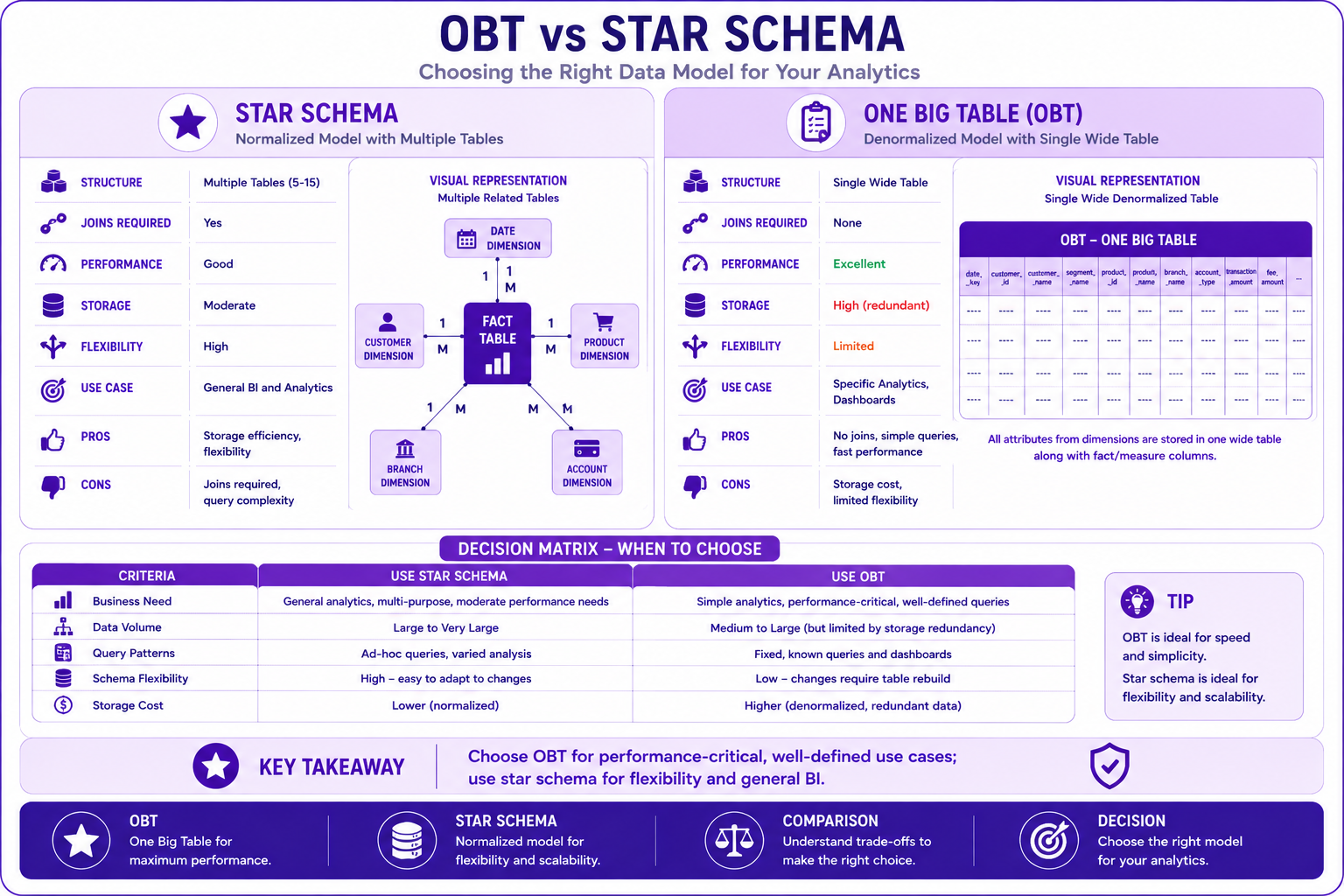
Prompt: Create a One Big Table structure diagram showing the wide table with all attributes. Use a 3-section structure with purple gradient theme:
Section 1: OBT Overview (Top) - Purple #E1BEE7
- Title: "One Big Table (OBT) - Wide Table Structure"
- Icon: 📊
- Description: "A single table containing all facts and dimensions"
- Characteristics: "No Joins, High Performance, Simple Queries, Denormalized"
- Banking Example: "Transaction Analytics OBT"
- Visual: Wide table with many columns
Section 2: Column Categories - Purple #CE93D8
- Title: "Column Categories in OBT"
- Fact Columns: 📈 "transaction_amount, fee_amount, tax_amount, transaction_count"
- Dimension Columns: 📋 "customer_id, customer_name, customer_segment, account_type, branch_name, region, merchant_category, product_name"
- Date Columns: 📅 "transaction_date, year, quarter, month, day, is_weekend"
- Derived Columns: 🔄 "value_tier, customer_age, transaction_segment"
Section 3: Storage Characteristics - Purple #AB47BC
- Title: "Storage Considerations"
- Redundancy: "High (data repeated across rows)"
- Compression: "Good (columnar storage benefits)"
- Partitioning: "Recommended (by date)"
- Clustering: "Recommended (by key columns)"
- Trade-offs: "Performance vs Storage Cost"
At bottom: Key takeaway: "OBT provides maximum simplicity and performance at the cost of storage redundancy." Footer tags: One Big Table, OBT, Wide Table, Performance. Enterprise-style clean layout with rounded corners.
Banking OBT Use Cases
Use Case 1: Executive Dashboard
-- OBT for executive dashboard
CREATE OR REPLACE TABLE banking.obt_executive_dashboard
PARTITION BY date
CLUSTER BY customer_segment
AS
SELECT
  transaction_date AS date,
  customer_segment,
  branch_region,
  merchant_category,
  SUM(transaction_amount) AS total_amount,
  COUNT(*) AS transaction_count,
  AVG(transaction_amount) AS avg_amount,
  SUM(fee_amount) AS total_fees,
  COUNT(DISTINCT customer_id) AS unique_customers,
  -- Pre-calculated metrics
  SUM(transaction_amount) / COUNT(DISTINCT customer_id) AS avg_per_customer
FROM banking.obt_transactions
WHERE transaction_date >= DATE_SUB(CURRENT_DATE(), INTERVAL 90 DAY)
GROUP BY transaction_date, customer_segment, branch_region, merchant_category;
Use Case 2: Customer 360 Single View
-- OBT for Customer 360
CREATE OR REPLACE TABLE banking.obt_customer_360_single
PARTITION BY snapshot_date
CLUSTER BY customer_id
AS
WITH latest_customer AS (
  SELECT *
  FROM banking.dim_customer
  WHERE is_current = TRUE
),
latest_accounts AS (
  SELECT
    customer_sk,
    ARRAY_AGG(STRUCT(
      account_id, account_type, account_status
    )) AS account_list
  FROM banking.dim_account
  WHERE is_current = TRUE
  GROUP BY customer_sk
),
latest_transactions AS (
  SELECT
    customer_sk,
    SUM(transaction_amount) AS total_spend,
    COUNT(*) AS transaction_count,
    AVG(transaction_amount) AS avg_transaction
  FROM banking.fact_transactions
  WHERE date_sk >= DATE_SUB(CURRENT_DATE(), INTERVAL 90 DAY)
  GROUP BY customer_sk
)
SELECT
  c.customer_id,
  c.first_name,
  c.last_name,
  c.email,
  c.phone,
  c.customer_segment,
  c.risk_profile,
  c.date_of_birth,
  a.account_list,
  t.total_spend,
  t.transaction_count,
  t.avg_transaction,
  CURRENT_DATE() AS snapshot_date
FROM latest_customer c
LEFT JOIN latest_accounts a ON c.customer_sk = a.customer_sk
LEFT JOIN latest_transactions t ON c.customer_sk = t.customer_sk;
OBT vs Star Schema - Decision Framework
When to Use OBT
| Scenario | OBT | Star Schema |
|---|---|---|
| Query Simplicity | ⭐⭐⭐⭐⭐ | ⭐⭐⭐ |
| Performance | ⭐⭐⭐⭐⭐ | ⭐⭐⭐⭐ |
| Storage Efficiency | ⭐⭐ | ⭐⭐⭐⭐ |
| Flexibility | ⭐⭐ | ⭐⭐⭐⭐⭐ |
| Maintenance | ⭐⭐⭐⭐⭐ | ⭐⭐⭐ |
| Multi-use Cases | ⭐⭐ | ⭐⭐⭐⭐⭐ |
| Self-Service BI | ⭐⭐⭐⭐⭐ | ⭐⭐⭐⭐ |
Decision Matrix
Use OBT When:
- Performance is critical
- Queries are well-defined
- Data volume is manageable
- Simplicity is prioritized

Use Star Schema When:
- Many use cases need support
- Storage costs are important
- Data is highly dynamic
- Flexibility is required

Use Hybrid When:
- Both performance and flexibility matter
- Multiple teams use the data
- Some dimensions change frequently
- Cost optimization is needed
Interview Questions
-
What is One Big Table (OBT)?
-
How does OBT differ from star schema?
-
When would you use OBT over star schema?
-
What are the advantages of OBT?
-
What are the disadvantages of OBT?
-
How do you optimize OBT for performance?
-
What is the impact on storage costs?
-
How do you handle updates in OBT?
-
What are the best practices for OBT design?
-
When should you avoid using OBT?
-
How do you implement OBT in BigQuery?
-
What is the role of partitioning in OBT?
Practice Exercises
-
Design an OBT for transaction analytics.
-
Create an OBT with all dimension attributes.
-
Partition and cluster the OBT.
-
Write queries without joins on the OBT.
-
Compare OBT vs star schema query performance.
-
Create a materialized view on OBT.
-
Design an OBT for executive dashboards.
-
Implement incremental updates for OBT.
-
Optimize OBT for specific query patterns.
-
Document the OBT structure and use cases.
Key Takeaways
| # | Takeaway |
|---|---|
| 1 | OBT provides maximum query simplicity |
| 2 | No joins required for analysis |
| 3 | Performance is excellent |
| 4 | Storage redundancy is high |
| 5 | Use for specific, well-defined use cases |
| 6 | Not suitable for all analytical needs |
| 7 | Partitioning and clustering are essential |
| 8 | Balance performance with storage costs |
Chapter Summary
In this chapter, you learned:
- ✅ What One Big Table is and its design principles
- ✅ Differences between OBT, star, and snowflake schemas
- ✅ When to use OBT vs traditional schemas
- ✅ How to implement OBT in BigQuery
- ✅ Optimization techniques for OBT
- ✅ Banking OBT use cases
- ✅ Best practices and common mistakes
- ✅ Decision framework for choosing OBT
You now understand how to design and implement One Big Table models for specific analytical use cases.
Next Chapter
👉 Next Chapter: Customer 360 Analytics