
Chapter 20: Streaming and Event Modeling
In the previous chapter, we explored semi-structured data modeling and learned how to handle JSON, XML, and nested data structures in modern data platforms.
In this chapter, we will dive into Streaming and Event Modeling—understanding how to design data models for real-time data processing, event-driven architectures, and streaming analytics.
Using our Digital Banking Platform case study, we will build event-driven data models that support real-time fraud detection, customer personalization, and operational analytics.
🎯 Learning Objectives
By the end of this chapter, you will be able to:
- Understand streaming data and event-driven architectures
- Design event schemas for real-time processing
- Model event streams for analytics
- Implement streaming data pipelines on Google Cloud
- Handle event time, processing time, and watermarks
- Design for exactly-once and at-least-once semantics
- Apply best practices for streaming data modeling
- Build banking use cases for real-time analytics
What is Streaming Data?
Streaming data is continuously generated data that flows from various sources in real-time, requiring immediate processing and analysis.
Streaming Data = Continuous Flow + Real-Time + Event-Driven + Unbounded
Think of streaming data as:
- A never-ending river of data
- Events happening continuously
- Requires immediate action
- Powers real-time applications
Real-World Banking Example
A bank needs to detect fraud in real-time:
Traditional Batch Approach:
Transaction occurs → Stored in database → Daily batch → Fraud detection → Next day
Fraud detected too late!

Streaming Approach:
Transaction occurs → Event generated → Stream processing → Real-time fraud detection
Fraud detected immediately!
Events and Event Types
What is an Event?
An event is a record of something that happened in a system, containing information about what occurred, when it occurred, and the context.
Event = What Happened + When + Context + Metadata
Event Types
| Event Type | Description | Banking Example |
|---|---|---|
| Transaction Event | Financial transaction | ATM withdrawal, payment |
| State Change Event | Entity state change | Account status change |
| User Action Event | User interaction | Login, page view |
| System Event | System occurrence | API call, error log |
| Monitoring Event | System metric | Performance alert |
| Business Event | Business process | Loan application |
Event Schema Design
Base Event Schema
{
  "event_id": "evt_123456789",
  "event_type": "TRANSACTION_CREATED",
  "event_version": "1.0",
  "event_time": "2024-01-15T10:30:45Z",
  "processing_time": "2024-01-15T10:30:46Z",
  "source_system": "core_banking",
  "correlation_id": "corr_987654321",
  "tenant_id": "bank_001",
  "data": {
    "transaction_id": "TXN123",
    "customer_id": "C001",
    "amount": 1500.00,
    "merchant": "Amazon",
    "location": "US-NY"
  },
  "metadata": {
    "ip_address": "192.168.1.1",
    "user_agent": "Mozilla/5.0",
    "session_id": "sess_abc123"
  }
}
Event Schema in BigQuery
-- Unified Event Table for Streaming Data
CREATE OR REPLACE TABLE banking.streaming_events (
  -- Event Identification
  event_id STRING NOT NULL,
  event_type STRING NOT NULL,
  event_version STRING,

  -- Timing
  event_timestamp TIMESTAMP NOT NULL,
  processing_timestamp TIMESTAMP DEFAULT CURRENT_TIMESTAMP(),

  -- Source Information
  source_system STRING NOT NULL,
  correlation_id STRING,
  tenant_id STRING,

  -- Event Data (flexible)
  event_data JSON NOT NULL,

  -- Metadata
  metadata JSON,

  -- Processing Flags
  processed BOOLEAN DEFAULT FALSE,
  processing_status STRING,  -- 'RECEIVED', 'PROCESSING', 'COMPLETED', 'FAILED'
  retry_count INT DEFAULT 0,

  -- Partitioning Key
  event_date DATE GENERATED ALWAYS AS DATE(event_timestamp) STORED,

  -- Timestamps
  created_at TIMESTAMP DEFAULT CURRENT_TIMESTAMP(),
  updated_at TIMESTAMP DEFAULT CURRENT_TIMESTAMP()
)
PARTITION BY event_date
CLUSTER BY event_type, source_system
OPTIONS (
  description = 'Unified streaming events table for real-time analytics'
);
Event-Driven Architecture
Core Components
1. Event Producers
   - Generate and publish events
   - Applications, services, devices

2. Event Broker
   - Receive and distribute events
   - Google Cloud Pub/Sub, Apache Kafka

3. Event Processors
   - Consume and process events
   - Google Cloud Dataflow, Cloud Functions

4. Event Storage
   - Store events for analytics
   - BigQuery, Cloud Storage

5. Event Consumers
   - Act on processed events
   - Dashboards, alerts, applications
Google Cloud Streaming Architecture
┌─────────────────────────────────────────────────────────────┐
│                    Event Producers                          │
│  Mobile Apps, Web Apps, Services, IoT, External Systems    │
├─────────────────────────────────────────────────────────────┤
│                    Event Ingestion                          │
│              Cloud Pub/Sub (Messaging)                      │
├─────────────────────────────────────────────────────────────┤
│                    Event Processing                         │
│              Cloud Dataflow (Streaming)                     │
├─────────────────────────────────────────────────────────────┤
│                    Event Storage                            │
│              BigQuery (Analytics)                           │
│              Cloud Storage (Archive)                        │
├─────────────────────────────────────────────────────────────┤
│                    Event Consumption                        │
│   Real-time Dashboards, Alerts, ML Models, Applications    │
└─────────────────────────────────────────────────────────────┘
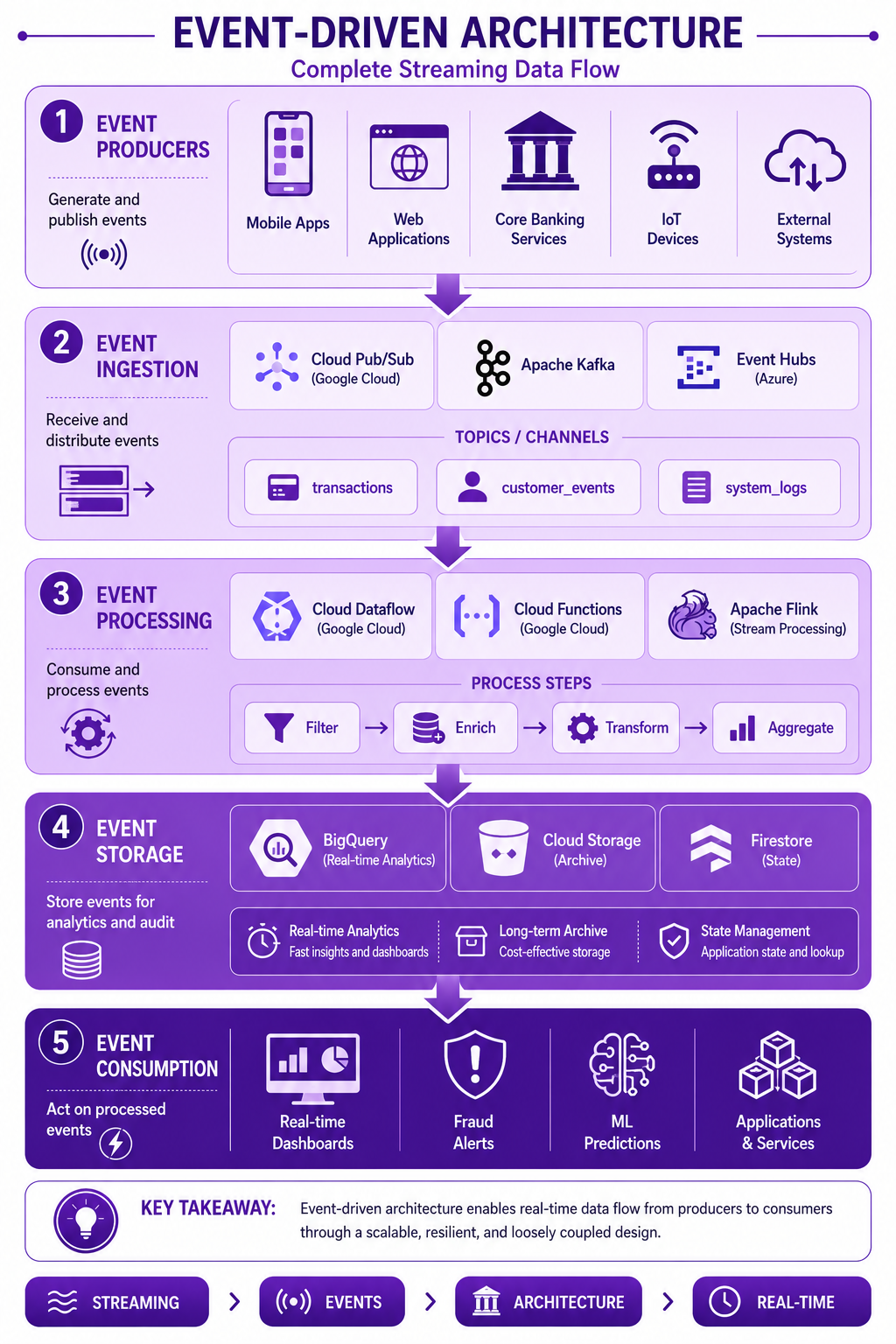
Prompt: Create an event-driven architecture diagram showing the complete streaming data flow. Use a 5-layer structure with purple gradient theme:
Layer 1: Event Producers (Top) - Purple #E1BEE7
- Mobile Apps, Web Applications, Core Banking Services, IoT Devices, External Systems
- Icons for each producer type
- Description: "Generate and publish events"
Layer 2: Event Ingestion - Purple #CE93D8
- Cloud Pub/Sub, Apache Kafka, Event Hubs
- Topics: transactions, customer_events, system_logs
- Icons for messaging/queue
- Description: "Receive and distribute events"
Layer 3: Event Processing - Purple #AB47BC
- Cloud Dataflow, Cloud Functions, Apache Flink
- Process: Filter, Enrich, Transform, Aggregate
- Icons for processing
- Description: "Consume and process events"
Layer 4: Event Storage - Purple #7B1FA2
- BigQuery (Real-time Analytics), Cloud Storage (Archive), Firestore (State)
- Icons for storage
- Description: "Store events for analytics and audit"
Layer 5: Event Consumption (Bottom) - Purple #4A148C
- Real-time Dashboards, Fraud Alerts, ML Predictions, Applications
- Icons for consumption
- Description: "Act on processed events"
Use downward arrows between layers. Include key takeaway at bottom: "Event-driven architecture enables real-time processing and immediate business action." Footer tags: Streaming, Events, Architecture, Real-Time. Enterprise-style clean layout with rounded corners.
Streaming Data Modeling
Event Time vs Processing Time
-- Handling event time and processing time
CREATE OR REPLACE TABLE banking.streaming_transactions (
  -- Business Data
  transaction_id STRING NOT NULL,
  customer_id STRING NOT NULL,
  account_id STRING NOT NULL,
  transaction_amount NUMERIC,
  transaction_type STRING,
  merchant_id STRING,
  merchant_category STRING,

  -- Event Time (when transaction occurred)
  event_timestamp TIMESTAMP NOT NULL,
  event_date DATE GENERATED ALWAYS AS DATE(event_timestamp) STORED,

  -- Processing Time (when event was processed)
  processing_timestamp TIMESTAMP DEFAULT CURRENT_TIMESTAMP(),
  processing_date DATE GENERATED ALWAYS AS DATE(processing_timestamp) STORED,

  -- Ingestion Time (when event was received)
  ingestion_timestamp TIMESTAMP DEFAULT CURRENT_TIMESTAMP(),
  ingestion_date DATE GENERATED ALWAYS AS DATE(ingestion_timestamp) STORED,

  -- Latency Metrics
  ingestion_latency_ms INT64,
  processing_latency_ms INT64,

  -- Watermark (for windowing)
  watermark_timestamp TIMESTAMP,

  -- Metadata
  source_system STRING,
  correlation_id STRING
)
PARTITION BY event_date
CLUSTER BY customer_id, event_type
OPTIONS (
  description = 'Streaming transactions with event time and processing time'
);
Streaming Window Aggregations
-- Tumbling Window (Fixed time intervals)
CREATE OR REPLACE TABLE banking.streaming_transactions_5min
PARTITION BY window_start
AS
SELECT
  TIMESTAMP_TRUNC(event_timestamp, MINUTE) AS window_start,
  TIMESTAMP_ADD(
    TIMESTAMP_TRUNC(event_timestamp, MINUTE),
    INTERVAL 5 MINUTE
  ) AS window_end,
  customer_id,
  merchant_category,
  COUNT(*) AS transaction_count,
  SUM(transaction_amount) AS total_amount,
  AVG(transaction_amount) AS avg_amount,
  MIN(transaction_amount) AS min_amount,
  MAX(transaction_amount) AS max_amount
FROM banking.streaming_transactions
GROUP BY window_start, window_end, customer_id, merchant_category;

-- Sliding Window (Overlapping intervals)
CREATE OR REPLACE TABLE banking.streaming_transactions_15min_sliding
AS
SELECT
  TIMESTAMP_SUB(event_timestamp, INTERVAL 15 MINUTE) AS window_start,
  event_timestamp AS window_end,
  customer_id,
  COUNT(*) AS transaction_count,
  SUM(transaction_amount) AS total_amount
FROM banking.streaming_transactions
GROUP BY window_start, window_end, customer_id;
Streaming Data Pipeline Implementation
Pub/Sub to BigQuery Pipeline
-- 1. Create Pub/Sub Topic
-- gcloud pubsub topics create banking-transactions

-- 2. Create Pub/Sub Subscription
-- gcloud pubsub subscriptions create banking-transactions-sub \
--   --topic=banking-transactions

-- 3. Create BigQuery Table for Streaming
CREATE OR REPLACE TABLE banking.streaming_transactions_raw (
  transaction_id STRING,
  customer_id STRING,
  account_id STRING,
  transaction_amount NUMERIC,
  transaction_type STRING,
  merchant_id STRING,
  merchant_category STRING,
  event_timestamp TIMESTAMP,
  ingestion_timestamp TIMESTAMP DEFAULT CURRENT_TIMESTAMP(),
  source_system STRING,
  raw_data JSON
)
PARTITION BY DATE(event_timestamp)
CLUSTER BY customer_id, transaction_type;

-- 4. Process streaming data with Dataflow (Java/Python)
-- Dataflow pipeline reads from Pub/Sub and writes to BigQuery

-- 5. Continuous SQL Queries
-- Create materialized view for real-time fraud detection
CREATE MATERIALIZED VIEW banking.mv_realtime_fraud_detection
AS
SELECT
  transaction_id,
  customer_id,
  transaction_amount,
  merchant_category,
  event_timestamp,
  -- Flag suspicious transactions
  CASE
    WHEN transaction_amount > 10000 THEN 'HIGH_VALUE'
    WHEN merchant_category IN ('CASINO', 'OFFSHORE') THEN 'RISKY_MERCHANT'
    WHEN transaction_amount > (
      SELECT AVG(transaction_amount) * 3
      FROM banking.streaming_transactions_raw
      WHERE customer_id = t.customer_id
        AND event_timestamp >= TIMESTAMP_SUB(CURRENT_TIMESTAMP(), INTERVAL 7 DAY)
    ) THEN 'ANOMALY'
    ELSE 'NORMAL'
  END AS fraud_risk_level
FROM banking.streaming_transactions_raw t
WHERE event_timestamp >= TIMESTAMP_SUB(CURRENT_TIMESTAMP(), INTERVAL 5 MINUTE);
Event Enrichment
Real-Time Enrichment
-- Enrich streaming events with customer data
CREATE OR REPLACE TABLE banking.streaming_enriched_transactions
PARTITION BY event_date
CLUSTER BY customer_id
AS
SELECT
  s.transaction_id,
  s.customer_id,
  s.account_id,
  s.transaction_amount,
  s.transaction_type,
  s.merchant_id,
  s.merchant_category,
  s.event_timestamp,
  -- Enriched Data
  c.first_name,
  c.last_name,
  c.customer_segment,
  c.risk_profile,
  c.credit_score,
  a.account_type,
  a.account_status,
  a.balance AS account_balance,
  -- Calculated Fields
  CASE
    WHEN s.transaction_amount > a.balance * 0.8 THEN 'HIGH_UTILIZATION'
    ELSE 'NORMAL'
  END AS account_health,
  -- Time-based
  EXTRACT(HOUR FROM s.event_timestamp) AS transaction_hour,
  FORMAT_TIMESTAMP('%A', s.event_timestamp) AS transaction_day
FROM banking.streaming_transactions_raw s
LEFT JOIN banking.dim_customer c ON s.customer_id = c.customer_id
LEFT JOIN banking.dim_account a ON s.account_id = a.account_id
WHERE c.is_current = TRUE
  AND a.is_current = TRUE;
Exactly-Once Processing
Idempotent Event Processing
-- Idempotent event storage with deduplication
CREATE OR REPLACE TABLE banking.streaming_events_deduplicated
PARTITION BY event_date
CLUSTER BY event_id, source_system
AS
SELECT
  event_id,
  event_type,
  event_timestamp,
  processing_timestamp,
  source_system,
  correlation_id,
  event_data,
  metadata,
  -- Deduplication columns
  ROW_NUMBER() OVER (
    PARTITION BY event_id
    ORDER BY processing_timestamp DESC
  ) AS event_sequence,
  FIRST_VALUE(processing_timestamp) OVER (
    PARTITION BY event_id
    ORDER BY processing_timestamp
  ) AS first_seen_timestamp,
  LAST_VALUE(processing_timestamp) OVER (
    PARTITION BY event_id
    ORDER BY processing_timestamp
  ) AS last_seen_timestamp
FROM banking.streaming_events_raw
QUALIFY event_sequence = 1;  -- Only keep latest version

-- Exactly-once processing with transaction IDs
CREATE OR REPLACE TABLE banking.streaming_transactions_exactly_once
AS
SELECT
  transaction_id,
  customer_id,
  account_id,
  transaction_amount,
  transaction_type,
  event_timestamp,
  processing_timestamp,
  -- Exactly-once guarantee
  CASE
    WHEN ROW_NUMBER() OVER (PARTITION BY transaction_id) = 1
    THEN 'FIRST_OCCURRENCE'
    ELSE 'DUPLICATE'
  END AS processing_status
FROM banking.streaming_transactions_raw
QUALIFY ROW_NUMBER() OVER (PARTITION BY transaction_id) = 1;
Banking Streaming Use Cases
Use Case 1: Real-Time Fraud Detection
-- Real-time fraud detection pipeline
CREATE OR REPLACE TABLE banking.fraud_alerts_realtime
PARTITION BY alert_date
CLUSTER BY customer_id, risk_level
AS
WITH fraud_indicators AS (
  SELECT
    transaction_id,
    customer_id,
    transaction_amount,
    merchant_category,
    event_timestamp,
    -- Rule-based indicators
    CASE WHEN transaction_amount > 10000 THEN 1 ELSE 0 END AS high_value,
    CASE WHEN merchant_category IN ('CASINO', 'OFFSHORE', 'CRYPTO') THEN 1 ELSE 0 END AS risky_merchant,
    CASE WHEN transaction_amount > (
      SELECT AVG(transaction_amount) * 3
      FROM banking.streaming_transactions_raw
      WHERE customer_id = t.customer_id
        AND event_timestamp >= TIMESTAMP_SUB(CURRENT_TIMESTAMP(), INTERVAL 1 DAY)
    ) THEN 1 ELSE 0 END AS anomaly,
    -- Velocity checks
    CASE WHEN (
      SELECT COUNT(*)
      FROM banking.streaming_transactions_raw
      WHERE customer_id = t.customer_id
        AND event_timestamp >= TIMESTAMP_SUB(CURRENT_TIMESTAMP(), INTERVAL 5 MINUTE)
    ) > 10 THEN 1 ELSE 0 END AS high_velocity
  FROM banking.streaming_transactions_raw t
  WHERE event_timestamp >= TIMESTAMP_SUB(CURRENT_TIMESTAMP(), INTERVAL 15 MINUTE)
)
SELECT
  transaction_id,
  customer_id,
  transaction_amount,
  merchant_category,
  event_timestamp,
  (high_value + risky_merchant + anomaly + high_velocity) AS risk_score,
  CASE
    WHEN (high_value + risky_merchant + anomaly + high_velocity) >= 3 THEN 'CRITICAL'
    WHEN (high_value + risky_merchant + anomaly + high_velocity) >= 2 THEN 'HIGH'
    WHEN (high_value + risky_merchant + anomaly + high_velocity) >= 1 THEN 'MEDIUM'
    ELSE 'LOW'
  END AS risk_level,
  ARRAY_AGG(
    CASE
      WHEN high_value = 1 THEN 'HIGH_VALUE'
      WHEN risky_merchant = 1 THEN 'RISKY_MERCHANT'
      WHEN anomaly = 1 THEN 'ANOMALY'
      WHEN high_velocity = 1 THEN 'HIGH_VELOCITY'
    END
  ) IGNORE NULLS AS triggered_rules,
  CURRENT_TIMESTAMP() AS alert_timestamp,
  CURRENT_DATE() AS alert_date
FROM fraud_indicators
WHERE (high_value + risky_merchant + anomaly + high_velocity) >= 1
GROUP BY transaction_id, customer_id, transaction_amount, merchant_category, event_timestamp;
Use Case 2: Real-Time Customer Personalization
-- Real-time customer personalization
CREATE OR REPLACE TABLE banking.realtime_customer_context
PARTITION BY date
CLUSTER BY customer_id
AS
WITH recent_activity AS (
  SELECT
    customer_id,
    COUNT(*) AS events_last_hour,
    SUM(transaction_amount) AS amount_last_hour,
    ARRAY_AGG(DISTINCT merchant_category) AS categories_last_hour,
    MAX(event_timestamp) AS last_activity_time,
    STRING_AGG(DISTINCT transaction_type, ',') AS transaction_types
  FROM banking.streaming_transactions_raw
  WHERE event_timestamp >= TIMESTAMP_SUB(CURRENT_TIMESTAMP(), INTERVAL 1 HOUR)
  GROUP BY customer_id
),
customer_context AS (
  SELECT
    c.customer_id,
    c.customer_segment,
    c.risk_profile,
    c.customer_lifetime_value,
    r.events_last_hour,
    r.amount_last_hour,
    r.categories_last_hour,
    r.last_activity_time,
    r.transaction_types,
    -- Context score
    CASE
      WHEN r.events_last_hour > 10 AND r.amount_last_hour > 1000 THEN 'HIGH_ENGAGEMENT'
      WHEN r.events_last_hour > 5 OR r.amount_last_hour > 500 THEN 'MEDIUM_ENGAGEMENT'
      ELSE 'LOW_ENGAGEMENT'
    END AS engagement_level
  FROM banking.dim_customer c
  LEFT JOIN recent_activity r ON c.customer_id = r.customer_id
  WHERE c.is_current = TRUE
    AND r.events_last_hour IS NOT NULL
)
SELECT
  customer_id,
  customer_segment,
  engagement_level,
  events_last_hour,
  amount_last_hour,
  categories_last_hour,
  last_activity_time,
  transaction_types,
  CURRENT_DATE() AS date,
  CURRENT_TIMESTAMP() AS context_timestamp
FROM customer_context;
Use Case 3: Real-Time Operational Dashboards
-- Real-time operational metrics
CREATE OR REPLACE TABLE banking.realtime_operational_metrics
PARTITION BY metric_date
AS
WITH metrics AS (
  SELECT
    event_timestamp,
    CASE
      WHEN transaction_amount > 10000 THEN 'HIGH'
      WHEN transaction_amount > 5000 THEN 'MEDIUM'
      ELSE 'LOW'
    END AS value_tier,
    merchant_category,
    transaction_type,
    customer_segment,
    COUNT(*) AS transaction_count,
    SUM(transaction_amount) AS total_amount,
    AVG(transaction_amount) AS avg_amount,
    COUNT(DISTINCT customer_id) AS unique_customers
  FROM banking.streaming_transactions_raw
  JOIN banking.dim_customer c ON customer_id = c.customer_id
  WHERE event_timestamp >= TIMESTAMP_SUB(CURRENT_TIMESTAMP(), INTERVAL 15 MINUTE)
  GROUP BY event_timestamp, value_tier, merchant_category, transaction_type, customer_segment
)
SELECT
  TIMESTAMP_TRUNC(event_timestamp, MINUTE) AS metric_minute,
  value_tier,
  merchant_category,
  transaction_type,
  customer_segment,
  transaction_count,
  total_amount,
  avg_amount,
  unique_customers,
  CURRENT_DATE() AS metric_date,
  CURRENT_TIMESTAMP() AS metric_timestamp
FROM metrics;
Streaming Data Best Practices
| # | Best Practice | Banking Example |
|---|---|---|
| 1 | Use event time for windowing | Transaction timestamps |
| 2 | Handle late data with watermarks | Fraud detection tolerance |
| 3 | Implement exactly-once semantics | Transaction deduplication |
| 4 | Enrich events in real-time | Customer 360 context |
| 5 | Use materialized views for speed | Real-time fraud alerts |
| 6 | Partition by event time | Daily partitions |
| 7 | Cluster by key columns | customer_id, event_type |
| 8 | Monitor streaming lag | Alert on latency |
| 9 | Handle schema evolution | Versioned event schemas |
| 10 | Test with realistic data volumes | Scale testing |
Common Mistakes
| # | Common Mistake | Better Approach |
|---|---|---|
| 1 | Ignoring event time | Always use event time |
| 2 | Not handling late data | Implement watermarks |
| 3 | No deduplication | Implement exactly-once |
| 4 | Over-complex processing | Keep it simple |
| 5 | Not monitoring latency | Monitor and alert |
| 6 | No schema versioning | Version schemas |
| 7 | Ignoring scalability | Test at scale |
| 8 | No error handling | Implement retries |
| 9 | Not using partitioning | Partition by date |
| 10 | No data quality checks | Validate events |
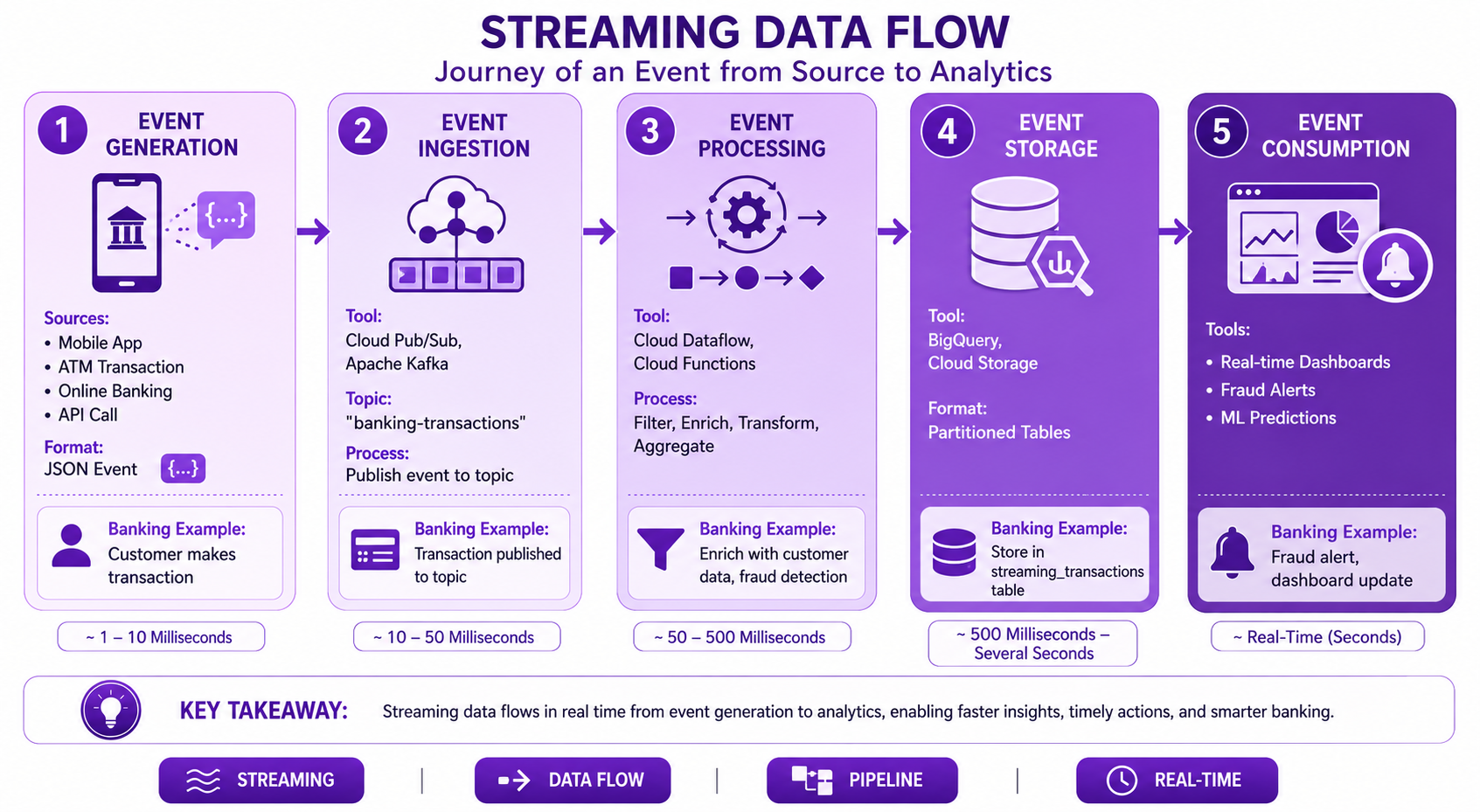
Prompt: Create a streaming data flow diagram showing the journey of an event from source to analytics. Use a 5-step horizontal flow with purple gradient theme:
Step 1: Event Generation (Left) - Purple #E1BEE7
- Title: "Event Generation"
- Sources: Mobile App, ATM Transaction, Online Banking, API Call
- Format: JSON Event
- Banking Example: "Customer makes transaction"
- Visual: Device/App icon with event
Step 2: Event Ingestion - Purple #CE93D8
- Title: "Event Ingestion"
- Tool: Cloud Pub/Sub, Apache Kafka
- Topic: "banking-transactions"
- Process: "Publish event to topic"
- Banking Example: "Transaction published to topic"
- Visual: Queue/Messaging icon
Step 3: Event Processing - Purple #AB47BC
- Title: "Event Processing"
- Tool: Cloud Dataflow, Cloud Functions
- Process: Filter, Enrich, Transform, Aggregate
- Banking Example: "Enrich with customer data, fraud detection"
- Visual: Processing/Flow icon
Step 4: Event Storage - Purple #7B1FA2
- Title: "Event Storage"
- Tool: BigQuery, Cloud Storage
- Format: Partitioned Tables
- Banking Example: "Store in streaming_transactions table"
- Visual: Database/Storage icon
Step 5: Event Consumption (Right) - Purple #4A148C
- Title: "Event Consumption"
- Tools: Real-time Dashboards, Fraud Alerts, ML Predictions
- Banking Example: "Fraud alert, dashboard update"
- Visual: Dashboard/Alert icon
Use horizontal flow arrows between steps. Include timing labels (Milliseconds). At bottom: Key takeaway: "Streaming data flows enable real-time insights and immediate business action." Footer tags: Streaming, Data Flow, Pipeline, Real-Time. Enterprise-style clean layout with rounded corners.
Interview Questions
-
What is streaming data and how does it differ from batch data?
-
What is an event and what are the different event types?
-
What is event time vs processing time?
-
What are watermarks and why are they important?
-
How do you handle late-arriving data?
-
What is exactly-once processing and how is it achieved?
-
How do you design event schemas?
-
What is the role of Pub/Sub in streaming architectures?
-
How do you enrich streaming events in real-time?
-
What are the best practices for streaming data modeling?
-
How do you handle schema evolution in streaming?
-
What are the challenges of streaming data processing?
Practice Exercises
-
Design an event schema for banking transactions.
-
Create a streaming pipeline from Pub/Sub to BigQuery.
-
Implement real-time fraud detection with Dataflow.
-
Handle late-arriving data with watermarks.
-
Implement exactly-once processing for transactions.
-
Enrich streaming events with customer data.
-
Build a real-time dashboard for operational metrics.
-
Implement windowed aggregations on streaming data.
-
Monitor streaming latency and set alerts.
-
Design for schema evolution in streaming.
Key Takeaways
| # | Takeaway |
|---|---|
| 1 | Streaming data enables real-time processing |
| 2 | Events are the foundation of streaming |
| 3 | Event time is critical for accurate analytics |
| 4 | Watermarks handle late-arriving data |
| 5 | Exactly-once semantics ensure reliability |
| 6 | Enrichment adds business context |
| 7 | Partitioning and clustering are essential |
| 8 | Monitoring is critical for streaming pipelines |
Chapter Summary
In this chapter, you learned:
- ✅ What streaming data and event-driven architectures are
- ✅ Event schema design and types
- ✅ Event time vs processing time
- ✅ Streaming data pipeline implementation
- ✅ Event enrichment and deduplication
- ✅ Banking use cases (fraud detection, personalization)
- ✅ Best practices and common mistakes
- ✅ Google Cloud streaming services
You now understand how to design and implement streaming data models for real-time analytics and event-driven applications.
Next Chapter
👉 Next Chapter: Introduction to Graph Databases