
Chapter 03: Google Cloud Data Platform Overview
In the previous chapter, we explored OLTP, OLAP, and HTAP processing paradigms and learned how modern analytics platforms handle diverse workloads.
In this chapter, we will take a comprehensive tour of the Google Cloud Data Platform, understand how its services work together, and set up our environment for the hands-on exercises throughout this course.
Using our Digital Banking Platform case study, we will map banking use cases to GCP services and build a foundational understanding of the platform.
🎯 Learning Objectives
By the end of this chapter, you will be able to:
- Understand the Google Cloud data ecosystem
- Identify key data services and their purposes
- Explain how services work together in a data platform
- Map banking use cases to appropriate GCP services
- Set up a GCP project for data modeling exercises
- Understand the BigQuery ecosystem
- Recognize data governance capabilities
- Navigate the GCP console for data services
What is Google Cloud Data Platform?
Google Cloud Data Platform is an integrated set of services that enables organizations to:
Collect, store, process, analyze, and govern data at scale
Using a unified, serverless, and AI-powered platform
Think of it as a complete data ecosystem:
Data Sources → Ingestion → Storage → Processing → Analytics → AI/ML
                ↓           ↓          ↓           ↓           ↓
           Pub/Sub    Cloud Storage  Dataflow    BigQuery   Vertex AI
           Dataflow    BigQuery      Dataproc    Looker     Vertex AI
Real-World Banking Example
A bank uses multiple GCP services to build its data platform:
Customer Transactions (Cloud SQL)
       ↓
Change Data Capture (Dataflow)
       ↓
Real-time Processing (Pub/Sub + Dataflow)
       ↓
Storage (Cloud Storage + BigQuery)
       ↓
Analytics (Looker + BigQuery)
       ↓
AI/ML (Vertex AI)
       ↓
Fraud Detection (Real-time + Batch)
Google Cloud Data Platform Architecture

Prompt: Create an enterprise-level Google Cloud data platform architecture diagram with 6 layers showing all major data services. Use a purple gradient theme from lightest at top to darkest at bottom.
Layer 1: Data Sources (Top) - Purple #F3E5F5
- On-premise Databases, SaaS Apps, Mobile Apps, IoT Devices, External Data, Cloud Storage (External)
- Icon: Database/Source icons
Layer 2: Data Ingestion - Purple #E1BEE7
- Pub/Sub (Messaging), Dataflow (Streaming/Batch), Dataproc (Hadoop/Spark), Transfer Service (Migration)
- Icon: Ingest/Flow icons
Layer 3: Data Storage - Purple #CE93D8
- Cloud Storage (Data Lake), BigQuery (Data Warehouse), Cloud SQL (OLTP), Spanner (Global), AlloyDB (HTAP), Firestore/Bigtable (NoSQL)
- Icon: Storage/Database icons
Layer 4: Data Processing - Purple #AB47BC
- Dataflow (Unified), Dataproc (Hadoop/Spark), Dataform (ELT), Dataprep (Data Preparation)
- Icon: Processing/Gear icons
Layer 5: Data Analytics & AI - Purple #7B1FA2
- BigQuery (Analytics), Looker (BI), Looker Studio (Visualization), Vertex AI (ML/AI), Vertex AI Search (RAG), Document AI
- Icon: Chart/ML icons
Layer 6: Data Governance (Bottom) - Purple #4A148C
- Data Catalog, DataPlex, Data Lineage, Data Quality, Cloud DLP, Access Management
- Icon: Shield/Governance icons
Use downward arrows between layers. Include key takeaway at bottom: "Google Cloud provides a unified, serverless, and AI-powered data platform for modern enterprises." Footer tags: Serverless, Intelligent, Unified, Scalable. Enterprise-style clean layout with rounded corners and consistent icons.
Core Data Services Deep Dive
1. Data Ingestion Services
Cloud Pub/Sub
Purpose: Real-time messaging and event ingestion
Type: Asynchronous messaging
Use Cases:
- Event streaming
- Real-time data pipelines
- Decoupling services
- IoT data ingestion

Banking Example:
- Transaction events from mobile banking
- ATM transaction streams
- Customer activity events
Cloud Dataflow
Purpose: Unified stream and batch processing
Type: Serverless data processing
Use Cases:
- ETL/ELT pipelines
- Real-time data processing
- Data transformation
- Complex event processing

Banking Example:
- Real-time transaction processing
- Batch customer data enrichment
- Regulatory reporting ETL
Cloud Dataproc
Purpose: Managed Hadoop and Spark clusters
Type: Managed cluster service
Use Cases:
- Big data processing
- Spark ML
- Hadoop workloads
- Ad-hoc data analysis

Banking Example:
- Historical data analysis
- ML model training
- Data science workloads
2. Data Storage Services
Cloud Storage
Purpose: Object storage for any data type
Type: Object storage (GCS)
Use Cases:
- Data lake storage
- Backup and archive
- Media storage
- Analytics data staging

Banking Example:
- Raw transaction logs
- Customer documents
- Regulatory archives
- Data lake foundation
BigQuery
Purpose: Serverless enterprise data warehouse
Type: Columnar storage + SQL analytics
Use Cases:
- Business intelligence
- Data warehousing
- Ad-hoc analytics
- Real-time analytics

Banking Example:
- Customer 360 analytics
- Transaction analysis
- Risk reporting
- Fraud detection
Cloud SQL
Purpose: Fully managed relational database
Type: OLTP database (PostgreSQL, MySQL, SQL Server)
Use Cases:
- Transactional applications
- Operational data
- Microservices

Banking Example:
- Customer profile data
- Account management
- Loan origination
Cloud Spanner
Purpose: Global distributed database
Type: Horizontally scalable OLTP + HTAP
Use Cases:
- Global applications
- Mission-critical workloads
- Strong consistency
- Global financial systems

Banking Example:
- Global customer accounts
- Cross-region transactions
- Payment processing
AlloyDB
Purpose: PostgreSQL-compatible with HTAP
Type: PostgreSQL + real-time analytics
Use Cases:
- HTAP workloads
- PostgreSQL migration
- Real-time analytics
- Operational analytics

Banking Example:
- Real-time fraud detection
- Operational analytics
- Reporting on live data
3. Data Processing Services
Dataform
Purpose: ELT orchestration and SQL pipelines
Type: SQL-based data transformation
Use Cases:
- Data transformation
- Pipeline orchestration
- Data quality
- CI/CD for data

Banking Example:
- Data quality checks
- Transformation pipelines
- Dimensional modeling
Cloud Dataprep
Purpose: Visual data preparation
Type: No-code data cleaning
Use Cases:
- Data exploration
- Data cleaning
- Data transformation
- User-friendly ETL

Banking Example:
- Data profiling
- Data cleansing
- Data validation
4. Analytics Services
Looker
Purpose: Enterprise business intelligence
Type: BI and data exploration
Use Cases:
- Executive dashboards
- Data exploration
- Embedded analytics
- Governed BI

Banking Example:
- Executive dashboards
- Risk reports
- Customer segmentation
- Regulatory dashboards
Looker Studio
Purpose: Self-service visualization
Type: Free visualization tool
Use Cases:
- Ad-hoc dashboards
- Data exploration
- Report sharing
- Self-service BI

Banking Example:
- Department reports
- Marketing dashboards
- Operational metrics
5. AI and ML Services
Vertex AI
Purpose: Unified ML platform
Type: End-to-end ML/AI
Use Cases:
- ML model development
- Model deployment
- Feature store
- MLOps

Banking Example:
- Credit scoring models
- Fraud detection
- Churn prediction
- Recommendation engine
Vertex AI Search
Purpose: Enterprise search and RAG
Type: AI-powered search
Use Cases:
- Enterprise search
- RAG applications
- Document retrieval
- Knowledge base

Banking Example:
- Customer service search
- Document retrieval
- Regulatory compliance
6. Data Governance Services
Data Catalog
Purpose: Metadata management
Type: Data discovery and governance
Use Cases:
- Data discovery
- Metadata management
- Data lineage
- Data search

Banking Example:
- Data asset discovery
- Data dictionary
- Metadata search
DataPlex
Purpose: Data governance and security
Type: Unified data governance
Use Cases:
- Data security
- Access control
- Data quality
- Compliance

Banking Example:
- Access policies
- Data classification
- Compliance controls
Data Lineage
Purpose: Track data movement
Type: Data flow tracking
Use Cases:
- Data tracing
- Impact analysis
- Compliance
- Debugging

Banking Example:
- Regulatory traceability
- Data flow visibility
- Problem debugging
Banking Use Cases to GCP Services
| Banking Use Case | Primary Services | Secondary Services |
|---|---|---|
| Customer 360 Analytics | BigQuery, Looker | Dataflow, Dataform |
| Real-time Fraud Detection | Pub/Sub, Dataflow, BigQuery | Vertex AI, AlloyDB |
| Transaction Processing | Cloud SQL, Spanner | Pub/Sub, Dataflow |
| Risk Portfolio Analysis | BigQuery, Looker | Dataform, Vertex AI |
| Regulatory Reporting | Dataflow, BigQuery, Looker | Dataform, Data Catalog |
| Anti-Money Laundering | BigQuery, Vertex AI | Dataflow, DataPlex |
| Customer Onboarding | Cloud SQL, Dataflow | Document AI, Vertex AI |
| Personalization Engine | BigQuery, Vertex AI | Dataflow, Looker |
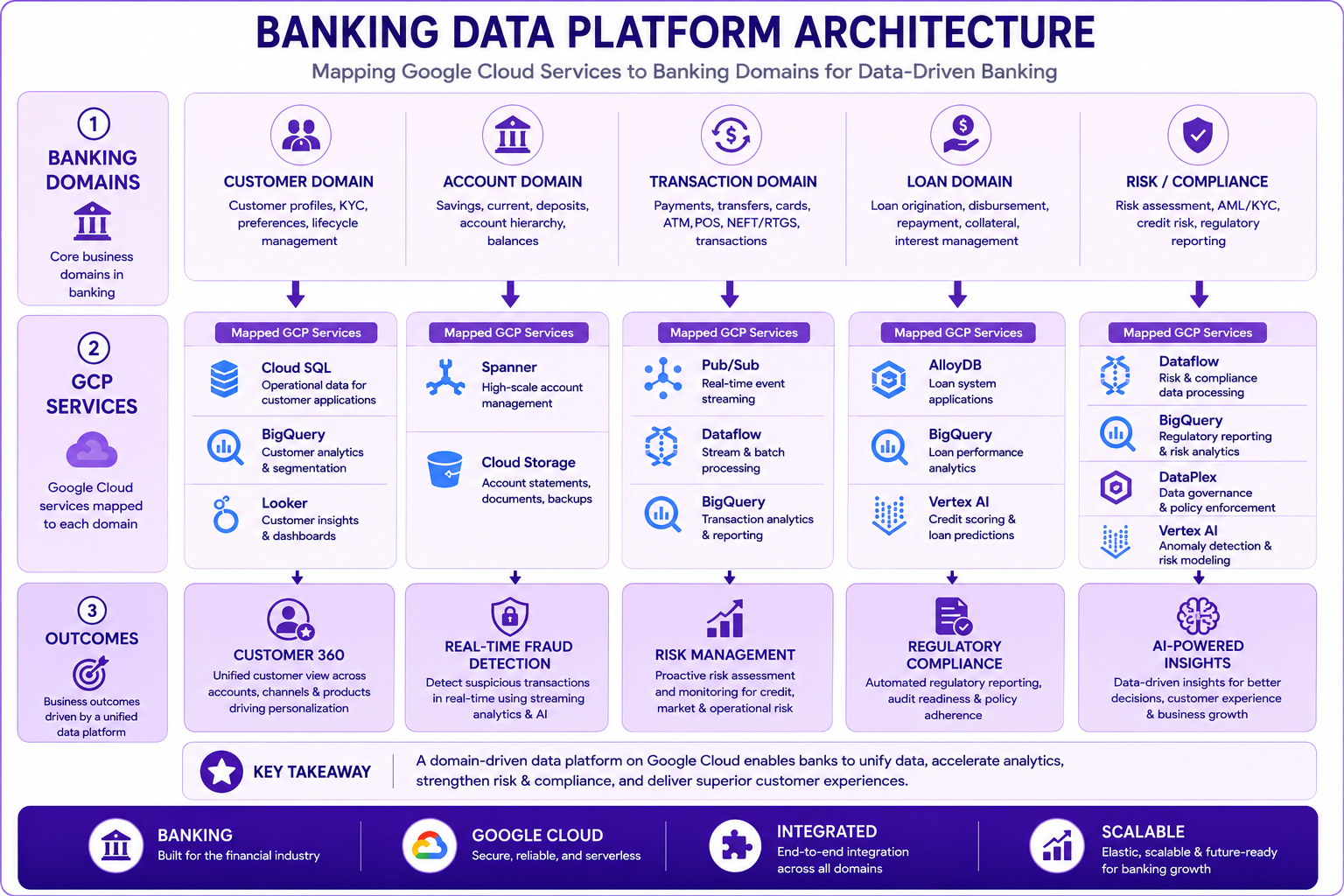
Prompt: Create a banking data platform architecture diagram showing how GCP services map to banking domains. Use a 3-layer structure:
Layer 1: Banking Domains (Top) - Purple #F3E5F5
- Customer Domain, Account Domain, Transaction Domain, Loan Domain, Risk/Compliance
Layer 2: GCP Services - Purple #E1BEE7
- Under Customer Domain: Cloud SQL (Customer DB), BigQuery (Analytics), Looker (Dashboards)
- Under Account Domain: Spanner (Global Accounts), Cloud Storage (Documents)
- Under Transaction Domain: Pub/Sub (Events), Dataflow (Processing), BigQuery (Analytics)
- Under Loan Domain: AlloyDB (Loan Origination), BigQuery (Portfolio Analysis), Vertex AI (Risk)
- Under Risk/Compliance: Dataflow (ETL), BigQuery (Reporting), DataPlex (Governance), Vertex AI (Detection)
Layer 3: Outcomes (Bottom) - Purple #CE93D8
- Customer 360, Real-time Fraud Detection, Risk Management, Regulatory Compliance, AI-Powered Insights
Use downward flow from banking domains to services to outcomes. Purple gradient theme. Include key takeaway at bottom: "Google Cloud services provide an integrated data platform for all banking domains." Footer tags: Banking, Google Cloud, Integrated, Scalable. Enterprise-style clean layout with rounded corners.
BigQuery Ecosystem Deep Dive
BigQuery is the centerpiece of Google Cloud's data platform.
BigQuery Architecture
┌─────────────────────────────────────────────────────────────┐
│                    BigQuery Architecture                     │
├─────────────────────────────────────────────────────────────┤
│  Storage: Columnar, Compressed, Encrypted                   │
│  ┌───────────────────────────────────────────────────────┐  │
│  │  Capacitor Engine (Columnar Storage Format)           │  │
│  └───────────────────────────────────────────────────────┘  │
├─────────────────────────────────────────────────────────────┤
│  Compute: Distributed, Serverless, Elastic                 │
│  ┌───────────────────────────────────────────────────────┐  │
│  │  Dremel Query Engine (Massively Parallel)             │  │
│  └───────────────────────────────────────────────────────┘  │
├─────────────────────────────────────────────────────────────┤
│  Features: Built-in ML, Geospatial, AI, BI Engine          │
│  ┌───────────────────────────────────────────────────────┐  │
│  │  BigQuery ML, GIS, BI Engine, Analytics Hub          │  │
│  └───────────────────────────────────────────────────────┘  │
├─────────────────────────────────────────────────────────────┤
│  Governance: Column-level security, Data masking           │
│  ┌───────────────────────────────────────────────────────┐  │
│  │  Data Catalog, Dynamic Data Masking, IAM              │  │
│  └───────────────────────────────────────────────────────┘  │
└─────────────────────────────────────────────────────────────┘
Key BigQuery Features
| Feature | Description | Banking Use Case |
|---|---|---|
| Serverless | No infrastructure management | Focus on data modeling |
| Columnar Storage | Optimized for analytics | Faster query performance |
| Auto-scaling | Scales with workload | Handle peak transaction volumes |
| Built-in ML | SQL-based ML training | Credit scoring models |
| Geospatial | Location-based analytics | Branch performance analysis |
| BI Engine | In-memory analytics | Real-time dashboards |
| Streaming | Real-time data ingestion | Transaction monitoring |
| Data Governance | Security and compliance | Regulatory compliance |
GCP Project Setup
Step 1: Create a GCP Project
1. Go to Google Cloud Console
2. Click on project dropdown
3. Click "New Project"
4. Name: "data-modeling-banking"
5. Click "Create"
Step 2: Enable Billing
1. Navigate to Billing
2. Link billing account
3. Set up budget alerts
Step 3: Enable Required APIs
gcloud services enable bigquery.googleapis.com
gcloud services enable storage.googleapis.com
gcloud services enable dataflow.googleapis.com
gcloud services enable dataproc.googleapis.com
gcloud services enable aiplatform.googleapis.com
gcloud services enable alloydb.googleapis.com
gcloud services enable spanner.googleapis.com
gcloud services enable cloudresourcemanager.googleapis.com
Step 4: Create Service Account
1. Navigate to IAM & Admin → Service Accounts
2. Click "Create Service Account"
3. Name: "data-modeling-sa"
4. Roles: BigQuery Admin, Storage Admin, Dataflow Admin
5. Create and download key
Step 5: Create Datasets
-- Create datasets for different layers
CREATE SCHEMA IF NOT EXISTS `data-modeling-banking.bronze`;
CREATE SCHEMA IF NOT EXISTS `data-modeling-banking.silver`;
CREATE SCHEMA IF NOT EXISTS `data-modeling-banking.gold`;
CREATE SCHEMA IF NOT EXISTS `data-modeling-banking.analytics`;
GCP Console Navigation
BigQuery Console
Navigation: BigQuery → SQL Workspace
Features:
- SQL Editor
- Table Explorer
- Job History
- Data Transfer
- BigQuery Studio
Cloud Storage Console
Navigation: Cloud Storage → Buckets
Features:
- Bucket creation
- File upload/download
- Lifecycle rules
- Object versioning
- Access control
Dataflow Console
Navigation: Dataflow → Jobs
Features:
- Pipeline monitoring
- Job creation
- Template deployment
- Metrics dashboard
- Logging
Looker Studio
Navigation: Looker Studio → Create Report
Features:
- Data source connection
- Report creation
- Dashboard design
- Sharing capabilities
- Refresh scheduling
Cost Optimization Considerations
BigQuery Cost Optimization
✅ Use partitioning (date/timestamp)
✅ Use clustering (frequently queried columns)
✅ Limit data scans (SELECT only needed columns)
✅ Use materialized views
✅ Set query cost controls
✅ Use BI Engine for caching
✅ Monitor costs with dashboards
Cloud Storage Cost Optimization
✅ Use appropriate storage class (Standard, Nearline, Coldline, Archive)
✅ Set lifecycle policies
✅ Use data compression
✅ Delete unnecessary data
✅ Optimize bucket structure
Dataflow Cost Optimization
✅ Use autoscaling
✅ Choose appropriate machine types
✅ Use streaming engine
✅ Optimize pipeline design
✅ Monitor resource usage
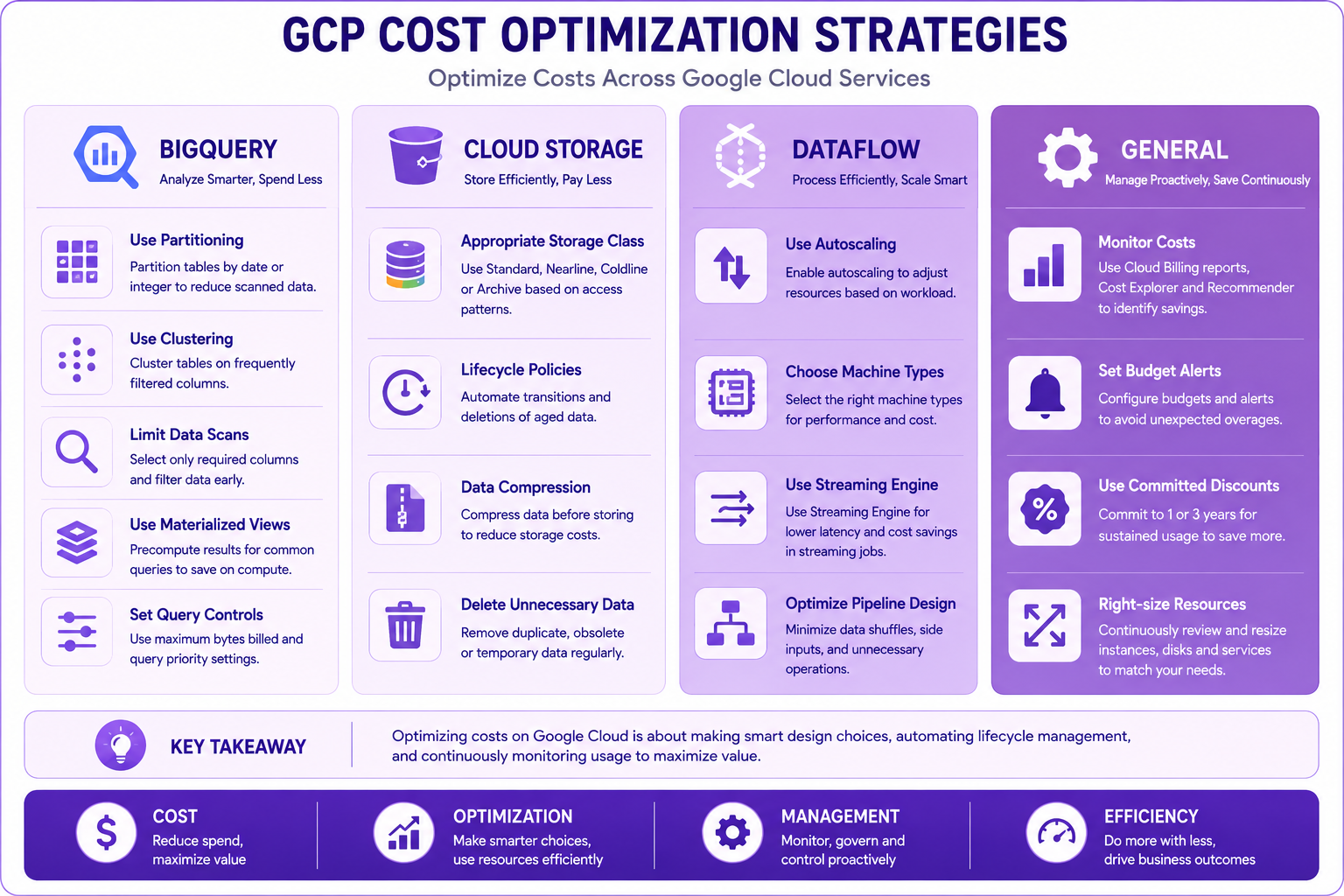
Prompt: Create a cost optimization diagram showing strategies for each GCP service. Use a 4-column structure:
Column 1: BigQuery (Left) - Purple #F3E5F5
- Use Partitioning
- Use Clustering
- Limit Data Scans
- Use Materialized Views
- Set Query Controls
Column 2: Cloud Storage - Purple #E1BEE7
- Appropriate Storage Class
- Lifecycle Policies
- Data Compression
- Delete Unnecessary Data
Column 3: Dataflow - Purple #CE93D8
- Use Autoscaling
- Choose Machine Types
- Use Streaming Engine
- Optimize Pipeline Design
Column 4: General (Right) - Purple #AB47BC
- Monitor Costs
- Set Budget Alerts
- Use Committed Discounts
- Right-size Resources
At bottom: Key takeaway: "Cost optimization is a continuous process requiring monitoring and proactive management." Footer tags: Cost, Optimization, Management, Efficiency. Enterprise-style clean layout with rounded corners.
Best Practices
| # | Best Practice |
|---|---|
| 1 | Enable billing alerts and budget notifications |
| 2 | Use separate projects for development, staging, production |
| 3 | Implement least-privilege access control |
| 4 | Use service accounts for automation |
| 5 | Tag resources for cost tracking |
| 6 | Use folders for organization structure |
| 7 | Implement data retention policies |
| 8 | Use version control for SQL/queries |
| 9 | Document your architecture decisions |
| 10 | Regularly review and optimize costs |
Common Mistakes
| # | Common Mistake | Better Approach |
|---|---|---|
| 1 | Not enabling billing alerts | Set up alerts and budgets |
| 2 | Using root account for daily work | Use IAM roles and accounts |
| 3 | Not securing service accounts | Rotate keys, use workload identity |
| 4 | Ignoring cost management | Monitor and optimize regularly |
| 5 | Not using partitioning/clustering | Optimize BigQuery tables |
| 6 | No data retention policy | Implement lifecycle rules |
| 7 | Over-provisioning resources | Use autoscaling |
| 8 | Not implementing governance | Start with governance early |
| 9 | Ignoring security best practices | Implement security from day one |
| 10 | Not documenting decisions | Maintain documentation |
Interview Questions
-
What are the key services in Google Cloud's data platform?
-
Explain the BigQuery architecture.
-
What is the difference between Cloud SQL and Cloud Spanner?
-
When would you use Cloud Storage vs BigQuery?
-
What is Dataflow and how does it work?
-
Explain the purpose of Dataform.
-
How does Vertex AI support data modeling?
-
What is Data Catalog and why is it important?
-
How would you architect a banking data platform on GCP?
-
What are the cost optimization strategies for GCP?
-
Explain the difference between Pub/Sub and Dataflow.
-
What is the role of Looker in data platform?
Practice Exercises
-
Create a GCP project and enable the required APIs.
-
Create BigQuery datasets for bronze, silver, and gold layers.
-
Create a Cloud Storage bucket with appropriate lifecycle policies.
-
Explore the BigQuery console and run a sample query.
-
Create a simple Dataflow pipeline using templates.
-
Set up budget alerts for your project.
-
Create a service account with appropriate permissions.
-
Connect Looker Studio to BigQuery and create a simple dashboard.
Key Takeaways
| # | Takeaway |
|---|---|
| 1 | GCP provides a comprehensive, integrated data platform |
| 2 | BigQuery is the centerpiece of GCP's data analytics |
| 3 | Different services serve different purposes |
| 4 | Services work together in a unified architecture |
| 5 | Cost optimization is crucial for cloud success |
| 6 | Security and governance must be built from day one |
| 7 | The platform supports both batch and real-time workloads |
| 8 | AI/ML is integrated throughout the platform |
Chapter Summary
In this chapter, you learned:
- ✅ The Google Cloud data platform architecture
- ✅ Key data services and their purposes
- ✅ How services work together in an integrated platform
- ✅ Banking use cases mapped to GCP services
- ✅ How to set up a GCP project
- ✅ BigQuery ecosystem and features
- ✅ Cost optimization strategies
- ✅ Best practices and common mistakes
You now have a comprehensive understanding of the Google Cloud data platform and are ready to start hands-on data modeling.
Next Chapter
👉 Next Chapter: BigQuery Architecture