
Chapter 17: Introduction to Data Vault
In the previous chapter, we explored Customer 360 Analytics and learned how to build a comprehensive, unified view of customers across all touchpoints and interactions.
In this chapter, we will dive into Data Vault —an innovative data modeling approach designed specifically for enterprise data warehousing, providing flexibility, scalability, and full historical tracking.
Using our Digital Banking Platform case study, we will understand Data Vault principles, its core components, and how it compares to traditional modeling approaches.
🎯 Learning Objectives
By the end of this chapter, you will be able to:
- Understand what Data Vault is and why it was created
- Differentiate Data Vault from Kimball and Inmon approaches
- Recognize the core components: Hubs, Links, and Satellites
- Understand Data Vault 2.0 principles and hash keys
- Identify when to use Data Vault vs dimensional modeling
- Understand the Data Vault architecture layers
- Apply Data Vault best practices
- Design banking Data Vault models
What is Data Vault?
Data Vault is a hybrid data modeling approach designed specifically for enterprise data warehousing. It combines the best practices of 3rd Normal Form (3NF) and Star Schema modeling while addressing their limitations.
Data Vault = Hybrid Approach + Enterprise Focus + Full Historization + Agile Flexibility
Think of Data Vault as:
- The "SUV" of data modeling (combines best of truck and car)
- Specifically designed for enterprise data warehousing
- Built to handle change and complexity
- Provides full auditability and historical tracking
Real-World Banking Example
A bank needs to integrate data from multiple systems:
Source Systems:
- Core Banking System (customer data)
- CRM System (customer preferences)
- Loan System (loan applications)
- Credit Card System (transactions)
- External Credit Bureaus (credit scores)

Traditional Challenges:
- Each system has different customer IDs
- Data formats and definitions vary
- Business rules change frequently
- Need to track historical changes

Data Vault Solution:
- Hubs store business keys from all systems
- Links connect related business concepts
- Satellites store context and history
- Flexible model adapts to changes
Evolution of Data Modeling Approaches
Kimball Approach (Bottom-Up)
Focus: Business processes and data marts
Structure: Star schemas (facts and dimensions)
Pros: Fast delivery, user-friendly
Cons: Data silos, integration challenges
Best For: Departmental BI, quick wins
Inmon Approach (Top-Down)
Focus: Enterprise data warehouse
Structure: 3rd Normal Form (3NF)
Pros: Single source of truth, strong governance
Cons: Slow to build, rigid
Best For: Large enterprises with stable requirements
Data Vault Approach (Hybrid)
Focus: Enterprise agility and scalability
Structure: Hubs, Links, Satellites
Pros: Flexible, auditable, handles change
Cons: More complex modeling
Best For: Cloud-native, real-time, big data ecosystems
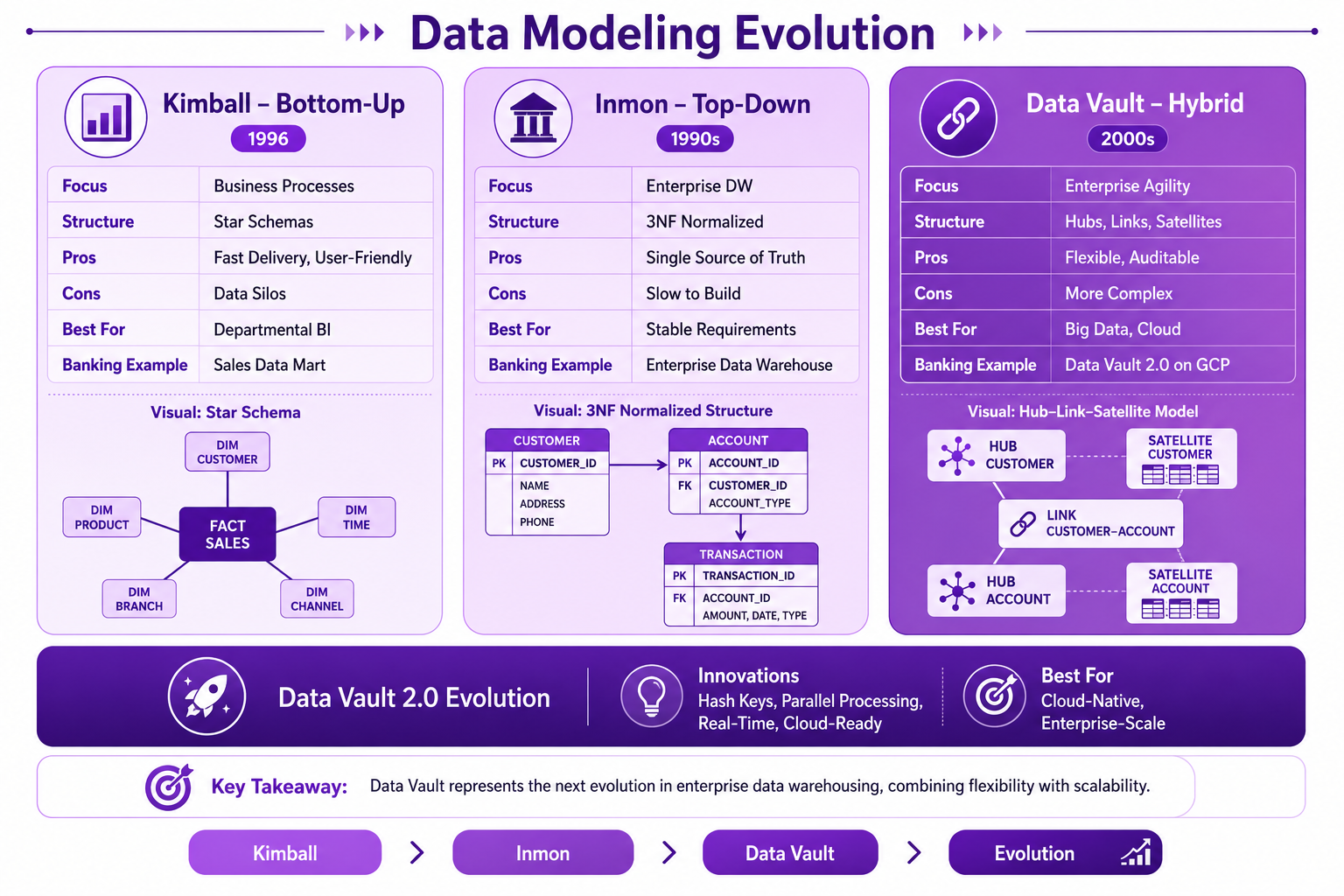
Prompt: Create a data modeling evolution diagram showing the progression from Kimball and Inmon to Data Vault. Use a 3-column structure with purple gradient theme:
Column 1: Kimball Approach (Left) - Purple #E1BEE7
- Title: "Kimball - Bottom-Up"
- Icon: 📊
- Year: "1996"
- Focus: "Business Processes"
- Structure: "Star Schemas"
- Pros: "Fast Delivery, User-Friendly"
- Cons: "Data Silos"
- Best For: "Departmental BI"
- Banking Example: "Sales Data Mart"
- Visual: Star schema icon
Column 2: Inmon Approach (Middle) - Purple #CE93D8
- Title: "Inmon - Top-Down"
- Icon: 🏛️
- Year: "1990s"
- Focus: "Enterprise DW"
- Structure: "3NF Normalized"
- Pros: "Single Source of Truth"
- Cons: "Slow to Build"
- Best For: "Stable Requirements"
- Banking Example: "Enterprise Data Warehouse"
- Visual: Normalized tables icon
Column 3: Data Vault (Right) - Purple #AB47BC
- Title: "Data Vault - Hybrid"
- Icon: 🔗
- Year: "2000s"
- Focus: "Enterprise Agility"
- Structure: "Hubs, Links, Satellites"
- Pros: "Flexible, Auditable"
- Cons: "More Complex"
- Best For: "Big Data, Cloud"
- Banking Example: "Data Vault 2.0 on GCP"
- Visual: Hub-Link-Satellite icon
Bottom Section: Data Vault 2.0 - Purple #7B1FA2
- Title: "Data Vault 2.0 Evolution"
- Innovations: "Hash Keys, Parallel Processing, Real-Time, Cloud-Ready"
- Best For: "Cloud-Native, Enterprise-Scale"
At bottom: Key takeaway: "Data Vault represents the next evolution in enterprise data warehousing, combining flexibility with scalability." Footer tags: Kimball, Inmon, Data Vault, Evolution. Enterprise-style clean layout with rounded corners.
Data Vault Architecture Layers
Data Vault architecture consists of three main layers:
Layer 1: Staging Area
Purpose: Ingest data from source systems
Characteristics:
- Raw data as-is
- No transformations
- Truncated each load
- Hard business rules only
- Hash key generation

Banking Example:
- Raw customer files
- Transaction extracts
- System logs
Layer 2: Enterprise Data Warehouse (Data Vault)
Purpose: Core historical repository
Characteristics:
- Hub, Link, Satellite structures
- Full history maintained
- Soft business rules applied
- Raw Vault + Business Vault
- Complete auditability

Banking Example:
- Customer Hub (business keys)
- Transaction Links (relationships)
- Customer Satellites (context)
Layer 3: Information Delivery
Purpose: End-user access and analytics
Characteristics:
- Data marts
- Star schemas
- Aggregated views
- Business intelligence
- Machine learning

Banking Example:
- Customer 360 marts
- Transaction summaries
- Executive dashboards
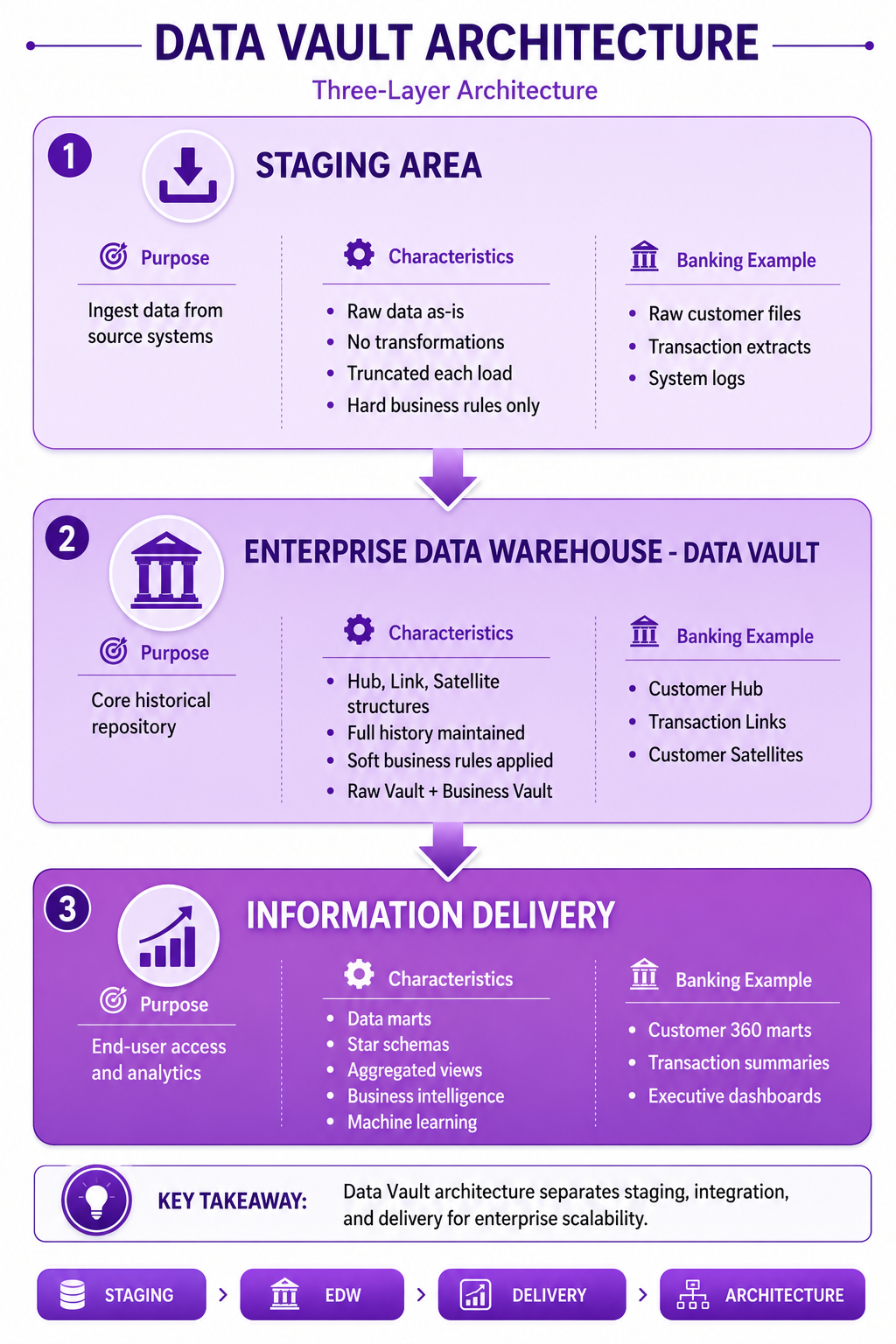
Prompt: Create a Data Vault architecture diagram showing the three-layer architecture. Use a 3-layer vertical structure with purple gradient theme:
Layer 1: Staging Area (Top) - Purple #E1BEE7
- Title: "Staging Area"
- Purpose: "Ingest data from source systems"
- Characteristics: "Raw data as-is, No transformations, Truncated each load, Hard business rules only"
- Banking Example: "Raw customer files, Transaction extracts, System logs"
- Icon: 📥
Layer 2: Enterprise Data Warehouse (Middle) - Purple #CE93D8
- Title: "Enterprise Data Warehouse - Data Vault"
- Purpose: "Core historical repository"
- Characteristics: "Hub, Link, Satellite structures, Full history maintained, Soft business rules applied, Raw Vault + Business Vault"
- Banking Example: "Customer Hub, Transaction Links, Customer Satellites"
- Icon: 🏛️
Layer 3: Information Delivery (Bottom) - Purple #AB47BC
- Title: "Information Delivery"
- Purpose: "End-user access and analytics"
- Characteristics: "Data marts, Star schemas, Aggregated views, Business intelligence, Machine learning"
- Banking Example: "Customer 360 marts, Transaction summaries, Executive dashboards"
- Icon: 📊
Use downward arrows between layers. Include key takeaway at bottom: "Data Vault architecture separates staging, integration, and delivery for enterprise scalability." Footer tags: Staging, EDW, Delivery, Architecture. Enterprise-style clean layout with rounded corners.
Core Components: Hubs, Links, and Satellites
Data Vault consists of three fundamental entity types:
Hubs
Definition: Unique business key repository
Purpose: Store distinct business keys from source systems
Characteristics:
- Business key (natural key)
- Hash key (surrogate in DV 2.0)
- Load date timestamp
- Record source

Banking Example:
- H_Customer (customer_id)
- H_Account (account_id)
- H_Transaction (transaction_id)
- H_Branch (branch_id)
Links
Definition: Relationship repository
Purpose: Store associations between business keys
Characteristics:
- Hash key (surrogate)
- Foreign keys to Hubs
- Load date timestamp
- Record source
- Relationship type

Banking Example:
- L_Customer_Account (customer has accounts)
- L_Account_Transaction (account has transactions)
- L_Customer_Branch (customer relationship with branch)
Satellites
Definition: Context and attribute repository
Purpose: Store descriptive data about Hubs and Links
Characteristics:
- Hash key (FK to Hub or Link)
- Attributes (descriptive data)
- Load date timestamp
- Record source
- End date (SCD Type 2)

Banking Example:
- S_Customer_Info (name, email, phone)
- S_Customer_Address (address history)
- S_Account_Details (type, status, balance)
- S_Customer_Profile (segment, risk score)
Data Vault 2.0 Innovations
Hash Keys
Data Vault 2.0 introduced hash keys as surrogate keys:
Hash Key Benefits:
- Independent of load sequence
- Enable parallel processing
- Consistent across environments
- Faster joins
- Deterministic values
- No database dependencies
Parallel Processing
Data Vault 2.0 enables true parallel processing:
- No dependency on sequence numbers
- Hubs, Links, Satellites can load independently
- Facts and dimensions process in parallel
- Cloud-native architecture support
Handling Change
Data Vault 2.0 handles change seamlessly:

Cardinality Changes:
- One person → Many orders (1:M)
- Multiple people → Same order (M:1)
- No structural changes needed

Granularity Changes:
- More detail required
- Add new Satellite
- Existing model unchanged
Banking Data Vault Example
Complete Banking Data Vault Model
-- ============================================
-- Hubs (Business Keys)
-- ============================================

-- Customer Hub
CREATE OR REPLACE TABLE banking.hub_customer (
  customer_hk STRING PRIMARY KEY,
  customer_id STRING NOT NULL,
  load_date TIMESTAMP NOT NULL,
  record_source STRING NOT NULL,
  CONSTRAINT unique_customer_id UNIQUE (customer_id)
);

-- Account Hub
CREATE OR REPLACE TABLE banking.hub_account (
  account_hk STRING PRIMARY KEY,
  account_id STRING NOT NULL,
  load_date TIMESTAMP NOT NULL,
  record_source STRING NOT NULL,
  CONSTRAINT unique_account_id UNIQUE (account_id)
);

-- ============================================
-- Links (Relationships)
-- ============================================

-- Customer to Account Link
CREATE OR REPLACE TABLE banking.link_customer_account (
  link_hk STRING PRIMARY KEY,
  customer_hk STRING NOT NULL,
  account_hk STRING NOT NULL,
  load_date TIMESTAMP NOT NULL,
  record_source STRING NOT NULL,
  relationship_type STRING,
  CONSTRAINT fk_customer FOREIGN KEY (customer_hk)
    REFERENCES hub_customer(customer_hk),
  CONSTRAINT fk_account FOREIGN KEY (account_hk)
    REFERENCES hub_account(account_hk)
);

-- ============================================
-- Satellites (Context/Attributes)
-- ============================================

-- Customer Information Satellite
CREATE OR REPLACE TABLE banking.sat_customer_info (
  customer_hk STRING NOT NULL,
  load_date TIMESTAMP NOT NULL,
  record_source STRING NOT NULL,
  end_date TIMESTAMP,
  first_name STRING,
  last_name STRING,
  email STRING,
  phone STRING,
  date_of_birth DATE,
  CONSTRAINT fk_customer FOREIGN KEY (customer_hk)
    REFERENCES hub_customer(customer_hk)
);

-- Customer Address Satellite
CREATE OR REPLACE TABLE banking.sat_customer_address (
  customer_hk STRING NOT NULL,
  load_date TIMESTAMP NOT NULL,
  record_source STRING NOT NULL,
  end_date TIMESTAMP,
  street_address STRING,
  city STRING,
  state STRING,
  zip_code STRING,
  country STRING,
  address_type STRING,
  is_primary BOOLEAN,
  CONSTRAINT fk_customer FOREIGN KEY (customer_hk)
    REFERENCES hub_customer(customer_hk)
);

-- Customer Segment Satellite
CREATE OR REPLACE TABLE banking.sat_customer_segment (
  customer_hk STRING NOT NULL,
  load_date TIMESTAMP NOT NULL,
  record_source STRING NOT NULL,
  end_date TIMESTAMP,
  customer_segment STRING,
  risk_profile STRING,
  credit_score INT,
  CONSTRAINT fk_customer FOREIGN KEY (customer_hk)
    REFERENCES hub_customer(customer_hk)
);
Data Vault vs Dimensional Modeling
| Aspect | Dimensional (Star Schema) | Data Vault |
|---|---|---|
| Purpose | Analytical queries | Enterprise integration |
| Structure | Facts + Dimensions | Hubs + Links + Satellites |
| Historization | SCD Type 2 | Built-in at all levels |
| Flexibility | Low | High |
| Change Management | Difficult | Seamless |
| Query Complexity | Simple | More complex |
| Auditability | Limited | Complete |
| Data Quality | Assumed | Enforced |
| Development | Bottom-up | Hybrid |
| Best Use | BI, Reporting | Enterprise DW |
Data Vault Best Practices
| # | Best Practice | Banking Example |
|---|---|---|
| 1 | Use hash keys in Data Vault 2.0 | SHA-256 for all Hubs |
| 2 | Separate structural and descriptive data | Hubs + Links vs Satellites |
| 3 | Track all history with Satellites | SCD Type 2 tracking |
| 4 | Enforce referential integrity | Foreign key constraints |
| 5 | Use consistent naming conventions | H_, L_, S_ prefixes |
| 6 | Document business key definitions | Clear key semantics |
| 7 | Load incrementally | Batch or real-time |
| 8 | Monitor data quality | Quality checks |
| 9 | Build Business Vault | Star schemas from Vault |
| 10 | Keep Hubs lean | No context in Hubs |
Common Mistakes
| # | Common Mistake | Better Approach |
|---|---|---|
| 1 | Using natural keys as primary keys | Use hash keys |
| 2 | Not tracking history | Use Satellites for history |
| 3 | Over-complicating Links | Keep links simple |
| 4 | No referential integrity | Enforce constraints |
| 5 | Inconsistent naming | Follow naming standards |
| 6 | Not documenting decisions | Document thoroughly |
| 7 | Ignoring performance | Optimize queries |
| 8 | Not building data marts | Create Business Vault |
| 9 | Including context in Hubs | Keep Hubs lean |
| 10 | Multiple sources in one Satellite | One per source |
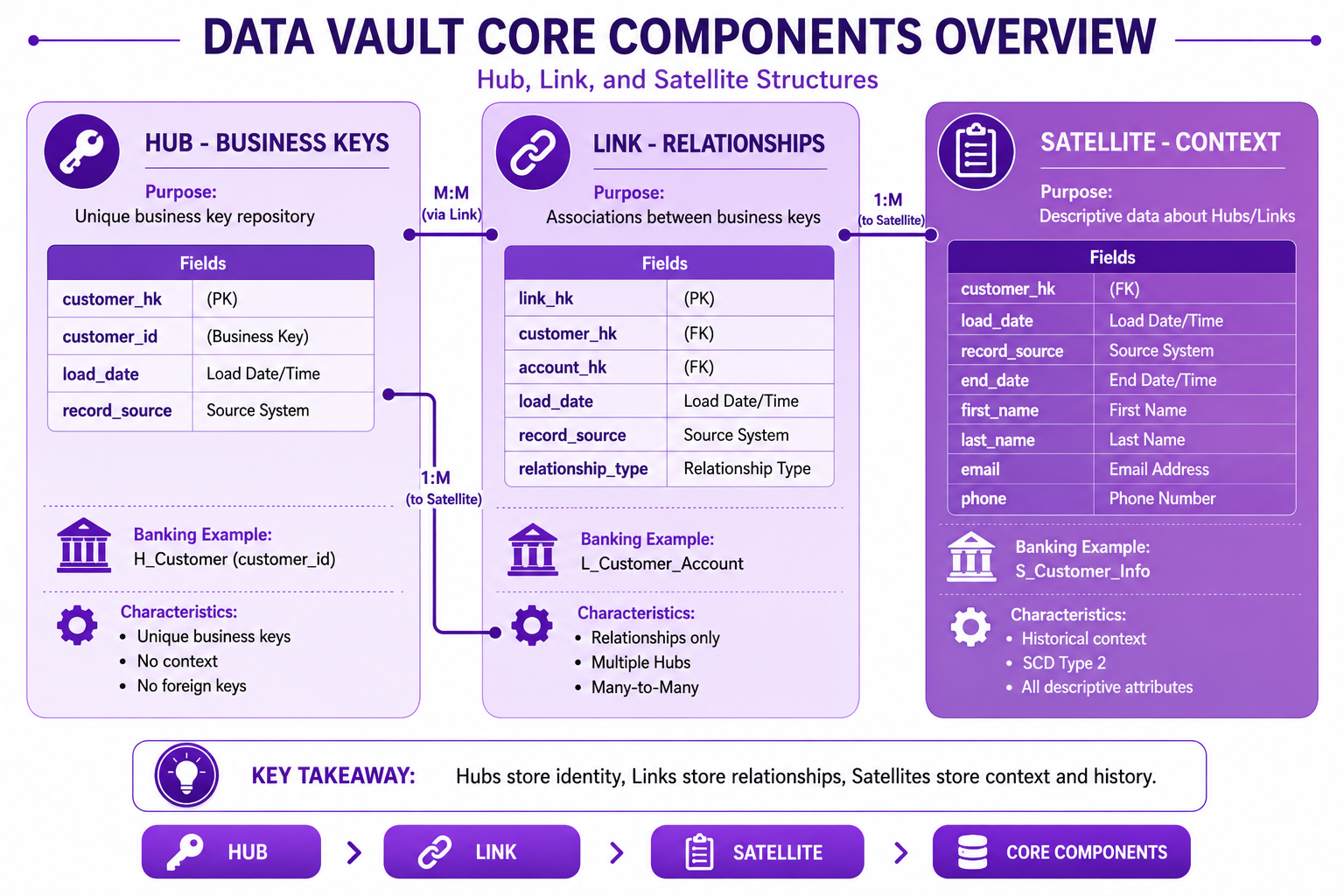
Prompt: Create a Data Vault core components overview diagram showing Hub, Link, and Satellite structures. Use a 3-table structure with purple gradient theme:
Table 1: Hub (Left) - Purple #E1BEE7
- Title: "Hub - Business Keys"
- Purpose: "Unique business key repository"
- Fields: customer_hk (PK), customer_id (Business Key), load_date, record_source
- Icon: 🔑
- Banking Example: "H_Customer (customer_id)"
- Characteristics: "Unique business keys, No context, No foreign keys"
Table 2: Link (Center) - Purple #CE93D8
- Title: "Link - Relationships"
- Purpose: "Associations between business keys"
- Fields: link_hk (PK), customer_hk (FK), account_hk (FK), load_date, record_source, relationship_type
- Icon: 🔗
- Banking Example: "L_Customer_Account"
- Characteristics: "Relationships only, Multiple Hubs, Many-to-Many"
Table 3: Satellite (Right) - Purple #AB47BC
- Title: "Satellite - Context"
- Purpose: "Descriptive data about Hubs/Links"
- Fields: customer_hk (FK), load_date, record_source, end_date, first_name, last_name, email, phone
- Icon: 📋
- Banking Example: "S_Customer_Info"
- Characteristics: "Historical context, SCD Type 2, All descriptive attributes"
Use connector lines showing relationships: Hub 1:M to Satellite, Hub M:M to Link. Include key takeaway at bottom: "Hubs store identity, Links store relationships, Satellites store context and history." Footer tags: Hub, Link, Satellite, Core Components. Enterprise-style clean layout with rounded corners.
Interview Questions
-
What is Data Vault and why was it created?
-
How does Data Vault differ from Kimball and Inmon approaches?
-
What are the three core components of Data Vault?
-
What is a Hub in Data Vault?
-
What is a Link in Data Vault?
-
What is a Satellite in Data Vault?
-
What are hash keys and why are they used in Data Vault 2.0?
-
What are the three layers of Data Vault architecture?
-
How does Data Vault handle change?
-
When would you use Data Vault vs dimensional modeling?
-
What is the Business Vault?
-
What are the benefits of Data Vault for cloud-native architectures?
Practice Exercises
-
Design a Hub for banking customers.
-
Create a Link between customer and account.
-
Implement a Satellite for customer address history.
-
Design a complete Data Vault model for banking.
-
Implement hash key generation in BigQuery.
-
Create a Business Vault with star schemas.
-
Load data into Hub, Link, and Satellite tables.
-
Write a query to get point-in-time customer view.
-
Implement SCD Type 2 using Satellites.
-
Build a data mart from the Data Vault.
Key Takeaways
| # | Takeaway |
|---|---|
| 1 | Data Vault is designed for enterprise data warehousing |
| 2 | Hubs store business keys |
| 3 | Links define relationships |
| 4 | Satellites store context and history |
| 5 | Data Vault 2.0 uses hash keys |
| 6 | Built-in historization at all levels |
| 7 | Handles change without redesign |
| 8 | Enables parallel processing |
Chapter Summary
In this chapter, you learned:
- ✅ What Data Vault is and its purpose
- ✅ Differences between Kimball, Inmon, and Data Vault
- ✅ The three core components: Hubs, Links, Satellites
- ✅ Data Vault 2.0 innovations (hash keys, parallel processing)
- ✅ Data Vault architecture layers
- ✅ Banking Data Vault implementation
- ✅ Best practices and common mistakes
- ✅ Data Vault vs dimensional modeling
You now understand the fundamentals of Data Vault modeling and when to use this approach for enterprise data warehousing.
Next Chapter
👉 Next Chapter: Hub, Link and Satellite Modeling
In the next chapter, we will dive deeper into each component, understand detailed implementation patterns, and build complete Data Vault models.
End of Chapter 17
Diagram Prompts Summary
Diagram 1: Data Modeling Evolution
Filename: ch17-data-modeling-evolution.png
Prompt:
Create a data modeling evolution diagram showing the progression from Kimball and Inmon to Data Vault. Use a 3-column structure with purple gradient theme. Column 1: Kimball Approach (Left) - Purple #E1BEE7 with Title "Kimball - Bottom-Up", Icon 📊, Year "1996", Focus "Business Processes", Structure "Star Schemas", Pros "Fast Delivery, User-Friendly", Cons "Data Silos", Best For "Departmental BI", Banking Example "Sales Data Mart", Visual star schema icon. Column 2: Inmon Approach (Middle) - Purple #CE93D8 with Title "Inmon - Top-Down", Icon 🏛️, Year "1990s", Focus "Enterprise DW", Structure "3NF Normalized", Pros "Single Source of Truth", Cons "Slow to Build", Best For "Stable Requirements", Banking Example "Enterprise Data Warehouse", Visual normalized tables icon. Column 3: Data Vault (Right) - Purple #AB47BC with Title "Data Vault - Hybrid", Icon 🔗, Year "2000s", Focus "Enterprise Agility", Structure "Hubs, Links, Satellites", Pros "Flexible, Auditable", Cons "More Complex", Best For "Big Data, Cloud", Banking Example "Data Vault 2.0 on GCP", Visual Hub-Link-Satellite icon. Bottom Section: Data Vault 2.0 - Purple #7B1FA2 with Title "Data Vault 2.0 Evolution", Innovations "Hash Keys, Parallel Processing, Real-Time, Cloud-Ready", Best For "Cloud-Native, Enterprise-Scale". At bottom: Key takeaway: "Data Vault represents the next evolution in enterprise data warehousing, combining flexibility with scalability." Footer tags: Kimball, Inmon, Data Vault, Evolution. Enterprise-style clean layout with rounded corners.
Diagram 2: Data Vault Architecture
Filename: ch17-data-vault-architecture.png
Prompt:
Create a Data Vault architecture diagram showing the three-layer architecture. Use a 3-layer vertical structure with purple gradient theme. Layer 1: Staging Area (Top) - Purple #E1BEE7 with Title "Staging Area", Purpose "Ingest data from source systems", Characteristics "Raw data as-is, No transformations, Truncated each load, Hard business rules only", Banking Example "Raw customer files, Transaction extracts, System logs", Icon 📥. Layer 2: Enterprise Data Warehouse (Middle) - Purple #CE93D8 with Title "Enterprise Data Warehouse - Data Vault", Purpose "Core historical repository", Characteristics "Hub, Link, Satellite structures, Full history maintained, Soft business rules applied, Raw Vault + Business Vault", Banking Example "Customer Hub, Transaction Links, Customer Satellites", Icon 🏛️. Layer 3: Information Delivery (Bottom) - Purple #AB47BC with Title "Information Delivery", Purpose "End-user access and analytics", Characteristics "Data marts, Star schemas, Aggregated views, Business intelligence, Machine learning", Banking Example "Customer 360 marts, Transaction summaries, Executive dashboards", Icon 📊. Use downward arrows between layers. Include key takeaway at bottom: "Data Vault architecture separates staging, integration, and delivery for enterprise scalability." Footer tags: Staging, EDW, Delivery, Architecture. Enterprise-style clean layout with rounded corners.
Diagram 3: Hub, Link, Satellite Overview
Filename: ch17-hub-link-satellite-overview.png
Prompt:
Create a Data Vault core components overview diagram showing Hub, Link, and Satellite structures. Use a 3-table structure with purple gradient theme. Table 1: Hub (Left) - Purple #E1BEE7 with Title "Hub - Business Keys", Purpose "Unique business key repository", Fields: customer_hk (PK), customer_id (Business Key), load_date, record_source, Icon 🔑, Banking Example "H_Customer (customer_id)", Characteristics "Unique business keys, No context, No foreign keys". Table 2: Link (Center) - Purple #CE93D8 with Title "Link - Relationships", Purpose "Associations between business keys", Fields: link_hk (PK), customer_hk (FK), account_hk (FK), load_date, record_source, relationship_type, Icon 🔗, Banking Example "L_Customer_Account", Characteristics "Relationships only, Multiple Hubs, Many-to-Many". Table 3: Satellite (Right) - Purple #AB47BC with Title "Satellite - Context", Purpose "Descriptive data about Hubs/Links", Fields: customer_hk (FK), load_date, record_source, end_date, first_name, last_name, email, phone, Icon 📋, Banking Example "S_Customer_Info", Characteristics "Historical context, SCD Type 2, All descriptive attributes". Use connector lines showing relationships: Hub 1:M to Satellite, Hub M:M to Link. Include key takeaway at bottom: "Hubs store identity, Links store relationships, Satellites store context and history." Footer tags: Hub, Link, Satellite, Core Components. Enterprise-style clean layout with rounded corners.