
Chapter 22: Property Graph Modeling
In the previous chapter, we introduced graph databases and learned about their unique approach to modeling connected data, with nodes, edges, and properties.
In this chapter, we will dive deep into Property Graph Modeling—understanding how to design comprehensive graph data models, define nodes and relationships, and implement property graph patterns for real-world banking use cases.
Using our Digital Banking Platform case study, we will build property graph models that power fraud detection, customer relationship management, and recommendation systems.
🎯 Learning Objectives
By the end of this chapter, you will be able to:
- Understand property graph modeling concepts
- Design nodes, edges, and properties effectively
- Implement property graph patterns
- Model complex relationships in banking
- Use Cypher for graph queries
- Apply graph design best practices
- Build banking property graph models
- Implement fraud detection and recommendation graphs
What is a Property Graph?
A property graph is a graph model where both nodes (vertices) and edges (relationships) can have properties (key-value pairs).
Property Graph = Nodes + Edges + Properties + Labels + Relationship Types
Think of a property graph as:
- A labeled graph with rich metadata
- Nodes with properties (attributes)
- Edges with properties (relationship details)
- Flexible schema
- Designed for connected data
Real-World Banking Example
A bank needs to model customer relationships for fraud detection:
Property Graph Model:

Nodes (with properties):
- Customer {customer_id, name, segment, risk_score}
- Account {account_id, type, balance, status}
- Transaction {transaction_id, amount, date, type}
- Merchant {merchant_id, name, category, location}

Edges (with properties):
- OWNS {since_date, is_primary}
- TRANSACTED {amount, date, status}
- WITH_MERCHANT {frequency, last_transaction}
- ASSOCIATED_WITH {relationship_type, strength}
Property Graph Components
1. Nodes (Vertices)
Definition: Entities in the graph
Purpose: Represent real-world entities
Characteristics:
- Have labels (types)
- Have properties (attributes)
- Can have multiple labels
- Unique identifiers

Banking Node Examples:
- Customer: {name, segment, risk_score}
- Account: {type, balance, status}
- Transaction: {amount, date, type}
- Merchant: {category, location}
- Branch: {region, city}
- Employee: {role, department}
2. Edges (Relationships)
Definition: Connections between nodes
Purpose: Define relationships between entities
Characteristics:
- Have types (relationship types)
- Have properties (attributes)
- Are directional
- Can connect any nodes

Banking Edge Examples:
- OWNS {since_date, is_primary}
- TRANSACTED {amount, date}
- WORKS_AT {since_date, position}
- REFERRED {date, incentive}
- ASSOCIATED_WITH {strength}
3. Properties
Definition: Attributes of nodes and edges
Purpose: Store descriptive and quantitative data
Characteristics:
- Key-value pairs
- Various data types (string, number, date, array)
- Flexible schema
- Can be indexed for performance

Banking Property Examples:
- Node Properties: name, balance, amount
- Edge Properties: since_date, relationship_type
4. Labels
Definition: Node types or categories
Purpose: Classify nodes for querying
Characteristics:
- One or more per node
- Used in query patterns
- Create indexes

Banking Label Examples:
- :Customer
- :Account
- :Transaction
- :Merchant
- :Employee
Property Graph Modeling Concepts
Entity Modeling
-- Basic Node Creation
CREATE (c:Customer {
  customer_id: 'C001',
  name: 'John Doe',
  email: 'john@email.com',
  segment: 'Premium',
  risk_score: 0.15,
  created_at: '2020-01-01'
})

-- Multiple Labels
CREATE (a:Account:FinancialProduct {
  account_id: 'A001',
  type: 'Savings',
  balance: 15000.00,
  status: 'Active'
})
Attribute Modeling
-- Basic Attributes
{
  name: 'John Doe',
  age: 35,
  email: 'john@email.com'
}

-- Complex Attributes
{
  address: {
    street: '123 Main St',
    city: 'New York',
    state: 'NY',
    zip: '10001'
  },
  preferences: ['mobile', 'email'],
  risk_metrics: {
    score: 0.15,
    factors: ['age', 'history']
  }
}
Relationship Modeling
-- Simple Relationship
CREATE (c:Customer {customer_id: 'C001'})
CREATE (a:Account {account_id: 'A001'})
CREATE (c)-[:OWNS {since_date: '2020-01-01'}]->(a)

-- Relationship with Multiple Properties
CREATE (a1:Account {account_id: 'A001'})
CREATE (a2:Account {account_id: 'A002'})
CREATE (a1)-[:TRANSFERRED {
  amount: 5000.00,
  date: '2024-01-15',
  status: 'COMPLETED',
  reference: 'REF123'
}]->(a2)
Property Graph Design Principles
1. Model Relationships as First-Class Citizens
-- Good: Explicit relationships
(Customer)-[:OWNS]->(Account)
(Customer)-[:ASSOCIATED_WITH]->(Customer)

-- Avoid: Implicit relationships (like foreign keys)
-- Don't put 'customer_id' on Account as a property
2. Use Descriptive Relationship Types
-- Good: Descriptive types
(Customer)-[:OWNS]->(Account)
(Customer)-[:HAS_POLICY]->(Policy)
(Account)-[:TRANSACTED]->(Merchant)

-- Avoid: Generic types
(Customer)-[:HAS]->(Account)
(Customer)-[:RELATED_TO]->(Policy)
3. Keep Nodes Focused
-- Good: Focused nodes
(Customer {id, name, email})
(Address {street, city, state})
(Phone {number, type})

-- Avoid: Overloaded nodes
(Customer {id, name, email, street, city, state, phone1, phone2, ...})
4. Use Properties for Context
-- Good: Relationship properties
(Customer)-[:OWNS {
  since_date: '2020-01-01',
  is_primary: true,
  ownership_percent: 100
}]->(Account)
5. Denormalize for Performance
-- Denormalize frequently accessed properties
(Customer {
  id: 'C001',
  name: 'John Doe',
  full_name: 'John H. Doe',  -- Pre-computed
  customer_segment: 'Premium', -- From segment node
  latest_balance: 15000.00    -- From account node
})
Banking Property Graph Models
Model 1: Customer Relationship Network
-- Customer Network Property Graph
CREATE (c1:Customer {
  customer_id: 'C001',
  name: 'John Doe',
  segment: 'Premium',
  risk_score: 0.15,
  clv: 50000.00
})

CREATE (c2:Customer {
  customer_id: 'C002',
  name: 'Jane Smith',
  segment: 'Gold',
  risk_score: 0.25,
  clv: 35000.00
})

CREATE (c3:Customer {
  customer_id: 'C003',
  name: 'Bob Johnson',
  segment: 'Silver',
  risk_score: 0.35,
  clv: 20000.00
})

-- Family Relationship
CREATE (c1)-[:FAMILY_OF {
  relationship_type: 'SPOUSE',
  since_date: '2015-06-01',
  confidence: 0.95
}]->(c2)

-- Business Partnership
CREATE (c1)-[:BUSINESS_PARTNER {
  since_date: '2020-01-01',
  confidence: 0.80
}]->(c3)

-- Joint Account
CREATE (c1)-[:OWNS {
  since_date: '2020-01-01',
  is_primary: true,
  ownership_percent: 60
}]->(a1:Account {account_id: 'A001', type: 'Joint'})

CREATE (c2)-[:OWNS {
  since_date: '2020-01-01',
  is_primary: false,
  ownership_percent: 40
}]->(a1)

-- Referral Chain
CREATE (c1)-[:REFERRED {
  date: '2021-03-15',
  incentive: 500.00
}]->(c2)

CREATE (c2)-[:REFERRED {
  date: '2022-01-10',
  incentive: 300.00
}]->(c3)
Model 2: Transaction Network for Fraud Detection
-- Fraud Detection Property Graph
CREATE (c1:Customer {
  customer_id: 'C001',
  name: 'John Doe',
  risk_score: 0.15
})

CREATE (c2:Customer {
  customer_id: 'C004',
  name: 'Suspicious User',
  risk_score: 0.85
})

CREATE (a1:Account {
  account_id: 'A001',
  type: 'Checking',
  balance: 100000.00,
  suspicious_flag: true
})

CREATE (a2:Account {
  account_id: 'A002',
  type: 'Savings',
  balance: 50000.00
})

CREATE (m1:Merchant {
  merchant_id: 'M001',
  name: 'Legit Merchant',
  category: 'Retail',
  risk_score: 0.10
})

CREATE (m2:Merchant {
  merchant_id: 'M002',
  name: 'Offshore Services',
  category: 'Financial',
  risk_score: 0.90,
  flagged: true
})

-- Normal Customer Transactions
CREATE (c1)-[:OWNS {since_date: '2020-01-01'}]->(a2)
CREATE (a2)-[:TRANSACTED {
  amount: 1500.00,
  date: '2024-01-15',
  status: 'COMPLETED'
}]->(m1)

-- Suspicious Transaction Pattern
CREATE (c2)-[:OWNS {since_date: '2024-01-01'}]->(a1)
CREATE (a1)-[:TRANSACTED {
  amount: 50000.00,
  date: '2024-01-15',
  status: 'COMPLETED'
}]->(m2)

-- Link to Suspicious Account
CREATE (c1)-[:ASSOCIATED_WITH {
  relationship_type: 'Suspected Money Mule',
  confidence: 0.75
}]->(c2)
Model 3: Product Recommendation Graph
-- Product Recommendation Property Graph
CREATE (c:Customer {
  customer_id: 'C001',
  name: 'John Doe',
  segment: 'Premium',
  preferences: ['Mobile', 'Online', 'Investment']
})

CREATE (p1:Product {
  product_id: 'P001',
  name: 'Premium Savings Account',
  category: 'Savings',
  interest_rate: 4.5,
  min_balance: 10000
})

CREATE (p2:Product {
  product_id: 'P002',
  name: 'Gold Credit Card',
  category: 'Credit',
  limit: 25000,
  rewards: 'Travel Points'
})

CREATE (p3:Product {
  product_id: 'P003',
  name: 'Investment Portfolio',
  category: 'Investment',
  min_investment: 5000,
  risk_level: 'Medium'
})

CREATE (p4:Product {
  product_id: 'P004',
  name: 'Basic Savings Account',
  category: 'Savings',
  interest_rate: 2.0,
  min_balance: 500
})

-- Customer Preferences
CREATE (c)-[:PREFERS {type: 'Savings'}]->(p1)
CREATE (c)-[:PREFERS {type: 'Credit'}]->(p2)
CREATE (c)-[:PREFERS {type: 'Investment'}]->(p3)

-- Similar Customers
CREATE (c1:Customer {
  customer_id: 'C005',
  name: 'Mary Johnson',
  segment: 'Premium',
  preferences: ['Savings', 'Investment']
})

CREATE (c1)-[:PREFERS {type: 'Savings'}]->(p1)
CREATE (c1)-[:PREFERS {type: 'Investment'}]->(p3)

-- Similar to Customer (Mary)
CREATE (c)-[:SIMILAR_TO {
  similarity_score: 0.85,
  common_preferences: ['Savings', 'Investment']
}]->(c1)
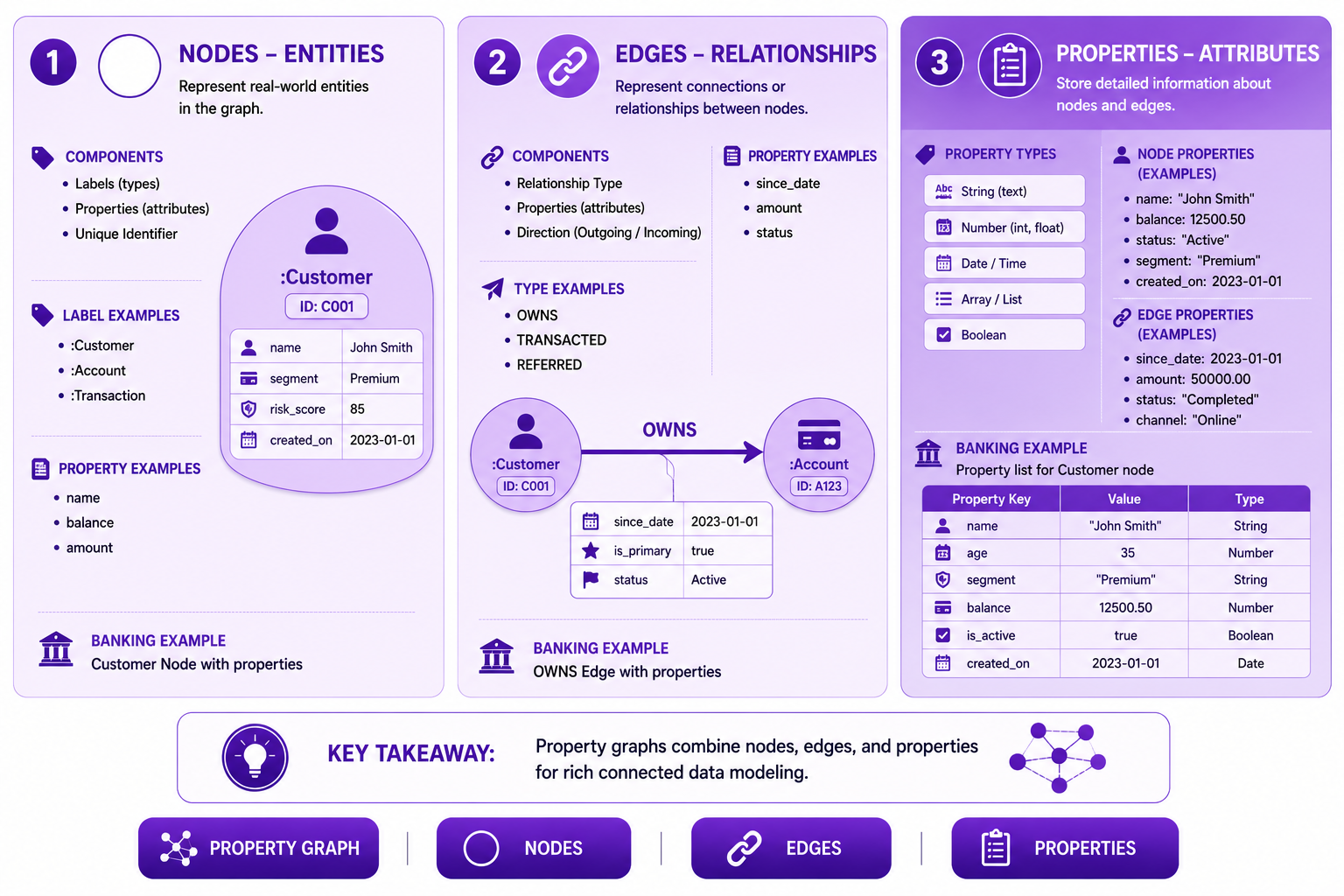
Prompt: Create a property graph components diagram showing nodes, edges, and properties in detail. Use a 3-section structure with purple gradient theme:
Section 1: Nodes (Left) - Purple #E1BEE7
- Title: "Nodes - Entities"
- Icon: ⚪
- Components: Labels, Properties, Unique ID
- Label Examples: :Customer, :Account, :Transaction
- Property Examples: name, balance, amount
- Banking Example: "Customer Node with properties"
- Visual: Circle with label and property list
Section 2: Edges (Center) - Purple #CE93D8
- Title: "Edges - Relationships"
- Icon: 🔗
- Components: Relationship Type, Properties, Direction
- Type Examples: OWNS, TRANSACTED, REFERRED
- Property Examples: since_date, amount, status
- Banking Example: "OWNS Edge with properties"
- Visual: Arrow between nodes with type label
Section 3: Properties (Right) - Purple #AB47BC
- Title: "Properties - Attributes"
- Icon: 📋
- Types: String, Number, Date, Array, Boolean
- Node Properties: name, balance, status
- Edge Properties: since_date, amount, status
- Banking Example: "Property list for Customer node"
- Visual: Property list with key-value pairs
At bottom: Key takeaway: "Property graphs combine nodes, edges, and properties for rich connected data modeling." Footer tags: Property Graph, Nodes, Edges, Properties. Enterprise-style clean layout with rounded corners.
Cypher Query Patterns
Basic Queries
-- Find all customers in Premium segment
MATCH (c:Customer {segment: 'Premium'})
RETURN c.name, c.risk_score

-- Find all accounts with balance > 10000
MATCH (a:Account)
WHERE a.balance > 10000
RETURN a.account_id, a.balance
Relationship Queries
-- Find all accounts owned by a customer
MATCH (c:Customer {customer_id: 'C001'})-[:OWNS]->(a:Account)
RETURN a.account_id, a.type, a.balance

-- Find customers who own joint accounts
MATCH (c1:Customer)-[:OWNS]->(a:Account)<-[:OWNS]-(c2:Customer)
WHERE c1 <> c2
RETURN c1.name, c2.name, a.account_id
Path Queries
-- Find transaction paths between customers (fraud detection)
MATCH path = (c1:Customer)-[:OWNS]->(:Account)
            -[:TRANSACTED]->(:Transaction)
            -[:WITH_MERCHANT]->(:Merchant)
            <-[:WITH_MERCHANT]-(:Transaction)
            <-[:TRANSACTED]-(:Account)
            <-[:OWNS]-(c2:Customer)
WHERE c1 <> c2
RETURN path

-- Find shortest path between customers
MATCH path = shortestPath(
  (c1:Customer {customer_id: 'C001'})-[*..5]-(c2:Customer {customer_id: 'C003'})
)
RETURN path
Advanced Property Graph Patterns
Pattern 1: Temporal Modeling
-- Temporal properties for change tracking
CREATE (c:Customer {
  customer_id: 'C001',
  name: 'John Doe',
  current_address: '123 Main St',
  address_history: [
    {address: '123 Main St', from: '2020-01-01', to: '2024-01-01'},
    {address: '456 Oak Ave', from: '2018-01-01', to: '2020-01-01'}
  ],
  updated_at: '2024-01-15'
})
Pattern 2: Hierarchical Modeling
-- Organizational hierarchy
CREATE (b1:Branch {
  branch_id: 'B001',
  name: 'Main Branch',
  region: 'Northeast'
})

CREATE (b2:Branch {
  branch_id: 'B002',
  name: 'Downtown Branch',
  region: 'Northeast'
})

CREATE (b3:Branch {
  branch_id: 'B003',
  name: 'Uptown Branch',
  region: 'Northeast'
})

CREATE (b1)-[:MANAGES]->(b2)
CREATE (b1)-[:MANAGES]->(b3)
Pattern 3: Network Modeling
-- Customer network with multi-hop queries
MATCH (c1:Customer)-[:FAMILY_OF*1..3]-(c2:Customer)
WHERE c1.customer_id = 'C001'
RETURN c2.name, length(path) AS distance

-- Find all connected customers (community detection)
MATCH (c:Customer)
OPTIONAL MATCH (c)-[:FAMILY_OF|BUSINESS_PARTNER|REFERRED]-(connected)
RETURN c.name, collect(DISTINCT connected.name) AS network
Property Graph Best Practices
| # | Best Practice | Banking Example |
|---|---|---|
| 1 | Design for queries, not for storage | Optimize for common traversals |
| 2 | Use labels for indexing | :Customer, :Account |
| 3 | Keep nodes focused | Separate customer and address |
| 4 | Use relationship types meaningfully | OWNS, TRANSACTED |
| 5 | Include properties on relationships | since_date, amount |
| 6 | Use indexes for performance | Index on customer_id |
| 7 | Denormalize for performance | Include segment on customer |
| 8 | Use constraints for integrity | Unique customer_id |
| 9 | Document graph model | Visual graph diagram |
| 10 | Version graph schema | Track evolution |
Common Mistakes
| # | Common Mistake | Better Approach |
|---|---|---|
| 1 | Overloading nodes with attributes | Split into multiple nodes |
| 2 | Generic relationship types | Use specific types |
| 3 | No properties on relationships | Add relationship context |
| 4 | Missing indexes | Create indexes for queries |
| 5 | Complex property values | Keep properties simple |
| 6 | Not using relationship direction | Use meaningful direction |
| 7 | Unclear labeling | Use consistent labels |
| 8 | No schema documentation | Document model |
| 9 | Ignoring performance | Profile queries |
| 10 | Not evolving schema | Support evolution |
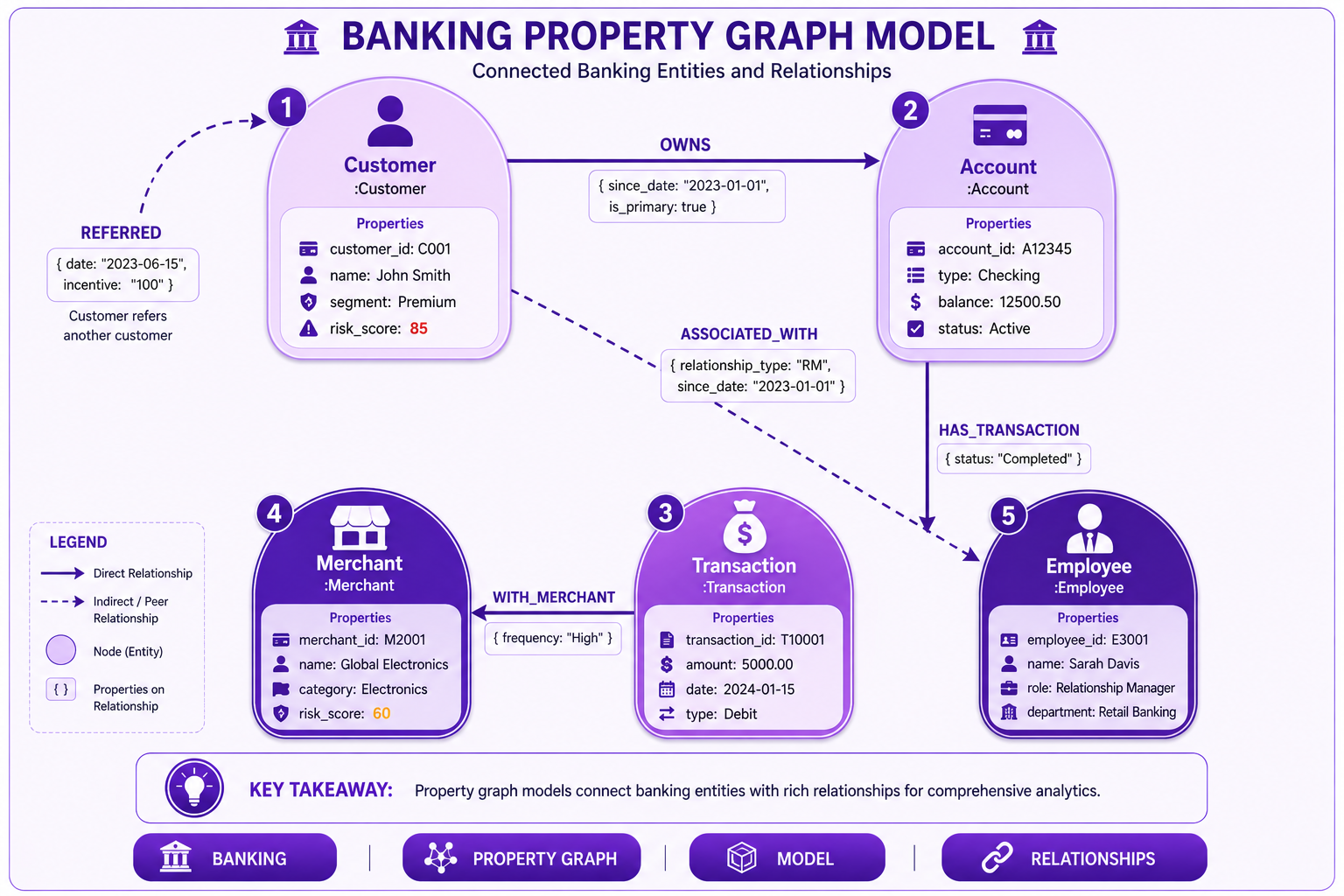
Prompt: Create a banking property graph model diagram showing the complete graph structure. Use a 5-node structure with purple gradient theme:
Node 1: Customer (Top Left) - Purple #E1BEE7
- Label: ":Customer"
- Properties: customer_id, name, segment, risk_score
- Icon: 👤
Node 2: Account (Top Right) - Purple #CE93D8
- Label: ":Account"
- Properties: account_id, type, balance, status
- Icon: 💳
Node 3: Transaction (Bottom Center) - Purple #AB47BC
- Label: ":Transaction"
- Properties: transaction_id, amount, date, type
- Icon: 💰
Node 4: Merchant (Bottom Left) - Purple #7B1FA2
- Label: ":Merchant"
- Properties: merchant_id, name, category, risk_score
- Icon: 🏪
Node 5: Employee (Bottom Right) - Purple #4A148C
- Label: ":Employee"
- Properties: employee_id, name, role, department
- Icon: 👔
Relationships:
- Customer → Account: OWNS {since_date, is_primary}
- Account → Transaction: HAS_TRANSACTION {status}
- Transaction → Merchant: WITH_MERCHANT {frequency}
- Customer → Employee: ASSOCIATED_WITH {relationship_type}
- Customer → Customer: REFERRED {date, incentive}
Use directional arrows with relationship labels and properties. Include key takeaway at bottom: "Property graph models connect banking entities with rich relationships for comprehensive analytics." Footer tags: Banking, Property Graph, Model, Relationships. Enterprise-style clean layout with rounded corners.
Interview Questions
-
What is a property graph?
-
What are the components of a property graph?
-
How do you model entities in a property graph?
-
How do you model relationships in a property graph?
-
What is the difference between labels and properties?
-
How do you use properties on relationships?
-
What are the design principles for property graph modeling?
-
How do you optimize property graph queries?
-
What are the use cases for property graphs in banking?
-
How do you evolve a property graph schema?
-
What is the role of indexes in property graphs?
-
How do you model temporal data in property graphs?
Practice Exercises
-
Design a property graph for banking relationships.
-
Create nodes for customers, accounts, and transactions.
-
Define relationships with properties.
-
Write Cypher queries to find customer networks.
-
Model fraud detection with property graphs.
-
Implement recommendation graph patterns.
-
Use indexes for query performance.
-
Model hierarchical organizational structure.
-
Implement temporal tracking in property graphs.
-
Query complex relationship patterns.
Key Takeaways
| # | Takeaway |
|---|---|
| 1 | Property graphs combine nodes, edges, and properties |
| 2 | Nodes represent entities with properties |
| 3 | Edges represent relationships with properties |
| 4 | Labels classify nodes for querying |
| 5 | Relationship types define edge semantics |
| 6 | Design for query patterns |
| 7 | Use indexes for performance |
| 8 | Model relationships as first-class citizens |
Chapter Summary
In this chapter, you learned:
- ✅ Property graph modeling concepts
- ✅ Nodes, edges, and properties design
- ✅ Labels and relationship types
- ✅ Property graph design principles
- ✅ Banking property graph models
- ✅ Cypher query patterns
- ✅ Advanced graph patterns
- ✅ Best practices and common mistakes
You now understand how to design comprehensive property graph models for banking use cases.
Next Chapter
👉 Next Chapter: Fraud Detection and Relationship Analytics
In the next chapter, we will apply property graph modeling to real-world fraud detection and relationship analytics use cases.
End of Chapter 22
Diagram Prompts Summary
Diagram 1: Property Graph Components
Filename: ch22-property-graph-components.png
Prompt:
Create a property graph components diagram showing nodes, edges, and properties in detail. Use a 3-section structure with purple gradient theme. Section 1: Nodes (Left) - Purple #E1BEE7 with Title "Nodes - Entities", Icon ⚪, Components: Labels, Properties, Unique ID, Label Examples: :Customer, :Account, :Transaction, Property Examples: name, balance, amount, Banking Example "Customer Node with properties", Visual circle with label and property list. Section 2: Edges (Center) - Purple #CE93D8 with Title "Edges - Relationships", Icon 🔗, Components: Relationship Type, Properties, Direction, Type Examples: OWNS, TRANSACTED, REFERRED, Property Examples: since_date, amount, status, Banking Example "OWNS Edge with properties", Visual arrow between nodes with type label. Section 3: Properties (Right) - Purple #AB47BC with Title "Properties - Attributes", Icon 📋, Types: String, Number, Date, Array, Boolean, Node Properties: name, balance, status, Edge Properties: since_date, amount, status, Banking Example "Property list for Customer node", Visual property list with key-value pairs. At bottom: Key takeaway: "Property graphs combine nodes, edges, and properties for rich connected data modeling." Footer tags: Property Graph, Nodes, Edges, Properties. Enterprise-style clean layout with rounded corners.
Diagram 2: Banking Property Graph Model
Filename: ch22-banking-property-graph.png
Prompt:
Create a banking property graph model diagram showing the complete graph structure. Use a 5-node structure with purple gradient theme. Node 1: Customer (Top Left) - Purple #E1BEE7 with Label ":Customer", Properties: customer_id, name, segment, risk_score, Icon 👤. Node 2: Account (Top Right) - Purple #CE93D8 with Label ":Account", Properties: account_id, type, balance, status, Icon 💳. Node 3: Transaction (Bottom Center) - Purple #AB47BC with Label ":Transaction", Properties: transaction_id, amount, date, type, Icon 💰. Node 4: Merchant (Bottom Left) - Purple #7B1FA2 with Label ":Merchant", Properties: merchant_id, name, category, risk_score, Icon 🏪. Node 5: Employee (Bottom Right) - Purple #4A148C with Label ":Employee", Properties: employee_id, name, role, department, Icon 👔. Relationships: Customer → Account: OWNS {since_date, is_primary}, Account → Transaction: HAS_TRANSACTION {status}, Transaction → Merchant: WITH_MERCHANT {frequency}, Customer → Employee: ASSOCIATED_WITH {relationship_type}, Customer → Customer: REFERRED {date, incentive}. Use directional arrows with relationship labels and properties. Include key takeaway at bottom: "Property graph models connect banking entities with rich relationships for comprehensive analytics." Footer tags: Banking, Property Graph, Model, Relationships. Enterprise-style clean layout with rounded corners.
Diagram 3: Fraud Detection Property Graph
Filename: ch22-fraud-detection-property-graph.png
Prompt:
Create a fraud detection property graph diagram showing suspicious patterns. Use a 5-node structure with purple gradient theme with highlighted suspicious elements:
Node 1: Customer A (Top Left) - Purple #E1BEE7
- Label: ":Customer"
- Name: "John Doe"
- Properties: risk_score: 0.15 (Low), segment: "Premium"
- Icon: 👤
- Highlight: Normal (No highlight)
Node 2: Customer B (Top Right) - Purple #CE93D8
- Label: ":Customer"
- Name: "Suspicious User"
- Properties: risk_score: 0.85 (High), segment: "Unknown"
- Icon: 👤
- Highlight: Red border (Suspicious)
Node 3: Account A (Center Left) - Purple #AB47BC
- Label: ":Account"
- Properties: account_id: "A001", balance: 100000.00, suspicious_flag: true
- Icon: 💳
- Highlight: Red border (Flagged)
Node 4: Account B (Center Right) - Purple #7B1FA2
- Label: ":Account"
- Properties: account_id: "A002", balance: 50000.00
- Icon: 💳
- Highlight: Normal
Node 5: Merchant (Bottom Center) - Purple #4A148C
- Label: ":Merchant"
- Name: "Offshore Services Inc."
- Properties: risk_score: 0.90, flagged: true
- Icon: 🏪
- Highlight: Red border (Flagged)
Relationships (Highlighted where suspicious):
- Customer A → Account B: OWNS (Normal) - Green
- Account B → Merchant: TRANSACTED {amount: 1500.00} (Normal) - Green
- Customer B → Account A: OWNS (Suspicious) - Red
- Account A → Merchant: TRANSACTED {amount: 50000.00} (Suspicious - High Value) - Red
- Customer A → Customer B: ASSOCIATED_WITH {type: "Suspected Money Mule"} - Red
Visual Elements:
- Fraud ring highlighted with red dashed circle
- Suspicious pattern shown with bold red arrows
- Risk scores displayed on nodes
- Amounts shown on suspicious transactions
- Warning icon on flagged nodes
At bottom: Key takeaway: "Property graphs reveal suspicious patterns and connections that indicate fraud." Footer tags: Fraud Detection, Property Graph, Suspicious, Banking. Enterprise-style clean layout with rounded corners.