
Chapter 24: AI-Ready Data Modeling
In the previous chapter, we explored fraud detection and relationship analytics using graph databases, learning how to identify suspicious patterns and detect fraud rings.
In this chapter, we will dive into AI-Ready Data Modeling—understanding how to design data models specifically optimized for artificial intelligence and machine learning workloads, including feature stores, data quality, and MLOps integration.
Using our Digital Banking Platform case study, we will build data models that power predictive analytics, recommendation systems, and intelligent automation.
🎯 Learning Objectives
By the end of this chapter, you will be able to:
- Understand AI-ready data modeling principles
- Design feature stores for ML workloads
- Implement data quality for AI/ML
- Build training and serving data pipelines
- Design for model explainability
- Apply MLOps best practices
- Implement banking ML use cases
- Optimize data for AI performance
What is AI-Ready Data?
AI-ready data is data that has been prepared, structured, and governed specifically for artificial intelligence and machine learning applications.
AI-Ready Data = High Quality + Well-Defined Features + Accessible + Governed + Scalable
Think of AI-ready data as:
- Data designed for machine learning
- Features are well-defined and consistent
- Data quality is ensured
- Available for both training and serving
- Governed and documented
Real-World Banking Example
A bank wants to build a churn prediction model:
Business Problem: Predict customers likely to churn

Traditional Data Approach:
- Raw data from multiple systems
- Inconsistent definitions
- Data quality issues
- Manual feature engineering
- Difficult to deploy

AI-Ready Data Approach:
- Unified feature store
- Consistent feature definitions
- Automated quality checks
- Versioned features
- Online/offline serving
AI-Ready Data Principles
Principle 1: Feature-Centric Design
Focus on creating and managing features for ML models.

Key Concepts:
- Features are measurable properties
- Features must be consistent
- Features should be reusable
- Features need versioning
- Features require documentation
Principle 2: Data Quality First
Ensure data quality for reliable ML models.

Quality Dimensions:
- Completeness (no missing values)
- Accuracy (correct values)
- Consistency (same format)
- Timeliness (current data)
- Relevance (useful for ML)

Banking Example:
- Customer features: age, balance, transaction history
- Account features: type, status, tenure
- Behavioral features: login frequency, product usage
Principle 3: Training-Serving Consistency
Ensure same data transformations for training and serving.

Requirements:
- Same feature extraction logic
- Same preprocessing steps
- Same encoding methods
- Same validation rules

Banking Example:
- Feature encoding: one-hot, label encoding
- Normalization: standard scaling
- Feature engineering: derived metrics
Principle 4: Governance and Explainability
Ensure data governance and model explainability.

Requirements:
- Feature lineage
- Data provenance
- Model documentation
- Explainable AI
- Regulatory compliance
Feature Store Architecture
What is a Feature Store?
A feature store is a centralized repository for managing, storing, and serving features for machine learning models.
Feature Store = Feature Management + Online Serving + Offline Serving + Governance
Key Components
1. Feature Registry
   - Feature definitions
   - Metadata management
   - Version control

2. Feature Storage
   - Offline store (training data)
   - Online store (serving data)
   - Historical data

3. Feature Serving
   - Batch serving (offline)
   - Real-time serving (online)
   - Streaming serving

4. Feature Governance
   - Data quality
   - Access control
   - Lineage tracking
Feature Store Implementation
Creating Feature Tables
-- Feature Table for Customer Features
CREATE OR REPLACE TABLE banking.features_customer (
  customer_id STRING NOT NULL,
  feature_date DATE NOT NULL,

  -- Customer Demographics
  age INT,
  gender STRING,
  income_range STRING,
  education_level STRING,
  marital_status STRING,

  -- Customer Segmentation
  customer_segment STRING,
  risk_profile STRING,

  -- Customer Behavior
  days_since_last_active INT,
  days_since_last_transaction INT,
  days_since_last_login INT,

  -- Transaction Behavior
  avg_transaction_amount_30d NUMERIC,
  transaction_count_30d INT,
  total_transaction_amount_30d NUMERIC,
  unique_merchant_count_30d INT,

  -- Account Behavior
  total_account_balance NUMERIC,
  account_count INT,
  primary_account_tenure_days INT,

  -- Derived Features (AI-Ready)
  customer_lifetime_value NUMERIC,
  churn_risk_score NUMERIC,
  engagement_score NUMERIC,

  -- Metadata
  created_at TIMESTAMP DEFAULT CURRENT_TIMESTAMP(),
  updated_at TIMESTAMP DEFAULT CURRENT_TIMESTAMP()
)
PARTITION BY feature_date
CLUSTER BY customer_id
OPTIONS (
  description = 'Customer features for ML models'
);

-- Feature Table for Transaction Features
CREATE OR REPLACE TABLE banking.features_transaction (
  transaction_id STRING NOT NULL,
  customer_id STRING NOT NULL,
  feature_date DATE NOT NULL,

  -- Transaction Features
  transaction_amount NUMERIC,
  transaction_type STRING,
  merchant_category STRING,
  merchant_risk_score NUMERIC,

  -- Time Features
  hour_of_day INT,
  day_of_week INT,
  is_weekend BOOLEAN,
  days_since_last_transaction INT,

  -- Location Features
  transaction_country STRING,
  transaction_city STRING,
  is_international BOOLEAN,

  -- Behavioral Features
  avg_daily_amount_30d NUMERIC,
  transaction_velocity_30d INT,
  amount_deviation NUMERIC,

  -- ML-Target Features
  is_fraud_label BOOLEAN,
  is_anomaly_label BOOLEAN,

  -- Metadata
  created_at TIMESTAMP DEFAULT CURRENT_TIMESTAMP()
)
PARTITION BY feature_date
CLUSTER BY customer_id, transaction_type
OPTIONS (
  description = 'Transaction features for ML models'
);
Feature Engineering
-- Feature Engineering Pipeline
CREATE OR REPLACE PROCEDURE banking.generate_customer_features()
BEGIN
  -- Insert new features with computation
  INSERT INTO banking.features_customer (
    customer_id,
    feature_date,
    age,
    gender,
    income_range,
    education_level,
    marital_status,
    customer_segment,
    risk_profile,
    days_since_last_active,
    days_since_last_transaction,
    days_since_last_login,
    avg_transaction_amount_30d,
    transaction_count_30d,
    total_transaction_amount_30d,
    unique_merchant_count_30d,
    total_account_balance,
    account_count,
    primary_account_tenure_days,
    customer_lifetime_value,
    churn_risk_score,
    engagement_score
  )
  SELECT
    c.customer_id,
    CURRENT_DATE() AS feature_date,
    EXTRACT(YEAR FROM CURRENT_DATE()) - EXTRACT(YEAR FROM c.date_of_birth) AS age,
    c.gender,
    c.income_range,
    c.education_level,
    c.marital_status,
    c.customer_segment,
    c.risk_profile,
    DATEDIFF(CURRENT_DATE(), c.last_active_date) AS days_since_last_active,
    COALESCE(
      DATEDIFF(CURRENT_DATE(), t.last_transaction_date),
      999
    ) AS days_since_last_transaction,
    COALESCE(
      DATEDIFF(CURRENT_DATE(), c.last_login_date),
      999
    ) AS days_since_last_login,
    COALESCE(t.avg_amount, 0) AS avg_transaction_amount_30d,
    COALESCE(t.tx_count, 0) AS transaction_count_30d,
    COALESCE(t.total_amount, 0) AS total_transaction_amount_30d,
    COALESCE(t.unique_merchants, 0) AS unique_merchant_count_30d,
    COALESCE(a.total_balance, 0) AS total_account_balance,
    COALESCE(a.account_count, 0) AS account_count,
    COALESCE(a.tenure_days, 0) AS primary_account_tenure_days,
    -- Derived features
    CASE
      WHEN t.total_amount > 10000 THEN 10000
      WHEN t.total_amount IS NULL THEN 0
      ELSE t.total_amount
    END * 0.3 AS customer_lifetime_value,
    CASE
      WHEN COALESCE(DATEDIFF(CURRENT_DATE(), c.last_active_date), 999) > 90 THEN 0.8
      WHEN COALESCE(DATEDIFF(CURRENT_DATE(), c.last_active_date), 999) > 60 THEN 0.5
      WHEN COALESCE(DATEDIFF(CURRENT_DATE(), c.last_active_date), 999) > 30 THEN 0.2
      ELSE 0.0
    END AS churn_risk_score,
    CASE
      WHEN COALESCE(t.tx_count, 0) > 10 THEN 0.9
      WHEN COALESCE(t.tx_count, 0) > 5 THEN 0.6
      WHEN COALESCE(t.tx_count, 0) > 2 THEN 0.3
      ELSE 0.0
    END AS engagement_score
  FROM banking.dim_customer c
  LEFT JOIN (
    SELECT
      customer_sk,
      MAX(transaction_date) AS last_transaction_date,
      AVG(transaction_amount) AS avg_amount,
      COUNT(*) AS tx_count,
      SUM(transaction_amount) AS total_amount,
      COUNT(DISTINCT merchant_category) AS unique_merchants
    FROM banking.fact_transactions
    WHERE transaction_date >= DATE_SUB(CURRENT_DATE(), INTERVAL 30 DAY)
    GROUP BY customer_sk
  ) t ON c.customer_sk = t.customer_sk
  LEFT JOIN (
    SELECT
      customer_sk,
      SUM(balance) AS total_balance,
      COUNT(*) AS account_count,
      DATEDIFF(CURRENT_DATE(), MIN(open_date)) AS tenure_days
    FROM banking.dim_account
    WHERE is_current = TRUE
    GROUP BY customer_sk
  ) a ON c.customer_sk = a.customer_sk
  WHERE c.is_current = TRUE
    AND NOT EXISTS (
      SELECT 1
      FROM banking.features_customer f
      WHERE f.customer_id = c.customer_id
        AND f.feature_date = CURRENT_DATE()
    );
END;
AI-Ready Data Quality
Data Quality Framework
-- Data Quality Checks for Features
CREATE OR REPLACE TABLE banking.feature_quality_checks
PARTITION BY check_date
AS
SELECT
  feature_name,
  check_date,
  -- Completeness
  ROUND(100 * (COUNT(*) - SUM(CASE WHEN value IS NULL THEN 1 ELSE 0 END)) / COUNT(*), 2) AS completeness,

  -- Accuracy (range checks)
  ROUND(100 * SUM(CASE
    WHEN value BETWEEN min_acceptable AND max_acceptable THEN 1
    ELSE 0
  END) / COUNT(*), 2) AS accuracy,

  -- Consistency (format checks)
  ROUND(100 * SUM(CASE
    WHEN REGEXP_CONTAINS(value, format_pattern) THEN 1
    ELSE 0
  END) / COUNT(*), 2) AS consistency,

  -- Uniqueness
  ROUND(100 * (1 - (COUNT(DISTINCT value) / COUNT(*))), 2) AS uniqueness,

  -- Overall quality score
  ROUND(
    (completeness + accuracy + consistency + uniqueness) / 4,
    2
  ) AS quality_score
FROM (
  SELECT
    'customer_age' AS feature_name,
    CURRENT_DATE() AS check_date,
    age AS value,
    0 AS min_acceptable,
    120 AS max_acceptable,
    r'^\d{1,3}$' AS format_pattern
  FROM banking.features_customer
  UNPIVOT(value FOR feature_name IN (
    age, gender, income_range, education_level, marital_status,
    customer_segment, risk_profile, days_since_last_active,
    days_since_last_transaction, days_since_last_login,
    avg_transaction_amount_30d, transaction_count_30d,
    total_transaction_amount_30d, unique_merchant_count_30d,
    total_account_balance, account_count, primary_account_tenure_days,
    customer_lifetime_value, churn_risk_score, engagement_score
  ))
)
GROUP BY feature_name, check_date;
Missing Value Handling
-- Handle missing values in features
CREATE OR REPLACE TABLE banking.features_customer_clean
AS
SELECT
  customer_id,
  feature_date,
  -- Simple imputation
  COALESCE(age,
    (SELECT AVG(age) FROM banking.features_customer)
  ) AS age,
  COALESCE(gender, 'UNKNOWN') AS gender,
  COALESCE(income_range, 'UNKNOWN') AS income_range,
  COALESCE(education_level, 'UNKNOWN') AS education_level,
  COALESCE(marital_status, 'UNKNOWN') AS marital_status,
  COALESCE(customer_segment, 'UNKNOWN') AS customer_segment,
  COALESCE(risk_profile, 'UNKNOWN') AS risk_profile,
  COALESCE(days_since_last_active, 999) AS days_since_last_active,
  COALESCE(days_since_last_transaction, 999) AS days_since_last_transaction,
  COALESCE(days_since_last_login, 999) AS days_since_last_login,
  COALESCE(avg_transaction_amount_30d, 0) AS avg_transaction_amount_30d,
  COALESCE(transaction_count_30d, 0) AS transaction_count_30d,
  COALESCE(total_transaction_amount_30d, 0) AS total_transaction_amount_30d,
  COALESCE(unique_merchant_count_30d, 0) AS unique_merchant_count_30d,
  COALESCE(total_account_balance, 0) AS total_account_balance,
  COALESCE(account_count, 0) AS account_count,
  COALESCE(primary_account_tenure_days, 0) AS primary_account_tenure_days,
  COALESCE(customer_lifetime_value, 0) AS customer_lifetime_value,
  COALESCE(churn_risk_score, 0) AS churn_risk_score,
  COALESCE(engagement_score, 0) AS engagement_score,
  created_at,
  updated_at
FROM banking.features_customer;
Training vs Serving Data
Training Data Pipeline
-- Training Data Preparation (Offline)
CREATE OR REPLACE TABLE banking.ml_training_data_churn
PARTITION BY feature_date
AS
SELECT
  -- Features
  fc.customer_id,
  fc.age,
  fc.gender,
  fc.income_range,
  fc.education_level,
  fc.marital_status,
  fc.customer_segment,
  fc.risk_profile,
  fc.days_since_last_active,
  fc.days_since_last_transaction,
  fc.days_since_last_login,
  fc.avg_transaction_amount_30d,
  fc.transaction_count_30d,
  fc.total_transaction_amount_30d,
  fc.unique_merchant_count_30d,
  fc.total_account_balance,
  fc.account_count,
  fc.primary_account_tenure_days,
  fc.customer_lifetime_value,
  fc.churn_risk_score,
  fc.engagement_score,

  -- Label (target variable)
  CASE
    WHEN DATEDIFF(CURRENT_DATE(), c.last_active_date) > 90 THEN 1
    ELSE 0
  END AS churned,

  -- Metadata
  fc.feature_date,
  CURRENT_TIMESTAMP() AS created_at
FROM banking.features_customer_clean fc
JOIN banking.dim_customer c ON fc.customer_id = c.customer_id
WHERE fc.feature_date BETWEEN '2023-01-01' AND '2024-06-30'
  AND c.is_current = TRUE;
Serving Data Pipeline
-- Serving Data Preparation (Online)
CREATE OR REPLACE VIEW banking.v_ml_features_serving AS
SELECT
  customer_id,
  age,
  gender,
  income_range,
  education_level,
  marital_status,
  customer_segment,
  risk_profile,
  days_since_last_active,
  days_since_last_transaction,
  days_since_last_login,
  avg_transaction_amount_30d,
  transaction_count_30d,
  total_transaction_amount_30d,
  unique_merchant_count_30d,
  total_account_balance,
  account_count,
  primary_account_tenure_days,
  customer_lifetime_value,
  churn_risk_score,
  engagement_score,
  feature_date,
  -- Pre-computed features for faster serving
  CASE
    WHEN days_since_last_active > 90 THEN 'HIGH_RISK'
    WHEN days_since_last_active > 60 THEN 'MEDIUM_RISK'
    ELSE 'LOW_RISK'
  END AS risk_category,
  CASE
    WHEN engagement_score > 0.7 THEN 'HIGH_ENGAGEMENT'
    WHEN engagement_score > 0.3 THEN 'MEDIUM_ENGAGEMENT'
    ELSE 'LOW_ENGAGEMENT'
  END AS engagement_category
FROM banking.features_customer_clean
WHERE feature_date = (
  SELECT MAX(feature_date)
  FROM banking.features_customer_clean f2
  WHERE f2.customer_id = customer_id
);
ML Data Pipeline on Google Cloud
Vertex AI Feature Store
-- Vertex AI Feature Store Integration
-- Step 1: Create Feature Store
-- gcloud ai featurestores create churn_prediction \
--   --location=us-central1

-- Step 2: Create Entity Type
-- gcloud ai featurestores entity-types create customers \
--   --featurestore=churn_prediction \
--   --location=us-central1

-- Step 3: Import Features to Vertex AI Feature Store
-- gcloud ai featurestores entity-types import \
--   --entity-type=customers \
--   --featurestore=churn_prediction \
--   --source=bigquery://banking.features_customer_clean \
--   --location=us-central1
Model Training Pipeline
# Vertex AI Pipeline for ML Training
pipeline:
  name: "churn_prediction_pipeline"
  schedule: "weekly"

  steps:
    - name: "feature_engineering"
      component: "bigquery"
      query: "CALL banking.generate_customer_features()"

    - name: "data_quality_check"
      component: "bigquery"
      query: "CALL banking.run_feature_quality_checks()"

    - name: "training_data_preparation"
      component: "bigquery"
      query: "CREATE OR REPLACE TABLE banking.ml_training_data_churn ..."

    - name: "model_training"
      component: "vertex_ai"
      model_type: "xgboost"
      training_data: "banking.ml_training_data_churn"
      target_column: "churned"
      feature_columns: "age,gender,income_range,education_level,..."

    - name: "model_evaluation"
      component: "vertex_ai"
      metrics: ["accuracy", "precision", "recall", "f1_score", "auc_roc"]

    - name: "model_deployment"
      component: "vertex_ai"
      endpoint: "churn_prediction_endpoint"
      traffic_split: "new_model:100"
AI-Ready Data Best Practices
| # | Best Practice | Banking Example |
|---|---|---|
| 1 | Design for features, not tables | Feature store approach |
| 2 | Ensure training-serving consistency | Same transformations |
| 3 | Implement data quality checks | Feature quality monitoring |
| 4 | Version features and models | Feature versioning |
| 5 | Provide feature documentation | Metadata catalog |
| 6 | Enable online and offline serving | Feature store capabilities |
| 7 | Handle missing values systematically | Imputation strategies |
| 8 | Monitor feature drift | Distribution monitoring |
Common Mistakes
| # | Common Mistake | Better Approach |
|---|---|---|
| 1 | Inconsistent training and serving | Same pipeline for both |
| 2 | No data quality checks | Implement automated checks |
| 3 | Missing feature documentation | Document all features |
| 4 | Hard-coded feature definitions | Use feature registry |
| 5 | No versioning | Version features and models |
| 6 | Ignoring feature drift | Monitor drift |
| 7 | Complex feature logic | Simplify transformations |
| 8 | No explainability | Provide feature importance |
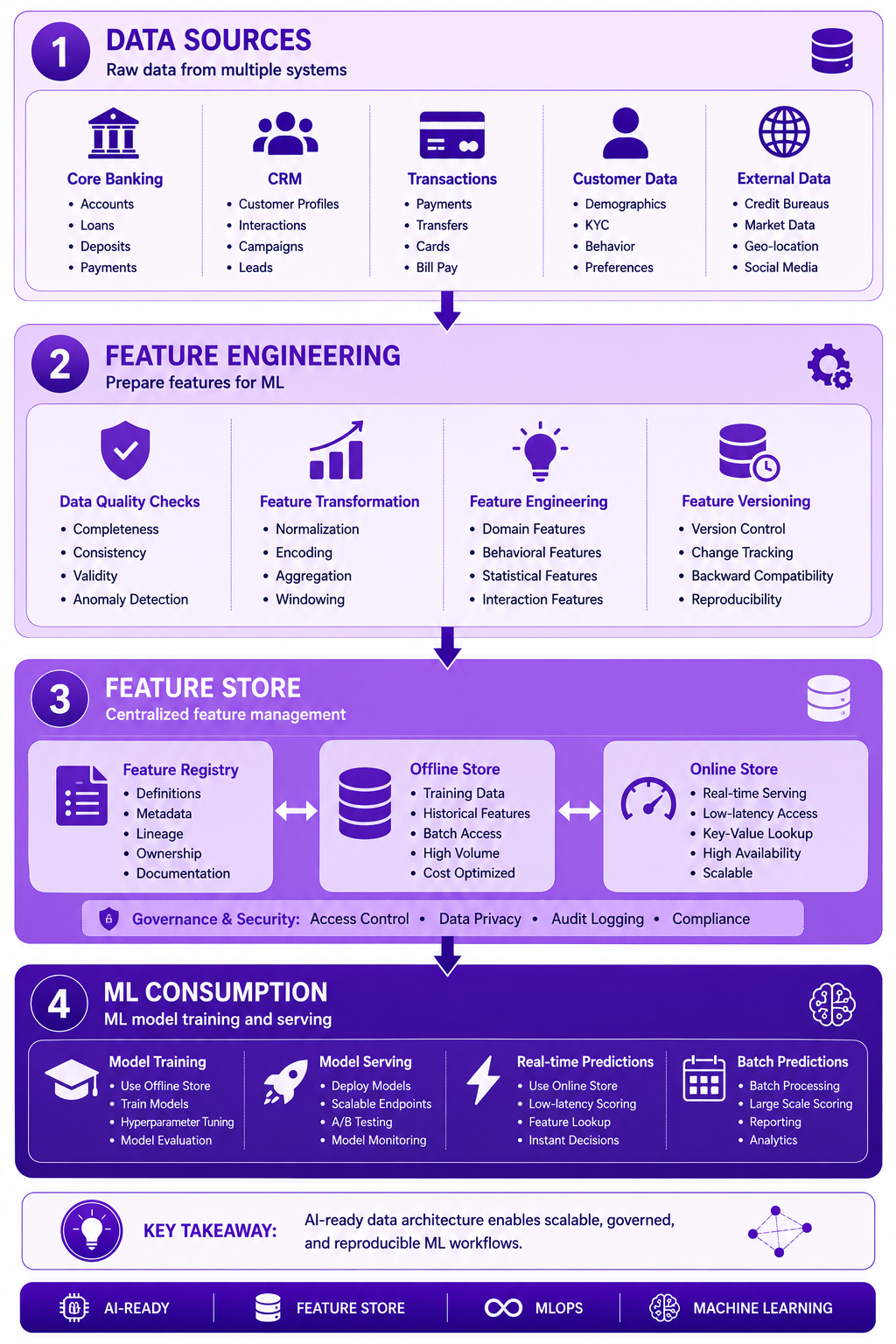
Prompt: Create an AI-ready data architecture diagram showing the complete data flow from raw data to ML models. Use a 4-layer structure with purple gradient theme:
Layer 1: Data Sources (Top) - Purple #E1BEE7
- Core Banking, CRM, Transactions, Customer Data, External Data
- Icons for each source
- Description: "Raw data from multiple systems"
Layer 2: Feature Engineering - Purple #CE93D8
- Data Quality Checks, Feature Transformation, Feature Engineering, Feature Versioning
- Icons for engineering
- Description: "Prepare features for ML"
Layer 3: Feature Store - Purple #AB47BC
- Feature Registry (Definitions, Metadata, Lineage)
- Offline Store (Training Data, Historical Features)
- Online Store (Real-time Serving, Low-latency)
- Icons for store components
- Description: "Centralized feature management"
Layer 4: ML Consumption (Bottom) - Purple #7B1FA2
- Model Training, Model Serving, Real-time Predictions, Batch Predictions
- Icons for consumption
- Description: "ML model training and serving"
Use downward arrows between layers. Include key takeaway at bottom: "AI-ready data architecture enables scalable, governed, and reproducible ML workflows." Footer tags: AI-Ready, Feature Store, MLOps, Machine Learning. Enterprise-style clean layout with rounded corners.
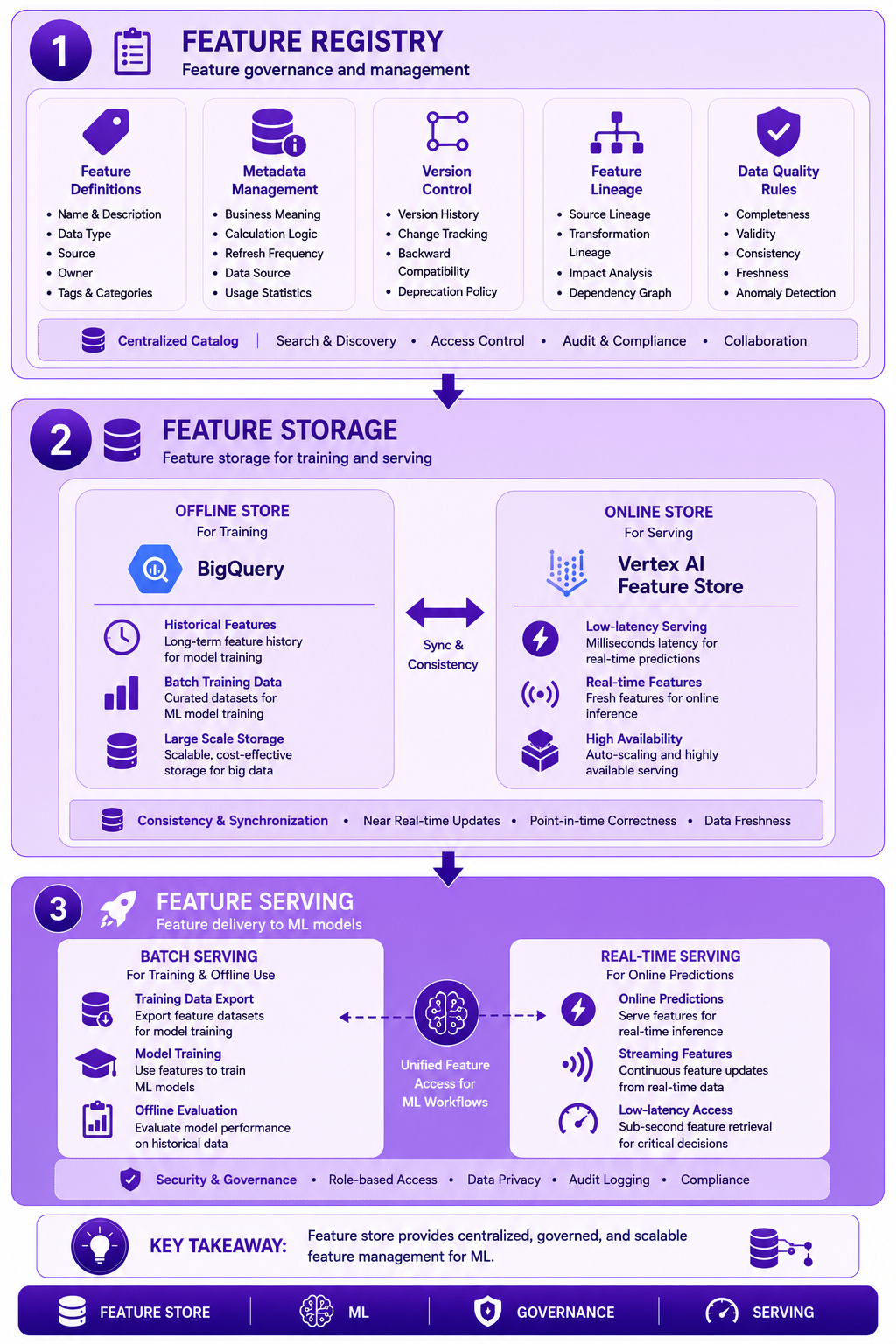
Prompt: Create a feature store architecture diagram showing the complete feature management system. Use a 3-layer structure with purple gradient theme:
Layer 1: Feature Registry (Top) - Purple #E1BEE7
- Feature Definitions, Metadata Management, Version Control, Feature Lineage, Data Quality Rules
- Icon: 📋
- Description: "Feature governance and management"
Layer 2: Feature Storage - Purple #CE93D8
- Offline Store: BigQuery, Historical Features, Batch Training Data
- Online Store: Vertex AI Feature Store, Low-latency Serving, Real-time Features
- Icons for storage
- Description: "Feature storage for training and serving"
Layer 3: Feature Serving (Bottom) - Purple #AB47BC
- Batch Serving: Training Data Export, Model Training, Offline Evaluation
- Real-time Serving: Online Predictions, Streaming Features, Low-latency Access
- Icons for serving
- Description: "Feature delivery to ML models"
Use downward arrows between layers. Include key takeaway at bottom: "Feature store provides centralized, governed, and scalable feature management for ML." Footer tags: Feature Store, ML, Governance, Serving. Enterprise-style clean layout with rounded corners.
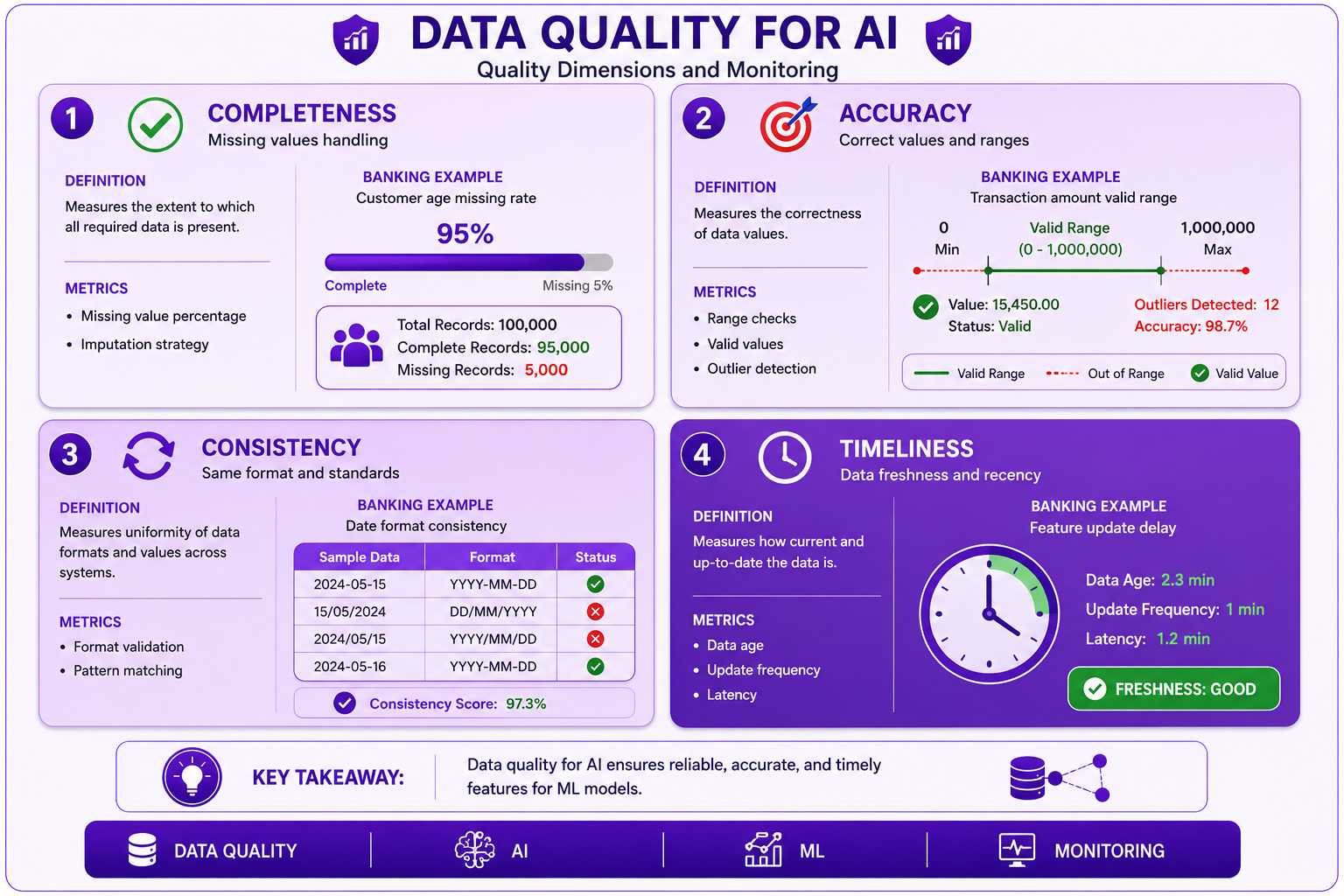
Prompt: Create a data quality for AI diagram showing quality dimensions and monitoring. Use a 4-section structure with purple gradient theme:
Section 1: Completeness (Top Left) - Purple #E1BEE7
- Title: "Completeness"
- Icon: ✅
- Definition: "Missing values handling"
- Metrics: Missing value percentage, Imputation strategy
- Banking Example: "Customer age missing rate"
- Visual: Progress bar showing 95% complete
Section 2: Accuracy (Top Right) - Purple #CE93D8
- Title: "Accuracy"
- Icon: 🎯
- Definition: "Correct values and ranges"
- Metrics: Range checks, Valid values, Outlier detection
- Banking Example: "Transaction amount valid range"
- Visual: Range indicator showing valid values
Section 3: Consistency (Bottom Left) - Purple #AB47BC
- Title: "Consistency"
- Icon: 🔄
- Definition: "Same format and standards"
- Metrics: Format validation, Pattern matching
- Banking Example: "Date format consistency"
- Visual: Format validation check
Section 4: Timeliness (Bottom Right) - Purple #7B1FA2
- Title: "Timeliness"
- Icon: ⏰
- Definition: "Data freshness and recency"
- Metrics: Data age, Update frequency, Latency
- Banking Example: "Feature update delay"
- Visual: Clock showing freshness
At bottom: Key takeaway: "Data quality for AI ensures reliable, accurate, and timely features for ML models." Footer tags: Data Quality, AI, ML, Monitoring. Enterprise-style clean layout with rounded corners.
Interview Questions
-
What is AI-ready data?
-
What are the key principles of AI-ready data modeling?
-
What is a feature store?
-
What are the components of a feature store?
-
How do you ensure training-serving consistency?
-
What are the data quality dimensions for AI?
-
How do you handle missing values in features?
-
What is feature drift and how do you monitor it?
-
How do you version features?
-
What is the role of Vertex AI Feature Store?
-
How do you design features for ML models?
-
What are the best practices for AI-ready data?
Practice Exercises
-
Design a feature store for banking churn prediction.
-
Implement feature engineering for customer features.
-
Create data quality checks for ML features.
-
Build a training data pipeline.
-
Implement online feature serving.
-
Design feature versioning strategy.
-
Monitor feature drift over time.
-
Build feature documentation.
-
Implement Vertex AI Feature Store integration.
-
Create ML training pipeline with features.
Key Takeaways
| # | Takeaway |
|---|---|
| 1 | AI-ready data is designed for machine learning |
| 2 | Feature stores centralize feature management |
| 3 | Data quality is critical for ML success |
| 4 | Training-serving consistency is essential |
| 5 | Features must be versioned and governed |
| 6 | Online and offline serving are both needed |
| 7 | Feature drift monitoring is important |
| 8 | Documentation ensures reproducibility |
Chapter Summary
In this chapter, you learned:
- ✅ AI-ready data modeling principles
- ✅ Feature store architecture and implementation
- ✅ Data quality for AI/ML
- ✅ Training vs serving data pipelines
- ✅ Vertex AI Feature Store integration
- ✅ Banking ML use cases
- ✅ Best practices and common mistakes
- ✅ Feature governance and monitoring
You now understand how to design and implement AI-ready data models for machine learning applications.
Next Chapter
👉 Next Chapter: Vector Search and Embeddings
End of Chapter 24
Diagram Prompts Summary
Diagram 1: AI-Ready Data Architecture
Filename: ch24-ai-ready-architecture.png
Prompt:
Create an AI-ready data architecture diagram showing the complete data flow from raw data to ML models. Use a 4-layer structure with purple gradient theme. Layer 1: Data Sources (Top) - Purple #E1BEE7 with Core Banking, CRM, Transactions, Customer Data, External Data. Icons for each source. Description: "Raw data from multiple systems". Layer 2: Feature Engineering - Purple #CE93D8 with Data Quality Checks, Feature Transformation, Feature Engineering, Feature Versioning. Icons for engineering. Description: "Prepare features for ML". Layer 3: Feature Store - Purple #AB47BC with Feature Registry (Definitions, Metadata, Lineage), Offline Store (Training Data, Historical Features), Online Store (Real-time Serving, Low-latency). Icons for store components. Description: "Centralized feature management". Layer 4: ML Consumption (Bottom) - Purple #7B1FA2 with Model Training, Model Serving, Real-time Predictions, Batch Predictions. Icons for consumption. Description: "ML model training and serving". Use downward arrows between layers. Include key takeaway at bottom: "AI-ready data architecture enables scalable, governed, and reproducible ML workflows." Footer tags: AI-Ready, Feature Store, MLOps, Machine Learning. Enterprise-style clean layout.
Diagram 2: Feature Store Architecture
Filename: ch24-feature-store-architecture.png
Prompt:
Create a feature store architecture diagram showing the complete feature management system. Use a 3-layer structure with purple gradient theme. Layer 1: Feature Registry (Top) - Purple #E1BEE7 with Feature Definitions, Metadata Management, Version Control, Feature Lineage, Data Quality Rules. Icon 📋. Description: "Feature governance and management". Layer 2: Feature Storage - Purple #CE93D8 with Offline Store: BigQuery, Historical Features, Batch Training Data; Online Store: Vertex AI Feature Store, Low-latency Serving, Real-time Features. Icons for storage. Description: "Feature storage for training and serving". Layer 3: Feature Serving (Bottom) - Purple #AB47BC with Batch Serving: Training Data Export, Model Training, Offline Evaluation; Real-time Serving: Online Predictions, Streaming Features, Low-latency Access. Icons for serving. Description: "Feature delivery to ML models". Use downward arrows between layers. Include key takeaway at bottom: "Feature store provides centralized, governed, and scalable feature management for ML." Footer tags: Feature Store, ML, Governance, Serving. Enterprise-style clean layout.
Diagram 3: Data Quality for AI
Filename: ch24-data-quality-ai.png
Prompt:
Create a data quality for AI diagram showing quality dimensions and monitoring. Use a 4-section structure with purple gradient theme. Section 1: Completeness (Top Left) - Purple #E1BEE7 with Title "Completeness", Icon ✅, Definition "Missing values handling", Metrics: Missing value percentage, Imputation strategy, Banking Example "Customer age missing rate", Visual progress bar showing 95% complete. Section 2: Accuracy (Top Right) - Purple #CE93D8 with Title "Accuracy", Icon 🎯, Definition "Correct values and ranges", Metrics: Range checks, Valid values, Outlier detection, Banking Example "Transaction amount valid range", Visual range indicator showing valid values. Section 3: Consistency (Bottom Left) - Purple #AB47BC with Title "Consistency", Icon 🔄, Definition "Same format and standards", Metrics: Format validation, Pattern matching, Banking Example "Date format consistency", Visual format validation check. Section 4: Timeliness (Bottom Right) - Purple #7B1FA2 with Title "Timeliness", Icon ⏰, Definition "Data freshness and recency", Metrics: Data age, Update frequency, Latency, Banking Example "Feature update delay", Visual clock showing freshness. At bottom: Key takeaway: "Data quality for AI ensures reliable, accurate, and timely features for ML models." Footer tags: Data Quality, AI, ML, Monitoring. Enterprise-style clean layout.