
Chapter 27: AI-Assisted Data Modeling
In the previous chapter, we explored knowledge graphs and RAG, learning how to build semantic knowledge representations and power intelligent applications combining retrieval with generative AI.
In this chapter, we will dive into AI-Assisted Data Modeling—understanding how artificial intelligence and machine learning can accelerate, automate, and enhance data modeling tasks, from schema discovery to model optimization.
Using our Digital Banking Platform case study, we will implement AI-assisted data modeling techniques that reduce manual effort, improve quality, and accelerate time-to-insight.
🎯 Learning Objectives
By the end of this chapter, you will be able to:
- Understand AI-assisted data modeling concepts and benefits
- Implement automated schema discovery and recommendation
- Use AI for data quality and anomaly detection
- Apply generative AI for data modeling assistance
- Implement AI-driven data lineage and impact analysis
- Use Vertex AI and BigQuery ML for modeling tasks
- Apply best practices for AI-assisted data modeling
- Build banking use cases for AI-assisted modeling
What is AI-Assisted Data Modeling?
AI-assisted data modeling is the practice of using artificial intelligence and machine learning to automate, accelerate, and enhance data modeling tasks across the entire data lifecycle.
AI-Assisted Data Modeling = Automation + Intelligence + Augmentation + Acceleration
Think of AI-assisted data modeling as:
- An AI copilot for data modeling
- Automated schema discovery and recommendation
- Intelligent data quality and anomaly detection
- Generative AI for model creation and documentation
- Faster, smarter, more accurate data modeling
Real-World Banking Example
A bank needs to model a new data source for customer transactions:
Traditional Approach:
1. Manual data exploration (days)
2. Manual schema design (days)
3. Manual data quality checks (days)
4. Manual documentation (days)
5. Manual optimization (days)
Total: 2-3 weeks

AI-Assisted Approach:
1. AI discovers schema automatically (hours)
2. AI recommends optimal structure (hours)
3. AI detects data quality issues (hours)
4. AI generates documentation (hours)
5. AI optimizes for performance (hours)
Total: 1-2 days

Result: 10x faster, higher quality, less manual effort
AI-Assisted Data Modeling Capabilities
1. Automated Schema Discovery
Capability: Automatically discover and infer schema from data
How it works:
- Analyze data structure and patterns
- Infer data types and relationships
- Detect nested and repeated structures
- Identify potential keys and constraints

Banking Use Case:
- New JSON data from mobile app
- AI detects nested customer structure
- AI identifies transaction arrays
- AI recommends denormalization
2. Intelligent Schema Recommendation
Capability: Recommend optimal schema based on usage patterns
How it works:
- Analyze query patterns and workloads
- Recommend partitioning and clustering
- Suggest materialization strategies
- Optimize for performance and cost

Banking Use Case:
- Transaction data with date-based queries
- AI recommends date partitioning
- AI recommends customer_id clustering
- AI suggests materialized views
3. Data Quality Automation
Capability: Automatically detect and suggest fixes for data quality issues
How it works:
- Profile data for quality metrics
- Detect anomalies and outliers
- Suggest data cleaning strategies
- Monitor quality over time

Banking Use Case:
- Customer data with missing values
- AI detects missing addresses
- AI suggests imputation strategies
- AI flags duplicate records
4. Generative AI for Data Modeling
Capability: Use LLMs to assist with data modeling tasks
How it works:
- Generate SQL DDL from natural language
- Generate data model documentation
- Explain complex data models
- Suggest model improvements

Banking Use Case:
- "Create a customer 360 star schema"
- AI generates complete DDL
- AI writes documentation
- AI explains design decisions
AI-Assisted Data Modeling Implementation
1. Automated Schema Discovery with BigQuery
-- BigQuery ML for schema inference
-- Automatically infer schema from JSON data

CREATE OR REPLACE EXTERNAL TABLE banking.customer_json_external
OPTIONS (
  format = 'JSON',
  uris = ['gs://banking-data/customers/*.json']
);

-- Discover schema using BigQuery
SELECT
  field_path,
  data_type,
  is_nullable,
  is_repeated,
  COUNT(*) AS occurrence_count
FROM banking.INFORMATION_SCHEMA.COLUMNS
WHERE table_name = 'customer_json_external';

-- Automatically generate DDL from discovered schema
CREATE OR REPLACE TABLE banking.customer_discovered
AS
SELECT * FROM banking.customer_json_external
LIMIT 0;

-- Analyze query patterns for optimization
SELECT
  query,
  total_bytes_processed,
  average_bytes_processed,
  execution_count
FROM banking.INFORMATION_SCHEMA.JOBS
WHERE query LIKE '%customer%'
ORDER BY total_bytes_processed DESC;
2. Intelligent Schema Recommendation
-- AI-powered schema recommendation using BigQuery ML
-- Analyze query patterns to recommend partitioning

CREATE OR REPLACE MODEL banking.schema_optimizer
OPTIONS (
  model_type = 'RECOMMENDATION',
  input_label_cols = ['table_id']
)
AS
SELECT
  table_id,
  query_column,
  filter_frequency,
  grouping_frequency,
  join_frequency
FROM banking.query_pattern_analysis;

-- Generate optimization recommendations
SELECT
  table_id,
  recommended_partition_column,
  recommended_cluster_columns,
  confidence_score
FROM banking.schema_optimizer
WHERE table_id = 'transactions';

-- Example: Create optimized table
CREATE OR REPLACE TABLE banking.transactions_optimized
PARTITION BY DATE(transaction_date)
CLUSTER BY customer_id, account_id
AS
SELECT * FROM banking.transactions_raw;
3. AI-Powered Data Quality
-- Automated data quality with BigQuery ML
-- Build anomaly detection model

CREATE OR REPLACE MODEL banking.anomaly_detection
OPTIONS (
  model_type = 'ISOLATION_FOREST'
)
AS
SELECT
  transaction_amount,
  customer_age,
  transaction_frequency,
  merchant_category
FROM banking.transactions_historical;

-- Detect anomalies in new data
SELECT
  transaction_id,
  transaction_amount,
  customer_age,
  ml_anomaly_score,
  CASE
    WHEN ml_anomaly_score > 0.8 THEN 'HIGH_RISK'
    WHEN ml_anomaly_score > 0.5 THEN 'MEDIUM_RISK'
    ELSE 'NORMAL'
  END AS anomaly_risk
FROM ML.PREDICT(
  MODEL banking.anomaly_detection,
  (SELECT * FROM banking.transactions_new)
)
WHERE ml_anomaly_score > 0.5;

-- Data quality rules with AI
CREATE OR REPLACE TABLE banking.data_quality_rules
AS
SELECT
  column_name,
  recommended_rules,
  confidence_score
FROM ML.GENERATE_TEXT(
  MODEL banking.llm_model,
  'For each column in a banking customer table, suggest data quality rules:
   Column: ' || column_name || '
   Data type: ' || data_type || '
   Sample values: ' || sample_values
)
FROM banking.customer_columns;
4. Generative AI for Data Modeling
-- Using Gemini for data model generation
-- Generate DDL from natural language description

CREATE OR REPLACE TABLE banking.generated_ddl
AS
SELECT
  ML.GENERATE_TEXT(
    MODEL banking.gemini_model,
    CONCAT(
      'Generate BigQuery DDL for a banking transaction star schema with:',
      ' - Fact table: transactions with amount, fee, tax',
      ' - Dimensions: date, customer, account, branch, merchant',
      ' - Include partitioning and clustering recommendations'
    )
  ) AS ddl,
  description
FROM (SELECT 'Transaction star schema' AS description);

-- Generate data model documentation
CREATE OR REPLACE TABLE banking.model_documentation
AS
SELECT
  table_name,
  ML.GENERATE_TEXT(
    MODEL banking.gemini_model,
    CONCAT(
      'Generate documentation for the ' || table_name || ' table including:',
      ' - Purpose and business use',
      ' - Key columns and their meaning',
      ' - Relationships to other tables',
      ' - Recommended query patterns'
    )
  ) AS documentation
FROM banking.table_metadata;

-- Explain complex model
CREATE OR REPLACE TABLE banking.model_explanation
AS
SELECT
  ML.GENERATE_TEXT(
    MODEL banking.gemini_model,
    CONCAT(
      'Explain the following data model in simple terms for business stakeholders:',
      '\n\n',
      model_description
    )
  ) AS explanation
FROM banking.data_model_descriptions;
AI-Assisted Data Modeling Pipeline
Complete AI-Assisted Modeling Pipeline
-- Step 1: Automated Schema Discovery
CREATE OR REPLACE PROCEDURE banking.ai_discover_schema(
  source_table STRING,
  OUT schema_output JSON
)
BEGIN
  -- Extract schema from source
  WITH schema_analysis AS (
    SELECT
      column_name,
      data_type,
      is_nullable,
      COUNT(*) AS null_count,
      COUNT(DISTINCT column_value) AS distinct_count
    FROM `banking.INFORMATION_SCHEMA.COLUMNS` c
    JOIN `banking.source_table` s ON TRUE
    GROUP BY column_name, data_type, is_nullable
  )
  SELECT TO_JSON(ARRAY_AGG(schema_analysis))
  INTO schema_output
  FROM schema_analysis;
END;

-- Step 2: AI Schema Optimization
CREATE OR REPLACE PROCEDURE banking.ai_optimize_schema(
  table_name STRING,
  OUT recommendations JSON
)
AS
  -- Analyze query patterns
  WITH query_analysis AS (
    SELECT
      query,
      referenced_columns,
      filter_columns,
      join_columns,
      aggregate_columns,
      total_bytes_processed,
      total_slot_ms
    FROM `banking.INFORMATION_SCHEMA.JOBS`
    WHERE query LIKE CONCAT('%', table_name, '%')
      AND job_type = 'QUERY'
  ),
  column_stats AS (
    SELECT
      column_name,
      AVG(column_value) AS avg_value,
      APPROX_TOP_COUNT(column_value, 3) AS top_values,
      COUNT(DISTINCT column_value) AS cardinality
    FROM `banking.` || table_name
    CROSS JOIN UNNEST(REGEXP_EXTRACT_ALL(
      (SELECT TO_JSON_STRING(__).column_name FROM ...),
      r'"([^"]+)"'
    )) AS column_name
    GROUP BY column_name
  )
  -- Generate recommendations using AI
  SELECT
    ML.GENERATE_TEXT(
      MODEL banking.gemini_model,
      CONCAT(
        'For table ', table_name,
        ' with columns: ', column_list,
        ' and query patterns: ', query_pattern,
        ' recommend: partitioning strategy, clustering columns, data types'
      )
    )
  INTO recommendations
  FROM query_analysis, column_stats
  LIMIT 1;

-- Step 3: AI Data Quality
CREATE OR REPLACE PROCEDURE banking.ai_data_quality(
  table_name STRING,
  OUT quality_report JSON
)
AS
  -- Profile data and detect issues
  WITH data_profile AS (
    SELECT
      column_name,
      COUNT(*) AS total_rows,
      SUM(CASE WHEN column_value IS NULL THEN 1 ELSE 0 END) AS null_count,
      SUM(CASE WHEN column_value = '' THEN 1 ELSE 0 END) AS empty_count,
      AVG(column_value) AS avg_value,
      STDDEV(column_value) AS stddev_value,
      MIN(column_value) AS min_value,
      MAX(column_value) AS max_value,
      COUNT(DISTINCT column_value) AS distinct_values
    FROM `banking.` || table_name
    CROSS JOIN UNNEST(REGEXP_EXTRACT_ALL(
      (SELECT TO_JSON_STRING(__).column_name FROM ...),
      r'"([^"]+)"'
    )) AS column_name
    GROUP BY column_name
  )
  -- Generate quality report with AI
  SELECT TO_JSON(data_profile)
  INTO quality_report
  FROM data_profile;

-- Step 4: AI Model Execution
CALL banking.ai_discover_schema('customer_raw', @schema);
CALL banking.ai_optimize_schema('customer_raw', @recommendations);
CALL banking.ai_data_quality('customer_raw', @quality);

-- Step 5: Apply AI Recommendations
-- Create optimized table
CREATE OR REPLACE TABLE banking.customer_optimized
PARTITION BY DATE(created_date)
CLUSTER BY customer_segment
OPTIONS (
  description = 'AI-optimized customer table',
  labels = [('ai_optimized', 'true')]
)
AS
SELECT
  customer_id,
  name,
  email,
  -- Apply AI-suggested transformations
  COALESCE(email, 'unknown@domain.com') AS email_clean,
  COALESCE(phone, '000-000-0000') AS phone_clean,
  -- AI-suggested derived columns
  CASE
    WHEN customer_segment IS NULL THEN 'UNKNOWN'
    ELSE customer_segment
  END AS customer_segment
FROM banking.customer_raw;
Vertex AI for Data Modeling
Vertex AI Integration
-- Deploy data modeling assistant with Vertex AI
-- Step 1: Create a Vertex AI endpoint
-- gcloud ai endpoints create data-modeling-assistant \
--   --region=us-central1

-- Step 2: Deploy a model for schema recommendation
-- gcloud ai models upload \
--   --display-name=schema-recommender \
--   --container-image-uri=us-docker.pkg.dev/vertex-ai/prediction/tf2-cpu.2-11:latest \
--   --artifact-uri=gs://models/schema-recommender/ \
--   --region=us-central1

-- Step 3: Create custom data modeling pipeline
CREATE OR REPLACE PROCEDURE banking.vertex_ai_modeling(
  task_type STRING,
  input_data STRING
)
AS
  -- Call Vertex AI endpoint
  SELECT
    ML.PREDICT(
      MODEL banking.vertex_ai_endpoint,
      (SELECT input_data AS input)
    )
  INTO result;

  -- Process and apply results
  CALL banking.apply_modeling_recommendations(result);
Custom AI Models for Data Modeling
-- Build custom AI models for data modeling tasks
-- Example: Table classification model

CREATE OR REPLACE MODEL banking.table_classifier
OPTIONS (
  model_type = 'LOGISTIC_REG',
  input_label_cols = ['table_type']
)
AS
SELECT
  table_name,
  column_count,
  row_count,
  storage_bytes,
  last_modified_days,
  query_frequency,
  table_type -- FACT, DIM, BRIDGE, UNKNOWN
FROM banking.table_features;

-- Classify new tables
SELECT
  table_name,
  predicted_table_type,
  probability
FROM ML.PREDICT(
  MODEL banking.table_classifier,
  (SELECT * FROM banking.new_table_features)
);

-- Example: Relationship discovery model
CREATE OR REPLACE MODEL banking.relationship_discoverer
OPTIONS (
  model_type = 'NEURAL_NET'
)
AS
SELECT
  table_a,
  table_b,
  column_overlap_count,
  column_name_similarity,
  query_join_frequency,
  data_type_match_score,
  has_relationship -- TRUE/FALSE
FROM banking.table_relationships;

-- Discover new relationships
SELECT
  table_a,
  table_b,
  predicted_relationship,
  confidence
FROM ML.PREDICT(
  MODEL banking.relationship_discoverer,
  (SELECT * FROM banking.new_table_pairs)
)
WHERE predicted_relationship = TRUE
  AND confidence > 0.8;
AI-Assisted Data Modeling Use Cases in Banking
Use Case 1: Automated Data Model Generation
-- Generate data model from business requirements
CREATE OR REPLACE PROCEDURE banking.generate_model_from_requirements(
  business_requirements STRING
)
AS
  -- Use Gemini to generate model
  SELECT
    ML.GENERATE_TEXT(
      MODEL banking.gemini_model,
      CONCAT(
        'Generate a complete data model for a banking system based on:',
        business_requirements,
        'Include:',
        '- Entity definitions',
        '- Relationships',
        '- DDL statements',
        '- Partitioning strategy',
        '- Sample queries'
      )
    )
  INTO model_output;

  -- Parse and execute generated DDL
  CALL banking.execute_generated_ddl(model_output);

  -- Generate documentation
  SELECT
    ML.GENERATE_TEXT(
      MODEL banking.gemini_model,
      CONCAT(
        'Document the following data model for business stakeholders:',
        model_output
      )
    )
  INTO documentation;

  -- Store model metadata
  INSERT INTO banking.ai_generated_models
  VALUES (CURRENT_TIMESTAMP(), business_requirements, model_output, documentation);
Use Case 2: Intelligent Data Lineage
-- AI-powered data lineage discovery
CREATE OR REPLACE TABLE banking.ai_data_lineage
AS
WITH query_analysis AS (
  SELECT
    query,
    referenced_tables,
    created_tables,
    column_mappings
  FROM banking.INFORMATION_SCHEMA.JOBS
  WHERE job_type = 'QUERY'
    AND query LIKE '%CREATE%TABLE%'
)
SELECT
  query,
  referenced_tables,
  created_tables,
  column_mappings,
  ML.GENERATE_TEXT(
    MODEL banking.gemini_model,
    CONCAT(
      'Analyze data lineage from this ETL query:',
      query,
      'Identify source tables, target tables, transformations'
    )
  ) AS lineage_analysis
FROM query_analysis;
Use Case 3: Automated Data Model Optimization
-- AI-driven performance optimization
CREATE OR REPLACE PROCEDURE banking.ai_optimize_performance(
  table_name STRING
)
AS
  -- Analyze current performance
  SELECT
    total_bytes_processed,
    total_slot_ms,
    query_count,
    avg_response_time
  FROM banking.table_performance_metrics
  WHERE table_name = table_name
  INTO current_performance;

  -- Generate optimization recommendations
  SELECT
    ML.GENERATE_TEXT(
      MODEL banking.gemini_model,
      CONCAT(
        'Optimize the following table for performance:',
        table_name,
        'Current performance: ', current_performance,
        'Provide recommendations for:',
        '- Partitioning strategy',
        '- Clustering columns',
        '- Materialized views',
        '- Query optimization'
      )
    )
  INTO recommendations;

  -- Apply recommendations
  CALL banking.apply_optimizations(table_name, recommendations);
AI-Assisted Data Modeling Best Practices
| # | Best Practice | Banking Example |
|---|---|---|
| 1 | Validate AI recommendations | Cross-check with business rules |
| 2 | Maintain human oversight | Review all generated models |
| 3 | Version AI models | Track model versions |
| 4 | Use high-quality training data | Clean labeled examples |
| 5 | Monitor AI performance | Track recommendation accuracy |
| 6 | Combine multiple AI approaches | Ensemble methods |
| 7 | Document AI decisions | Log recommendations and rationale |
| 8 | Iterate and improve | Continuous learning |
Common Mistakes
| # | Common Mistake | Better Approach |
|---|---|---|
| 1 | Trusting AI blindly | Always validate recommendations |
| 2 | No human review | Implement review workflow |
| 3 | Poor training data | Use high-quality labeled data |
| 4 | No monitoring | Track AI performance |
| 5 | Over-automation | Keep human in the loop |
| 6 | No documentation | Document AI decisions |
| 7 | Ignoring business context | Incorporate business rules |
| 8 | One-time use | Continuous improvement |
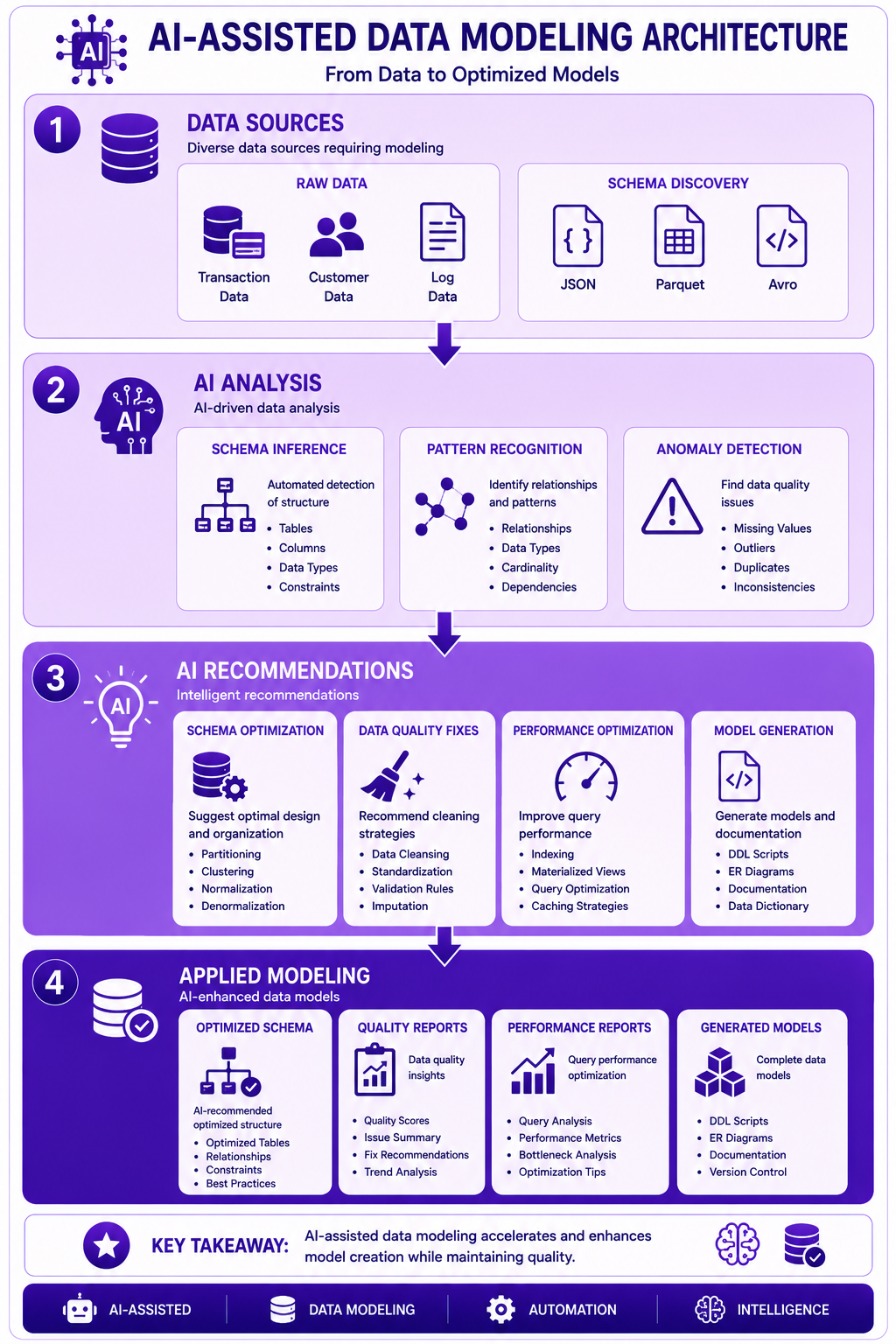
Prompt: Create an AI-assisted data modeling architecture diagram showing the complete flow from data to optimized models. Use a 4-layer structure with purple gradient theme:
Layer 1: Data Sources (Top) - Purple #E1BEE7
- Raw Data: Transaction Data, Customer Data, Log Data
- Schema Discovery: JSON, Parquet, Avro
- Icons for data sources
- Description: "Diverse data sources requiring modeling"
Layer 2: AI Analysis - Purple #CE93D8
- Schema Inference: Automated detection of structure
- Pattern Recognition: Identify relationships, types
- Anomaly Detection: Find data quality issues
- Icons for AI models
- Description: "AI-driven data analysis"
Layer 3: AI Recommendations - Purple #AB47BC
- Schema Optimization: Partitioning, clustering
- Data Quality Fixes: Cleaning strategies
- Performance Optimization: Indexing, MVs
- Model Generation: DDL, documentation
- Icons for recommendations
- Description: "Intelligent recommendations"
Layer 4: Applied Modeling (Bottom) - Purple #7B1FA2
- Optimized Schema: AI-recommended structure
- Quality Reports: Data quality insights
- Performance Reports: Query optimization
- Generated Models: Complete data models
- Icons for outputs
- Description: "AI-enhanced data models"
Use downward arrows between layers. Include key takeaway at bottom: "AI-assisted data modeling accelerates and enhances model creation while maintaining quality." Footer tags: AI-Assisted, Data Modeling, Automation, Intelligence. Enterprise-style clean layout with rounded corners.
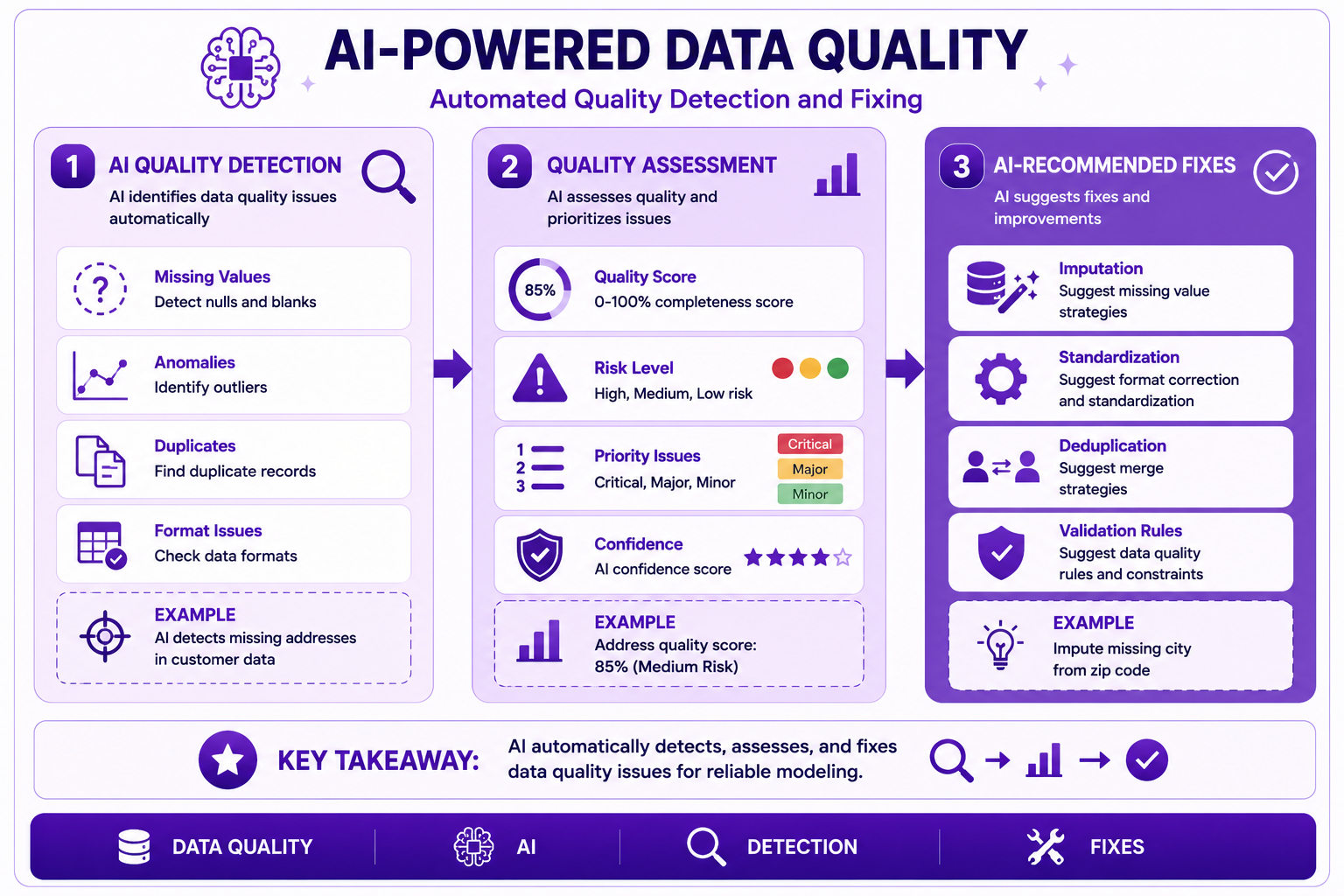
Prompt: Create an AI-powered data quality diagram showing automated quality detection and fixing. Use a 3-section structure with purple gradient theme:
Section 1: Quality Detection (Left) - Purple #E1BEE7
- Title: "AI Quality Detection"
- Icon: 🔍
- Missing Values: "Detect nulls and blanks"
- Anomalies: "Identify outliers"
- Duplicates: "Find duplicate records"
- Format Issues: "Check data formats"
- Example: "AI detects missing addresses in customer data"
Section 2: Quality Assessment - Purple #CE93D8
- Title: "Quality Assessment"
- Icon: 📊
- Quality Score: "0-100% completeness score"
- Risk Level: "High, Medium, Low risk"
- Priority Issues: "Critical, Major, Minor"
- Confidence: "AI confidence score"
- Example: "Address quality score: 85% (Medium Risk)"
Section 3: Quality Fixes (Right) - Purple #AB47BC
- Title: "AI-Recommended Fixes"
- Icon: ✅
- Imputation: "Suggest missing value strategies"
- Standardization: "Suggest format correction"
- Deduplication: "Suggest merge strategies"
- Validation Rules: "Suggest data quality rules"
- Example: "Impute missing city from zip code"
At bottom: Key takeaway: "AI automatically detects, assesses, and fixes data quality issues for reliable modeling." Footer tags: Data Quality, AI, Detection, Fixes. Enterprise-style clean layout with rounded corners.
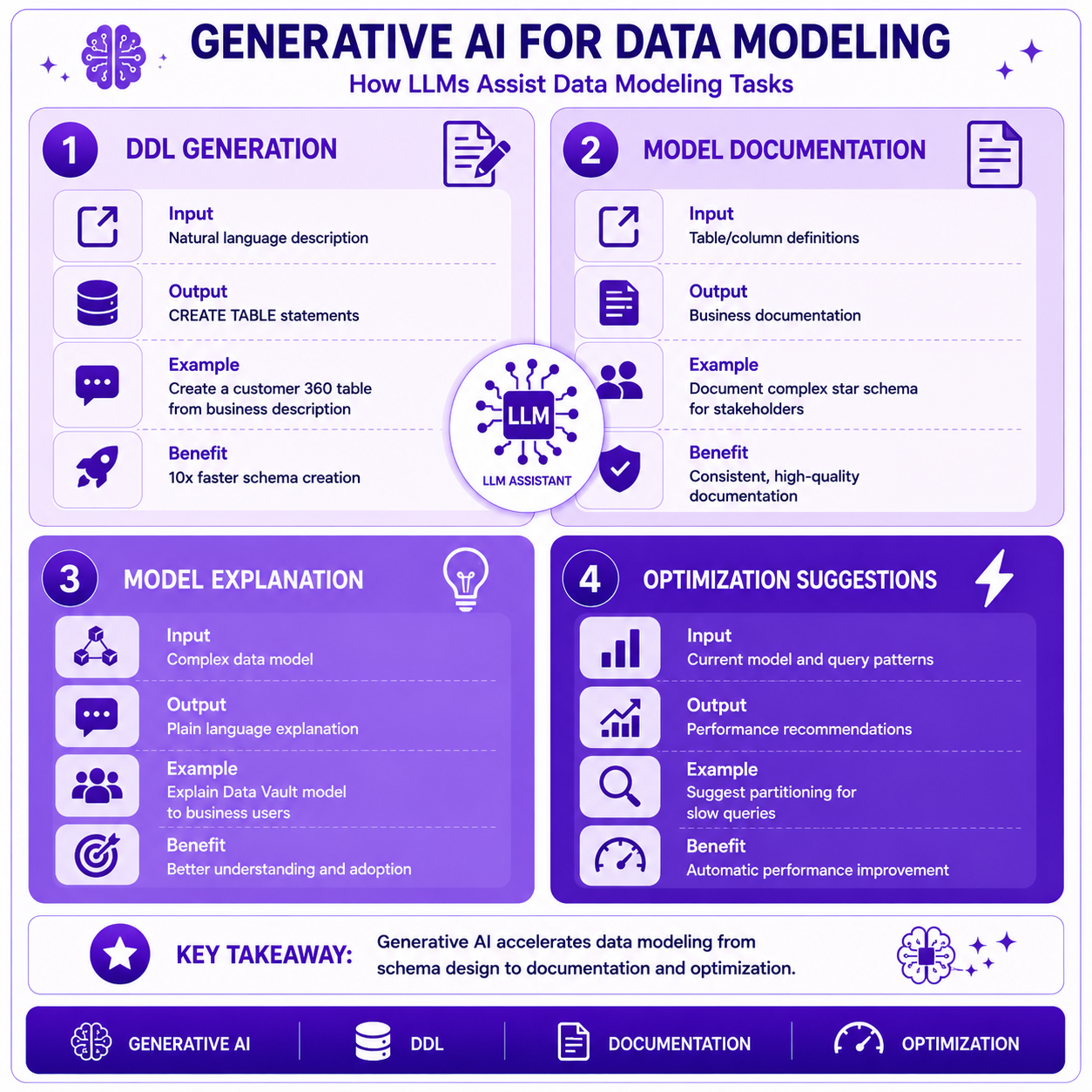
Prompt: Create a generative AI for data modeling diagram showing how LLMs assist modeling tasks. Use a 4-quadrant structure with purple gradient theme:
Quadrant 1: DDL Generation (Top Left) - Purple #E1BEE7
- Title: "DDL Generation"
- Icon: 📝
- Input: "Natural language description"
- Output: "CREATE TABLE statements"
- Example: "Create a customer 360 table from business description"
- Benefit: "10x faster schema creation"
Quadrant 2: Model Documentation (Top Right) - Purple #CE93D8
- Title: "Model Documentation"
- Icon: 📄
- Input: "Table/column definitions"
- Output: "Business documentation"
- Example: "Document complex star schema for stakeholders"
- Benefit: "Consistent, high-quality documentation"
Quadrant 3: Model Explanation (Bottom Left) - Purple #AB47BC
- Title: "Model Explanation"
- Icon: 💡
- Input: "Complex data model"
- Output: "Plain language explanation"
- Example: "Explain Data Vault model to business users"
- Benefit: "Better understanding and adoption"
Quadrant 4: Optimization Suggestions (Bottom Right) - Purple #7B1FA2
- Title: "Optimization Suggestions"
- Icon: ⚡
- Input: "Current model and query patterns"
- Output: "Performance recommendations"
- Example: "Suggest partitioning for slow queries"
- Benefit: "Automatic performance improvement"
At bottom: Key takeaway: "Generative AI accelerates data modeling from schema design to documentation and optimization." Footer tags: Generative AI, DDL, Documentation, Optimization. Enterprise-style clean layout with rounded corners.
Interview Questions
-
What is AI-assisted data modeling?
-
What are the key capabilities of AI-assisted data modeling?
-
How does AI help with schema discovery?
-
How does AI recommend schema optimizations?
-
What is the role of AI in data quality?
-
How can generative AI help with data modeling?
-
What are the best practices for AI-assisted data modeling?
-
How do you validate AI recommendations?
-
What are the risks of AI-assisted data modeling?
-
How does Vertex AI support data modeling?
-
How do you build custom AI models for data modeling?
-
What is the future of AI-assisted data modeling?
Practice Exercises
-
Implement automated schema discovery with BigQuery.
-
Build an AI-powered schema recommendation system.
-
Implement data quality detection with BigQuery ML.
-
Use generative AI for DDL generation.
-
Generate data model documentation with Gemini.
-
Build an intelligent data lineage system.
-
Implement performance optimization recommendations.
-
Create a custom ML model for table classification.
-
Build a relationship discovery model.
-
Implement a complete AI-assisted modeling pipeline.
Key Takeaways
| # | Takeaway |
|---|---|
| 1 | AI-assisted data modeling accelerates model creation |
| 2 | Automated schema discovery reduces manual effort |
| 3 | AI improves data quality detection and fixing |
| 4 | Generative AI accelerates documentation and DDL |
| 5 | AI recommends performance optimizations |
| 6 | Combine multiple AI approaches for best results |
| 7 | Validate AI recommendations with human oversight |
| 8 | Continuous learning improves AI models |
Chapter Summary
In this chapter, you learned:
- ✅ What AI-assisted data modeling is and its benefits
- ✅ Automated schema discovery and recommendation
- ✅ AI-powered data quality detection and fixes
- ✅ Generative AI for DDL and documentation
- ✅ Vertex AI integration for data modeling
- ✅ Banking use cases for AI-assisted modeling
- ✅ Best practices and common mistakes
- ✅ Future directions for AI-assisted data modeling
You now understand how to leverage AI to accelerate, automate, and enhance data modeling tasks.
Next Chapter
👉 Next Chapter: Responsible AI, Governance and Enterprise Capstone