
Chapter 16: Customer 360 Analytics
In the previous chapter, we explored One Big Table (OBT) and learned how denormalized structures can provide maximum query performance and simplicity for specific use cases.
In this chapter, we will bring together all our data modeling knowledge to design a comprehensive Customer 360 Analytics platform—the holy grail of customer-centric organizations.
Using our Digital Banking Platform case study, we will build a complete Customer 360 solution that provides a unified, 360-degree view of each customer across all touchpoints and interactions.
🎯 Learning Objectives
By the end of this chapter, you will be able to:
- Understand Customer 360 and its business value
- Design a comprehensive Customer 360 data model
- Integrate data from multiple banking domains
- Implement customer identity and relationship management
- Build customer segmentation and scoring models
- Enable real-time customer insights
- Apply best practices for Customer 360 implementation
- Design a complete banking Customer 360 solution
What is Customer 360?
Customer 360 is a unified, complete view of a customer across all touchpoints, channels, and interactions with an organization.
Customer 360 = Single Customer View + All Interactions + Complete History + Unified Identity
Think of Customer 360 as:
- A complete customer profile
- All interactions in one place
- Understanding customer behavior
- Personalizing customer experiences
- Building lasting relationships
Real-World Banking Example
A bank wants to understand its customers holistically:
Customer Touchpoints:
- Account opening (Branch)
- ATM transactions
- Online banking
- Mobile app usage
- Customer service calls
- Loan applications
- Credit card usage
- Investment activities

Current State (Siloed):
- Each system has separate customer view
- Inconsistent customer data
- Missing interaction history
- No unified analytics

Customer 360 State (Unified):
- Complete customer profile
- All interactions visible
- Consistent data
- Complete analytics
Customer 360 Components
Core Components
1. Customer Identity
   - Name, Contact, Demographics
   - Unique identifiers
   - Cross-system matching

2. Customer Relationships
   - Account relationships
   - Family connections
   - Business relationships

3. Customer Interactions
   - Transaction history
   - Channel activity
   - Service interactions

4. Customer Profile
   - Segmentation
   - Scoring
   - Preferences

5. Customer Analytics
   - Lifetime value
   - Churn prediction
   - Next best action
Banking Customer 360 Data Model
Core Customer Entity
-- Core Customer Master
CREATE OR REPLACE TABLE banking.customer_master (
  customer_sk STRING PRIMARY KEY,
  customer_id STRING NOT NULL,
  -- Identity
  first_name STRING,
  last_name STRING,
  full_name STRING,
  email STRING,
  phone STRING,
  date_of_birth DATE,
  age INT,
  gender STRING,
  nationality STRING,
  -- Identification
  government_id_hash STRING,  -- PCI compliant
  ssn_hash STRING,           -- PCI compliant
  passport_hash STRING,      -- PCI compliant
  -- Contact
  address_id STRING,
  preferred_contact STRING,
  preferred_language STRING,
  -- Status
  customer_status STRING,    -- Active, Inactive, Closed
  customer_since DATE,
  last_active_date DATE,
  -- Verification
  verification_status STRING,
  verification_date DATE,
  -- SCD Type 2
  valid_from DATE,
  valid_to DATE,
  is_current BOOLEAN,
  change_reason STRING,
  -- Metadata
  created_at TIMESTAMP,
  updated_at TIMESTAMP
)
PARTITION BY valid_from
CLUSTER BY customer_id, customer_status;
Customer Addresses
-- Customer Addresses
CREATE OR REPLACE TABLE banking.customer_addresses (
  address_sk STRING PRIMARY KEY,
  customer_sk STRING NOT NULL,
  street_address STRING,
  city STRING,
  state STRING,
  zip_code STRING,
  country STRING,
  address_type STRING,       -- Home, Work, Mailing
  is_primary BOOLEAN,
  valid_from DATE,
  valid_to DATE,
  is_current BOOLEAN,
  created_at TIMESTAMP,
  updated_at TIMESTAMP
)
PARTITION BY valid_from
CLUSTER BY customer_sk;
Customer Relationships
-- Customer Relationships
CREATE OR REPLACE TABLE banking.customer_relationships (
  relationship_sk STRING PRIMARY KEY,
  customer_sk STRING NOT NULL,
  related_customer_sk STRING NOT NULL,
  relationship_type STRING,  -- Family, Business, Joint, Referral
  relationship_sub_type STRING,
  relationship_strength INT, -- 1-10
  effective_date DATE,
  end_date DATE,
  is_active BOOLEAN,
  description STRING,
  created_at TIMESTAMP,
  updated_at TIMESTAMP
)
CLUSTER BY customer_sk, related_customer_sk;
Customer Profile (SCD Type 2)
-- Customer Profile with Segments
CREATE OR REPLACE TABLE banking.customer_profile (
  profile_sk STRING PRIMARY KEY,
  customer_sk STRING NOT NULL,
  -- Demographics
  income_range STRING,
  occupation STRING,
  education_level STRING,
  marital_status STRING,
  household_size INT,
  -- Segments
  customer_segment STRING,   -- Premium, Gold, Silver, Bronze
  segment_sub_type STRING,
  segment_score INT,
  -- Risk
  risk_profile STRING,       -- Low, Medium, High
  credit_score INT,
  risk_score DECIMAL(5,2),
  -- Value
  customer_lifetime_value DECIMAL(15,2),
  customer_potential_value DECIMAL(15,2),
  profitability_score DECIMAL(5,2),
  -- Behavior
  engagement_score DECIMAL(5,2),
  sentiment_score DECIMAL(5,2),
  churn_risk_score DECIMAL(5,2),
  -- Preferences
  preferred_channel STRING,
  marketing_opt_in BOOLEAN,
  communication_frequency STRING,
  -- SCD Type 2
  valid_from DATE,
  valid_to DATE,
  is_current BOOLEAN,
  created_at TIMESTAMP,
  updated_at TIMESTAMP
)
PARTITION BY valid_from
CLUSTER BY customer_sk, customer_segment;
Customer 360 Fact Tables
Customer Daily Snapshot
-- Customer Daily Snapshot Fact
CREATE OR REPLACE TABLE banking.fact_customer_daily (
  snapshot_sk STRING PRIMARY KEY,
  date_sk STRING NOT NULL,
  customer_sk STRING NOT NULL,
  -- Account aggregates
  total_accounts INT,
  total_balance NUMERIC,
  total_deposits NUMERIC,
  total_loans NUMERIC,
  -- Transaction aggregates (last 30 days)
  transaction_count_30d INT,
  transaction_amount_30d NUMERIC,
  avg_transaction_30d NUMERIC,
  -- Activity metrics
  days_since_last_active INT,
  days_since_last_transaction INT,
  days_since_last_login INT,
  -- Relationship metrics
  total_relationships INT,
  relationship_score DECIMAL(5,2),
  -- Value metrics
  net_worth NUMERIC,
  available_credit NUMERIC,
  used_credit NUMERIC,
  -- Flags
  is_high_value BOOLEAN,
  is_at_risk BOOLEAN,
  is_churn_risk BOOLEAN,
  -- Metadata
  created_at TIMESTAMP
)
PARTITION BY date_sk
CLUSTER BY customer_sk;
Customer Transaction Summary
-- Customer Transaction Summary Fact
CREATE OR REPLACE TABLE banking.fact_customer_transactions (
  summary_sk STRING PRIMARY KEY,
  date_sk STRING NOT NULL,
  customer_sk STRING NOT NULL,
  -- Transaction counts
  total_transactions INT,
  credit_transactions INT,
  debit_transactions INT,
  atm_transactions INT,
  pos_transactions INT,
  online_transactions INT,
  -- Amounts
  total_amount NUMERIC,
  credit_amount NUMERIC,
  debit_amount NUMERIC,
  avg_transaction_amount NUMERIC,
  max_transaction_amount NUMERIC,
  min_transaction_amount NUMERIC,
  -- Merchant categories
  top_merchant_category STRING,
  top_merchant_category_amount NUMERIC,
  -- Channel analysis
  primary_channel STRING,
  channel_distribution STRING,
  -- Metadata
  created_at TIMESTAMP
)
PARTITION BY date_sk
CLUSTER BY customer_sk;
Customer Identity Resolution
Identity Resolution Process
-- Identity Resolution Master
CREATE OR REPLACE TABLE banking.customer_identity_master (
  identity_sk STRING PRIMARY KEY,
  customer_sk STRING NOT NULL,
  -- Identifiers from various systems
  core_banking_id STRING,
  crm_id STRING,
  online_banking_id STRING,
  mobile_app_id STRING,
  loyalty_id STRING,
  ssn_hash STRING,
  email_hash STRING,
  phone_hash STRING,
  -- Matching confidence
  match_confidence_score DECIMAL(5,2),
  match_method STRING,        -- Exact, Fuzzy, Probabilistic
  -- Metadata
  created_at TIMESTAMP,
  updated_at TIMESTAMP
)
CLUSTER BY customer_sk, email_hash, phone_hash;
Identity Resolution Matching
-- Identity Resolution - Find potential duplicates
WITH potential_duplicates AS (
  SELECT
    c1.customer_sk AS customer_1,
    c2.customer_sk AS customer_2,
    -- Scoring criteria
    CASE
      WHEN c1.email = c2.email THEN 0.40
      WHEN c1.phone = c2.phone THEN 0.30
      WHEN c1.first_name = c2.first_name
        AND c1.last_name = c2.last_name
        AND c1.date_of_birth = c2.date_of_birth THEN 0.60
      ELSE 0
    END AS match_score,
    -- Match details
    ARRAY_AGG(DISTINCT
      CASE
        WHEN c1.email = c2.email THEN 'Email Match'
        WHEN c1.phone = c2.phone THEN 'Phone Match'
        WHEN c1.first_name = c2.first_name
          AND c1.last_name = c2.last_name
          AND c1.date_of_birth = c2.date_of_birth THEN 'Name+DOB Match'
      END
    ) AS match_evidence
  FROM banking.customer_master c1
  JOIN banking.customer_master c2
    ON c1.customer_sk < c2.customer_sk
  WHERE c1.is_current = TRUE
    AND c2.is_current = TRUE
    AND (
      c1.email = c2.email
      OR c1.phone = c2.phone
      OR (c1.first_name = c2.first_name
          AND c1.last_name = c2.last_name
          AND c1.date_of_birth = c2.date_of_birth)
    )
  GROUP BY c1.customer_sk, c2.customer_sk
)
SELECT
  customer_1,
  customer_2,
  match_score,
  match_evidence,
  CASE
    WHEN match_score >= 0.60 THEN 'High Confidence - Auto Merge'
    WHEN match_score >= 0.40 THEN 'Medium Confidence - Review Required'
    ELSE 'Low Confidence - Manual Review'
  END AS resolution_action
FROM potential_duplicates
WHERE match_score > 0;
Customer Segmentation
Customer Segment Definition
-- Customer Segmentation Logic
CREATE OR REPLACE TABLE banking.customer_segments
PARTITION BY snapshot_date
CLUSTER BY customer_segment
AS
WITH customer_metrics AS (
  SELECT
    customer_sk,
    -- Financial metrics
    total_balance,
    total_loans,
    total_deposits,
    -- Activity metrics
    transaction_count_30d,
    days_since_last_active,
    -- Engagement metrics
    login_frequency,
    product_count,
    -- Value metrics
    customer_lifetime_value,
    -- Relationship metrics
    total_relationships,
    -- Scoring
    ROW_NUMBER() OVER (ORDER BY total_balance DESC) AS wealth_rank,
    ROW_NUMBER() OVER (ORDER BY transaction_count_30d DESC) AS activity_rank
  FROM banking.fact_customer_daily
  WHERE date_sk = CURRENT_DATE()
    AND customer_sk IN (SELECT customer_sk FROM banking.customer_master WHERE is_current = TRUE)
),
segment_assignment AS (
  SELECT
    customer_sk,
    CASE
      -- Premium Segment: Top 10% by balance AND high activity
      WHEN wealth_rank <= 0.10 AND activity_rank <= 0.30 THEN 'Premium'
      -- Gold Segment: Top 25% by balance OR high activity
      WHEN wealth_rank <= 0.25 OR activity_rank <= 0.20 THEN 'Gold'
      -- Silver Segment: Middle 50%
      WHEN wealth_rank BETWEEN 0.25 AND 0.75 THEN 'Silver'
      -- Bronze Segment: Bottom 25%
      ELSE 'Bronze'
    END AS customer_segment,
    -- Sub-segment based on behavior
    CASE
      WHEN transaction_count_30d > 50 AND avg_transaction_30d > 1000 THEN 'High Frequency - High Value'
      WHEN transaction_count_30d > 50 THEN 'High Frequency - Low Value'
      WHEN avg_transaction_30d > 1000 THEN 'Low Frequency - High Value'
      ELSE 'Low Frequency - Low Value'
    END AS segment_sub_type,
    -- Score
    (wealth_rank + activity_rank) / 2 AS segment_score,
    CURRENT_DATE() AS snapshot_date
  FROM customer_metrics
)
SELECT
  customer_sk,
  customer_segment,
  segment_sub_type,
  segment_score,
  snapshot_date
FROM segment_assignment;
Customer Scoring Models
Customer Lifetime Value (CLV) Calculation
-- Customer Lifetime Value Model
CREATE OR REPLACE TABLE banking.customer_clv
PARTITION BY calculation_date
CLUSTER BY customer_sk
AS
WITH historical_revenue AS (
  SELECT
    customer_sk,
    SUM(transaction_amount) AS total_revenue,
    AVG(transaction_amount) AS avg_revenue,
    COUNT(*) AS transaction_count,
    DATEDIFF(CURRENT_DATE(), MIN(transaction_date)) AS customer_tenure_days
  FROM banking.fact_customer_transactions f
  JOIN banking.dim_date d ON f.date_sk = d.date_sk
  WHERE d.full_date >= DATE_SUB(CURRENT_DATE(), INTERVAL 365 DAY)
  GROUP BY customer_sk
),
clv_calculation AS (
  SELECT
    customer_sk,
    -- Historical value
    total_revenue,
    avg_revenue,
    transaction_count,
    -- Customer lifetime value formula
    (total_revenue / 365) * 365 * 3 AS historical_clv, -- 3-year projection
    -- Future value prediction
    CASE
      WHEN customer_tenure_days > 730 THEN total_revenue * 1.2  -- Loyal customers
      WHEN customer_tenure_days > 365 THEN total_revenue * 1.5  -- Established customers
      ELSE total_revenue * 2.0   -- New customers (growth potential)
    END AS predicted_clv,
    -- CLV tier
    CASE
      WHEN total_revenue > 100000 THEN 'High Value'
      WHEN total_revenue > 50000 THEN 'Medium Value'
      ELSE 'Low Value'
    END AS clv_tier,
    CURRENT_DATE() AS calculation_date
  FROM historical_revenue
)
SELECT * FROM clv_calculation;
Churn Prediction Score
-- Customer Churn Risk Score
CREATE OR REPLACE TABLE banking.customer_churn_score
PARTITION BY calculation_date
CLUSTER BY churn_risk_level
AS
WITH churn_indicators AS (
  SELECT
    customer_sk,
    -- Activity indicators
    days_since_last_transaction,
    days_since_last_login,
    days_since_last_contact,
    -- Product indicators
    product_count,
    product_usage_frequency,
    -- Sentiment indicators
    complaint_count_30d,
    support_ticket_count_30d,
    -- Engagement indicators
    email_open_rate,
    app_usage_frequency,
    -- Transaction indicators
    transaction_count_change_30d,
    balance_change_30d
  FROM banking.fact_customer_daily
  WHERE date_sk = CURRENT_DATE()
),
churn_score AS (
  SELECT
    customer_sk,
    -- Churn risk factors
    CASE
      WHEN days_since_last_transaction > 90 THEN 0.80
      WHEN days_since_last_transaction > 60 THEN 0.50
      WHEN days_since_last_transaction > 30 THEN 0.20
      ELSE 0
    END +
    CASE
      WHEN product_count = 1 THEN 0.20
      WHEN product_count = 2 THEN 0.10
      ELSE 0
    END +
    CASE
      WHEN complaint_count_30d > 0 THEN 0.30
      WHEN support_ticket_count_30d > 2 THEN 0.20
      ELSE 0
    END AS churn_risk_score,
    -- Churn risk level
    CASE
      WHEN days_since_last_transaction > 90 THEN 'High Risk'
      WHEN days_since_last_transaction > 60 THEN 'Medium Risk'
      WHEN days_since_last_transaction > 30 THEN 'Low Risk'
      ELSE 'Low Risk'
    END AS churn_risk_level,
    CURRENT_DATE() AS calculation_date
  FROM churn_indicators
)
SELECT * FROM churn_score;
Customer 360 Analytics Views
Complete Customer 360 View
-- Complete Customer 360 View
CREATE OR REPLACE VIEW banking.v_customer_360 AS
SELECT
  -- Customer Identity
  cm.customer_id,
  cm.first_name,
  cm.last_name,
  cm.full_name,
  cm.email,
  cm.phone,
  cm.date_of_birth,
  cm.age,
  cm.gender,
  cm.nationality,
  cm.customer_status,
  cm.customer_since,
  cm.last_active_date,

  -- Customer Profile
  cp.customer_segment,
  cp.segment_sub_type,
  cp.segment_score,
  cp.risk_profile,
  cp.credit_score,
  cp.risk_score,
  cp.customer_lifetime_value,
  cp.customer_potential_value,
  cp.profitability_score,
  cp.engagement_score,
  cp.sentiment_score,
  cp.churn_risk_score,
  cp.preferred_channel,
  cp.marketing_opt_in,

  -- Address
  ca.street_address,
  ca.city,
  ca.state,
  ca.zip_code,
  ca.country,

  -- Daily Metrics
  fd.total_accounts,
  fd.total_balance,
  fd.total_deposits,
  fd.total_loans,
  fd.transaction_count_30d,
  fd.transaction_amount_30d,
  fd.avg_transaction_30d,
  fd.days_since_last_active,
  fd.days_since_last_transaction,
  fd.days_since_last_login,
  fd.net_worth,
  fd.available_credit,
  fd.used_credit,
  fd.is_high_value,
  fd.is_at_risk,
  fd.is_churn_risk,

  -- CLV and Churn
  clv.total_revenue,
  clv.historical_clv,
  clv.predicted_clv,
  clv.clv_tier,
  cs.churn_risk_score,
  cs.churn_risk_level,

  -- Relationships
  COUNT(DISTINCT cr.related_customer_sk) AS relationship_count,
  AVG(cr.relationship_strength) AS avg_relationship_strength,

  -- Segment
  s.customer_segment AS latest_segment,
  s.segment_sub_type AS latest_segment_sub_type,
  s.snapshot_date AS segment_snapshot_date,

  -- Metadata
  cm.created_at,
  cm.updated_at,
  CURRENT_TIMESTAMP() AS view_refresh_timestamp

FROM banking.customer_master cm
LEFT JOIN banking.customer_profile cp ON cm.customer_sk = cp.customer_sk AND cp.is_current = TRUE
LEFT JOIN banking.customer_addresses ca ON cm.customer_sk = ca.customer_sk AND ca.is_primary = TRUE AND ca.is_current = TRUE
LEFT JOIN banking.fact_customer_daily fd ON cm.customer_sk = fd.customer_sk AND fd.date_sk = CURRENT_DATE()
LEFT JOIN banking.customer_clv clv ON cm.customer_sk = clv.customer_sk
LEFT JOIN banking.customer_churn_score cs ON cm.customer_sk = cs.customer_sk
LEFT JOIN banking.customer_relationships cr ON cm.customer_sk = cr.customer_sk AND cr.is_active = TRUE
LEFT JOIN banking.customer_segments s ON cm.customer_sk = s.customer_sk AND s.snapshot_date = CURRENT_DATE()
WHERE cm.is_current = TRUE
GROUP BY 1,2,3,4,5,6,7,8,9,10,11,12,13,14,15,16,17,18,19,20,21,22,23,24,25,26,27,28,29,30,31,32,33,34,35,36,37,38,39,40,41,42,43,44,45,46,47,48,49,50,51,52,53,54,55,56,57,58,59,60,61,62,63,64,65,66,67,68,69,70;
Customer 360 Best Practices
| # | Best Practice | Banking Example |
|---|---|---|
| 1 | Start with a single source of truth | Customer Master |
| 2 | Implement identity resolution | Cross-system matching |
| 3 | Track customer relationships | Family, business connections |
| 4 | Use SCD Type 2 for history | Profile changes |
| 5 | Calculate key metrics daily | CLV, churn risk |
| 6 | Implement consistent segmentation | Segment definitions |
| 7 | Enable real-time insights | Customer 360 view |
| 8 | Ensure data privacy compliance | PII protection |
| 9 | Document business definitions | Segment criteria |
| 10 | Monitor data quality | Regular validation |
Common Mistakes
| # | Common Mistake | Better Approach |
|---|---|---|
| 1 | Siloed customer data | Unified customer master |
| 2 | No identity resolution | Implement matching |
| 3 | Inconsistent segmentation | Document segment definitions |
| 4 | Outdated metrics | Calculate daily |
| 5 | No relationship tracking | Track customer connections |
| 6 | Ignoring data quality | Implement quality checks |
| 7 | No privacy controls | Implement data protection |
| 8 | Complex, hard-to-use views | Simplify for users |
| 9 | No business glossary | Document all terms |
| 10 | Not updating regularly | Implement refresh strategy |
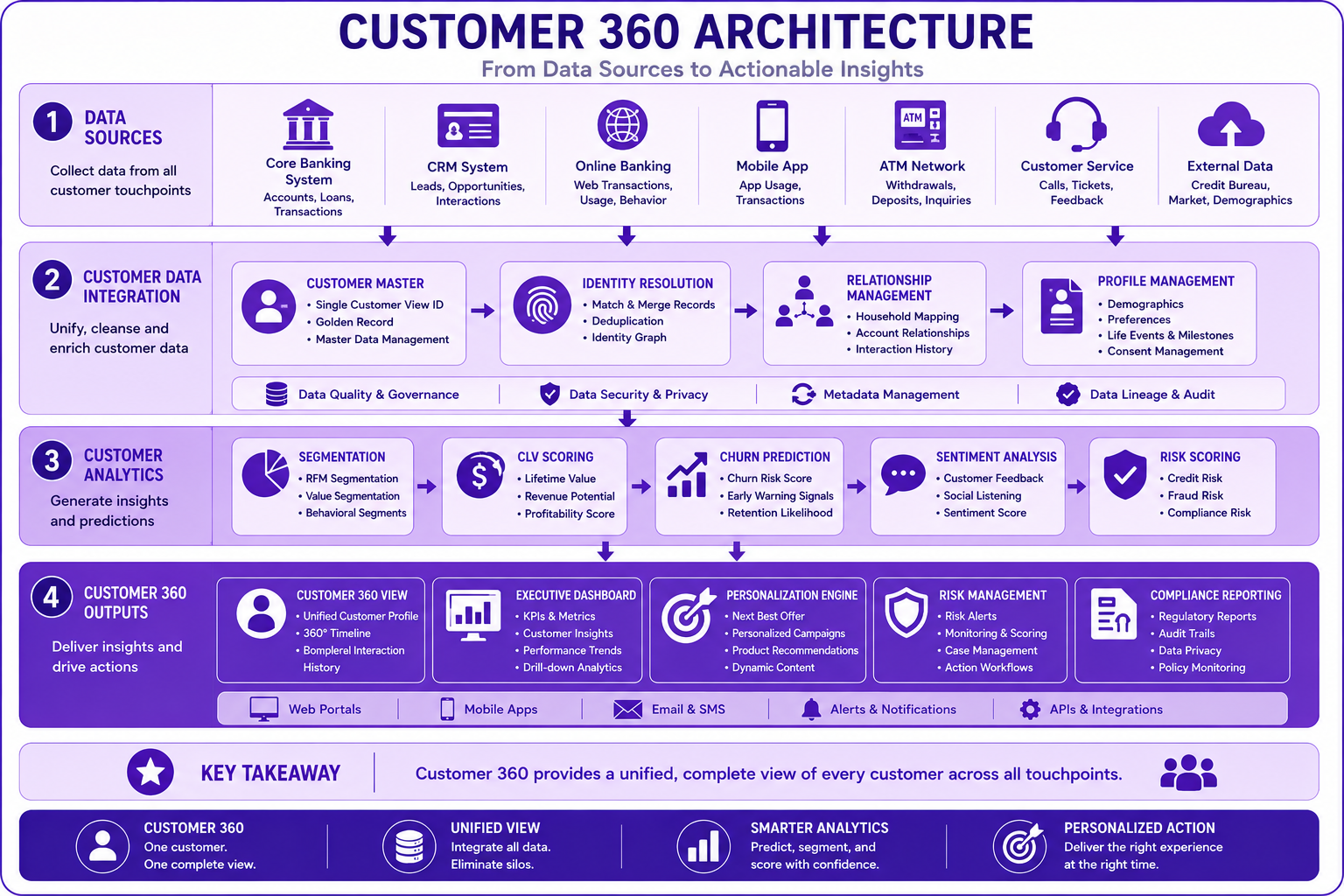
Prompt: Create a comprehensive Customer 360 architecture diagram showing the complete data flow from sources to insights. Use a 4-layer structure with purple gradient theme:
Layer 1: Data Sources (Top) - Purple #E1BEE7
- Core Banking System, CRM System, Online Banking, Mobile App, ATM Network, Customer Service, External Data
- Icons for each source system
Layer 2: Customer Data Integration - Purple #CE93D8
- Customer Master, Identity Resolution, Relationship Management, Profile Management
- Flow arrows showing data integration
Layer 3: Customer Analytics - Purple #AB47BC
- Segmentation, CLV Scoring, Churn Prediction, Sentiment Analysis, Risk Scoring
- Analytics icons and flow
Layer 4: Customer 360 Outputs (Bottom) - Purple #7B1FA2
- Customer 360 View, Executive Dashboard, Personalization Engine, Risk Management, Compliance Reporting
- Output/delivery icons
Use downward arrows between layers. Include key takeaway at bottom: "Customer 360 provides a unified, complete view of every customer across all touchpoints." Footer tags: Customer 360, Unified View, Analytics, Personalization. Enterprise-style clean layout with rounded corners.
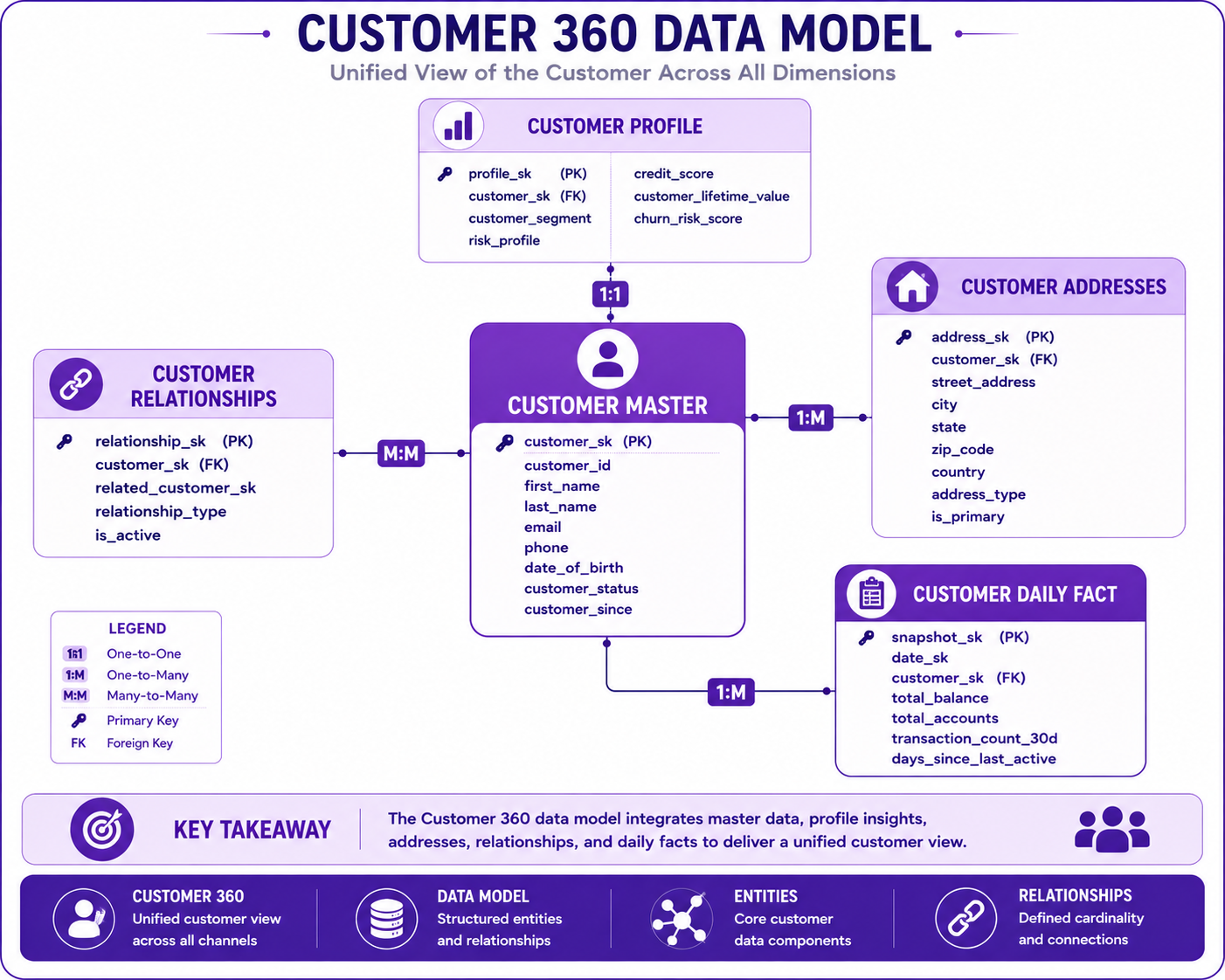
Prompt: Create a Customer 360 data model diagram showing the core entities and their relationships. Use a 5-table structure with purple gradient theme:
Center: Customer Master - Purple #AB47BC
- Fields: customer_sk (PK), customer_id, first_name, last_name, email, phone, date_of_birth, customer_status, customer_since
- Icon: 👤
Surrounding Tables:
Top: Customer Profile - Purple #E1BEE7
- Fields: profile_sk (PK), customer_sk (FK), customer_segment, risk_profile, credit_score, customer_lifetime_value, churn_risk_score
- Icon: 📊
- Relationship: 1:1 to Customer
Right: Customer Addresses - Purple #CE93D8
- Fields: address_sk (PK), customer_sk (FK), street_address, city, state, zip_code, country, address_type, is_primary
- Icon: 🏠
- Relationship: 1:M to Customer
Bottom Left: Customer Relationships - Purple #CE93D8
- Fields: relationship_sk (PK), customer_sk (FK), related_customer_sk, relationship_type, is_active
- Icon: 🔗
- Relationship: M:M to Customer
Bottom Right: Customer Daily Fact - Purple #AB47BC
- Fields: snapshot_sk (PK), date_sk, customer_sk (FK), total_balance, total_accounts, transaction_count_30d, days_since_last_active
- Icon: 📋
- Relationship: 1:M to Customer (daily snapshots)
Use relationship lines with cardinality indicators. Include key takeaway at bottom. Footer tags: Customer 360, Data Model, Entities, Relationships. Enterprise-style clean layout with rounded corners.
Interview Questions
-
What is Customer 360 and why is it important?
-
What are the key components of Customer 360?
-
How do you implement identity resolution?
-
How do you track customer relationships?
-
What metrics are important for Customer 360?
-
How do you calculate customer lifetime value?
-
How do you predict customer churn?
-
What is the role of segmentation in Customer 360?
-
How do you ensure data quality in Customer 360?
-
How do you handle data privacy in Customer 360?
-
What is the difference between Customer 360 and Customer Data Platform (CDP)?
-
How do you implement Customer 360 on Google Cloud?
Practice Exercises
-
Design a customer master table with SCD Type 2.
-
Implement identity resolution for customer matching.
-
Create customer segmentation logic.
-
Build a customer lifetime value model.
-
Implement churn prediction scoring.
-
Create a complete Customer 360 view.
-
Design customer relationship tracking.
-
Implement daily customer snapshots.
-
Build an executive dashboard using Customer 360 data.
-
Implement data quality checks for Customer 360.
Key Takeaways
| # | Takeaway |
|---|---|
| 1 | Customer 360 provides a unified customer view |
| 2 | Identity resolution is critical for matching |
| 3 | Track all customer interactions and relationships |
| 4 | Use SCD Type 2 for historical tracking |
| 5 | Calculate metrics daily for freshness |
| 6 | Implement customer segmentation |
| 7 | Predict CLV and churn risk |
| 8 | Ensure data privacy and compliance |
Chapter Summary
In this chapter, you learned:
- ✅ What Customer 360 is and its business value
- ✅ Core components of Customer 360
- ✅ Customer identity resolution
- ✅ Customer relationship tracking
- ✅ Segmentation and scoring models
- ✅ Customer lifetime value calculation
- ✅ Churn prediction
- ✅ Complete Customer 360 view
- ✅ Best practices and common mistakes
- ✅ Banking Customer 360 implementation
You now understand how to design and implement a comprehensive Customer 360 analytics platform on Google Cloud.
Next Chapter
👉 Next Chapter: Introduction to Data Vault