
Chapter 19: Semi-Structured Data Modeling
In the previous chapter, we explored Hub, Link, and Satellite modeling in depth, learning how to build complete Data Vault structures for enterprise data warehousing.
In this chapter, we will dive into Semi-Structured Data Modeling—understanding how to model JSON, XML, and nested data structures in modern data platforms, and how to integrate semi-structured data with traditional relational models.
Using our Digital Banking Platform case study, we will design models that handle the growing volume of semi-structured data from APIs, mobile apps, IoT devices, and external data sources.
🎯 Learning Objectives
By the end of this chapter, you will be able to:
- Understand semi-structured data and its characteristics
- Differentiate between structured, semi-structured, and unstructured data
- Model JSON and XML data effectively
- Handle nested and hierarchical data structures
- Implement semi-structured data in BigQuery
- Design schemas for evolving data
- Apply best practices for semi-structured data modeling
- Build banking use cases for semi-structured data
What is Semi-Structured Data?
Semi-structured data is data that does not conform to a rigid schema but contains tags, markers, or other organizational elements to separate semantic elements and enforce hierarchies.
Semi-Structured Data = Flexible Schema + Self-Describing + Hierarchical + Evolving
Think of semi-structured data as:
- Data with some structure but not as rigid as relational
- Contains self-describing information
- Can evolve and change over time
- Common in APIs, web data, and modern applications
Real-World Banking Example
A bank receives customer data from multiple modern sources:
Semi-Structured Data Sources:
- Mobile App Logs (JSON events)
- API Responses from Fintech Partners
- Customer Chat Interactions
- Social Media Feeds
- IoT Data from ATMs
- Third-Party Credit Bureau Data

Characteristics:
- Inconsistent formats
- Nested structures
- Evolving schemas
- Missing fields
- Array values
Structured vs Semi-Structured vs Unstructured
| Aspect | Structured | Semi-Structured | Unstructured |
|---|---|---|---|
| Schema | Fixed, predefined | Flexible, self-describing | None |
| Organization | Tables, rows, columns | Hierarchical, nested | No formal structure |
| Examples | Relational databases | JSON, XML, Parquet | Text, images, video |
| Querying | SQL | JSONPath, SQL (with functions) | Search, NLP |
| Evolution | Schema changes costly | Schema evolution natural | No schema |
| Banking Example | Customer master table | Transaction JSON from mobile app | Customer service call transcripts |
JSON Data Modeling
JSON Structure Basics
{
  "customer_id": "C001",
  "first_name": "John",
  "last_name": "Doe",
  "email": "john.doe@email.com",
  "address": {
    "street": "123 Main St",
    "city": "New York",
    "state": "NY",
    "zip_code": "10001"
  },
  "accounts": [
    {
      "account_id": "A001",
      "type": "SAVINGS",
      "balance": 15000.00
    },
    {
      "account_id": "A002",
      "type": "CHECKING",
      "balance": 5000.00
    }
  ],
  "preferences": {
    "language": "en",
    "notifications": true,
    "marketing_opt_in": false
  }
}
JSON Modeling Approaches
1. Native JSON Storage
   - Store entire JSON document
   - Query with JSON functions
   - Flexible schema
   - Good for document-centric data

2. Normalized JSON
   - Extract nested structures
   - Separate tables for arrays
   - More complex but queryable

3. Hybrid Approach
   - Store core data in relational
   - Keep flexible data as JSON
   - Best of both worlds
BigQuery JSON Modeling
-- Native JSON Storage
CREATE OR REPLACE TABLE banking.customer_json (
  customer_id STRING,
  customer_data JSON,
  ingested_at TIMESTAMP DEFAULT CURRENT_TIMESTAMP()
)
PARTITION BY DATE(ingested_at)
CLUSTER BY customer_id;

-- Insert JSON Data
INSERT INTO banking.customer_json (
  customer_id,
  customer_data
)
VALUES (
  'C001',
  JSON '{"first_name":"John","last_name":"Doe","email":"john.doe@email.com","address":{"street":"123 Main St","city":"New York","state":"NY","zip_code":"10001"}}'
);

-- Query JSON Data
SELECT
  customer_id,
  JSON_EXTRACT_SCALAR(customer_data, '$.first_name') AS first_name,
  JSON_EXTRACT_SCALAR(customer_data, '$.last_name') AS last_name,
  JSON_EXTRACT_SCALAR(customer_data, '$.address.city') AS city,
  JSON_EXTRACT(customer_data, '$.accounts') AS accounts
FROM banking.customer_json
WHERE customer_id = 'C001';
XML Data Modeling
XML Structure Basics
<Customer customer_id="C001">
  <PersonalInfo>
    <FirstName>John</FirstName>
    <LastName>Doe</LastName>
    <Email>john.doe@email.com</Email>
  </PersonalInfo>
  <Address>
    <Street>123 Main St</Street>
    <City>New York</City>
    <State>NY</State>
    <ZipCode>10001</ZipCode>
  </Address>
  <Accounts>
    <Account type="SAVINGS">
      <AccountId>A001</AccountId>
      <Balance>15000.00</Balance>
    </Account>
    <Account type="CHECKING">
      <AccountId>A002</AccountId>
      <Balance>5000.00</Balance>
    </Account>
  </Accounts>
</Customer>
BigQuery XML Handling
-- BigQuery supports XML via external functions
-- Using SQL Server or other databases for XML processing

-- Alternative: Convert XML to JSON first
CREATE OR REPLACE TABLE banking.customer_xml_json AS
SELECT
  customer_id,
  JSON_EXTRACT(xml_to_json, '$.Customer') AS customer_data
FROM banking.customer_xml_raw;
Nested and Repeated Data
Handling Nested Structures
-- Nested fields using STRUCT
CREATE OR REPLACE TABLE banking.transactions (
  transaction_id STRING NOT NULL,
  customer_id STRING NOT NULL,
  transaction_date DATE,
  transaction_amount NUMERIC,
  -- Nested STRUCT for location
  location STRUCT<
    latitude FLOAT64,
    longitude FLOAT64,
    country STRING,
    city STRING
  >,
  -- Nested STRUCT for merchant
  merchant STRUCT<
    merchant_id STRING,
    merchant_name STRING,
    category STRING
  >,
  -- Repeated STRUCT for line items
  line_items ARRAY<STRUCT<
    item_id STRING,
    description STRING,
    quantity INT64,
    unit_price NUMERIC,
    total_price NUMERIC
  >>
)
PARTITION BY transaction_date
CLUSTER BY customer_id;

-- Querying nested fields
SELECT
  transaction_id,
  location.city,
  merchant.merchant_name,
  ARRAY_LENGTH(line_items) AS item_count
FROM banking.transactions
WHERE location.country = 'USA';

-- Unnesting repeated fields
SELECT
  transaction_id,
  item.item_id,
  item.description,
  item.quantity,
  item.unit_price
FROM banking.transactions,
UNNEST(line_items) AS item;
Schema Evolution
Handling Schema Evolution
Challenge: Semi-structured data schemas change frequently
Solution: Flexible schema design and versioning

Approaches:
1. Schema-on-Read
   - Store raw data as-is
   - Apply schema at query time
   - Most flexible

2. Schema Versioning
   - Track schema versions
   - Support multiple versions
   - Gradual migration

3. Schema Registry
   - Central schema management
   - Version control
   - Compatibility checking
BigQuery Schema Evolution
-- Flexible schema with optional columns
CREATE OR REPLACE TABLE banking.customer_events (
  event_id STRING NOT NULL,
  customer_id STRING NOT NULL,
  event_type STRING NOT NULL,
  event_timestamp TIMESTAMP,
  event_data JSON,  -- Flexible JSON for varying fields
  schema_version INT,
  created_at TIMESTAMP DEFAULT CURRENT_TIMESTAMP()
)
PARTITION BY DATE(event_timestamp)
CLUSTER BY customer_id, event_type;

-- Query with schema flexibility
SELECT
  event_id,
  customer_id,
  event_type,
  event_timestamp,
  JSON_EXTRACT_SCALAR(event_data, '$.page_url') AS page_url,
  JSON_EXTRACT_SCALAR(event_data, '$.device_type') AS device_type,
  JSON_EXTRACT_SCALAR(event_data, '$.session_id') AS session_id
FROM banking.customer_events
WHERE event_type = 'PAGE_VIEW'
  AND event_timestamp >= '2024-01-01'
  AND JSON_EXTRACT_SCALAR(event_data, '$.device_type') = 'MOBILE';
Semi-Structured Data Use Cases
Use Case 1: Customer Event Tracking
-- Event tracking for customer journey
CREATE OR REPLACE TABLE banking.customer_journey (
  journey_id STRING NOT NULL,
  customer_id STRING NOT NULL,
  session_id STRING,
  events ARRAY<STRUCT<
    event_id STRING,
    event_type STRING,
    event_timestamp TIMESTAMP,
    event_data JSON,
    page_url STRING,
    referrer STRING
  >>,
  started_at TIMESTAMP,
  ended_at TIMESTAMP,
  duration_seconds INT,
  device_type STRING,
  channel STRING
)
PARTITION BY DATE(started_at)
CLUSTER BY customer_id;
Use Case 2: API Response Logging
-- Logging API responses for analysis
CREATE OR REPLACE TABLE banking.api_logs (
  api_log_id STRING NOT NULL,
  api_endpoint STRING NOT NULL,
  request_timestamp TIMESTAMP,
  response_timestamp TIMESTAMP,
  response_time_ms INT,
  status_code INT,
  request_data JSON,
  response_data JSON,  -- Store full API response
  error_data JSON,
  customer_id STRING,
  correlation_id STRING
)
PARTITION BY DATE(request_timestamp)
CLUSTER BY api_endpoint, customer_id;

-- Query API response patterns
SELECT
  api_endpoint,
  COUNT(*) AS request_count,
  AVG(response_time_ms) AS avg_response_time,
  COUNTIF(status_code >= 400) AS error_count,
  AVG(ARRAY_LENGTH(JSON_EXTRACT_ARRAY(response_data, '$.items'))) AS avg_items_returned
FROM banking.api_logs
WHERE request_timestamp >= '2024-01-01'
GROUP BY api_endpoint
HAVING request_count > 100
ORDER BY avg_response_time DESC;
Use Case 3: Multi-Channel Customer Profile
-- Unified customer profile with semi-structured data
CREATE OR REPLACE TABLE banking.unified_customer_profile (
  customer_id STRING NOT NULL,
  core_data STRUCT<
    first_name STRING,
    last_name STRING,
    email STRING,
    phone STRING,
    date_of_birth DATE
  >,
  preferences JSON,  -- Flexible preferences
  devices ARRAY<STRUCT<
    device_id STRING,
    device_type STRING,
    os STRING,
    app_version STRING,
    last_active TIMESTAMP
  >>,
  marketing_consent JSON,
  personalized_attributes JSON,
  updated_at TIMESTAMP DEFAULT CURRENT_TIMESTAMP()
)
CLUSTER BY customer_id;

-- Query with JSON functions
SELECT
  customer_id,
  core_data.first_name,
  core_data.last_name,
  JSON_EXTRACT_SCALAR(preferences, '$.language') AS language,
  JSON_EXTRACT_SCALAR(preferences, '$.notification_interval') AS notification_interval,
  ARRAY_LENGTH(devices) AS device_count
FROM banking.unified_customer_profile
WHERE core_data.email IS NOT NULL;
Semi-Structured Data Best Practices
| # | Best Practice | Banking Example |
|---|---|---|
| 1 | Store raw JSON/XML for audit | Customer event logging |
| 2 | Use STRUCT for nested data | Location, merchant in transactions |
| 3 | Use ARRAY for repeated fields | Line items, accounts list |
| 4 | Version schemas for evolution | API response versions |
| 5 | Use JSON functions for flexible queries | Event analysis |
| 6 | Partition by date for performance | Event logs, API logs |
| 7 | Cluster by key columns | customer_id, event_type |
| 8 | Validate JSON/XML quality | Schema validation |
| 9 | Document JSON structure | API documentation |
| 10 | Monitor schema changes | Evolution tracking |
Common Mistakes
| # | Common Mistake | Better Approach |
|---|---|---|
| 1 | Storing JSON as STRING without validation | Use JSON data type |
| 2 | No schema documentation | Document JSON structure |
| 3 | Not handling missing fields | Use COALESCE or defaults |
| 4 | Deeply nested queries without optimization | Flatten for performance |
| 5 | No partitioning for semi-structured data | Partition by date |
| 6 | Ignoring schema evolution | Plan for evolution |
| 7 | No data quality checks | Validate JSON/XML |
| 8 | Over-normalizing JSON | Keep appropriate structure |
| 9 | No indexing/clustering | Cluster by key columns |
| 10 | Not using ARRAY for repeated data | Use ARRAY data type |
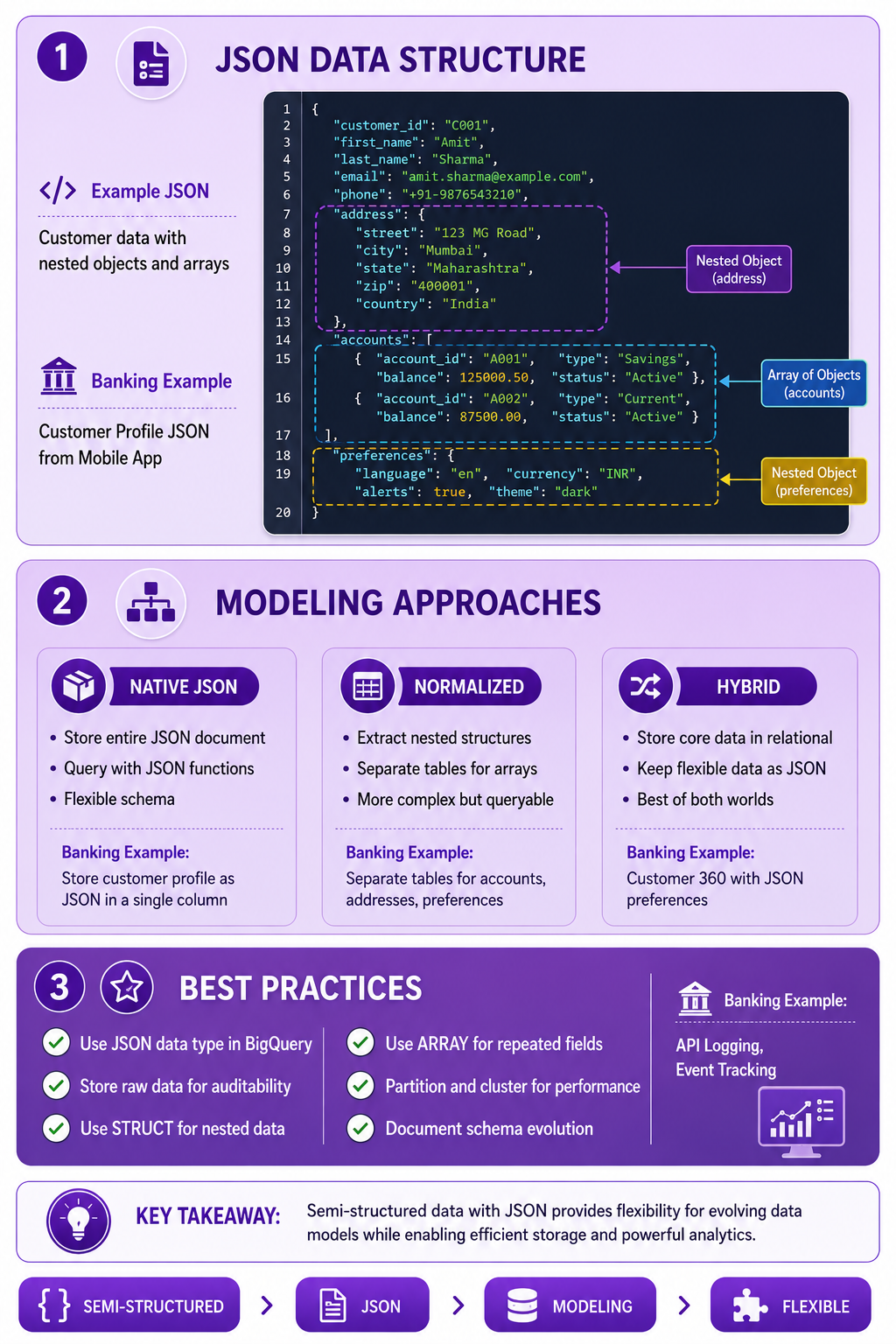
Prompt: Create a semi-structured data modeling diagram showing JSON structure and modeling approaches. Use a 3-section structure with purple gradient theme:
Section 1: JSON Structure (Top) - Purple #E1BEE7
- Title: "JSON Data Structure"
- Icon: 📄
- Example JSON: customer with nested address, accounts array, preferences
- Visual: JSON document with nested structure highlighted
- Banking Example: "Customer Profile JSON from Mobile App"
Section 2: Modeling Approaches - Purple #CE93D8
- Title: "Modeling Approaches"
- Native JSON: "Store entire JSON document, Query with JSON functions, Flexible schema"
- Normalized: "Extract nested structures, Separate tables for arrays, More complex but queryable"
- Hybrid: "Store core data in relational, Keep flexible data as JSON, Best of both worlds"
- Icons: 📦, 📊, 🔀
- Banking Example: "Customer 360 with JSON preferences"
Section 3: Best Practices - Purple #AB47BC
- Title: "Best Practices"
- ✅ "Use JSON data type in BigQuery"
- ✅ "Store raw data for auditability"
- ✅ "Use STRUCT for nested data"
- ✅ "Use ARRAY for repeated fields"
- ✅ "Partition and cluster for performance"
- ✅ "Document schema evolution"
- Banking Example: "API Logging, Event Tracking"
At bottom: Key takeaway: "Semi-structured data modeling provides flexibility while maintaining query performance and data quality." Footer tags: Semi-Structured, JSON, Modeling, Flexible. Enterprise-style clean layout with rounded corners.
Interview Questions
-
What is semi-structured data?
-
How does semi-structured data differ from structured and unstructured data?
-
What are the characteristics of semi-structured data?
-
How do you model JSON data in BigQuery?
-
What is the difference between STRUCT and ARRAY in BigQuery?
-
How do you handle schema evolution in semi-structured data?
-
What are the advantages of storing data as JSON vs normalizing?
-
How do you query nested data in BigQuery?
-
What is schema-on-read vs schema-on-write?
-
When should you use semi-structured data modeling?
-
How do you validate JSON data quality?
-
What are the best practices for semi-structured data modeling?
Practice Exercises
-
Design a JSON schema for banking transactions.
-
Store JSON data in BigQuery native JSON format.
-
Query nested JSON data using JSON functions.
-
Create a STRUCT for customer address data.
-
Use ARRAY for repeated transaction line items.
-
Implement schema evolution for API responses.
-
Design a semi-structured customer profile.
-
Handle missing fields in JSON data.
-
Partition and cluster semi-structured data tables.
-
Build a view that flattens nested JSON data.
Key Takeaways
| # | Takeaway |
|---|---|
| 1 | Semi-structured data is flexible and self-describing |
| 2 | JSON is the most common semi-structured format |
| 3 | BigQuery supports native JSON data type |
| 4 | STRUCT models nested objects |
| 5 | ARRAY models repeated fields |
| 6 | Schema evolution is natural with semi-structured data |
| 7 | Partition and cluster for performance |
| 8 | Balance flexibility with query performance |
Chapter Summary
In this chapter, you learned:
- ✅ What semi-structured data is and its characteristics
- ✅ Differences between structured, semi-structured, and unstructured data
- ✅ JSON and XML data modeling
- ✅ Nested and repeated data handling
- ✅ Schema evolution strategies
- ✅ Banking use cases for semi-structured data
- ✅ Best practices and common mistakes
- ✅ BigQuery implementation patterns
You now understand how to model semi-structured data effectively in modern data platforms.
Next Chapter
👉 Next Chapter: Streaming and Event Modeling