
Chapter 14: Snowflake Schema
In the previous chapter, we explored star schema design and learned how to create intuitive, high-performance dimensional models for business intelligence and analytics.
In this chapter, we will dive into Snowflake Schema—understanding its structure, advantages and disadvantages, when to use it, and how to implement it in BigQuery.
Using our Digital Banking Platform case study, we will design snowflake schemas that balance normalization with analytical performance.
🎯 Learning Objectives
By the end of this chapter, you will be able to:
- Understand snowflake schema and its components
- Differentiate between star and snowflake schemas
- Identify when to use snowflake vs star schemas
- Design snowflake schemas with normalized dimensions
- Implement snowflake schemas in BigQuery
- Optimize snowflake schema queries
- Apply best practices for snowflake schema design
- Design banking snowflake schemas
What is a Snowflake Schema?
A snowflake schema is a normalized version of a star schema where dimension tables are further broken down into sub-dimension tables, creating a snowflake-like structure.
Snowflake Schema = Central Fact Table + Normalized Dimensions
Think of a snowflake schema as:
- A star schema with more detailed dimension structures
- Dimension tables are split into multiple related tables
- Resembles a snowflake pattern when visualized
- Reduces data redundancy
- May improve storage efficiency
Real-World Banking Example
A bank needs to analyze customer data with complex hierarchies:
Star Schema Approach:
- Customer dimension with 50+ attributes
- Denormalized, all attributes in one table
- Simple queries but potential redundancy

Snowflake Schema Approach:
- Customer dimension normalized
- Separate tables: Customer, Address, Segment, Demographics
- Less redundancy, more flexible
- More complex queries but better maintainability
Snowflake Schema Components
Fact Table (Center)
Purpose: Same as star schema - contains measures
Characteristics:
- Same as star schema fact table
- Foreign keys to normalized dimension tables
- No changes from star schema
Normalized Dimension Tables
Purpose: Provide context with reduced redundancy
Characteristics:
- Normalized into multiple tables
- Reduced data redundancy
- More complex query patterns
- Improved data maintenance
- Better storage efficiency
Snowflake vs Star Schema
| Aspect | Star Schema | Snowflake Schema |
|---|---|---|
| Dimension Normalization | Denormalized | Normalized |
| Query Performance | Faster (fewer joins) | Slower (more joins) |
| Storage | More (redundant) | Less (normalized) |
| Query Complexity | Simple | Complex |
| Usability | Easier for business users | Harder for business users |
| Maintenance | More complex | Easier |
| Data Redundancy | High | Low |
| Flexibility | Less | More |
| Best Use Case | BI, Reporting | Data Warehousing, Data Vault |
Snowflake Schema Example
Traditional Banking Star Schema (Denormalized)
-- Star Schema - Denormalized Customer Dimension
CREATE OR REPLACE TABLE banking.dim_customer_star (
  customer_sk STRING PRIMARY KEY,
  customer_id STRING NOT NULL,
  first_name STRING,
  last_name STRING,
  email STRING,
  phone STRING,
  date_of_birth DATE,
  street_address STRING,
  city STRING,
  state STRING,
  zip_code STRING,
  country STRING,
  customer_segment STRING,
  risk_profile STRING,
  income_range STRING,
  valid_from DATE,
  valid_to DATE,
  is_current BOOLEAN
);
Banking Snowflake Schema (Normalized)
-- Snowflake Schema - Normalized Dimensions

-- Fact Table (Same as Star)
CREATE OR REPLACE TABLE banking.fact_transactions (
  transaction_sk STRING PRIMARY KEY,
  date_sk STRING NOT NULL,
  customer_sk STRING NOT NULL,
  account_sk STRING NOT NULL,
  branch_sk STRING,
  merchant_sk STRING,
  product_sk STRING,
  transaction_amount NUMERIC,
  fee_amount NUMERIC,
  transaction_count INT DEFAULT 1
)
PARTITION BY date_sk
CLUSTER BY customer_sk, account_sk;

-- Customer Dimension (Normalized)
CREATE OR REPLACE TABLE banking.dim_customer_snowflake (
  customer_sk STRING PRIMARY KEY,
  customer_id STRING NOT NULL,
  first_name STRING,
  last_name STRING,
  full_name STRING,
  email STRING,
  phone STRING,
  date_of_birth DATE,
  address_sk STRING,        -- Foreign key to address
  segment_sk STRING,        -- Foreign key to segment
  demographic_sk STRING,    -- Foreign key to demographics
  valid_from DATE,
  valid_to DATE,
  is_current BOOLEAN
);

-- Address Sub-Dimension
CREATE OR REPLACE TABLE banking.dim_address (
  address_sk STRING PRIMARY KEY,
  street_address STRING,
  city STRING,
  state STRING,
  zip_code STRING,
  country STRING,
  address_type STRING,
  is_primary BOOLEAN
);

-- Segment Sub-Dimension
CREATE OR REPLACE TABLE banking.dim_segment (
  segment_sk STRING PRIMARY KEY,
  segment_name STRING,
  segment_description STRING,
  risk_profile STRING,
  priority_level INT
);

-- Demographics Sub-Dimension
CREATE OR REPLACE TABLE banking.dim_demographics (
  demographic_sk STRING PRIMARY KEY,
  age_range STRING,
  income_range STRING,
  education_level STRING,
  occupation STRING,
  marital_status STRING
);
Snowflake Schema Queries
Simple Query with Multiple Joins
-- Querying snowflake schema requires multiple joins
SELECT
  f.transaction_amount,
  f.fee_amount,
  d.year,
  d.month_name,
  c.first_name,
  c.last_name,
  a.street_address,
  a.city,
  a.state,
  s.segment_name,
  s.risk_profile
FROM banking.fact_transactions f
JOIN banking.dim_date d ON f.date_sk = d.date_sk
JOIN banking.dim_customer_snowflake c ON f.customer_sk = c.customer_sk
JOIN banking.dim_address a ON c.address_sk = a.address_sk
JOIN banking.dim_segment s ON c.segment_sk = s.segment_sk
WHERE d.year = 2024
  AND c.is_current = TRUE
LIMIT 100;
Analytical Query with Snowflake
-- Transaction analysis by segment and location
SELECT
  s.segment_name,
  a.state,
  SUM(f.transaction_amount) AS total_amount,
  COUNT(*) AS transaction_count,
  AVG(f.transaction_amount) AS avg_amount
FROM banking.fact_transactions f
JOIN banking.dim_customer_snowflake c ON f.customer_sk = c.customer_sk
JOIN banking.dim_address a ON c.address_sk = a.address_sk
JOIN banking.dim_segment s ON c.segment_sk = s.segment_sk
WHERE c.is_current = TRUE
  AND f.date_sk >= '2024-01-01'
GROUP BY s.segment_name, a.state
ORDER BY total_amount DESC;
Snowflake Schema Design
Normalization Levels
| Level | Description | Banking Example |
|---|---|---|
| 1NF | Atomic values | Customer table with atomic attributes |
| 2NF | Full dependency | Separate address from customer |
| 3NF | No transitive dependencies | Separate segment from customer |
| BCNF | Determinants are keys | Advanced normalization |
When to Normalize
Normalize When:
- Data redundancy is a concern
- Storage costs are significant
- Data maintenance is frequent
- Hierarchies are deep and complex
- Multiple dimension hierarchies exist
- Data needs to be shared across systems
When Not to Normalize
Avoid Normalization When:
- Query performance is critical
- Business users need simple access
- Data is read-mostly
- OLAP/BI workloads dominate
- Simple star schema is sufficient
- Development time is constrained
Snowflake Schema Implementation
Building Snowflake from Star
-- Step 1: Identify normalization opportunities
-- Customer dimension has address and segment attributes

-- Step 2: Create sub-dimension tables
-- Address table
CREATE OR REPLACE TABLE banking.dim_address (
  address_sk STRING PRIMARY KEY,
  street_address STRING,
  city STRING,
  state STRING,
  zip_code STRING,
  country STRING,
  address_type STRING,
  is_primary BOOLEAN,
  created_at TIMESTAMP
);

-- Segment table
CREATE OR REPLACE TABLE banking.dim_segment (
  segment_sk STRING PRIMARY KEY,
  segment_name STRING,
  segment_description STRING,
  risk_profile STRING,
  created_at TIMESTAMP
);

-- Step 3: Create normalized customer dimension
CREATE OR REPLACE TABLE banking.dim_customer_snowflake (
  customer_sk STRING PRIMARY KEY,
  customer_id STRING NOT NULL,
  first_name STRING,
  last_name STRING,
  full_name STRING,
  email STRING,
  phone STRING,
  date_of_birth DATE,
  address_sk STRING,        -- References dim_address
  segment_sk STRING,        -- References dim_segment
  valid_from DATE,
  valid_to DATE,
  is_current BOOLEAN,
  created_at TIMESTAMP,
  updated_at TIMESTAMP
);

-- Step 4: Maintain referential integrity
-- Quality check for orphaned foreign keys
SELECT
  c.customer_sk,
  c.address_sk,
  c.segment_sk
FROM banking.dim_customer_snowflake c
LEFT JOIN banking.dim_address a ON c.address_sk = a.address_sk
LEFT JOIN banking.dim_segment s ON c.segment_sk = s.segment_sk
WHERE c.is_current = TRUE
  AND (a.address_sk IS NULL OR s.segment_sk IS NULL);
Performance Optimization
-- View for denormalized access (best of both worlds)
CREATE OR REPLACE VIEW banking.v_customer_full AS
SELECT
  c.customer_sk,
  c.customer_id,
  c.first_name,
  c.last_name,
  c.full_name,
  c.email,
  c.phone,
  c.date_of_birth,
  a.street_address,
  a.city,
  a.state,
  a.zip_code,
  a.country,
  s.segment_name,
  s.segment_description,
  s.risk_profile,
  c.valid_from,
  c.valid_to,
  c.is_current
FROM banking.dim_customer_snowflake c
LEFT JOIN banking.dim_address a ON c.address_sk = a.address_sk
LEFT JOIN banking.dim_segment s ON c.segment_sk = s.segment_sk;

-- Use materialized view for performance
CREATE MATERIALIZED VIEW banking.mv_customer_current AS
SELECT *
FROM banking.v_customer_full
WHERE is_current = TRUE;
Snowflake Schema vs Star Schema Decision Matrix
| Criteria | Star Schema | Snowflake Schema |
|---|---|---|
| Query Performance | ⭐⭐⭐⭐⭐ | ⭐⭐⭐ |
| Storage Efficiency | ⭐⭐ | ⭐⭐⭐⭐⭐ |
| Data Maintainability | ⭐⭐⭐ | ⭐⭐⭐⭐⭐ |
| Business User Friendliness | ⭐⭐⭐⭐⭐ | ⭐⭐ |
| Development Complexity | ⭐⭐⭐ | ⭐⭐ |
| Flexibility | ⭐⭐⭐ | ⭐⭐⭐⭐⭐ |
| BI Tool Integration | ⭐⭐⭐⭐⭐ | ⭐⭐⭐ |
| Data Governance | ⭐⭐⭐ | ⭐⭐⭐⭐⭐ |
Banking Snowflake Schema Use Cases
Use Case 1: Complex Customer 360
-- Snowflake schema for comprehensive customer view
CREATE OR REPLACE TABLE banking.dim_customer_snowflake (
  customer_sk STRING PRIMARY KEY,
  customer_id STRING NOT NULL,
  basic_info_sk STRING,     -- Name, DOB, contact
  address_sk STRING,        -- Address details
  segment_sk STRING,        -- Segment info
  financial_sk STRING,      -- Financial details
  employment_sk STRING,     -- Employment info
  relationship_sk STRING,   -- Relationships
  valid_from DATE,
  valid_to DATE,
  is_current BOOLEAN
);

-- Each sub-dimension handles specific aspect
CREATE OR REPLACE TABLE banking.dim_basic_info (
  basic_info_sk STRING PRIMARY KEY,
  first_name STRING,
  last_name STRING,
  email STRING,
  phone STRING,
  date_of_birth DATE
);

CREATE OR REPLACE TABLE banking.dim_financial (
  financial_sk STRING PRIMARY KEY,
  income_range STRING,
  credit_score INT,
  risk_tolerance STRING,
  investment_experience STRING
);
Use Case 2: Multi-Hierarchy Analysis
-- Location hierarchy with multiple levels
CREATE OR REPLACE TABLE banking.dim_country (
  country_sk STRING PRIMARY KEY,
  country_code STRING,
  country_name STRING,
  region STRING
);

CREATE OR REPLACE TABLE banking.dim_state (
  state_sk STRING PRIMARY KEY,
  country_sk STRING,
  state_code STRING,
  state_name STRING,
  timezone STRING
);

CREATE OR REPLACE TABLE banking.dim_city (
  city_sk STRING PRIMARY KEY,
  state_sk STRING,
  city_name STRING,
  population INT,
  is_metro BOOLEAN
);

CREATE OR REPLACE TABLE banking.dim_branch_snowflake (
  branch_sk STRING PRIMARY KEY,
  branch_id STRING,
  branch_name STRING,
  city_sk STRING,
  branch_type STRING,
  manager_name STRING
);
Snowflake Schema Best Practices
| # | Best Practice | Banking Example |
|---|---|---|
| 1 | Normalize only when needed | Segment sub-dimension |
| 2 | Use views for denormalized access | Customer full view |
| 3 | Implement materialized views | Current customer view |
| 4 | Maintain referential integrity | Foreign key checks |
| 5 | Document relationships | ER diagrams |
| 6 | Consider query patterns | Optimize for common queries |
| 7 | Balance normalization and performance | Hybrid approach |
| 8 | Use surrogate keys consistently | All tables use SK |
| 9 | Implement proper indexing | Clustering strategy |
| 10 | Monitor performance | Query optimization |
Common Mistakes
| # | Common Mistake | Better Approach |
|---|---|---|
| 1 | Over-normalization | Balance with performance |
| 2 | Complex queries without optimization | Use views and materialized views |
| 3 | No referential integrity | Implement foreign key checks |
| 4 | Missing documentation | Document all relationships |
| 5 | Poor query performance | Optimize with clustering |
| 6 | No denormalized views | Provide views for business users |
| 7 | Ignoring BI tool limitations | Consider tool capabilities |
| 8 | Not testing queries | Test and optimize |
| 9 | Inconsistent naming | Consistent naming conventions |
| 10 | No performance monitoring | Monitor and tune |
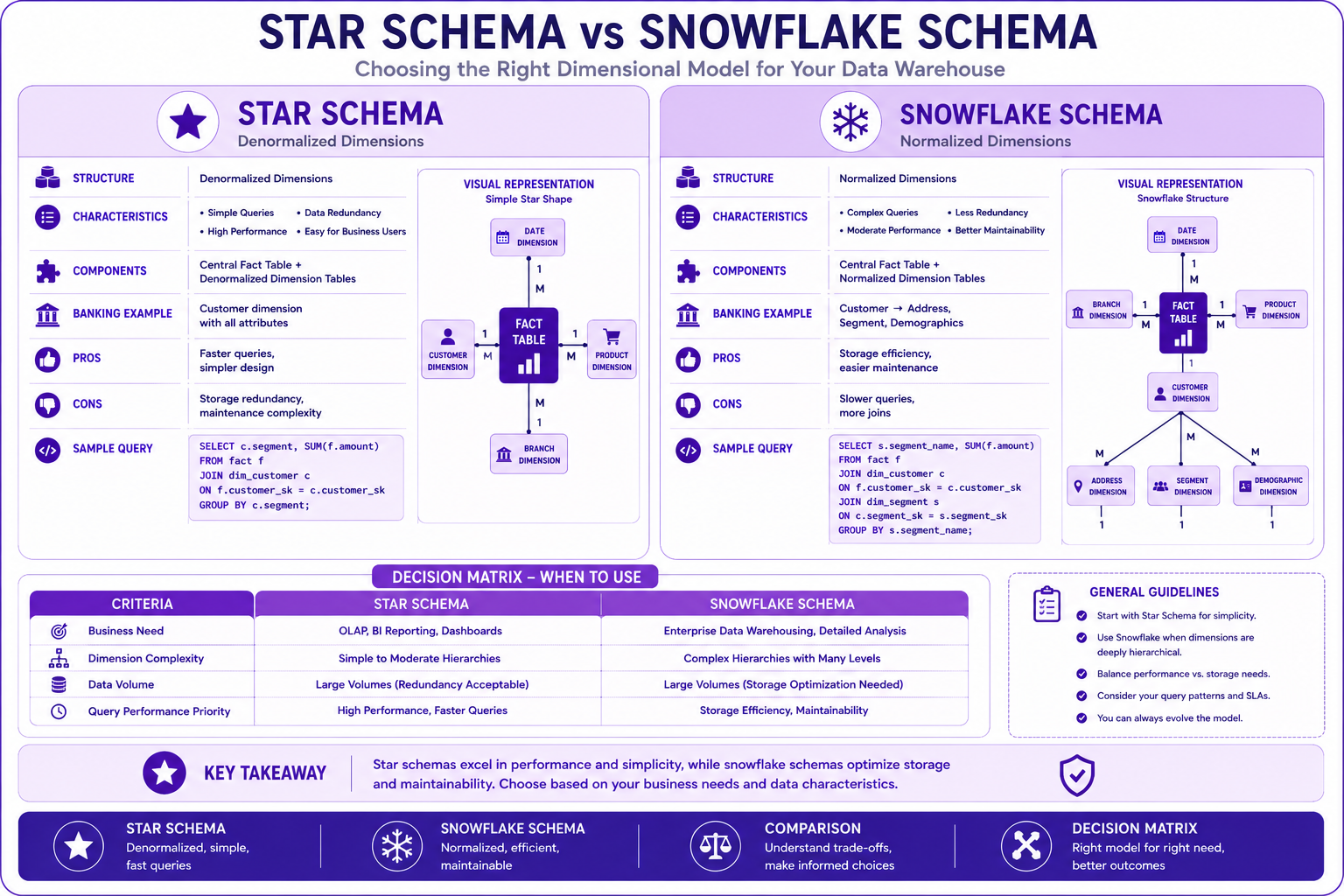
Prompt: Create a comprehensive comparison diagram showing Snowflake Schema vs Star Schema. Use a 2-column structure with purple gradient theme:
Left Column: Star Schema - Purple #E1BEE7
- Title: "Star Schema"
- Icon: ⭐
- Structure: "Denormalized Dimensions"
- Characteristics: "Simple Queries", "High Performance", "Data Redundancy", "Easy for Business Users"
- Components: "Central Fact Table + Denormalized Dimension Tables"
- Banking Example: "Customer dimension with all attributes"
- Pros: "Faster queries, simpler design"
- Cons: "Storage redundancy, maintenance complexity"
- Query: "SELECT c.segment, SUM(f.amount) FROM fact f JOIN dim_customer c ON f.customer_sk = c.customer_sk GROUP BY c.segment"
- Visual: Simple star with 4 dimensions
Right Column: Snowflake Schema - Purple #CE93D8
- Title: "Snowflake Schema"
- Icon: ❄️
- Structure: "Normalized Dimensions"
- Characteristics: "Complex Queries", "Moderate Performance", "Less Redundancy", "Better Maintainability"
- Components: "Central Fact Table + Normalized Dimension Tables"
- Banking Example: "Customer → Address, Segment, Demographics"
- Pros: "Storage efficiency, easier maintenance"
- Cons: "Slower queries, more joins"
- Query: "SELECT s.segment_name, SUM(f.amount) FROM fact f JOIN dim_customer c ON f.customer_sk = c.customer_sk JOIN dim_segment s ON c.segment_sk = s.segment_sk GROUP BY s.segment_name"
- Visual: Snowflake with 6+ tables
Bottom Section: Decision Matrix - Purple #AB47BC
- Title: "When to Use"
- Star Schema: "OLAP, BI Reporting, Simple Hierarchies"
- Snowflake Schema: "Data Warehousing, Complex Hierarchies, Storage Optimization"
At bottom: Key takeaway: "Choose between star and snowflake schemas based on performance, storage, and maintainability requirements." Footer tags: Star Schema, Snowflake Schema, Comparison, Decision Matrix. Enterprise-style clean layout with rounded corners.
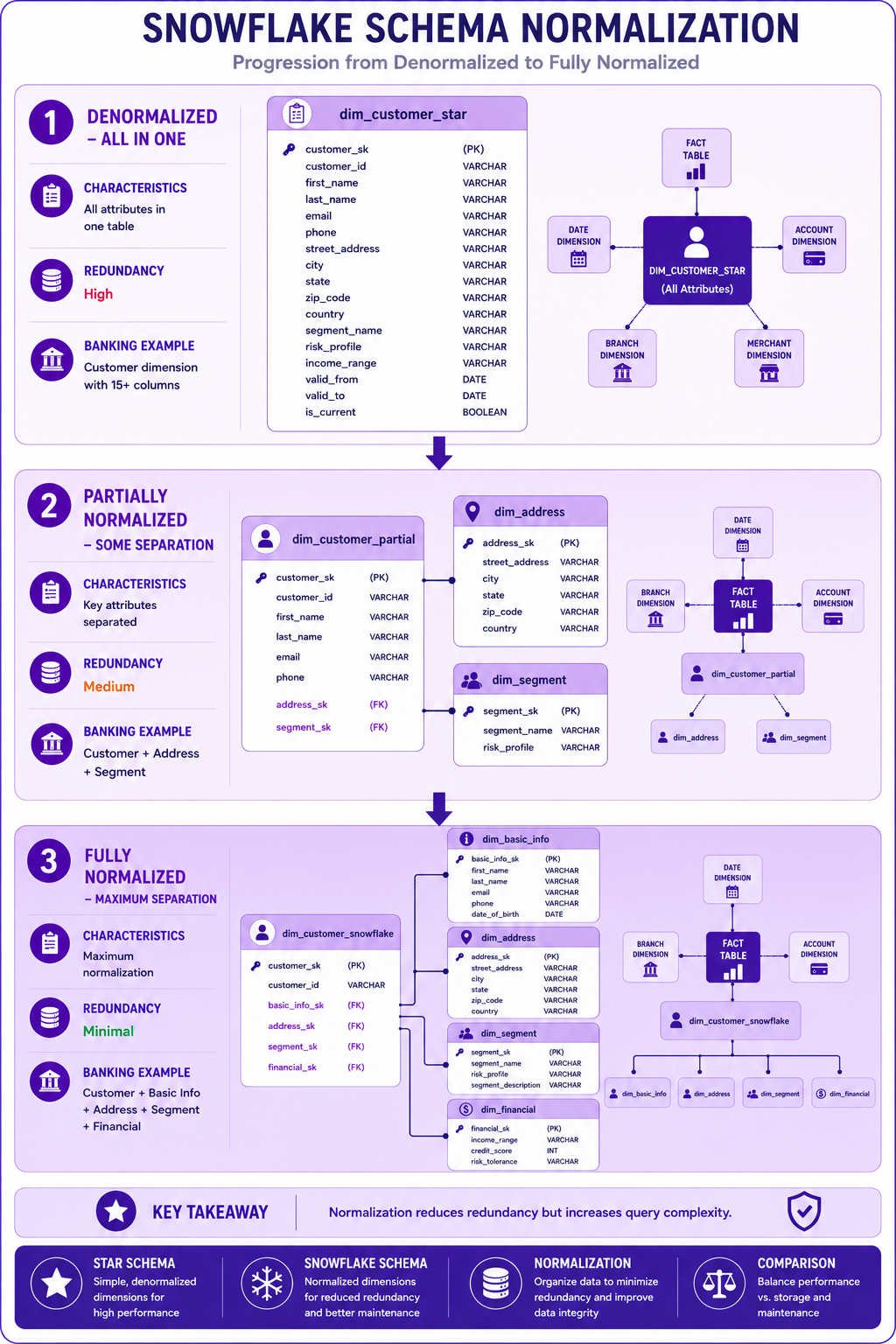
Prompt: Create a snowflake schema normalization diagram showing the progression from denormalized to normalized. Use a 3-layer vertical structure with purple gradient theme:
Layer 1: Denormalized (Top) - Purple #E1BEE7
- Title: "Denormalized - All in One"
- Table: "dim_customer_star"
- Fields: customer_sk, customer_id, first_name, last_name, email, phone, street_address, city, state, zip_code, country, segment_name, risk_profile, income_range, valid_from, valid_to, is_current
- Icon: 📋
- Characteristics: "All attributes in one table"
- Redundancy: "High"
- Banking Example: "Customer dimension with 15+ columns"
Layer 2: Partially Normalized (Middle) - Purple #CE93D8
- Title: "Partially Normalized - Some Separation"
- Table: "dim_customer_partial" with fields: customer_sk, customer_id, first_name, last_name, email, phone, address_sk (FK), segment_sk (FK)
- Table: "dim_address" with fields: address_sk, street_address, city, state, zip_code, country
- Table: "dim_segment" with fields: segment_sk, segment_name, risk_profile
- Icon: 🔄
- Characteristics: "Key attributes separated"
- Redundancy: "Medium"
- Banking Example: "Customer + Address + Segment"
Layer 3: Fully Normalized (Bottom) - Purple #AB47BC
- Title: "Fully Normalized - Maximum Separation"
- Table: "dim_customer_snowflake" with fields: customer_sk, customer_id, basic_info_sk (FK), address_sk (FK), segment_sk (FK), financial_sk (FK)
- Table: "dim_basic_info" with fields: basic_info_sk, first_name, last_name, email, phone, date_of_birth
- Table: "dim_address" with fields: address_sk, street_address, city, state, zip_code, country
- Table: "dim_segment" with fields: segment_sk, segment_name, risk_profile, segment_description
- Table: "dim_financial" with fields: financial_sk, income_range, credit_score, risk_tolerance
- Icon: 📊
- Characteristics: "Maximum normalization"
- Redundancy: "Minimal"
- Banking Example: "Customer + Basic Info + Address + Segment + Financial"
Use arrows showing progression from denormalized to fully normalized. At bottom: Key takeaway: "Normalization reduces redundancy but increases query complexity." Footer tags: Normalization, Denormalized, Snowflake Schema, Star Schema. Enterprise-style clean layout with rounded corners.
Interview Questions
-
What is a snowflake schema?
-
How does a snowflake schema differ from a star schema?
-
When would you use a snowflake schema?
-
What are the advantages of snowflake schemas?
-
What are the disadvantages of snowflake schemas?
-
How do you normalize dimensions in a snowflake schema?
-
What is the impact on query performance?
-
How do you optimize snowflake schema queries?
-
When should you avoid snowflake schemas?
-
How do you implement snowflake schemas in BigQuery?
-
What is the role of views in snowflake schemas?
-
How do you balance normalization and performance?
Practice Exercises
-
Design a snowflake schema for banking customers.
-
Normalize a customer dimension into sub-dimensions.
-
Create views for denormalized access.
-
Implement materialized views for performance.
-
Write queries across normalized dimensions.
-
Compare star vs snowflake query performance.
-
Implement referential integrity checks.
-
Design a snowflake schema for branch hierarchy.
-
Create a hybrid star-snowflake schema.
-
Optimize snowflake schema queries.
Key Takeaways
| # | Takeaway |
|---|---|
| 1 | Snowflake schemas normalize dimension tables |
| 2 | Star schemas are simpler and faster |
| 3 | Snowflake reduces redundancy but adds complexity |
| 4 | Choose based on performance vs maintainability |
| 5 | Views can provide denormalized access |
| 6 | Materialized views improve performance |
| 7 | Use snowflake for complex hierarchies |
| 8 | Balance normalization with business needs |
Chapter Summary
In this chapter, you learned:
- ✅ What snowflake schema is and its components
- ✅ Differences between star and snowflake schemas
- ✅ When to use snowflake vs star schemas
- ✅ How to normalize dimensions
- ✅ Snowflake schema implementation in BigQuery
- ✅ Query patterns and optimization
- ✅ Banking snowflake schema examples
- ✅ Best practices and common mistakes
You now understand how to design and implement snowflake schemas and when to choose them over star schemas.
Next Chapter
👉 Next Chapter: One Big Table (OBT)