
Chapter 10: Keys, Relationships and Entity Lifecycle
In the previous chapter, we explored modern normalization techniques and learned how to balance data integrity with performance in data models.
In this chapter, we will dive into Keys, Relationships, and Entity Lifecycle—understanding how to identify entities, define relationships, manage keys, and track data evolution over time.
Using our Digital Banking Platform case study, we will design comprehensive entity models with proper keys, relationships, and lifecycle management.
🎯 Learning Objectives
By the end of this chapter, you will be able to:
- Understand different types of keys (Primary, Foreign, Surrogate, Natural, Composite)
- Design relationships between entities (One-to-One, One-to-Many, Many-to-Many)
- Implement key strategies in BigQuery
- Understand entity lifecycle management
- Track data changes over time
- Implement effective dating and versioning
- Apply best practices for keys and relationships
- Design banking entity models
What are Keys in Data Modeling?
Keys are attributes or combinations of attributes that uniquely identify entities and define relationships between them.
Keys = Identity + Relationships + Integrity
Think of keys as:
- Social Security Number (Unique Identity)
- Passport Number (Global Identity)
- Family Relationships (Foreign Keys)
- Marriage Certificate (Composite Key)
Types of Keys
Primary Key (PK)
Definition: Uniquely identifies each row in a table
Characteristics:
- Unique value
- Not null
- Single column or composite
- Stable over time

Banking Example:
- customer_id in Customers table
- account_id in Accounts table
- transaction_id in Transactions table
Foreign Key (FK)
Definition: Links to primary key in another table
Characteristics:
- References a primary key
- Enforces referential integrity
- Defines relationships
- Can be null (optional relationship)

Banking Example:
- customer_id in Accounts table (references Customers)
- account_id in Transactions table (references Accounts)
Surrogate Key
Definition: System-generated unique identifier
Characteristics:
- No business meaning
- Auto-generated (sequence, UUID, GUID)
- Never changes
- Hidden from users

Banking Example:
- transaction_id as UUID
- account_id as auto-increment
- customer_id as GUID

Benefits:
- Independent of business data
- Never changes
- Efficient for joins
- Consistent across systems
Natural Key
Definition: Business-meaningful identifier
Characteristics:
- Exists in business domain
- Has business meaning
- May change over time
- Used by business users

Banking Example:
- Social Security Number
- Account Number
- Customer Loyalty ID

Risks:
- May change over time
- May not be unique
- May have formatting issues
Composite Key
Definition: Multiple columns combined to form a key
Characteristics:
- Two or more columns
- Together provide uniqueness
- Used for relationship tables

Banking Example:
- (customer_id, account_id) in Customer_Account table
- (transaction_id, product_id) in Transaction_Detail table
Candidate Key
Definition: Any column or set of columns that could be a primary key
Characteristics:
- Unique values
- Not null
- Minimal set

Banking Example:
- customer_id
- email (if unique)
- phone (if unique)
Key Types Comparison
| Key Type | Uniqueness | Nullable | Business Meaning | Stable | Use Case |
|---|---|---|---|---|---|
| Primary Key | ✅ | ❌ | Varies | Should be | Table identity |
| Surrogate Key | ✅ | ❌ | ❌ | ✅ | System identity |
| Natural Key | Should be | Should be | ✅ | Varies | Business identity |
| Composite Key | ✅ | ❌ | Varies | Varies | Complex identity |
| Foreign Key | No | Varies | ✅ | Varies | Relationships |
Relationships Between Entities
One-to-One (1:1)
Definition: One entity related to exactly one other entity
Characteristics:
- Each row in Table A matches at most one row in Table B
- Each row in Table B matches at most one row in Table A

Banking Example:
- Customer → Customer_Profile (one-to-one)
- Account → Account_Details (one-to-one)
-- One-to-One Implementation
CREATE TABLE customers (
  customer_id STRING PRIMARY KEY,
  first_name STRING,
  last_name STRING
);

CREATE TABLE customer_profiles (
  profile_id STRING PRIMARY KEY,
  customer_id STRING UNIQUE REFERENCES customers(customer_id),
  credit_score INT,
  risk_profile STRING,
  income_range STRING
);
One-to-Many (1:M)
Definition: One entity related to multiple entities
Characteristics:
- Each row in Table A matches many rows in Table B
- Each row in Table B matches at most one row in Table A

Banking Example:
- Customer → Accounts (one customer, many accounts)
- Account → Transactions (one account, many transactions)
- Branch → Customers (one branch, many customers)
-- One-to-Many Implementation
CREATE TABLE customers (
  customer_id STRING PRIMARY KEY,
  first_name STRING,
  last_name STRING
);

CREATE TABLE accounts (
  account_id STRING PRIMARY KEY,
  customer_id STRING REFERENCES customers(customer_id),
  account_type STRING,
  balance NUMERIC
);
Many-to-Many (M:M)
Definition: Multiple entities related to multiple entities
Characteristics:
- Each row in Table A matches many rows in Table B
- Each row in Table B matches many rows in Table A
- Requires junction/link table

Banking Example:
- Customers → Products (customers can have multiple products)
- Customers → Branches (customers can use multiple branches)
- Accounts → Services (accounts can have multiple services)
-- Many-to-Many Implementation
CREATE TABLE customers (
  customer_id STRING PRIMARY KEY,
  first_name STRING,
  last_name STRING
);

CREATE TABLE products (
  product_id STRING PRIMARY KEY,
  product_name STRING,
  product_type STRING
);

-- Junction table for many-to-many relationship
CREATE TABLE customer_products (
  customer_id STRING REFERENCES customers(customer_id),
  product_id STRING REFERENCES products(product_id),
  enrollment_date DATE,
  status STRING,
  PRIMARY KEY (customer_id, product_id)
);
Relationship Cardinality
Understanding Cardinality
Cardinality defines how many instances of one entity relate to another.

1. One-to-One (1:1)
   Customer → Customer_Profile

2. One-to-Many (1:M)
   Customer → Accounts

3. Many-to-One (M:1)
   Accounts → Customer (reverse of 1:M)

4. Many-to-Many (M:M)
   Customers → Products (through Customer_Products)
Cardinality Notation
| Notation | Meaning | Banking Example |
|---|---|---|
| 1:1 | One-to-One | Customer → Customer_Profile |
| 1:M | One-to-Many | Customer → Accounts |
| M:1 | Many-to-One | Accounts → Customer |
| M:M | Many-to-Many | Customers → Products |
Entity Lifecycle
What is Entity Lifecycle?
Entity Lifecycle tracks changes to an entity over time.

Lifecycle Stages:
1. Creation - Entity is created
2. Active - Entity is in use
3. Modified - Entity is updated
4. Inactive - Entity is no longer active
5. Archived - Entity is archived
6. Deleted - Entity is removed
Banking Entity Lifecycle Examples
Customer Lifecycle:
1. Registration (Creation)
2. Active Customer (Active)
3. Profile Update (Modified)
4. Inactive (Inactive)
5. Archived (Archived)
6. GDPR Delete (Deleted)

Account Lifecycle:
1. Account Opening (Creation)
2. Active Account (Active)
3. Balance Update (Modified)
4. Account Closed (Inactive)
5. Account Archived (Archived)

Transaction Lifecycle:
1. Transaction Initiated (Creation)
2. Pending (Processing)
3. Completed/Approved (Active)
4. Modified/Corrected (Modified)
5. Reversed/Adjusted (Inactive)
Temporal Data Modeling
Effective Dating
-- Effective dating for historical tracking
CREATE TABLE customer_address_effective (
  address_id STRING,
  customer_id STRING,
  street_address STRING,
  city STRING,
  state STRING,
  zip_code STRING,
  effective_from DATE,
  effective_to DATE,  -- NULL means current
  is_current BOOLEAN,
  updated_by STRING,
  updated_at TIMESTAMP
);

-- Query current address
SELECT *
FROM customer_address_effective
WHERE customer_id = 'C001'
  AND is_current = TRUE;

-- Query address at a specific point in time
SELECT *
FROM customer_address_effective
WHERE customer_id = 'C001'
  AND effective_from <= '2024-01-01'
  AND (effective_to IS NULL OR effective_to > '2024-01-01');
Versioning
-- Versioning for change tracking
CREATE TABLE customer_versions (
  customer_id STRING,
  version_number INT,
  first_name STRING,
  last_name STRING,
  email STRING,
  phone STRING,
  changed_by STRING,
  changed_at TIMESTAMP,
  change_type STRING, -- 'CREATE', 'UPDATE', 'DELETE'
  PRIMARY KEY (customer_id, version_number)
);

-- Get latest version
SELECT *
FROM customer_versions
WHERE customer_id = 'C001'
ORDER BY version_number DESC
LIMIT 1;

-- Get version history
SELECT *
FROM customer_versions
WHERE customer_id = 'C001'
ORDER BY version_number;
Temporal Table Patterns
-- Type 2 Slowly Changing Dimension (SCD)
-- For dimension tables that change over time
CREATE TABLE customer_dim (
  customer_sk STRING PRIMARY KEY,  -- Surrogate key
  customer_id STRING,               -- Natural key
  first_name STRING,
  last_name STRING,
  email STRING,
  phone STRING,
  date_of_birth DATE,
  -- SCD Type 2 columns
  valid_from DATE,
  valid_to DATE,                    -- NULL means current
  is_current BOOLEAN,
  change_reason STRING
);

-- Track customer changes
INSERT INTO customer_dim (
  customer_sk, customer_id, first_name, last_name,
  email, phone, valid_from, valid_to, is_current
)
SELECT
  GENERATE_UUID() AS customer_sk,
  customer_id,
  first_name,
  last_name,
  email,
  phone,
  CURRENT_DATE() AS valid_from,
  NULL AS valid_to,
  TRUE AS is_current
FROM customer_staging;
Keys and Relationships in BigQuery
Implementing Keys
-- Primary Key constraint (BigQuery supports but doesn't enforce)
CREATE OR REPLACE TABLE banking.customers (
  customer_id STRING NOT NULL,
  first_name STRING,
  last_name STRING,
  email STRING,
  created_at TIMESTAMP
)
OPTIONS (
  description = 'Customer master data',
  primary_key = 'customer_id'
);

-- Foreign Key constraint (BigQuery supports but doesn't enforce)
CREATE OR REPLACE TABLE banking.accounts (
  account_id STRING NOT NULL,
  customer_id STRING NOT NULL,
  account_type STRING,
  balance NUMERIC,
  created_at TIMESTAMP
)
OPTIONS (
  description = 'Account data with customer reference',
  foreign_key = 'customer_id REFERENCES customers(customer_id)'
);
Best Practices for Keys in BigQuery
1. Use Surrogate Keys
   - Strings (UUID) or INT64 sequences
   - Never change
   - Efficient for joins

2. Use Natural Keys as Business Keys
   - For business identification
   - Track separately
   - Accept changes

3. Use Partitioning/Clustering Keys
   - Partition: Date/Timestamp
   - Cluster: Customer_ID, Account_ID

4. Don't Rely on Enforced Keys
   - BigQuery doesn't enforce constraints
   - Implement quality checks
   - Use tools like Dataform
BigQuery Key Optimization
-- Optimizing with surrogate keys
CREATE OR REPLACE TABLE banking.transactions (
  transaction_sk STRING PRIMARY KEY,   -- Surrogate key (UUID)
  transaction_id STRING,               -- Business key
  customer_sk STRING,                  -- Surrogate foreign key
  account_sk STRING,                   -- Surrogate foreign key
  transaction_date DATE,
  transaction_amount NUMERIC,
  transaction_type STRING
)
PARTITION BY transaction_date
CLUSTER BY customer_sk, account_sk;

-- Efficient join using surrogate keys
SELECT
  t.transaction_sk,
  c.customer_sk,
  c.first_name,
  c.last_name,
  t.transaction_amount,
  t.transaction_date
FROM banking.transactions t
JOIN banking.customers c ON t.customer_sk = c.customer_sk
WHERE t.transaction_date >= '2024-01-01';
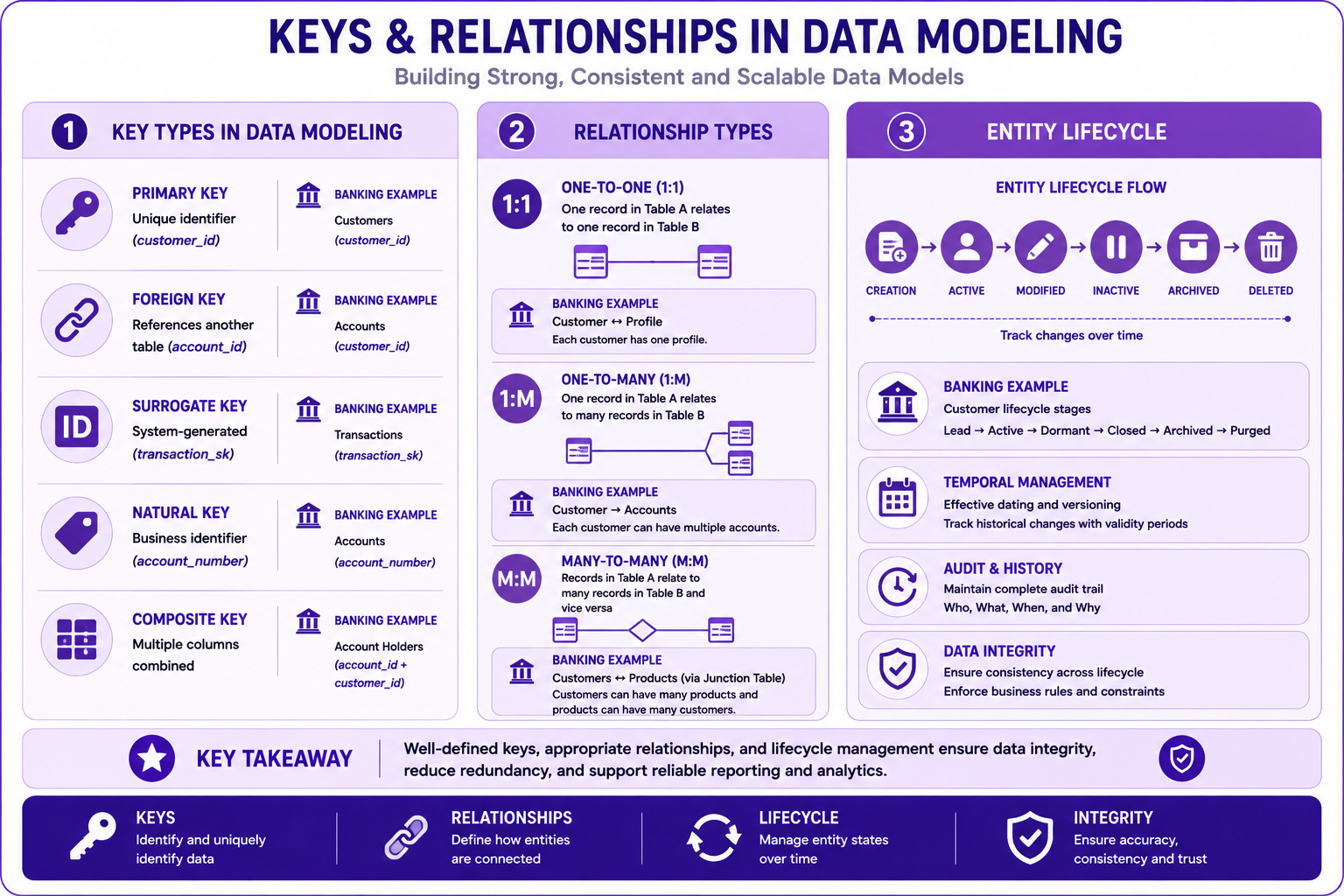
Prompt: Create a comprehensive keys and relationships diagram showing different key types and relationships. Use a 3-section structure with purple gradient theme:
Section 1: Key Types (Left) - Purple #F3E5F5
- Title: "Key Types in Data Modeling"
- Primary Key: 🔑 "Unique identifier (customer_id)"
- Foreign Key: 🔗 "References another table (account_id)"
- Surrogate Key: 🆔 "System-generated (transaction_sk)"
- Natural Key: 🏷️ "Business identifier (account_number)"
- Composite Key: 🔢 "Multiple columns combined"
- Each with brief description and banking example
Section 2: Relationship Types (Middle) - Purple #CE93D8
- Title: "Relationship Types"
- 1:1 One-to-One: Customer ↔ Profile (single arrow)
- 1:M One-to-Many: Customer → Accounts (one-to-many arrow)
- M:M Many-to-Many: Customers ↔ Products (two-way arrow)
- Each with banking example and SQL snippet
Section 3: Entity Lifecycle (Right) - Purple #AB47BC
- Title: "Entity Lifecycle"
- Flow: Creation → Active → Modified → Inactive → Archived → Deleted
- Timeline: "Track changes over time"
- Banking Example: "Customer lifecycle stages"
- Temporal: "Effective dating and versioning"
At bottom: Key takeaway: "Proper keys and relationships ensure data integrity and enable effective modeling." Footer tags: Keys, Relationships, Lifecycle, Integrity. Enterprise-style clean layout with rounded corners.
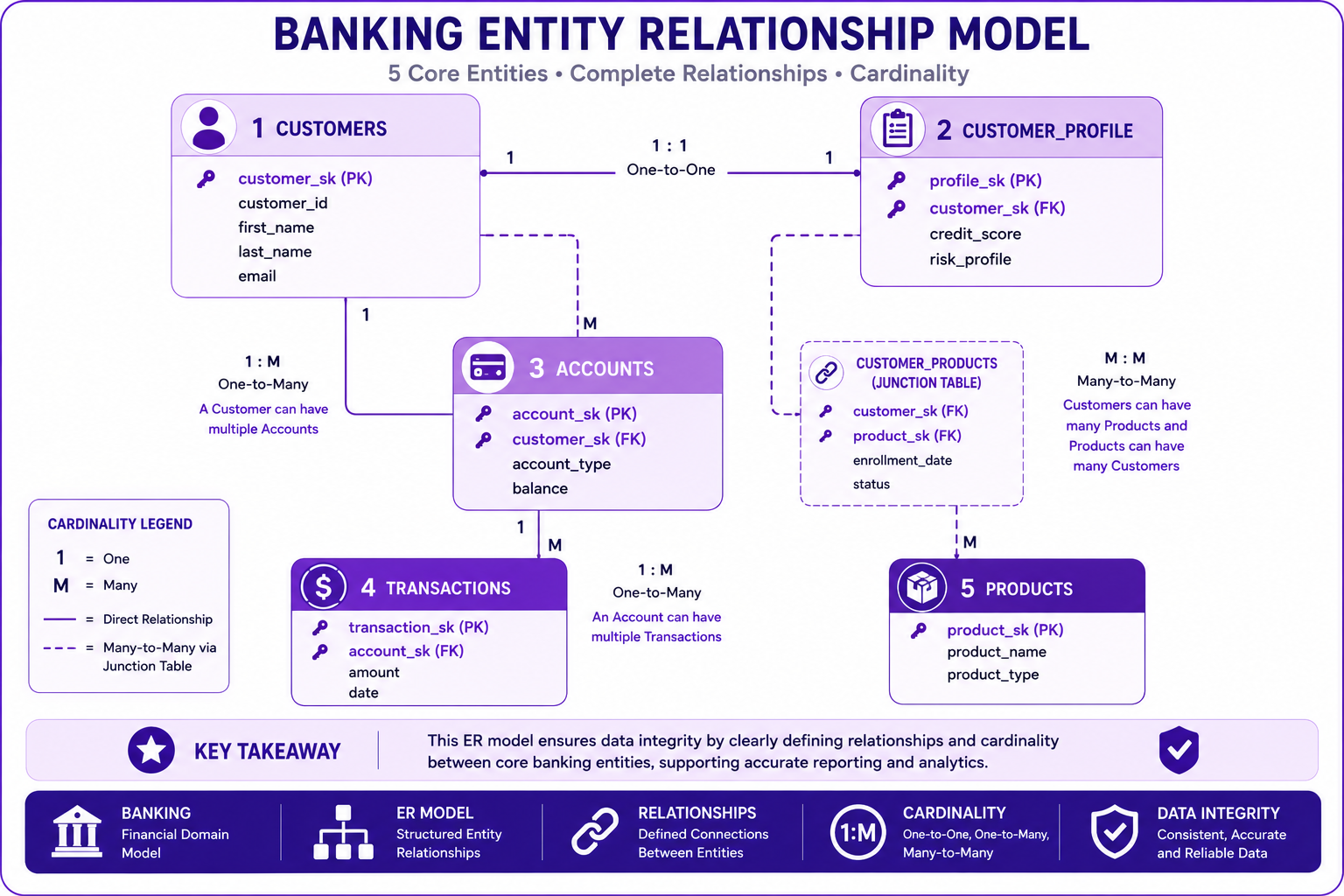
Prompt: Create a banking entity relationship model diagram showing complete relationships between entities. Use a 5-table structure with purple gradient theme showing cardinality:
Table 1: Customers (Top Left) - Purple #E1BEE7
- Fields: customer_sk (PK), customer_id, first_name, last_name, email
- Icon: 👤
- Relationships: 1:M to Accounts, 1:1 to Customer_Profile, M:M to Products
Table 2: Customer_Profile (Top Right) - Purple #CE93D8
- Fields: profile_sk (PK), customer_sk (FK), credit_score, risk_profile
- Icon: 📋
- Relationships: 1:1 to Customers
Table 3: Accounts (Center) - Purple #AB47BC
- Fields: account_sk (PK), customer_sk (FK), account_type, balance
- Icon: 💳
- Relationships: M:1 to Customers, 1:M to Transactions
Table 4: Transactions (Bottom Left) - Purple #7B1FA2
- Fields: transaction_sk (PK), account_sk (FK), amount, date
- Icon: 💰
- Relationships: M:1 to Accounts
Table 5: Products (Bottom Right) - Purple #4A148C
- Fields: product_sk (PK), product_name, product_type
- Icon: 📦
- Relationships: M:M to Customers (via Customer_Products junction)
Show relationship lines with cardinality indicators (1, M) between tables. Include key takeaway at bottom. Footer tags: Banking, ER Model, Relationships, Cardinality. Enterprise-style clean layout.
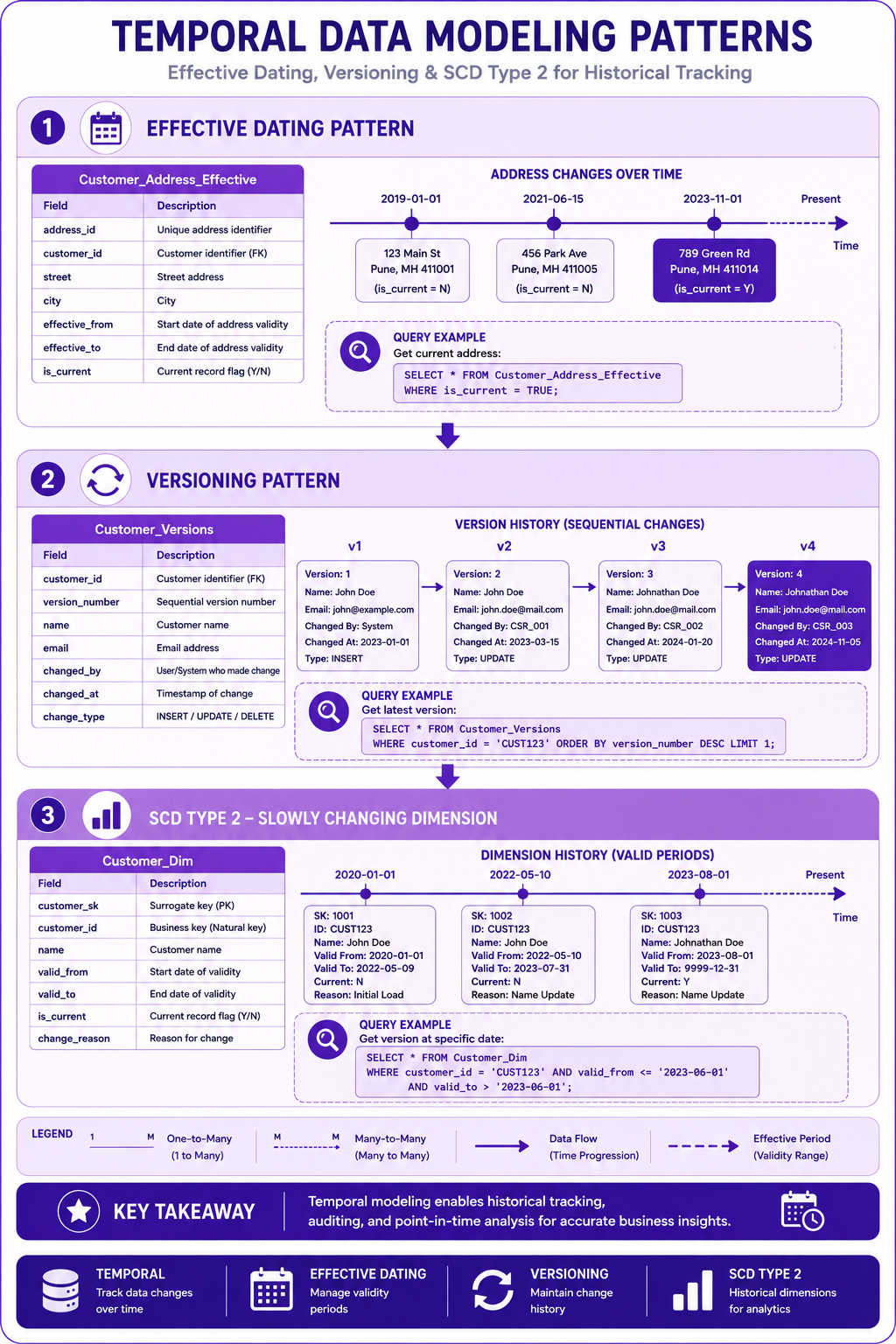
Prompt: Create a temporal data modeling diagram showing effective dating and versioning patterns. Use a 3-layer vertical structure with purple gradient theme:
Layer 1: Effective Dating (Top) - Purple #E1BEE7
- Title: "Effective Dating Pattern"
- Table: Customer_Address_Effective
- Fields: address_id, customer_id, street, city, effective_from, effective_to, is_current
- Visual: Timeline showing address changes with effective dates
- Query Example: "Get current address: WHERE is_current = TRUE"
- Icon: 📅 Calendar icon
Layer 2: Versioning (Middle) - Purple #CE93D8
- Title: "Versioning Pattern"
- Table: Customer_Versions
- Fields: customer_id, version_number, name, email, changed_by, changed_at, change_type
- Visual: Version history showing sequential changes
- Query Example: "Get latest version: ORDER BY version_number DESC"
- Icon: 🔄 Version icon
Layer 3: SCD Type 2 (Bottom) - Purple #AB47BC
- Title: "SCD Type 2 - Slowly Changing Dimension"
- Table: Customer_Dim
- Fields: customer_sk, customer_id, name, valid_from, valid_to, is_current, change_reason
- Visual: Dimension history showing valid periods
- Query Example: "Get version at specific date: valid_from <= date AND valid_to > date"
- Icon: 📊 Dimension icon
Use arrows showing data flow and time progression. At bottom: Key takeaway: "Temporal modeling enables historical tracking and point-in-time analysis." Footer tags: Temporal, Effective Dating, Versioning, SCD Type 2. Enterprise-style clean layout with rounded corners.
Banking Entity Model
Complete Banking Entity Model
-- Customer Domain
CREATE TABLE customers (
  customer_sk STRING PRIMARY KEY,      -- Surrogate key
  customer_id STRING,                  -- Natural/business key
  first_name STRING,
  last_name STRING,
  email STRING,
  phone STRING,
  date_of_birth DATE,
  created_at TIMESTAMP,
  updated_at TIMESTAMP,
  is_active BOOLEAN
);

-- Account Domain
CREATE TABLE accounts (
  account_sk STRING PRIMARY KEY,
  account_id STRING,                   -- Natural/business key
  customer_sk STRING,                  -- Foreign key to customers
  account_type STRING,
  balance NUMERIC,
  currency STRING,
  open_date DATE,
  status STRING,
  created_at TIMESTAMP,
  updated_at TIMESTAMP
);

-- Transaction Domain
CREATE TABLE transactions (
  transaction_sk STRING PRIMARY KEY,
  transaction_id STRING,               -- Natural/business key
  account_sk STRING,                   -- Foreign key to accounts
  transaction_date DATE,
  transaction_time TIMESTAMP,
  transaction_amount NUMERIC,
  transaction_type STRING,
  merchant_name STRING,
  merchant_category STRING,
  created_at TIMESTAMP
);

-- Relationship Tracking
CREATE TABLE customer_relationships (
  relationship_sk STRING PRIMARY KEY,
  customer_sk STRING,                  -- Primary customer
  related_customer_sk STRING,          -- Related customer
  relationship_type STRING,            -- 'FAMILY', 'BUSINESS', 'JOINT'
  effective_date DATE,
  end_date DATE,
  is_active BOOLEAN
);
Data Quality for Keys
Key Quality Checks
-- Check for duplicate primary keys
SELECT
  customer_sk,
  COUNT(*) as duplicate_count
FROM banking.customers
GROUP BY customer_sk
HAVING COUNT(*) > 1;

-- Check for orphaned foreign keys
SELECT
  a.account_sk,
  a.customer_sk
FROM banking.accounts a
LEFT JOIN banking.customers c ON a.customer_sk = c.customer_sk
WHERE c.customer_sk IS NULL;

-- Check for null primary keys
SELECT
  COUNT(*) as null_count
FROM banking.customers
WHERE customer_sk IS NULL;

-- Check for natural key duplicates
SELECT
  customer_id,
  COUNT(*) as duplicate_count
FROM banking.customers
GROUP BY customer_id
HAVING COUNT(*) > 1;
Best Practices
| # | Best Practice |
|---|---|
| 1 | Use surrogate keys as primary keys |
| 2 | Keep natural keys as business identifiers |
| 3 | Use foreign keys for relationships |
| 4 | Implement effective dating for historical tracking |
| 5 | Use versioning for change tracking |
| 6 | Document key strategies |
| 7 | Implement data quality checks for keys |
| 8 | Use appropriate data types for keys |
| 9 | Consider performance in key design |
| 10 | Plan for key evolution |
Common Mistakes
| # | Common Mistake | Better Approach |
|---|---|---|
| 1 | Using natural keys as primary keys | Use surrogate keys |
| 2 | Not tracking key changes | Use effective dating |
| 3 | No referential integrity checks | Implement quality checks |
| 4 | Using inappropriate data types | Choose right types |
| 5 | Not documenting key strategy | Document decisions |
| 6 | Changing keys frequently | Use stable keys |
| 7 | No key constraints | Implement checks |
| 8 | Ignoring performance | Design for performance |
| 9 | No historical tracking | Track changes |
| 10 | Complex composite keys unnecessarily | Simplify where possible |
Interview Questions
-
What is the difference between a primary key and a foreign key?
-
When would you use a surrogate key vs a natural key?
-
What is a composite key and when is it used?
-
Explain the different types of relationships.
-
What is entity lifecycle management?
-
How do you implement historical tracking in data modeling?
-
What is the difference between SCD Type 1 and Type 2?
-
How do you handle keys in BigQuery?
-
What are the challenges with many-to-many relationships?
-
How do you ensure data integrity with keys?
-
What is effective dating and why is it important?
-
How do you handle key changes over time?
Practice Exercises
-
Design a banking data model with all key types.
-
Implement one-to-many relationships for customers and accounts.
-
Create a many-to-many relationship between customers and products.
-
Implement effective dating for customer addresses.
-
Create versioning for account data.
-
Implement SCD Type 2 for customer dimensions.
-
Write quality checks for primary and foreign keys.
-
Design a customer lifecycle tracking model.
-
Implement a temporal data model for transactions.
-
Create relationship tracking between customers.
Key Takeaways
| # | Takeaway |
|---|---|
| 1 | Keys are fundamental to data integrity |
| 2 | Different key types serve different purposes |
| 3 | Relationships define entity connections |
| 4 | Entity lifecycle tracks data over time |
| 5 | Temporal modeling enables historical analysis |
| 6 | Effective dating is essential for change tracking |
| 7 | Data quality checks ensure key integrity |
| 8 | Proper key design enables scalable models |
Chapter Summary
In this chapter, you learned:
- ✅ Different types of keys (Primary, Foreign, Surrogate, Natural, Composite)
- ✅ Relationship types (1:1, 1:M, M:M)
- ✅ Entity lifecycle management
- ✅ Temporal data modeling and effective dating
- ✅ Versioning and change tracking
- ✅ Keys and relationships in BigQuery
- ✅ Banking entity models
- ✅ Best practices and common mistakes
You now understand how to design comprehensive entity models with proper keys, relationships, and lifecycle management.
Next Chapter
👉 Next Chapter: Historical Data Modeling